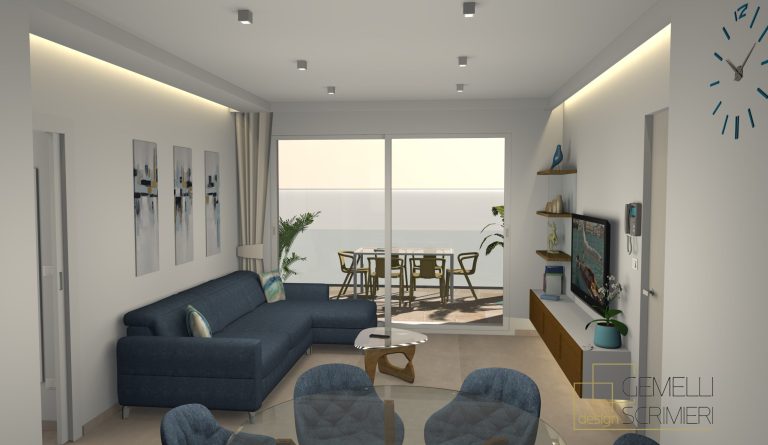
The living room is the core of your home, and you’ll probably spend the most of your time in there. Designing a living room that is both aesthetically pleasing and functional takes careful thought. With Sweet Home 3D, you can design the perfect living room with ease, no matter the vibe you’re looking to recreate. In this home design tutorial, we’ll show you how to make the most of Sweet Home 3D’s powerful tools to create a living room that suits your needs.
Step 1: Start with Your Layout and Room Shape
The first step to designing a functional living room is getting the layout right. Use Sweet Home 3D as a living room layout software and create a layout that fits your space and style with little effort.
Sketch the Basic Shape: Start by defining the walls of your living room. Use the Wall Tool to create the floor plan. Don’t worry about getting everything perfect at first—this is just the base!
Consider Your Space: Think about your room’s shape and the flow of traffic. For larger rooms, try creating distinct areas for different activities (e.g., a reading nook, media area, or lounge space). Sweet Home 3D allows you to play with room shapes, including adding walls and partitions, to fine-tune the layout.
Step 2: Customize Your Walls and Ceilings
The walls and ceilings set the tone for the entire room. In Sweet Home 3D, you can create and customize walls that reflect your desired aesthetic while also optimizing functionality.
Choose the Right Wall Colors: Pick wall colors that complement your furniture and decor. Lighter colors like whites, off-whites, or pastels can make a room feel airy, while deeper tones like navy, charcoal, or burgundy create a more intimate atmosphere.
Textured Walls for Added Depth: Experiment with wall textures (such as brick or wood paneling) to give the room extra character. You can even design accent walls to highlight a particular feature or area of the room, like the TV or a fireplace.
Consider Ceiling Height: The ceiling can impact how spacious your room feels. Sweet Home 3D allows you to adjust the ceiling height, which is crucial if you’re going for a more open, grand feeling or if you need a cozy, intimate environment.
Step 3: Furniture Selection
Your furniture choices are essential for setting the tone of the room, so think thoroughly about the function of each piece before placing it.
Choose a Sofa as the Focal Point: The sofa is often the heart of the living room, so place it centrally in your space. Choose a sectional or a sofa that fits your room size and style. You can customize the color and texture, from sleek leather to soft fabrics, depending on the vibe you want to create.
Complement with Armchairs and Side Tables: Add armchairs or loveseats to provide extra seating. Side tables are also essential to place next to the sofa for drinks or lamps.
Consider the Flow: Think about how people will move around the room. Leave enough space for comfortable walking paths and create conversational seating areas. Use Sweet Home 3D’s grid system and dimension tool to ensure optimal placement.
Step 4: Set the Mood with Lighting
The right lighting can transform a room and set the atmosphere. Whether you want a bright, lively room or a soft, relaxed space, lighting plays a key role in your living room design.
Ambient Lighting for General Illumination: Start by adding ceiling lights or recessed lighting to provide overall illumination. You can adjust the intensity to find the perfect balance.
Accent Lighting to Highlight Features: Use floor lamps, table lamps, or wall sconces to accentuate artwork or highlight specific areas like a cozy reading nook. Play around with different lighting positions to create depth and interest.
Natural Light Considerations: If your living room has windows, experiment with how sunlight will affect the space at different times of the day. Sweet Home 3D lets you adjust for natural light, so you can see how shadows fall throughout the day and adjust your lighting accordingly.
Step 5: Personalize with Decor and Accessories
The decor and accessories you choose make the living room feel like home. Whether it’s through artwork, rugs, or plants, these finishing touches can inject personality into your design.
Rugs for Coziness and Contrast: A well-placed rug can make a huge difference in creating a cozy atmosphere. Choose a rug that complements your color scheme and adds texture. Sweet Home 3D offers a variety of rug designs to experiment with.
Add Life with Indoor Plants: Incorporate greenery to bring the space to life. Whether it’s a large indoor tree or small potted plants, plants can add a fresh, natural element to the room.
Decorative Accessories: Add artwork, mirrors, or throw pillows to give the room personality. Mixing patterns and textures creates visual interest, and Sweet Home 3D allows you to fine-tune your accessory placement to perfect the look.
Step 7: Export and Share
Once you’re satisfied with your living room design, it’s time to share or save your creation.
Create Renderings: Use the Create Photo or Create Video features to produce realistic and high-quality renderings of your living room.
Export Your Project: You can export your project as an image or video file to present your design to friends, family, or clients.
Ready to design your dream living room? Get started today with Sweet Home 3D!
Download it now!