Since the change wasn't difficult, I made a test to evaluate whether it's worth it.
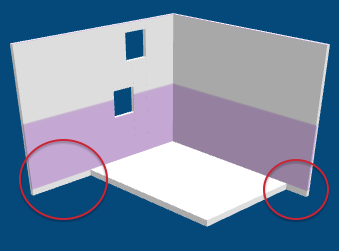
But I noticed two problems:
- first, to get the result you expect (i.e. a texture that starts at the visible bottom of the wall), I have to take into account the thickness of the level floor (the parts surrounded with red in the above image). This is not really a problem... unless you want these parts to be visible because you create a mezzanine for example.
- If the texture is applied using this new way on two walls on top of each other using a same pattern texture (for example a roughcast texture applied on the exterior wall sides of a house with two levels), the limit between the two walls will be visible if the pattern doesn't exactly ends where the upper wall starts. This issue could be avoided if you draw one very high wall instead of one wall at each level, but I'm pretty sure that many users don't create walls this way.
Actually, your issue reveals the need of an option in the wall modification pane that would let the user choose some offsets to apply to the texture along both axes. But, even if it's not so difficult to program, I fear it's out of the scope of a program like Sweet Home 3D.
If you look for an immediate solution, you should shift vertically your texture image of a value proportional to the elevation of the level divided by 250 (the height of your wall).
Hope you can handle it.

----------------------------------------
Emmanuel Puybaret, Sweet Home 3D creator
