Okay. I think its solved now. Thank you very much for your help.
Here is what I wanted, shown as a cross-section through the foundation and walls.
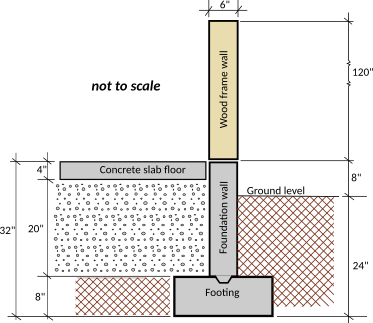
What your tips told me is to create, where necessary, levels with fake walls or fake floors. So this is what I did.
1. Created level 0 for the footing (elev. -24, height 8, first level did not ask for floor thickness)
2. Drew a wall in level 0 for the footing (height 8", thickness 24")
3. Created level 1 for the foundation wall (elev. -16, floor thickness 0.125 (minimum permitted), height 24")
4. Drew a wall in level 1 for the foundation wall to width and length of the building exterior (height 24", thickness 6")
5. Created level 2 for the concrete slab (elev. 8", floor thickness 4", height 4")
6. Drew a fake wall in level 2 inside the wall of level 1 ( (height 0.125" (min. permitted), thickness 6"). That exposed the 4" floor of level 2 and forced it to stop inside the foundation wall of level 1.
7. Created level 3 for the wood frame wall to rest on the foundation wall of level 1 (elev. 8", floor thickness 0.125" (fake floor), height 120")
8. Drew the wood frame wall in level 3 (height 120", thickness 6")
It would work better if floor height and wall height could be set to 0.
here is link to the test drawing with those parameters.
foundation_test.sh3d
Thanks again.
