Also, a little digging around on 3dWarehouse will often turn up models of casually discarded towels, discarded clothing, crumpled paper, and the like. However, rather than searching for, say, "dress on the floor," in my experience one is more likely to find such things as components of a related collection. (This is also a good way to delve into models by contributors who don't necessarily cater to your particular language.)
For instance, recently I was in the market for a bed -- and, as one might expect, began by searching for 'bed.' Once I found a likely candidate, I made certain to open any "collections that contain this model," as listed towards the bottom of the page. Quite a few of the bed- or bedroom-oriented collections contain models of bedclothing alone or of an item of bedclothing lying in a heap. In addition, there are several bed models that include a bathrobe tossed casually across the bedspread that presumably could be extracted and used elsewhere, as well as a number of models labelled "unmade bed," "badly made bed," and the like.
One caveat: Most disorderly, complex Sketchup models -- for instance, those of pillows or bedclothes -- if simply imported directly into SweetHome3D will render as a fragmented patchwork of (typically) the material color and white. This is because the surface of the item will often be a hodge-podge of Sketchup primary and secondary faces. In Sketchup, as long as all outward-facing, um, faces are uniformly colored, the object will display as a solid color; however, sh3d will display each component face that makes up the surface in its assigned color. Most Sketchup objects have faces with one colored face and one unassigned or default face; sh3d renders default faces as white, resulting in the material-color-and-white dappling.
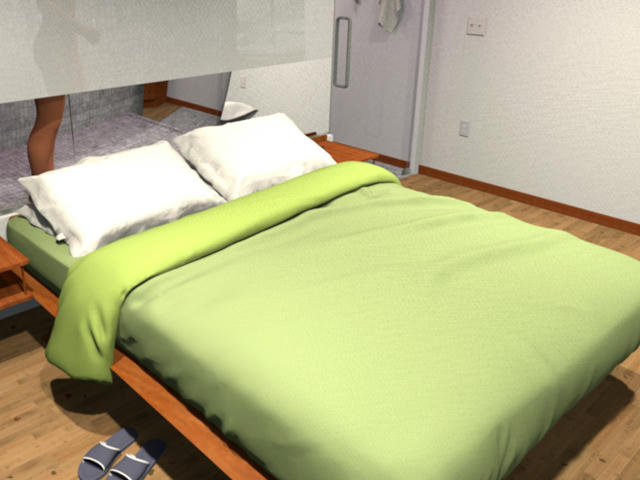
At the bottom of this post I've attached two images illustrating this issue. The bedclothing in this object originated with a model from either 3DWarehouse or SketchupTextures. The first image shows the default, uncorrected render; the second image shows the render after uniformly coloring the primary and secondary faces that make up the bedclothing's surfaces. (I should note the effect, while unintended, can often turn out quite appealingly -- and in some cases even preferable to the "correct" rendering.)
Fortunately, a simple fix for this problem exists: Rather than downloading the object in its already-exported KMZ or Collada format, instead download it as a Sketchup object. Then, using Sketchup or Sketchup Make (available for free), open the object, select the surface in question, and color all of its faces, primary and secondary alike, uniformly. After eliminating its undefined faces, export the model as a 3D object (typically in KMZ format) and import that object as a new item of furniture into sh3d.
Fortunately, only the barest of Sketchup proficiency is required to carry out these steps. Sketchup has an admirably intuitive UI; typically, to correct such problems, all that is required is to repeatedly click on the desired surface until it is selected, as indicated by its being shown with a grid of tiny blue dots overlaid upon it. At this point the Entity window (Window > Entity) should display two rectangles labeled 'Faces'. Clicking either of the rectangles will open a drop-down menu showing each color or texture currently used by the model; scroll throw the swatches until you find the desired color or texture; select it; and click 'OK.' Repeat for the other face.
Secondary face default texture:
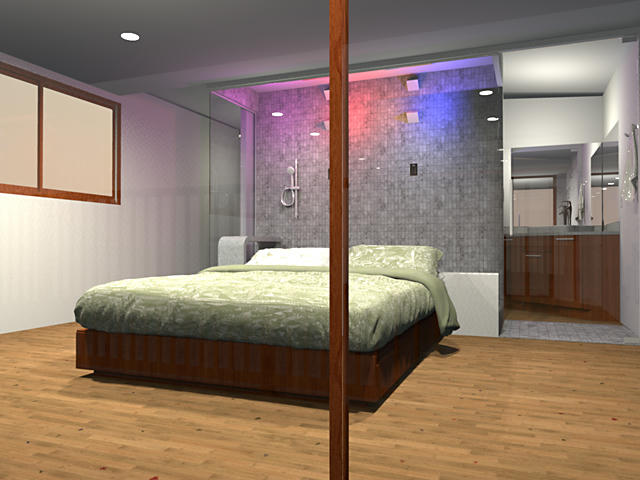
Both faces uniformly colored/textured: