For the .obj file to work it should have an accompanying .mtl file to sort out where to put textures and colours. Without it all the .obj references will disappear.
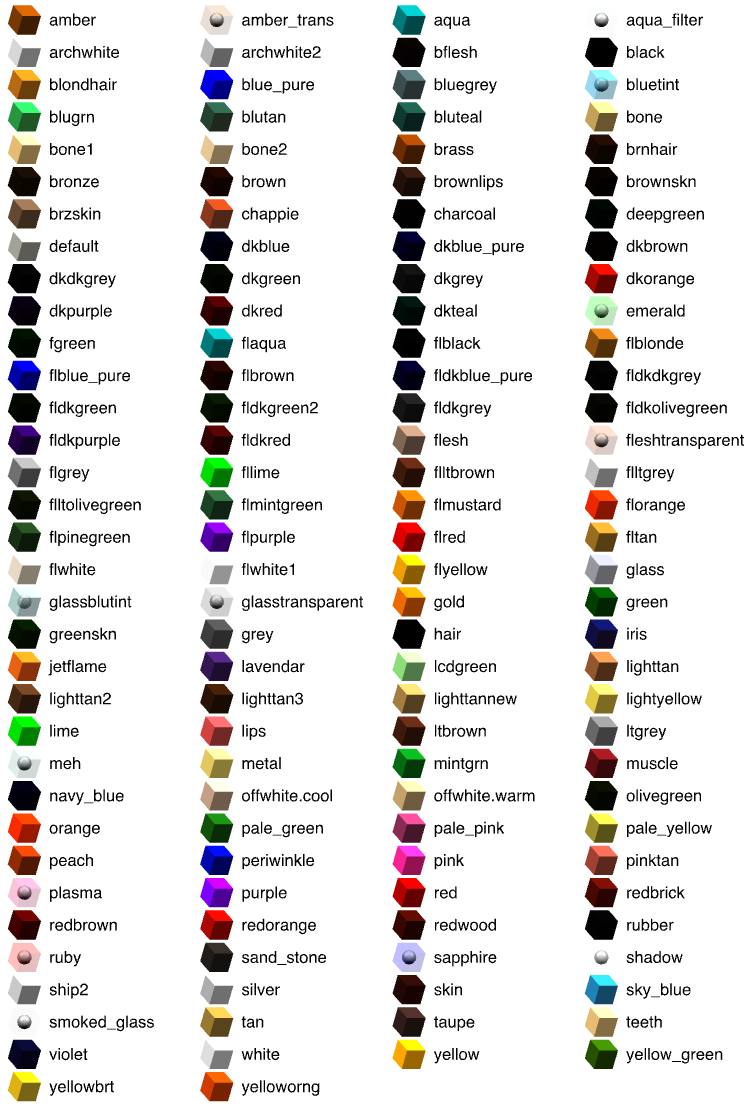
But I guess there might be a workaround if your .obj model is not too complicated: Try to edit the .obj file references to SH3D native colours (one of the exact names shown in the colour chart below). The .obj file is clean text, so you could open it in any text editor and substitute current references (lines beginning with usemtl) - for instance like this:
usemtl materialxxx >> usemtl grey
usemtl materialyyy >> usemtl amber
etc
At least that way I think the model should retain different colours (and names) for the different surfaces - and you can later modify them in SH3D.
Failing that, you could always look for other similar models like the 3D Warehouse spotlight on a tripod.
ok
PS .max format, I think, is a binary somehow related to the .3ds format. Doubt it works, but you could also try renaming your .max file to *.3ds.
