Hans -
I don't think I was very clear in my earlier comment. As I see it, there are two separate issues regarding the way SunFlow (and, thus, SH3D) handles surface normals in Sketchup-originated models. One is relatively trivial; the other, probably not.
1. Ambiguous meshes
The first is the problem to which Emmanuel alluded [um, in a comment I can no longer locate] a while back -- namely, when importing a model where different textures have been defined for either face of a surface, it's not always possible to determine the appropriate surface normal for a given triangle. As a result, the imported object can end up a patchwork quilt of triangles displaying one or the other face -- which can have a nice effect if one is rendering an actual quilt, but for other objects, not so nice.
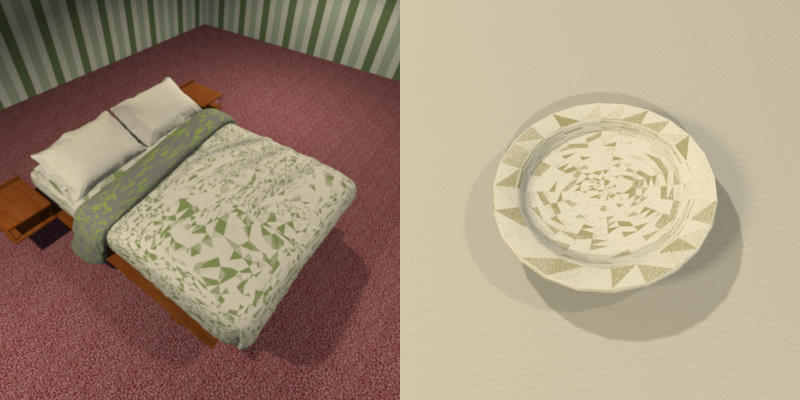
This is the more trivial of the two issues -- in part because, as you note, an easy workaround exists (at least for models originating in Sketchup), but mainly because the scope and extent of the problem is understood: Only models with a specific design quirk are involved.
2. Unpredictable results
I'm more concerned with the other surface normal problem, where an object, when rendered a second time under different anti-aliasing settings, can end up with surfaces that display the supposedly hidden face.
As an example, these two images were rendered of the same scene using identical lighting, objects, camera position, and the like. The only difference is the image on the left was rendered with SH3D's default settings for highest quality, including a minimum anti-aliasing value of 1 and a maximum value of 2, while for the image on the right an aa.min of 0 and an aa.max of 4 were used.
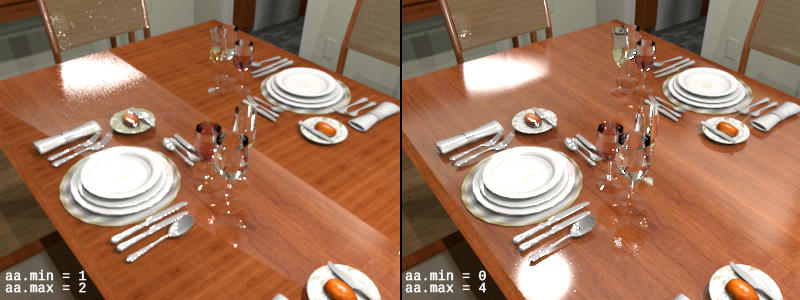
Note the texture displayed for the tabletop. The image on the right is correct, displaying the cherry wood texture I applied to that portion of the model using SH3D's 'Materials' override. The image on the left, though, displays the model's original texture over most of the tabletop. (Fortunately, the two textures are oriented perpendicular to each other, making the shift from one to the other easier to see.) Incidentally, also note the areas displaying an incorrect surface normal also reflect light incorrectly: The large specular reflection in the foreground is missing, while secondary reflections of light initially reflecting off the chair back at the rear of the image and the frontmost wineglass, are clipped.
In this case, I see the surface normal failure as being more of a symptom than a self-contained problem. While the first issue could conceivably be a correct rendering of an incorrectly imported mesh, this second problem can only be caused by a bug in the SunFlow engine. Emmanuel doesn't pass objects to the SunFlow API differently based upon the amount of over-sampling; neither does SunFlow process them differently. Finally, differing rates of over-sampling should not cause SunFlow to read surface normals differently: If the mesh has been loaded as an incorrect patchwork of faces, the same incorrect patchwork should be displayed at any anti-aliiasing setting.
While in the case of Sketchup-originated objects this problem can be ameliorated by the same workaround provided for the first failure, I am less comfortable with accepting this as a true resolution, primarily because in this case the scope and extent are not definitively known. While the unreliable surface normal problem may be limited to models with the same sort of two-textured surface that triggered the first issue, the underlying bug could easily manifest itself in other ways under other conditions.
For instance, as the 'white spot' problem.
White spots
Admittedly, I don't know the white spot problem is caused by the same broken routine that causes the anti-aliasing-dependent surface normal issue, I believe there are strong enough suggestions of a link to merit additional investigation. Furthermore, based on the results of my tests, I believe it may be advisable to modify SH3D's default anti-aliasing parameters for highest quality (Q4) renders when using the 'uber' shader.
I first came across the anti-aliasing-dependent surface normal problem while investigating the relationship between over-sampling and the anomalous white spots that occasionally appear in Q$ rendering with SH3D. While this in and of itself does not prove a definite link between the two issues, I had several reasons to suspect some sort of involvement with SunFlow's anti-aliasing mechanism. In my experience:
- White spots clearly are not, strictly speaking image artifacts -- for instance, they don't appear randomly (think noise or, in the hardware realm, a stuck pixel), nor do they appear without spatial relevance to underlying scene elements (as would, say, a JPEG compression artifact).
- White spots larger than a pixel or two in diameter typically aren't literally 'white' spots. Instead, when viewed at high-enough resolution (for instance, in the foreground), they look like any other strong specular highlight: a strong reflection at the half-angle, solely the color of reflected light, progressively fading (and increasingly incorporating color of the underlying texture) outward from the center.
- Unlike normal specular reflections, white spots appear either where there should be no such reflection or with far more intensity than they should. As such, one might more accurately think of them as scene artifacts: tiny disturbances in the faux universe where we imagine the scene exists.
- White spots typically appear on reflective textured surfaces; only very infrequently on reflective colored surfaces; and -- to date -- never on (as we call them on this side of the pond) matte surfaces.
- They more frequently involve textures with discontinuous transitions between adjacent colors (as opposed to, say, a smoothly transitioning gradient), and they typically appear to be centered on a transition border.
Items 1 through 3 suggest white spots result from a flaw that involves calculating the 3D architecture of a scene, as opposed to one that involves mapping a 3D representation onto a 2D image. (For example, this would be the equivalent of SunFlow's anti-aliasing miscalculating the component values making up an over-sampled pixel versus making a mistake in how it averages the multiple components together.)
Items 4 and 5, to me, suggests the reason the miscalculation typically appears as discrete spots instead of a larger field or area of too-high reflectivity is an artifact of SunFlow's adaptive anti-aliasing, which toggles between a standard sampling level (aa.min) to a [supposedly] more accurate level (aa.max) whenever a pixel varies more than a threshold amount from the pixels surrounding it. This shift from one sampling level to another would cause anomalies to appear at transition points within a texture -- as they do -- and to appear as 'island' anomalies -- as they do -- if the way the broken algorithm breaks is dependent upon or influenced by the degree of anti-aliasing in effect for a given point -- which we've seen it is, at least as regards correctly identifying surface normals.
The sample rate also influences the amount and positioning of white spot anomalies, as shown in the following image. Its source is a single scene definition, rendered using five different sampling levels. In SunFlow, adaptive anti-aliasing can be disabled by setting both aa.min and aa.max to the same value, resulting in every pixel in the image being rendered at the same sampling rate.
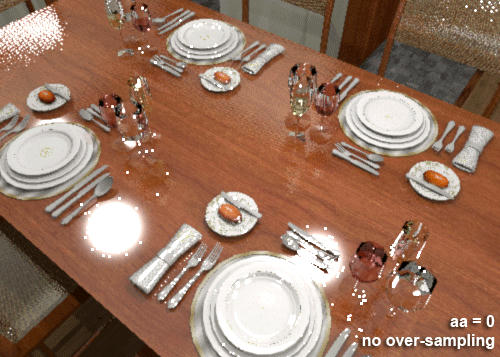
As you can see, significant white spots appear at a setting of (aa = 1), which causes 4 rays to be shot for each pixel. A setting of (aa = 2), or 8x over-sampling, reduces the number and size of the anomalies somewhat, with settings of (aa = 3) (16x) and (aa = 4) (128x) further improving the image. [In theory, 1024x over-sampling using (aa = 5) should result in even additional improvement. While SunFlow appears to support sampling values from -4 to +5, in my tests any attempt to exceed 128x over-sampling inevitably failed.]
Caveats
I should note I've only performed limited tests, and some of what I've found hasn't necessarily held true for you and other users. It's certainly possible that rendering at different resolutions, different camera configurations, or different lighting models could lead to very different results. However, I have to assume the underlying behaviors will be consistent, regardless of the specific expression. I will say what I've found in my tests is in line with my day-to-day experience with SH3D.
Possible changes
Again, much of this post is smoke and mirrors, conjecture based on assumption. While I've broken open the SunFlow source, I've only barely scratched the surface of understanding the code. (My last real exposure to anything having to do with low-level graphics programming was a brief stint in 2007 documenting PS3 APIs, while the last time I seriously thought about ray tracing was nearly 25 years ago.) It's an open question whether I'll be able even to identify areas for additional study, let alone pinpoint the source of the troubles.
However, fully aware my attempts are based on little more than half-assed investigation and superstition, I've been experimenting with modifications to the default Q4 parameters. So far I've had good results with using Enko Nyito's Advanced Photo Rendering Properties plug-in to change the desired values of antiAliasing.min and antiAliasing.max from the default values of 1 and 2, respectively, to a .min of 0 and a .max of 4. (I also find I prefer the Mitchell filter to the default box filter, as it seems to result in fewer artifacts. One place this is especially noticeable has been in the depiction of vertical blinds.)
Setting antiAliasing.min to 0 disables anti-aliasing on many, perhaps most, pixels in a typical scene; in theory, doing so should increase blockiness, resulting in a lower-quality render than would be achieved at SH3D's Q4 defaults. However, in practice I've not found this to be the case, which I believe to be for two reasons.
First, my tests suggest the uber shader at a 4x sampling rate (set by an aa.min or aa.max of 1, and the current Q4 default) introduces the greatest number of errors: Not only does the surface normal bug appear only with 4x over-sampling, but the rate also leads to the worst white spot performance. As a result, it appears that forcing over-sampling for every pixel risks degrading the image for any pixel less than [threshhold] different from its neighbors.
Second, SunFlow's default adaptive anti-aliasing threshold of 10% difference is an extremely conservative one -- I'm more accustomed to values nearer 30%. As a result, essentially every pixel whose appearance would benefit from anti-aliasing is anti-aliased, without the risk of introduced errors or the performance hit resulting from forced anti-aliasing of pixels below the threshold. [This can be tested by rendering a scene at (aa.min = 1, aa.max = 4) and at (aa.min = 4, aa.max = 4) and comparing the resulting images. In my experience the two have been identical or very nearly identical.]
Admittedly, there is something of a performance hit at (aa.max = 4) -- or there is, at least, on my antiquated system. However, as the white spot tests earlier showed, there is a significant-enough improvement in quality to merit the additional processing time. You may find an aa.max of 3 or even 2 sufficent for many scenes, and for preliminary renders I often use (aa.min = 0, aa.max = 2).
Conclusions
I hope this comment, while overly wordy, better explains my concerns over anti-aliasing and the two surface normal issues. In fact, I suspect, in the end, there will prove to be only one such problem, and we'll find there is nothing wrong with the way Emmanuel's code exports meshes to the render engine. Below, you'll find the same rendering of a bread plate I used earlier to illustrate the pathwork effect causes by ambiguously oriented triangles. Beside it you'll find another rendering of the same scene -- but this time at a different sampling rate.
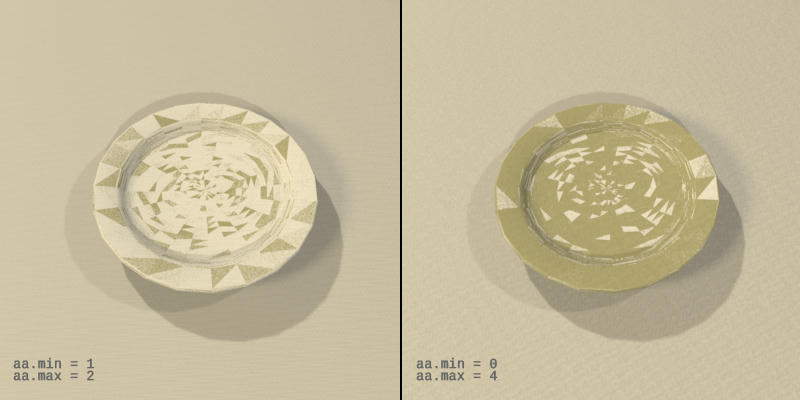
As you can see, a number of triangles display a different surface normal depending upon anti-aliasing value. Accordingly, fixing the second failure type will likely correct the first one, as well.
And one final quirk -- one that, although technically still caused by a glitch in SunFlow, may in part owe its behavior to implementation choices made within SH3D. Below you'll find two renderings of the table setting scene similar to those cited earlier showing how an incorrect face may be displayed for a surface, depending upon the sample rate.
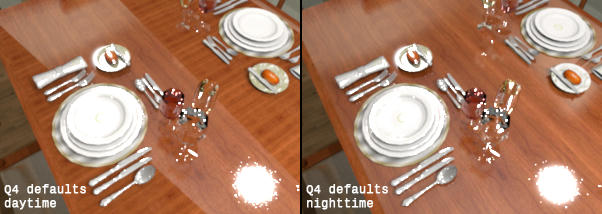
---except that, here, default Q4 anti-aliasing settings are used for both. The only difference is the left-hand image was rendered with a 'local time' of 11:25 a.m., but the right-hand image uses a time of 11:25 {b]p.m.. Notice the different faces displayed on what should be identical images -- even though the scene is entirely shielded from the effects of any 'natural' light.
From my quick dash through the SH3D source, though, it appears that in an effort to reduce the prevalence of white spots on exterior renders under some conditions, Emmanuel chose to tweak certain render parameters based on time-of-day. Conceivably, the discrepancy in face displayed may be an unintended side effect of this earlier fix.
Maz
