Here is my solution to my own help request. Hopefully, this won't result in "Uh, yeah, everyone knows this." I was surprised that I didn't receive more input on this inquiry since it seems like a very basic need. (If you review the previous responses in this help post, you will see that using the Modify Wall feature and keying-in XY offsets will not work for me since I work in Foot/Inch/Fraction preference.)
Let's see if my attempt at inserting images will work for this.
First image is a series of grabs from a quick video I made showing the solution. The idea is that you use a temporary wall placement as a "guide wall" to establish the offset from the existing wall or object.
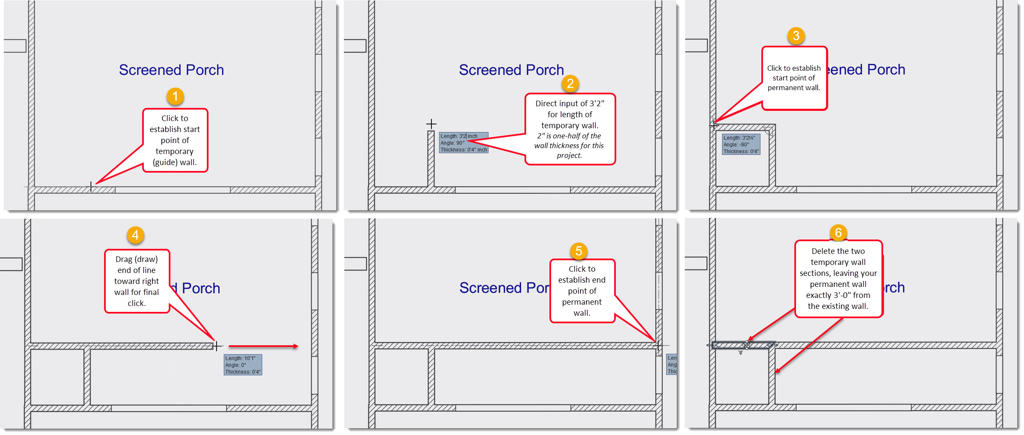
In this case, I am wanting to draw a wall that will end up being 3'-0" parallel to the existing wall of a room. Since this project uses 4" as the wall thickness preference, I include half of that, 2", in my temporary wall length.
Step 1&2 - draw a wall that is 3'-2" perpendicular from the existing wall side. I do this using direct input (of 3'-2" and Enter) for the second wall end. If you go from the existing wall's centerline, you will need to input as 3'-4".
Step 3 - continue without interrupting the Wall draw action and move mouse directly to the left wall to establish the start point of your permanent wall, and click.
Step 4&5 - move the mouse toward the right wall and click to set the end point of the permanent wall. Hit Escape or select the Select object command which completes the Wall draw action.
Step 6 - Select and Delete the two temporary guide walls leaving you with the single permanent wall.
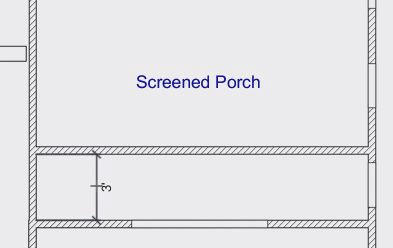
Here is the quick video. Draw wall with guide walls
There ya go; hope it helps someone else.
Thanks to those who did throw in on this previously with their methods.
Thank you,
Delain
