Hi Mike
I just tried a quick and dirty comparison between renderers.
Idea was to allow 10 mins for each adjusting settings to complete in that time - did not want to spend all day comparing

This is not scientific I do not know the default Sunflow renderer very well. Someone else might "drive" it better than me.
I also have recently started messing around with adding a real roof - at the moment its just a skew white block created with the CreateShape plugin - this adds the complication that the test involves an interior lit only by what is coming through the window so diffuse bounces are going to be the big players here.
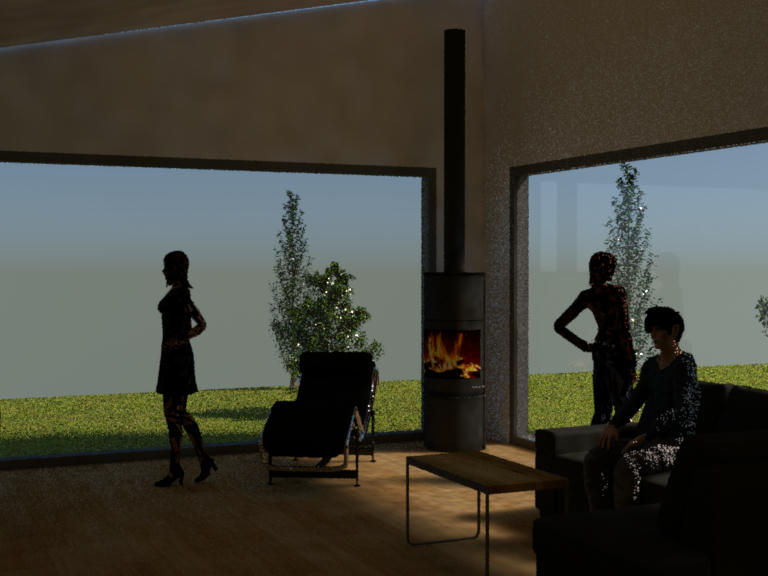
For the Mistuba I chose "photon mapper" and pretty much the low end defaults which are set up fast and dirty preview.
For instance only 4 samples per pixel, and 250,000 global photons I would usually add a zero to both of these for something decent and then be expecting to wait for an hour I did set irridiance caching as this is usually required in "photo mapper" to reduce blotchiness.
As you can see despite very low samples Mitsuba gave a realistic "quick and dirty" preview in ten minutes - give it an hour and you would have a nice image.
The Sunflow run was much more difficult because I do not know it well and had to try to optimise yet complete the render in 10 minutes ( unless I wanted to spend all day on it ).
The real issue in Sunflow was finding a combination that included diffuse bounces so that the windows could realistically illuminate the room yet find a combination that would show some kind of activity on the screen within a few minutes - most seemed to show no sign of anything after 2 minutes so I tended to close and move on to the next combination.
It does seem in Sunflow that as soon as you opt for Global illumination and then ask for anything above 1 diffuse bounce then it all slows down to the point where a ten minute completion looks very unlikely.
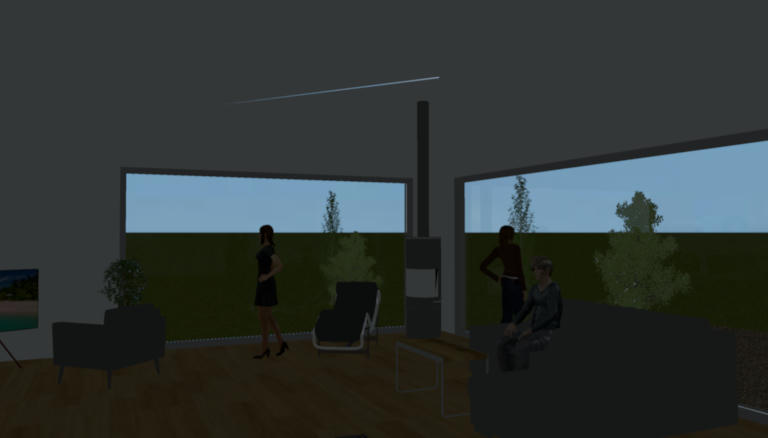
I failed to get any meaningful image with Sunflow other than the one presented which is "Best quality" but ignoring all extra options presented in the Advance render plugin so this was the default on "Illumination" which appears to be some low level ambient. I had turned down brightness in the SweetHome options and asked for "no ceiling" lights as here I am interested in natural window illumination only.
The following render took perhaps one minute, I was unable to find options to make use of the remaining nine minutes that looked like they would complete - indeed show any output within the allotted ten minutes.
So what does this all say....?
Option 1.
Jon at the current time is not a skilled Sunflow user and did not get the best out of it.
OR
Option 2.
I know Mitsuba is heavily optimised so as to be able to dismiss diffuse bounces that will not actually add to the result. It would not surprise me if the result was actually indicative of true relative performance. You can see in only 10 minutes chrome details are showing detail and the overall pattern of diffuse, direct and shadows are showing some level of sophistication.
Not sure we have learned much here - its all a bit flakey and unscientific but I am not sure I can spend much longer on the comparison side.
Its very difficult to compare different systems - I used to work on code in a very large scale CADCAM system, we were always up in time trials against competing systems. The best anyone could come up with was to sit company A's best user against company B's best user and ask them to both make the same model from stated dimensions in the shortest time they could. I guess this is a similar situation.
