This thead is few months old, maybe you have found good solution already.
Any way, my solution is not as clear, shiny and detailed as in your two demo pictures behind links but here it is.
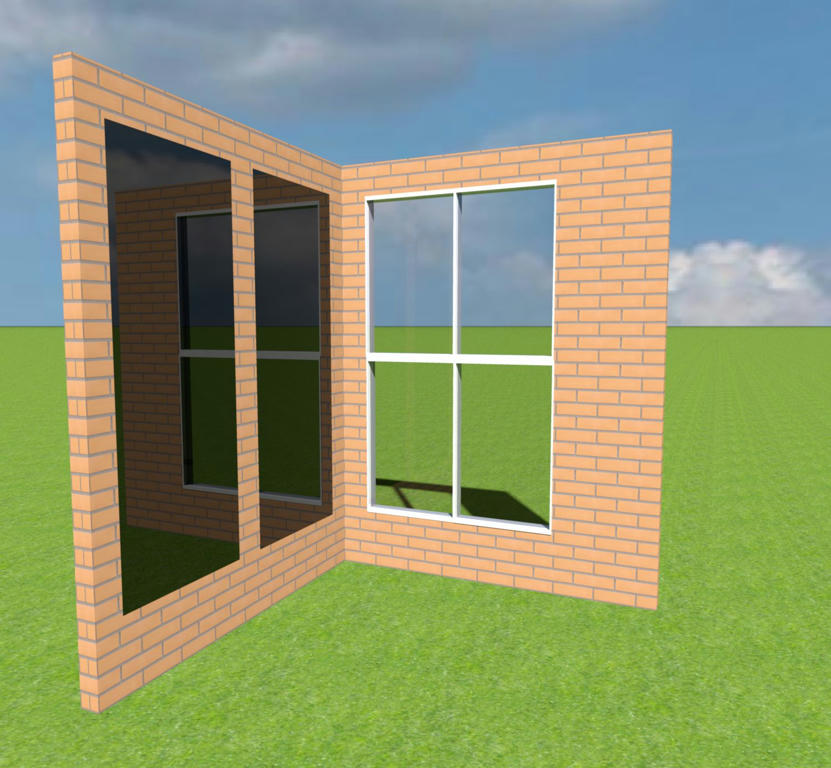
This is what I have done:
- i took frameless mirror from SH3D furniture library (just one material, fine!)
- used 'Copy as new furniture'-plugin to copy it to SH3D workspace
- converted that copy to .OBJ-format with '3D view-Export to OBJ format...'
- results are filename.OBJ and filename.MTL
- replaced material definition lines in MTL-file with following lines:
newmtl sweethome3d_window_mirror_1
illum 3
Ka 0.0000 0.0000 0.0000
Kd 0.0000 0.0000 0.0000
Ks 0.0000 0.0000 0.0000
Ns 200
Ni 1.5
#d 0.9
d 0.7
- parameter d defines how this material dissolves into the background.
(1 is completely opaque, 0 completely transparent, # means comment line)
- after each modification I imported OBJ-file to SH3D ('Furniture - Import as furniture')
- left black window in my picture has d=0.7, right one has d=0.9
(other windows are not modified and used just to show in reflections)
Crude explanation:
- effect of parameter d in MTL file can be seen in redered picture
- in SH3D:s 3d-window also 'Modify furniture - Materials' Color and shininess affect what is seen AND in rendered picture
Inside 'black window.zip' are files black window.sh3d, black window.obj, black window.mtl and black window.jpg.
http://www.mediafire.com/file/54uk91ssnam4itp/black_window.zip/file
I hope this help somebody.
(and also hope that I really could understand things in MTL-file..
 )
)Seppo
