Not sure what you refer to as "add payment", are you using google translate?
Look at this image
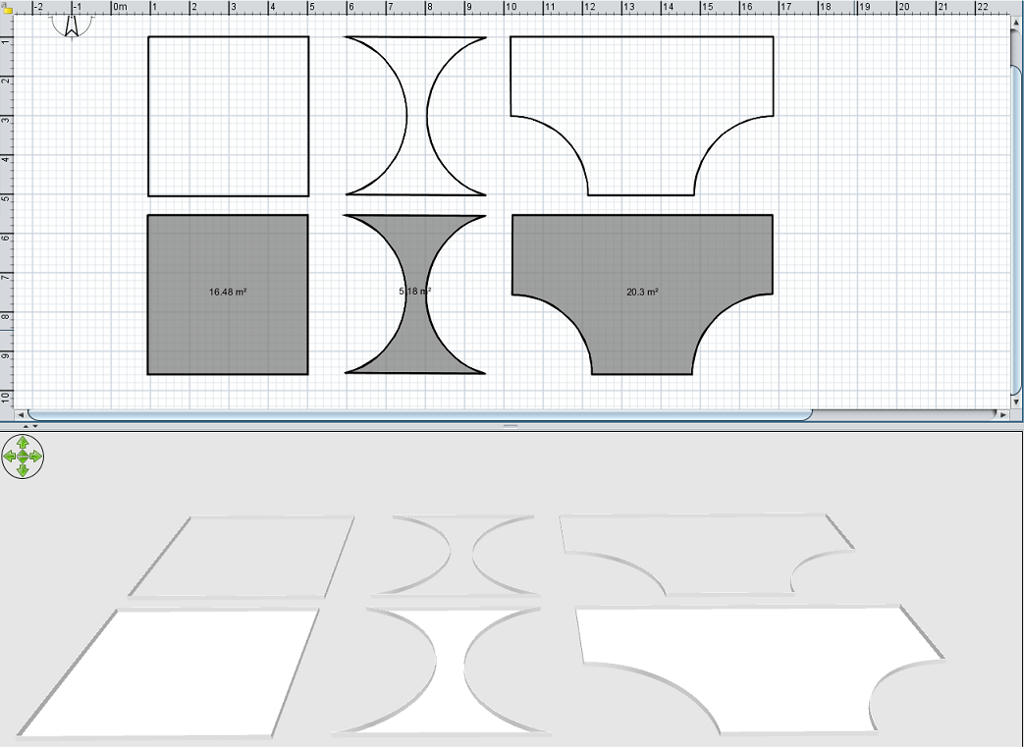
The top row is 3 shapes created with walls, the 2nd has an arc added to the 2 side walls, the 3rd was made with 6 walls, this also has an arc on 2 of its walls.
Arcs can be added either in the walls modification window, you will see Arc in the bottom right corner
or
move your mouse pointer to the centre of a wall, where the wall has an arrow on one side, your pointer will change to a double arrow, you can then left click your mouse and drag the wall to form your arc. Once you have achieved the shape you need select the room tool and double click within the borders formed by the walls, remember, for this to work all the walls MUST be joined.
This method, when used on a level with an elevation of 0 will give you a shape that has no depth.
If you use the same method, but at an elevated level where the floor has a depth, the shape you create will have that depth, very handy for creating custom kitchen worktops, steps, lintels, copings etc. For these you can export your room and import it as an object.
And don't forget you can use the room tool to create a shape without the use of walls, just select the tool and draw in your 2d window by randomly clicking the mouse
