Mr. Rostov:
It's logical that if you add many dimensions using Plan --> Create dimensions your screen will look very full and cluttered.
There is a different way to get a lot of information about an object. If you look at the bottom-left part of the screen you will see a list of all objects used. Right-click there and a pop-up menu opens. Now choose Display column and you will see a list of fields that you can display in this window. Select the items you want to see and those columns will be visible
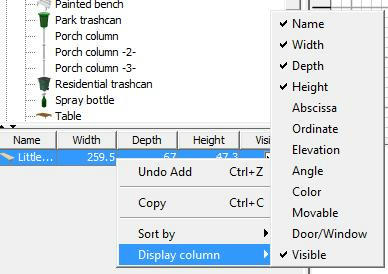
Back to the project you are designing. Select an object that you have inserted. Now look at the list at the bottom-left: your object will be highlighted and you can easily see all the data of the object that you have selected.
Hans
----------------------------------------
Hans
new website - under constuction
hansdirkse.info
