Hello,
When using Ubuntu 10.04 you will have to change the program permissions in order to be able to start SH3D from the desktop icon.
Right-click the text icon on the desktop and select PROPERTIES. A window opens as seen below:
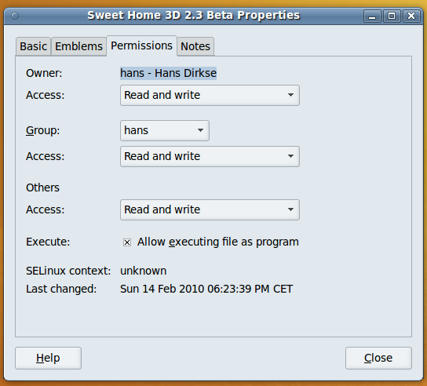
Click the PERMISSIONS tab and make sure to check the box that says "Allow executing file as a program". I also changed the other settings to "Read and write" although I am not sure if that is necessary. Close the window and you'll see that the desktop icon now shows the SH3D logo. Double-clicking the icon now starts the program.
Success.
Hans
----------------------------------------
Hans
new website - under constuction
hansdirkse.info
