Hi Dorin,
it make update only one at a time not multiple which mean You need to restart SH3D after every update (at least this happen to me)
Even if you have to update one plugin at a time, you can update them all and then execute a single restart of SH3D, there is no need to restart for every single update. I could add a "update all" or "update selected" button in a future release, however I think once you have updated everything to the latest version, it will be very rare that there could be multiple plugins to update at once, unless you haven't used SH3D for several months.on Search tab filter the already installed and let only the rest.
There is a reason for having even already installed plugins in the search tab. A plugin may offer several secondary features, some of which cannot be deduced by the plugin's name, but they could be listed in the plugin's keywords. An user could have installed a plugin to use a feature and he could not be aware of its other features. If - at a later time - the user search for such features using the search tab, he could get one of his installed plugins in the results, and learn from the description that this plugins also offer the feature he is looking for.for every plugin add a list with available translations
This is already implemented. Look at this picture from the developer interface: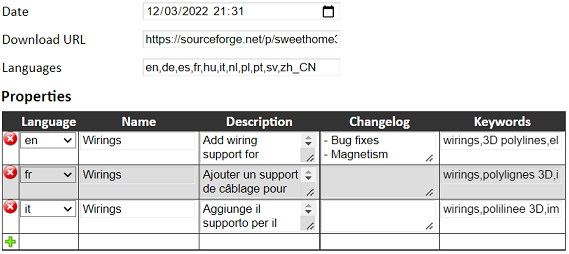
The "Languages" field is reported under the plugin description on the Plugin manager:
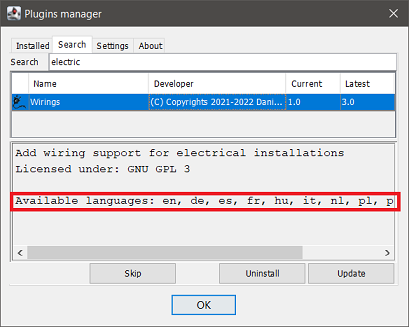
This is intended to inform the user about the plugin translations.
The "Languages" field must not be confused with the "Language" column, which is related to the translations shown in the Plugin manager, not the plugin itself.
the link to World Installation map point ONLY to list NOT to map like few days ago
The world map is plugin specific, so you have to click on a plugin name from the list to see its map. What's changed from the previous days is just the aspect of the list.at login Firefox is complain "This connection is not secure"
This is a terrible mistake I made initially when I published the links. You can switch to https: https://daniels118.altervista.org/sh3d/pluginmanager/I will implement a rule to automatically redirect to the secure connection.
RotateHomePlugin.sh3p is inside of a zip archive in dist folder.
There is already a set of rules, one of which is to have ApplicationPlugin.properties within the archive. This already excludes archive which contain in turn a sh3p file (dist) and a zip file (src), but I didn't manage sh3p+plain src folder.You have earned the bug reporter badge!

I will add the rule to avoid this case, however this means this plugin will leave the Plugin manager, unless we upload the sh3p file separately. I have to contact the plugin's author to ask him to fix the deliverable; only if I won't get any reply in a reasonable amount of time, I will upload the sh3p file by myself.
- some rules about license files and README file(s).
- maybe to include also a CHANGE LOG file which could be translated
This is a good idea, but I won't implement it as a requirement, it will be mostly a guideline: I don't want to impose my rules beyond the ones provided by SH3D, unless they became part of SH3D itself (I don't like de facto standards).- maybe to include also a CHANGE LOG file which could be translated
