1. Setting a cutout is not needed if your model is a closed area. It will cut the hole automatically. When it doesn't cut a hole that is usually because the bottom is not closing the sides. To cut a hole a closed area is required OR you need to set a custom cutout.
When you place a door or window in a wall it will adjust itself to the wall thickness if doorOrWindowWallThickness is not defined in the properties file. So set that property.
If your door has a border that needs to stay outside of the wall add:
doorOrWindowWallDistance #110=0.52. what dorin said
 You can check my doors library and look for a double door that also has double sashes for another example.
From this post:
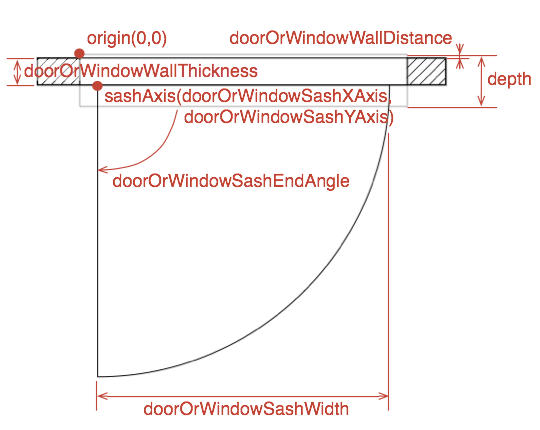
ETA:
I placed a door from the standard catalog at location (0,0) and saved the plan as obj-file. This way I had the door with its two files (obj and mtl).
Manually I changed the vertices of the frame so it has the desired width, height and depth. I placed this changed door in a plan and it look as expected. The frame with the new size, the rest at its original location.
Often it is better to place the model with it's top left corner at 0,0 before export. In many cases that makes "reading" the object file much easier because you can relate numbers to width and depth.Manually I changed the vertices of the frame so it has the desired width, height and depth. I placed this changed door in a plan and it look as expected. The frame with the new size, the rest at its original location.
I'm sure you already found this out but when exporting for editing in Blender also set the elevation to 0. Combined with a 0,0 origin this will show the model in Blender without having to search for it

----------------------------------------
Dodecagon.nl
1300+ 3D models, manuals, and projects
