The first Beta of Sweet Home 3D 3.0 is available as a Java Web Start application.
As seen at the bottom of the following capture, it integrates the features available in the Advanced rendering plug-in, except glossy and silk rendering options that I'll probably manage in the coming weeks.
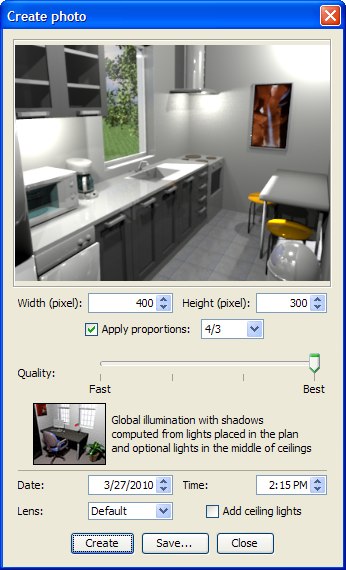
To avoid adding too many new controls in the Photo and Video creation dialogs, I just let to the user the ability to change the date of the photo, the lens and the option to add ceiling lights (checked by default). The other controls are spread elsewhere:
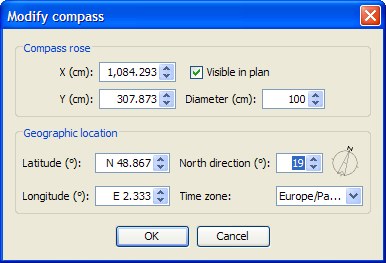
- The geographic location, the time zone and the North direction are set with the new compass that you can display in the plan as a rose.

The North direction, the location and the size of this rose can be changed with the mouse or with the Compass dialog displayed by the menu Plan > Modify compass….
This dialog lets you change also the geographic location, the time zone and whether the rose should be displayed or not.
- The power of lights can be set in the Furniture dialog with a new Light power spinner.
As you can see in the following capture, this dialog layout was reorganized (and will change again to manage glossiness). Hope you like it!

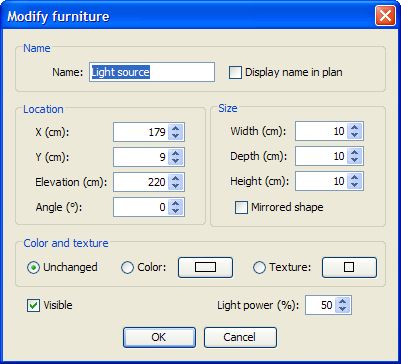
Of course setting a light as invisible or setting its power to 0 will turn it off.
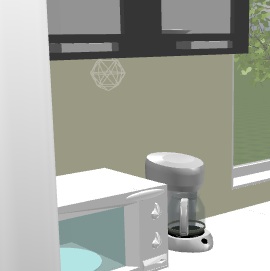
- A Light source was added to Lights category. As the additional lights available with the Adavanced rendering plug-in, its 3D model is normally invisible in the 3D view.
To help you place this light source (and the ones updated by db4tech), a 3D model is displayed but only when the light is selected in the plan. This 3D model will never appear in prints or photos created at low level quality. The 3D model of the new light source provided with this version looks like a grey wireframe sphere:
- The window transparency is now fixed in SunFlow, therefore light can go through any window.
- The additional Sun light is always active. If you don't want it, orientate the North of your home differently.
- Images created at the third level quality use the same parameters as the ones db4tech uses in his latest releases.
This new version has also some other features among which:
- The date/time spinners added to the Video creation dialog let you make vary the time during the video, and therefore the Sun location, as Frédéric did by hand in April.
- The navigation in the 3D view in Aerial view mode was improved, and it should work better (sometimes the camera elevation during a zoom was updated a bizarre way).
- I finally added the function that deletes automatically outdated temporary files of a given Sweet Home 3D version. Please test this feature by crashing Sweet Home 3D voluntarily and relaunching Sweet Home 3D (old temporary files should be deleted 20 seconds after program relaunch). The temporary files are in the Work subdirectory in Sweet Home 3D private directory.
A question: in a new home, the compass rosace is visible and appears at the top left of the plan. Even if many users don't care about the North direction, I felt that displaying the rose by default was the right behavior to be sure people know it exists. They can always move it or hide it if they don't need it.
What's your opinion about this?
Is the top left corner a good location, knowing that from a computer to another new windows don't have always the same size.
Expect more features in the next Beta updates.
Meanwhile, your feedback will always be much appreciated...
[Note from developer: Sweet Home 3D 3.0 was released on November 30, 2010]
----------------------------------------
Emmanuel Puybaret, Sweet Home 3D creator
