|
Sweet Home 3D Forum » List all forums » » Forum: 3D models and textures » » » Thread: Imported dae shows polygon lines |
|
| Print at Dec 21, 2025, 4:12:51 AM | View all posts in this thread on one page |
| Posted by BM80 at Feb 25, 2020, 2:51:59 PM |
|
Imported dae shows polygon lines Hi all I downloaded some models from 3dwarehouse.sketchup.com as dae and imported them into sh3d. Unfortunately, the models 3D views look somehow strange: the models consist of many polygons, and all surrounding lines (i.e. the whole mesh) are shown. Can I change that, are some settings wrong? Thank you for all hints. Best, Bernd |
| Posted by hansmex at Feb 25, 2020, 6:58:06 PM |
|
Re: Imported dae shows polygon lines Use Modify Furniture -> Materials -> Modify, then make the edge lines invisible. H ---------------------------------------- Hans new website - under constuction hansdirkse.info |
| Posted by BM80 at Feb 27, 2020, 7:06:27 AM |
|
Re: Imported dae shows polygon lines Thanks a lot! |
| Posted by Gildaniel at Mar 12, 2020, 6:06:00 AM |
|
Re: Imported dae shows polygon lines Hi! I have different problem - need edges to be shown, but there are none of them. Haven't found any edge switcher in Modify Furniture -> Materials -> Modify... Situation: I negotiate house frame construction with builders, and export model from my soft in dae or obj; import to SH as a furniture and publish it online. But when there is no edges it hard to understand whether there one board or several. Please, help to switch on the edges! Needed view: SH view: ![]() Material parameters: ![]() |
| Posted by SeppoV12 at Mar 26, 2020, 10:07:27 AM |
|
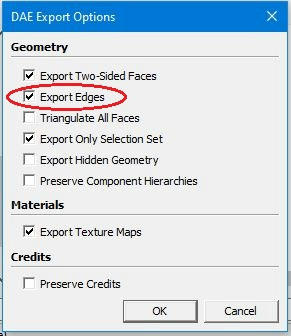
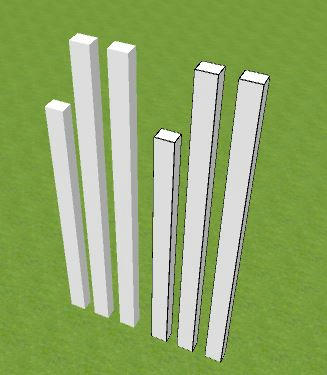
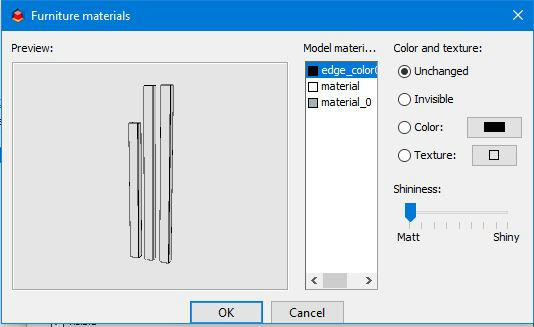
Re: Imported dae shows polygon lines Hello Gildaniel, I think that your problem can be solved if your CAD-software has export option like 'Export Edges' in Sketcup Make 2017 I have used here. Usually I dont't use this option but now it is necessary (picture below) Below is part of SH3D:s 3D view: on left 3 pillars exported without Export Edges, on the right same pillars exported with that option. ![]() And in last picture can be seen Furniture Material when rightmost 3 pillars are selected. Now there is edge color available as needed. ![]() I hope this help or at least show some possibilies to solve your problem. Seppo |
| Posted by Gildaniel at Mar 28, 2020, 5:24:34 PM |
|
Re: Imported dae shows polygon lines SeppoV12, thank you very much for your help! |
|
|
Current timezone is GMT Dec 21, 2025, 4:12:51 AM |