|
Sweet Home 3D Forum » List all forums » » Forum: New versions » » » Thread: Sweet Home 3D 6.3 |
|
| Print at Dec 20, 2025, 1:38:50 AM | |
| Posted by Puybaret at Apr 7, 2020, 7:36:06 PM |
|
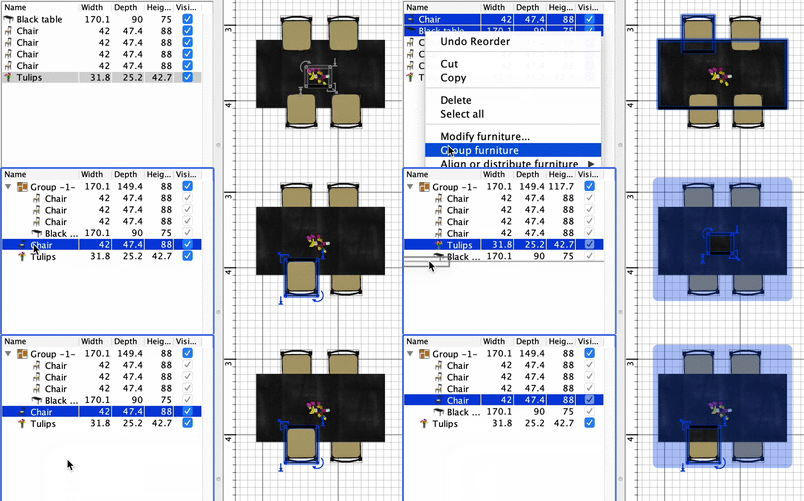
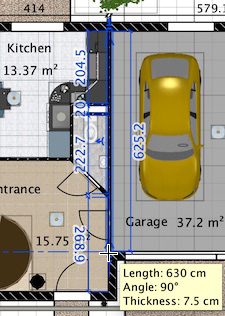
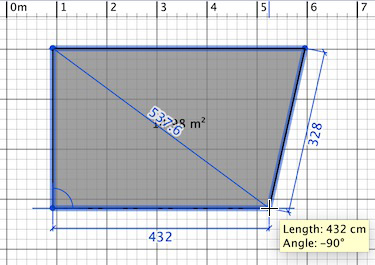
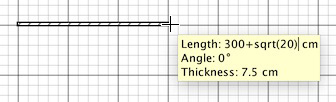
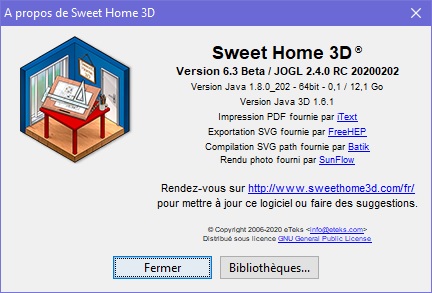
Sweet Home 3D 6.3 Hi, Here's a beta version of Sweet Home 3D 6.3. This version brings the following new features: - It's now possible to reorder the selected items in the furniture list with a drag-and-drop, when the list is not ordered under a criterion. It's also possible to drag and drop selected furniture out of a group or within a group. - Some temporary dimension lines are now displayed along walls when you resize them. - Some temporary dimension lines are also displayed while drawing or modifying a room, showing the length of the two sides starting from the edited point plus the diagonal to the previous point. This should allow to more easily draw rooms using triangulation. ![]() - It's now possible to enter math expressions in editable plan tooltips. - The maximum scale was increased in the plan, and now 1 pixel can be as small as 1 mm. - The 3D view proposes the new Select object item in its contextual menu to let you select the object under the cursor where you right clicked in the 3D view. When you press the Shift key, this menu item becomes Toggle selection and will toggle the selected state of the object under the cursor. Right clicking on a window pane will select the object behind the pane, so you'll be able to select a window in the 3D view only if you click on its frame. - Importing some 3D models which are made of repeated small parts like some trees found on 3D Warehouse (like this edge or this bonsai) will alter Sweet Home 3D performances much less. By the way, note that all 3D models at Collada format were recently regenerated with edges on 3D Warehouse. Even if these edges can be hidden afterwards in Sweet Home 3D, I wonder why such a decision was made. Showing our opinion could maybe make SketchUp / Trimble people change their mind. Among the fixed bugs, the management of maximized windows after reopening a file was improved under macOS, computing issues on 3D polylines with very large coordinates and some blocking bug for walls with a null side length were fixed. I have some doubts about the reordering feature, because I fear that some users may think that sometimes, it doesn't work whereas they didn't pay attention if the list is ordered or not. I also wonder if I should check some kind of minimal length to display the temporary dimension lines for rooms, because when the displayed lengths are small, the plan is quickly overcrowded with lines. Finally, I included the version 2.4.0 RC 20200202 of JOGL in this Beta version of Sweet Home 3D, wondering if it could fix some 3D issues like the corrupted display that have been reported more often during the past months. If it's not the case, I might not release the final version 6.3 with JOGL 2.4.0 because it's still in development (it may still take a few months before the final version of JOGL 2.4.0 is released). Using JOGL 2.4.0 should also allow Sweet Home 3D to run with Java versions > 8 under macOS, but I'm not sure that supporting more recent Java versions is so important in a close future. I hope you'll like this new version and as always, your feedback will be much appreciated ![]() [Note from developer: Sweet Home 3D 6.3 was released on April 15, 2020] ---------------------------------------- Emmanuel Puybaret, Sweet Home 3D creator |
| Posted by bdfd at Apr 8, 2020, 7:12:42 AM |
|
Re: Sweet Home 3D 6.3 Hi Manu, For a first contact, it's ok for me at this time ! . ---------------------------------------- Evil progresses when good people do nothing! --- SH3D 7.1 and nothing else - W11 64b in 4K |
| Posted by Gildaniel at Apr 8, 2020, 7:19:02 AM |
|
Re: Sweet Home 3D 6.3 Emmanuel, thank you for new features! Selection on 3D is very nice feature to correct objects when there is a lot of furniture on one vertical It was nice if one can enter exact dimensions/expression while editing wall or room. Now it's possible to enter only when room or wall is creating. "I also wonder if I should check some kind of minimal length to display the temporary dimension lines for rooms, because when the displayed lengths are small, the plan is quickly overcrowded with lines." As for me it's not a problem because they are display zoom sensetive. Very nice feature could be to make this dimensions (with the same font size they shown) permanent by clicking some button. Much more annying now that handmade dimensions of any objects are always standard font/arrow size, so one should press complicated combinations ctrl+shift+K and ctrl+shift+alt+K many many many times on each dimension to make in readable on plane. If they (and squares) were font size like temporary (display zoom sensetive) - it would be much faster to work ![]() |
| Posted by ndorigatti at Apr 8, 2020, 7:58:13 AM |
|
Re: Sweet Home 3D 6.3 hi, i can't find time to test it deeply, but the feature of drag and dropping items in and out of groups is a life saver for me! please do not remove, at least set as default disabled in option! |
| Posted by hansmex at Apr 8, 2020, 12:00:08 PM |
|
Re: Sweet Home 3D 6.3 Emmanuel, Thanks for this new version. As fas as possible, I tested the new features and they all work (windows 10). Temporary dimension lines This is useful, You might consider making their appearance depending on the amount of zoom to avoid crowding the screen. Select object in 3D In potential very useful. But... When selecting an object this way, the object should be "activated" so that it can be moved with the cursor keys. Now you still have to select the object in the 2D window, which cancels the usefulness of the new selection feature. Hans ---------------------------------------- Hans new website - under constuction hansdirkse.info |
| Posted by dorin at Apr 8, 2020, 1:12:37 PM |
|
Re: Sweet Home 3D 6.3 I'm glad to see a new version! 1. - It's now possible to reorder the selected items in the furniture list with a drag-and-drop, when the list is not ordered under a criterion. It's a missing feature from start. We don't have an option to revert the "sort by" to default order. That's mean the insert order. IMHO this new very useful feature could(must) work in this scenario: - You've sort furniture for different needs; - Reset the sort criteria; - Modify the order with this new feature AND - This became the last object insert order. After this You could make new sort and could reverse to last order. 2. - Some temporary dimension lines are now displayed along walls when you resize them. At this moment I don't have a clear opinion. I'ts good. 3. - The 3D view proposes the new Select object item in its contextual menu... It's great to select objects in 3D view especially when are on vertical axis. I've not tested whit all You indicate options BUT I have some pipes and other plumbing stuff inside walls. I've set the visibility of walls to minimum to see the pipes. When I try to select object the wall is selected and not the furniture. IMHO it's a very useful feature which could be improved. 4. - Importing some 3D models ... with edges Usually are useless BUT In some cases could be useful ONLY if I could decide which and where to be displayed. The most common example is staircase and steps. In 3D view look ok but in 2D view are indistinguishable. Few edges are welcome in this case. I've start work to a plug-in for this but it's a very long way. 5. I have some doubts about the reordering feature, because I fear that some users may think that sometimes, it doesn't work whereas they didn't pay attention if the list is ordered or not. Don't worry! Always will be this kind of users BUT with some help all's OK. Anyway THANKS FOR YOUR WORK! God keep You Safe and healthy because I need You !!!---------------------------------------- A computer program does what you tell it to do, not what you want it to do. Murphy's Law When all else fails, read the instructions. Murphy's Law If you don't like "AS IS", DIY. Dorin's law |
| Posted by YGYL at Apr 9, 2020, 3:45:52 PM |
Re: Sweet Home 3D 6.3Emmanuel, Select object in 3D In potential very useful. But... When selecting an object this way, the object should be "activated" so that it can be moved with the cursor keys. Now you still have to select the object in the 2D window, which cancels the usefulness of the new selection feature. Hans Press TAB 5 times to switch windows |
| Posted by YGYL at Apr 9, 2020, 3:58:37 PM |
Re: Sweet Home 3D 6.3- Importing some 3D models which are made of repeated small parts like some trees found on 3D Warehouse (like this edge or this bonsai) will alter Sweet Home 3D performances much less. t was hundreds of times faster. This is the best improvement in recent years!!!!!!!!!!! |
| Posted by YGYL at Apr 9, 2020, 4:01:46 PM |
Re: Sweet Home 3D 6.3- The 3D view proposes the new Select object item in its contextual menu to let you select the object under the cursor where you right clicked in the 3D view. When you press the Shift key, this menu item becomes Toggle selection and will toggle the selected state of the object under the cursor. Right clicking on a window pane will select the object behind the pane, so you'll be able to select a window in the 3D view only if you click on its frame. It is best to set it to double-click with the left mouse button to automatically select this object and jump to the floor plan window. Otherwise, many people will not know or use this function |
| Posted by Puybaret at Apr 10, 2020, 3:38:36 PM |
|
Re: Sweet Home 3D 6.3 Many thanks for your feedback You seem to like the reordering feature in the furniture list, so I'll keep it. Here's the version 6.3 Beta 3. It brings two small changes: - from Dorin's suggestion, I made walls and rooms undetectable by Select object contextual menu as soon as walls transparency isn't fully opaque in the 3D view modification pane. - I replaced the version 2.4.0 RC 20200202 of JOGL by the version used in previous versions of Sweet Home 3D, because it didn't seem to solve the corrupted display bug. This Beta 3 tests another solution because this bug seems to be bound to tool tips, but I'm not sure it will work (it's difficult for a developer to fix a bug that he can't experience himself!) @Gildaniel, thanks for your suggestions about the default text size of dimension lines, except that the two images you showed over-exaggerate the problem. In a future version, I could try to compute a different text size according to the place it will occupy along the line, propose a default size in the preferences or add a modification pane for selected dimension lines. But as these dimension lines are permanent and printed, I can't change their size according to the current zoom factor like for temporary dimensions, otherwise this would break WYSIWYG (What You See Is What You get) in the plan view. In case you didn't know, note that the Enlarge / Decrease size menu items will affect all the dimension lines and other texts selected in the plan, so you can select more than one line to change its text size at the same time. Temporary dimension lines That's what I had in mind. I could also not display them if the number of the dimension line becomes invisible at screen because of the zoom factor.This is useful, You might consider making their appearance depending on the amount of zoom to avoid crowding the screen. Select object in 3D Arrows are used to change the point of view at the moment. If you want them to act differently, this would imply to introduce some kind of modification mode in the 3D view, and I'm very reluctant to program that. In potential very useful. But... When selecting an object this way, the object should be "activated" so that it can be moved with the cursor keys. Now you still have to select the object in the 2D window, which cancels the usefulness of the new selection feature. As YGYL suggested, you should press a few time the Tab key to give the focus to the plan view, or even faster press Alt + Tab keys to go directly to the plan view (they are even listed in this article about shortcuts). We don't have an option to revert the "sort by" to default order. There are two options to revert to the natural order in which objects were added: select again the sort criterion column in the Sort by menu or more simply, click again on the header of the column (first click on a column header sorts the furniture list according to the column in ascending order, second click in descending order and third click removes sorting).Happy Easter to you all! [Updated wrong links on 4/13/2020] ---------------------------------------- Emmanuel Puybaret, Sweet Home 3D creator |
| Posted by Gildaniel at Apr 12, 2020, 2:59:45 PM |
|
Re: Sweet Home 3D 6.3 @Gildaniel, thanks for your suggestions about the default text size of dimension lines, except that the two images you showed over-exaggerate the problem. In a future version, I could try to compute a different text size according to the place it will occupy along the line, propose a default size in the preferences or add a modification pane for selected dimension lines. But as these dimension lines are permanent and printed, I can't change their size according to the current zoom factor like for temporary dimensions, otherwise this would break WYSIWYG (What You See Is What You get) in the plan view. In case you didn't know, note that the Enlarge / Decrease size menu items will affect all the dimension lines and other texts selected in the plan, so you can select more than one line to change its text size at the same time. Good morning, Emmanuel! May be I was not very good explaining. Using SVG online one can easily inspect whole plane and small details on it, zooming picture. So, big objects like square region, or house basement, need of large dimension size and names/squares, small objects (like window width or chair size)- need small dimensions. So, on one page I need couple of dimension sizes, like here https://woodmouse.ru/3dplan/aeb/4.html I use hotkeys with several dimenstions selected. Why not menu options - because I often need about 6-8 steps to adjust text/room name to needed size. Enlarge/decrease option locates on the third menu level and works out only once. Thus, to increase the text size for basement I need ~21 aimed mouse clicks. But I see that temporary dimensions are always good size to be placed permanently (because they correspond to suitable zoom level for measured object!) Thus, you already has algorithm for good dimension size calculating, I just ask you to put permanent dimension same size like temporary shown. Of course, placed once they should stay exact permanent size. Thank you! |
| Posted by dorin at Apr 13, 2020, 7:29:02 AM |
|
Re: Sweet Home 3D 6.3 @Emmanuel Please verify the last link for beta 3. It appear is the same as previous. About show JOGL 2.4. @Gildaniel Use Select Hide Utility plugin . Your problem was also for me and one reason to write it. After You've select ALL dimensions at current (selected) level. You could deselect unwanted and increase/decrease font. ---------------------------------------- A computer program does what you tell it to do, not what you want it to do. Murphy's Law When all else fails, read the instructions. Murphy's Law If you don't like "AS IS", DIY. Dorin's law |
| Posted by Puybaret at Apr 13, 2020, 7:58:06 AM |
|
Re: Sweet Home 3D 6.3 Sorry for the wrong links, I just fixed them. @Gildaniel I forgot to answer about your suggestion to be able to enter values when editing walls and rooms. That would be nice but at the opposite of creation time, modifications are done with a drag-and-drop. Authorizing to press <enter> and enter values while the mouse button is pressed (then released) would mix two modification behaviors which would make it too complicate to manage and understand by users. Or maybe I could allow the <enter> key while the mouse button is not pressed to allow the same modification with the keyboard as if the user would do a drag-and-drop... I will try, but if most of you here don’t see what I want to program after a first read, I’m not sure it’s a good idea either. ---------------------------------------- Emmanuel Puybaret, Sweet Home 3D creator |
| Posted by dorin at Apr 13, 2020, 9:28:48 AM |
|
Re: Sweet Home 3D 6.3 Great!! Now it works as You promise. Thanks!!! Good job!! ---------------------------------------- A computer program does what you tell it to do, not what you want it to do. Murphy's Law When all else fails, read the instructions. Murphy's Law If you don't like "AS IS", DIY. Dorin's law |
| Posted by Xiste at Apr 13, 2020, 10:07:20 AM |
|
Re: Sweet Home 3D 6.3 I think I have found a small bug. Applying a texture to an object can make SH3D crash. Happens only in the 6.3 beta version. I made a screen recording: Timeline1 Xiste |
| Posted by Gildaniel at Apr 13, 2020, 11:00:45 AM |
|
Re: Sweet Home 3D 6.3 Sorry for the wrong links, I just fixed them. @Gildaniel I forgot to answer about your suggestion to be able to enter values when editing walls and rooms. ... I will try, but if most of you here don’t see what I want to program after a first read, I’m not sure it’s a good idea either. Emmanuel, it would be very helpful function! Now despite of all existing tools of size correcting (properties, resizing plugin), it's quite hard to draw in SH with exact dimensions. As for me, after a lot of trying, I gave up and draw approximately, like sketch. It was quite hard to rebuild the head, because before I was always very exact, as a "make-perfect man". They probably could be custom mode with alternative drag-drop behavior, same as a new objects drawing: click-n-release to get; drag (and enter value if needed); click-n-release to drop. Thank you once again for your very useful work! |
| Posted by bdfd at Apr 13, 2020, 11:16:06 AM |
|
Re: Sweet Home 3D 6.3 I think I have found a small bug. None problem for me !Applying a texture to an object can make SH3D crash. Happens only in the 6.3 beta version. I made a screen recording: Timeline1 Xiste . ---------------------------------------- Evil progresses when good people do nothing! --- SH3D 7.1 and nothing else - W11 64b in 4K |
| Posted by Ceciliabr at Apr 14, 2020, 2:13:26 PM |
|
Re: Sweet Home 3D 6.3 I have the same problem as Xiste. A lot of my textures causes this version to shut down. When re-importing a problem texture by changing it with the modifier, the problem is gone. Cec |
| Posted by Puybaret at Apr 14, 2020, 3:37:54 PM |
|
Re: Sweet Home 3D 6.3 Xiste, Cec, could you confirm that this bug doesn't happen with the Beta 3 where I replaced the version 2.4.0 RC 20200202 of JOGL by the version used in previous versions of Sweet Home 3D? ---------------------------------------- Emmanuel Puybaret, Sweet Home 3D creator |
| Posted by Xiste at Apr 14, 2020, 4:30:18 PM |
|
Re: Sweet Home 3D 6.3 Version 3 seems to be working great! Problem solved, thank you! Time to look at the new features. |
| Posted by Puybaret at Apr 15, 2020, 11:05:02 PM |
|
Re: Sweet Home 3D 6.3 I released Sweet Home 3D 6.3 tonight. Thanks you all for your feedback and support ![]() ---------------------------------------- Emmanuel Puybaret, Sweet Home 3D creator |
| Posted by T2000 at May 4, 2020, 7:51:10 AM |
|
Re: Sweet Home 3D 6.3 Hey, I just stumbled across these postings. First of all, thank you VERY much for keeping this piece of software alive and all the effort you spend on it! I have planned my whole house with sweethome3d! One thing I noticed though is that on Arch Linux it stopped working and the reason is mesa in version 20. It seems to be related to JOGL as JOGL-2.4 apparently should support mesa-20 but you have removed it from the final version. Unfortunately I cannot find the download link to the 6.3 beta1 because I would like to give it a try, even though I would have some glitches, but I would like to see whether its working with mesa-20. Regards, Stefan |
| Posted by Puybaret at May 4, 2020, 9:46:42 AM |
|
Re: Sweet Home 3D 6.3 T2000, did you try the second script SweetHome3D-Java3D-1_5_2 available with Sweet Home 3D installer version? ---------------------------------------- Emmanuel Puybaret, Sweet Home 3D creator |
| Posted by Xiste at May 10, 2020, 8:50:16 PM |
|
Re: Sweet Home 3D 6.3 It seems that the shortcut for join walls has been lost in the Mac version. It works from the drop down menu though, and it works in the Windows version. Could you please check? Xiste |
| Posted by Ceciliabr at May 18, 2020, 11:28:02 PM |
|
Re: Sweet Home 3D 6.3 Sorry to say, but I'm really having trouble with v6.3. Suddenly my Mac is freezing completely when I'm changing a texture or making a copy of an object with option+move. I am forced to do a Swedish restart. This is frequent, and this has not happened to me in many years. No other apps running. So something is obviously not right with v6.3. 6.0, however, is working perfect. After going back to using that version, I have had no crashes now for five days. Going back to v6.3 this evening, I had a total meltdown in two hours, and it took ages to restart my machine. Sorry I cannot send you a crash report, since I'm not offered any crash report after a Swedish restart. Cec |
| Posted by Puybaret at May 19, 2020, 2:36:18 PM |
|
Re: Sweet Home 3D 6.3 Xiste, I just tried cmd + alt + J shortcut and it worked as expected. Maybe, you set this shortcut on the system for another task? Cec, I looked at the differences between versions 6.0 and 6.3, and I'm really wondering what could cause the issues you encountered. First, I tried to guess from the context what you meant by "Swedish restart"? Is it a reference to the color of the Windows BSOTD (Blue Screen Of The Death)? Then, I tried to duplicate many large objects with the option key under macOS 10.14.6, but it never crashed even if the 3D view was slowed down (but I didn't edit the same file during hours). Did you pay attention to increase the max memory if needed? Would you have the patience to test Sweet Home 3D 6.1.2 or 6.2 too? ---------------------------------------- Emmanuel Puybaret, Sweet Home 3D creator |
| Posted by Ceciliabr at May 19, 2020, 8:17:57 PM |
|
Re: Sweet Home 3D 6.3 A "Swedish Restart" is when you pull the plug to shut down your computer :) Did you pay attention to increase the max memory if needed? I have given SH3D 64G. That should be plenty. I'm monitoring my memory, and it's stable at around 38G app mem when I'm only running SH3D. Memory usage is the same for v6.0 and v6.3. Would you have the patience to test Sweet Home 3D 6.1.2 or 6.2 too? Sure. v6.1.2 I haven't tried yet, but v6.2 has a texture problem. I will try 6.1.2 now. If no one else reports any trouble with 6.3, don't bother about this. I'm perfectly happy with v6.0. BTW: option+cmd+j has not worked for years. No bother. It's just as fast to use the right-click menu. Cecilia |
| Posted by Ceciliabr at May 20, 2020, 12:12:10 PM |
|
Re: Sweet Home 3D 6.3 I have worked with 6.1.2 for some 5 hours now without any trouble. It seems to be stable. I don't notice any differences between 6.0 and 6.1.2. |
| Posted by Ceciliabr at May 23, 2020, 12:42:42 PM |
|
Re: Sweet Home 3D 6.3 I got a tip yesterday to clear the Quick look cache and reinstall Java. That seems to have solved the problem with 6.3. I have worked with a VERY big file now for 6 hours without any problems. So I'm back on 6.3 and happy :) Cecilia |
| Posted by s_koch at May 24, 2020, 8:28:40 AM |
|
Re: Sweet Home 3D 6.3 [quote clear the Quick look cache... Can someone help please. HOW to clear this cache on Windows PC (I use Win7 and Win10) many thanks! (because I got the problem that larger video-renderings causes shut-down of the programm...) |
| Posted by hansmex at May 24, 2020, 8:33:04 AM |
|
Re: Sweet Home 3D 6.3 Did you increase the memory enough? Look for the xmx-trick in the faq. H ---------------------------------------- Hans new website - under constuction hansdirkse.info |
| Posted by s_koch at May 24, 2020, 1:03:42 PM |
|
Re: Sweet Home 3D 6.3 Hello Hans, Thanks for this hint! But the description does not seem to be easy for non-coder like me. So, to be shure to understand, I ask again and hope for your patience with my stupid questions: 1. The "xmx-trick" is used for increasing the RAM Memory "amount" that an be adressed by SW3D, correct? 2. But, if my SW3D info window does show already 26 GB of available Memory, does it make sense to do the "xmx-trick"? 3. To be clear, what I am talking about, here is a screenshot of my Info-window, after opening an empty project: Does that mean, SW3D can use 26,3 GB? |
| Posted by Puybaret at Jun 8, 2020, 8:29:51 AM |
|
Re: Sweet Home 3D 6.3 s_koch, the fact that you can't generate large videos is another issue. I don't think your problem under Windows and the Ceciliabr's one are bound. Anyway, I'm quite confident that Apple's Security update 2020-003 (available in 10.15.5, here for Mojave and there for High Sierra) fixed some stability issues reported during the past 2 months in this thread and in bug tickets. ---------------------------------------- Emmanuel Puybaret, Sweet Home 3D creator |
| Posted by Xiste at Jun 8, 2020, 2:32:41 PM |
|
Re: Sweet Home 3D 6.3 HOW to clear this cache on Windows PC You can't. It's an Apple feature that eats memory on a Mac. Be happy you don't have it :) |
| Posted by Hordeia at Jan 20, 2021, 10:02:03 AM |
Re: Sweet Home 3D 6.3Hello Gildaniel, have you ever had a solution for the standard font size for dimensions? |
|
|
Current timezone is GMT Dec 20, 2025, 1:38:50 AM |