Print at Dec 18, 2025, 8:44:02 PM
Posted by jmadero at Apr 11, 2020, 4:26:24 PM
SweetHome3d Not Seeing My Data Partition in Linux
Hi All,

I've been using Linux for over 15 years and I can say this is a first. Sweet Home 3D is not seeing my main data partition. I separate /, /home, and /data, for various reasons.

lsblk output

├─sdb5 8:21 0 29.3G 0 part /
├─sdb6 8:22 0 24.4G 0 part /home
├─sdb7 8:23 0 222.7G 0 part /data


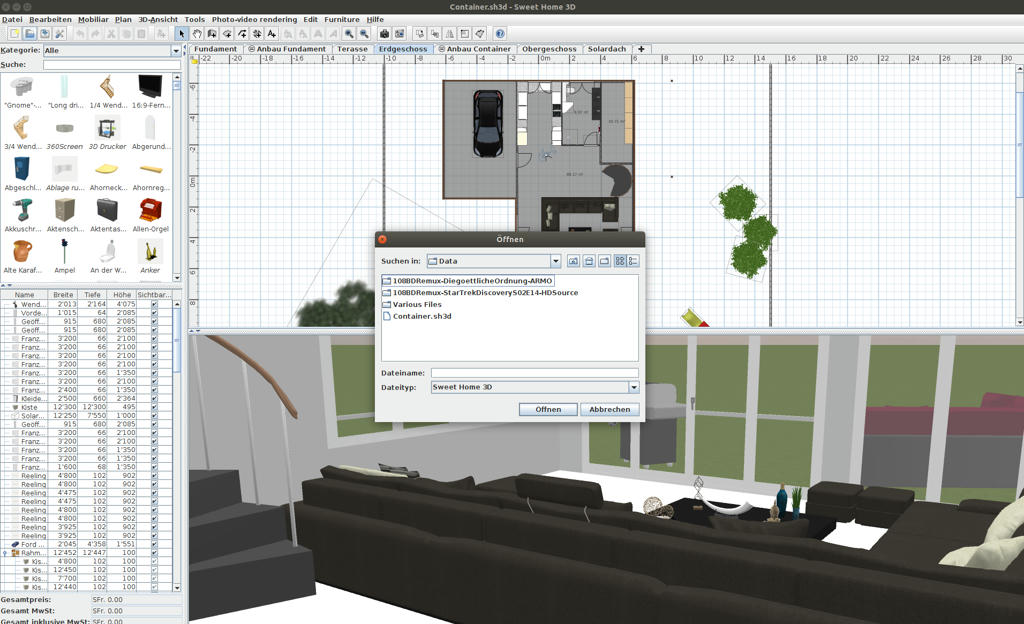
SweetHome3d Open Dialog


Additionally, my shortcuts to the /data/XXXX folders within my Home Folder are all missing in SH3D. Finally, permissions are pretty standard, 770, for the data partition.

This is super bizarre. Any suggestions welcome.
Posted by dorin at Apr 13, 2020, 12:23:33 PM
Re: SweetHome3d Not Seeing My Data Partition in Linux
I've been using Linux for over 15 years

Me too. I have also separate partitions for different purpose.
Sweet Home 3D is not seeing my main data partition

Normal. All other programs act the same (Libre Office, Inkscape, kate etc.)
At start are mounted in system ONLY "/" and "/home".
All other partitions have only shortcuts in file browser.
First I need to click on it then insert the root password to mount it in the system.
For many personal reasons I don't like to use sudo.
After that I found it in file chooser (from every program) under:
Root/media/ my_user_name / partition_name
That's applicable for every new reboot or boot.
At least that's the way I use my linux systems.
I use debian with KDE.
Hope is useful.
P.S. An general advice: DON'T use the repository version.
Use the installer version from this site.
----------------------------------------
A computer program does what you tell it to do, not what you want it to do. Murphy's Law
When all else fails, read the instructions. Murphy's Law
If you don't like "AS IS", DIY. Dorin's law

Posted by UbuntuBirdy at Apr 13, 2020, 2:22:11 PM
Re: SweetHome3d Not Seeing My Data Partition in Linux
I'm using Linux (Ubuntu) only since 12 years, so you guys are the pros. But I solved this problem with "systemd":

systemd man page.
I put it in the fstab so a mount point looks like this:
/home/"user"/music nfs nfsvers=4,noauto,x-systemd.automount,x-systemd.idle-timeout=900,users,rw 0 0


This is for a NAS via nfs, but it works also for partitions.

The mount point is not mounted (this saves you booting time) until you access it, but all the programs can do that.

Perhaps this could be a solution for you...
----------------------------------------
Pascal

SH3D 6.6 / Ubuntu 22.04 (Mainline-Kernel) / Radeon RX580 / Ryzen 7 5800x

Posted by jmadero at Apr 15, 2020, 8:08:15 PM
Re: SweetHome3d Not Seeing My Data Partition in Linux
It is mounted. LibreOffice and every other application sees the mount and I have permissions to access. It's literally just Sweet Home 3d. It's an EXT4 partition.

Posted by UbuntuBirdy at Apr 15, 2020, 8:40:23 PM
Re: SweetHome3d Not Seeing My Data Partition in Linux
My partitions, NAS, server, RaspberryPi, all mounted with systemd the way I wrote it in my last post, are all accessible with Sweet Home 3D without any restrictions. And these are Ext4, FAT or NTFS partitions.
So, for me systemd is the one and only thing to mount with (also because of many other options and features).
----------------------------------------
Pascal

SH3D 6.6 / Ubuntu 22.04 (Mainline-Kernel) / Radeon RX580 / Ryzen 7 5800x

Posted by jmadero at Apr 15, 2020, 8:44:44 PM
Re: SweetHome3d Not Seeing My Data Partition in Linux
Thought that some additional details could help:

FSTAB
UUID=06461143-2fd0-4dee-b4cd-826690435ec5 /data ext4 defaults 0 2

View from LibreOffice Dialog:


View from Sweet Home Dialog:


As can be seen, "/data" is just entirely missing from Sweet Home Dialog....it's extremely bizarre. I can see /data in LibreOffice and access it without a hitch.

Posted by jmadero at Apr 15, 2020, 8:46:20 PM
Re: SweetHome3d Not Seeing My Data Partition in Linux
And of course the image option didn't work:
LibreOffice: https://drive.google.com/open?id=1rL-54REVMHg1ITCucFE8vwcN46prj37E

Sweet Home: https://drive.google.com/open?id=1dn0TPggTGaZjsBwqmpto7mvZM27WxpkE

Posted by UbuntuBirdy at Apr 15, 2020, 10:09:06 PM
Re: SweetHome3d Not Seeing My Data Partition in Linux
and what's in the "mnt" folder?
----------------------------------------
Pascal

SH3D 6.6 / Ubuntu 22.04 (Mainline-Kernel) / Radeon RX580 / Ryzen 7 5800x

Posted by jmadero at Apr 16, 2020, 1:29:01 AM
Re: SweetHome3d Not Seeing My Data Partition in Linux
/mnt/Synology
/mnt/Windows

(two other shares in my FSTAB)

Posted by UbuntuBirdy at Apr 16, 2020, 4:35:00 AM
Re: SweetHome3d Not Seeing My Data Partition in Linux
Ok, other idea: normally you need root rights to access any folder or file in the root directory (they are read-only). So, could this be the reason for your issue?
----------------------------------------
Pascal

SH3D 6.6 / Ubuntu 22.04 (Mainline-Kernel) / Radeon RX580 / Ryzen 7 5800x

Posted by jmadero at Apr 18, 2020, 3:56:23 AM
Re: SweetHome3d Not Seeing My Data Partition in Linux
nope:

drwxrwx--- 15 joel shared 4096 Jan 19 18:09 data


Owner is "joel" (my user), group is "shared" (my shared group with my wife and myself), perms are pretty straight forward 770. The fact that it works in literally every other application I use (pdf viewer, web browsers, libreoffice, text editors, handbrake, vlc, literally tens of programs) leads me to think that this is a bug in Sweet Home.

Posted by UbuntuBirdy at Apr 18, 2020, 10:12:11 AM
Re: SweetHome3d Not Seeing My Data Partition in Linux
If this is a bug, it does not affect my system:


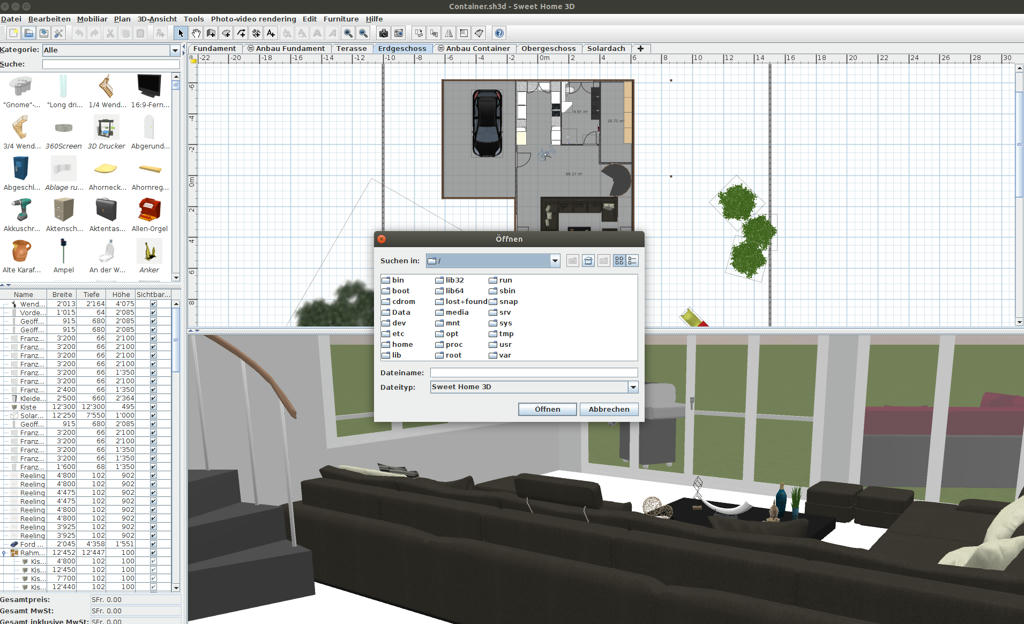
I created a "Data" folder like you have it in the root directory. Then I mounted a partition into this mount point.
And as you can see, I can access it via SweetHome3D.
----------------------------------------
Pascal

SH3D 6.6 / Ubuntu 22.04 (Mainline-Kernel) / Radeon RX580 / Ryzen 7 5800x

Posted by jmadero at Apr 18, 2020, 2:45:32 PM
Re: SweetHome3d Not Seeing My Data Partition in Linux
Thanks for testing that!

Okay - next question I have. Your distro and version of Sweet Home installed?

I'm running a Ubuntu derivative (Bodhi Linux, built on Ubuntu 18.04), used Snap to install Sweet Home.

Posted by jmadero at Apr 18, 2020, 2:52:15 PM
Re: SweetHome3d Not Seeing My Data Partition in Linux
Bingo - it's the snap version. I just used the more generalized Linux version and it worked. If you have time to test the Snap version...then I can report the issue.

Posted by UbuntuBirdy at Apr 18, 2020, 5:55:42 PM
Re: SweetHome3d Not Seeing My Data Partition in Linux
I do not need to test the snap version. On my Ubuntu 18.04 the snap version does NOT run!
I'm always running the latest sh3d downloaded from this site.
----------------------------------------
Pascal

SH3D 6.6 / Ubuntu 22.04 (Mainline-Kernel) / Radeon RX580 / Ryzen 7 5800x

Posted by jmadero at Apr 18, 2020, 9:24:17 PM
Re: SweetHome3d Not Seeing My Data Partition in Linux
I'll report my bug :) Thanks for the assistance. The fact that you did that last test made me think "what could possibly be different" and then that led to a workable solution.

Posted by UbuntuBirdy at Apr 18, 2020, 10:16:35 PM
Re: SweetHome3d Not Seeing My Data Partition in Linux
Together we can solve every problem! This is why I'm working with Linux since many years!
----------------------------------------
Pascal

SH3D 6.6 / Ubuntu 22.04 (Mainline-Kernel) / Radeon RX580 / Ryzen 7 5800x

Posted by dorin at Apr 19, 2020, 11:07:48 AM
Re: SweetHome3d Not Seeing My Data Partition in Linux
@UbuntuBirdy
This is why I'm working with Linux since many years!
Me too!
@jmadero
I'll report my bug :)

No problem! Don't forget the repository version, appimage, snap and what ever other UNOFFICIAL versions.
Don't forget also, for those versions, are not responsible Emmanuel.
----------------------------------------
A computer program does what you tell it to do, not what you want it to do. Murphy's Law
When all else fails, read the instructions. Murphy's Law
If you don't like "AS IS", DIY. Dorin's law