I started using Art of Illusion to create the models I need, but I'm having a problem with textures.
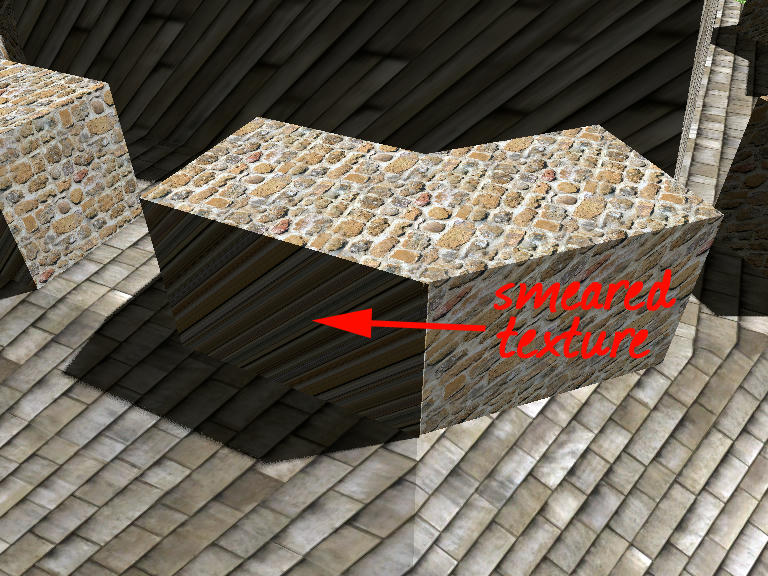
Does anyone know what you have to do to prevent textures from sliding or smearing on a face, like this?:
|
Sweet Home 3D Forum » List all forums » » Forum: 3D models and textures » » » Thread: Preventing 'smeared' textures? |
|
| Print at Sep 28, 2026, 9:58:11 PM | View all posts in this thread on one page |
| Posted by harbinger at Sep 23, 2020, 11:50:42 PM |
|
Preventing 'smeared' textures? I started using Art of Illusion to create the models I need, but I'm having a problem with textures. Does anyone know what you have to do to prevent textures from sliding or smearing on a face, like this?: |
| Posted by Puybaret at Sep 25, 2020, 9:35:04 PM |
|
Re: Preventing 'smeared' textures? This can avoided when texture coordinates are set on a 3D model and you modify textures with the Material modification dialog box. Otherwise you could also use a thin box for that part. ---------------------------------------- Emmanuel Puybaret, Sweet Home 3D creator |
| Posted by harbinger at Sep 26, 2020, 12:11:28 AM |
|
Re: Preventing 'smeared' textures? You're right. I found out that in order to avoid this you MUST apply a texture to that face before exporting to OBJ. If anyone is using AoI, make sure if you apply a texture (rather than a material), do not set it to Projection. This will smear the texture you applied on certain faces of the outgoing model. (I've not begun using Materials, so I dont know of the settings there...) |

|
Current timezone is GMT Sep 28, 2026, 9:58:11 PM |