|
Sweet Home 3D Forum » List all forums » » Forum: Developers » » » Thread: Multiplier plugin |
|
| Print at Dec 16, 2025, 11:15:09 AM | |
| Posted by dorin at Sep 29, 2020, 6:48:03 PM |
|
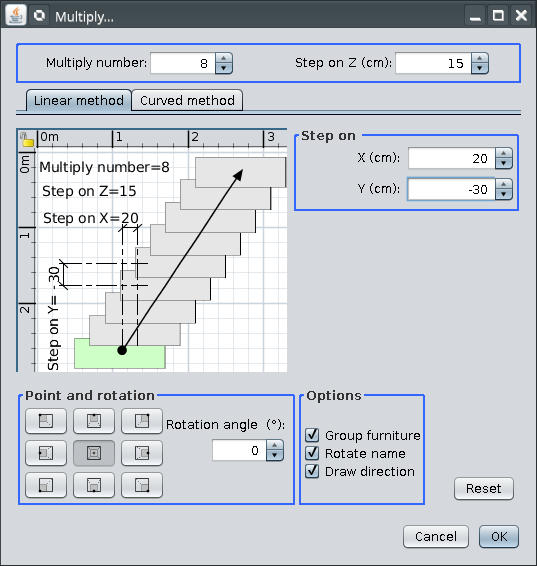
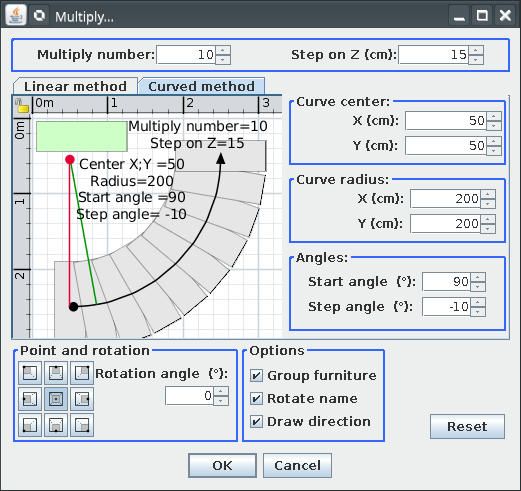
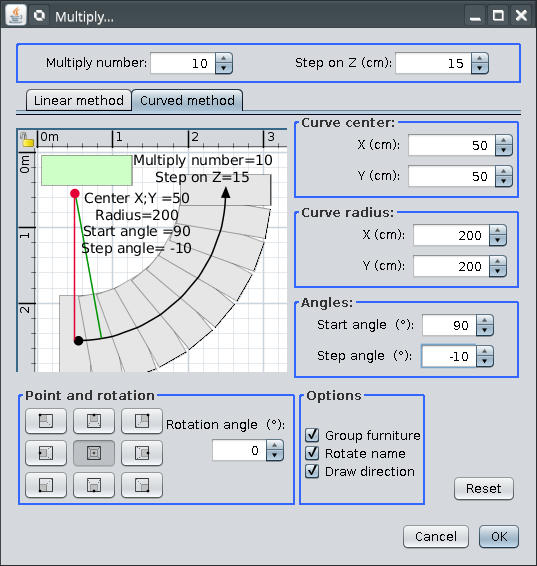
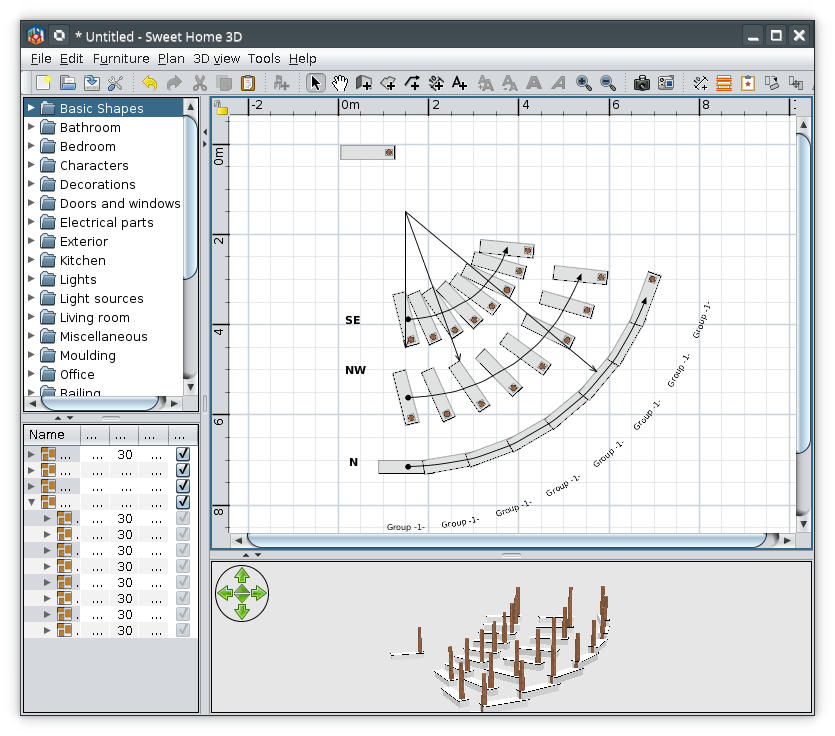
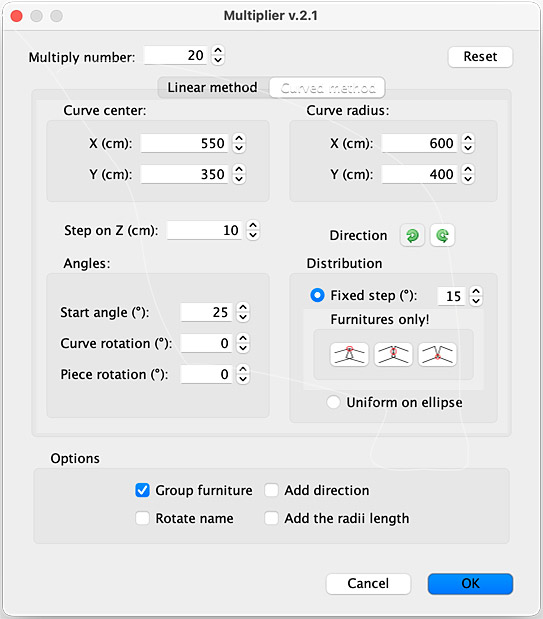
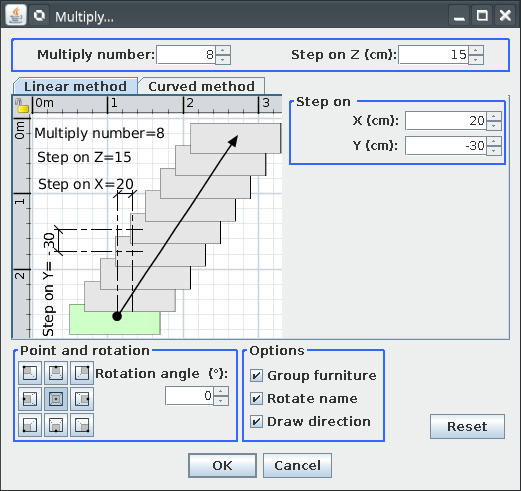
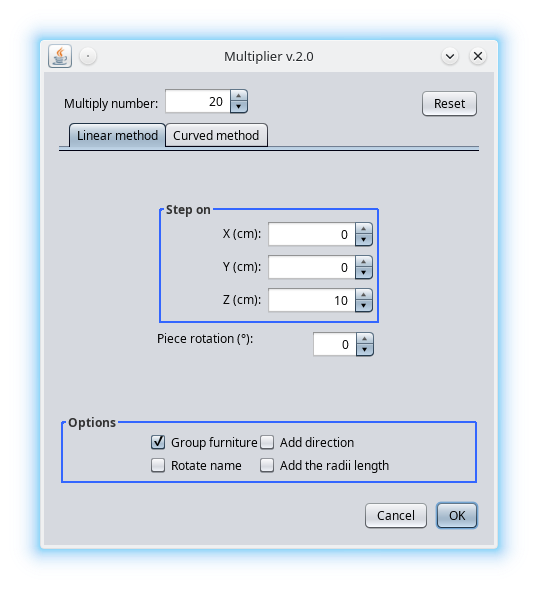
Multiplier plugin Preamble: I'm not a programmer, almost all line of cods are stolen (including from me), especially from Emmanuel and Tobias. I've rewrite it from scratch. So, I've split the Paste special and distribute plugin on two separate plugins. This one is Multiplier plugin v1 which replace Paste special action. Also have some news: 1. The most important: it work with selection and no more with copy; 2. Are under Tool->Multiply... 3. I've add some improvement which I invite You to discover. It look like this (on default and nimbus look&fill) ![]() ![]() and here are a screenshot: ![]() I must mention the point position are relevant only for curved method. You are invited to risk and discover bugs but don't make illusion from me to solve them. ---------------------------------------- A computer program does what you tell it to do, not what you want it to do. Murphy's Law When all else fails, read the instructions. Murphy's Law If you don't like "AS IS", DIY. Dorin's law |
| Posted by Gildaniel at Sep 30, 2020, 11:01:58 AM |
|
Re: Multiplier plugin Dear Dorin! Thank you for very usefull plugin! I often need to copy log walls to exact distance (to next building axis) - this tool is more handy for this Is it possible to make user button on button bar somehow? |
| Posted by dorin at Sep 30, 2020, 11:30:56 AM |
|
Re: Multiplier plugin Look on the toolbar and You will find it (something yellow with a red star) ---------------------------------------- A computer program does what you tell it to do, not what you want it to do. Murphy's Law When all else fails, read the instructions. Murphy's Law If you don't like "AS IS", DIY. Dorin's law |

| Posted by Gildaniel at Sep 30, 2020, 2:55:35 PM |
|
Re: Multiplier plugin Great, found it! |
| Posted by harbinger at Sep 30, 2020, 9:21:10 PM |
|
Re: Multiplier plugin This is a wonderful intermediate workaround until we get a standard feature in SH3D (as I wished for here). I intend to be using this alot, and hope you keep perfecting it! ![]() |
| Posted by dorin at Nov 21, 2020, 8:16:58 PM |
|
Re: Multiplier plugin New version Multiplier v1.1 on mediafire and Multiplier v1.1 on sourceforge. I fixed a bug in the order of creation. Thanks Emmanuel to open my eyes .---------------------------------------- A computer program does what you tell it to do, not what you want it to do. Murphy's Law When all else fails, read the instructions. Murphy's Law If you don't like "AS IS", DIY. Dorin's law |
| Posted by dorin at Apr 24, 2021, 9:05:13 AM |
|
Re: Multiplier plugin New version 1.2 -add a better undo/redo -add a "M" on icon to avoid confusion Also on Source Forge ---------------------------------------- A computer program does what you tell it to do, not what you want it to do. Murphy's Law When all else fails, read the instructions. Murphy's Law If you don't like "AS IS", DIY. Dorin's law |
| Posted by Puybaret at Apr 24, 2021, 1:28:42 PM |
|
Re: Multiplier plugin Thank you Dorin for this update ![]() ---------------------------------------- Emmanuel Puybaret, Sweet Home 3D creator |
| Posted by dorin at Dec 7, 2023, 7:55:54 PM |
|
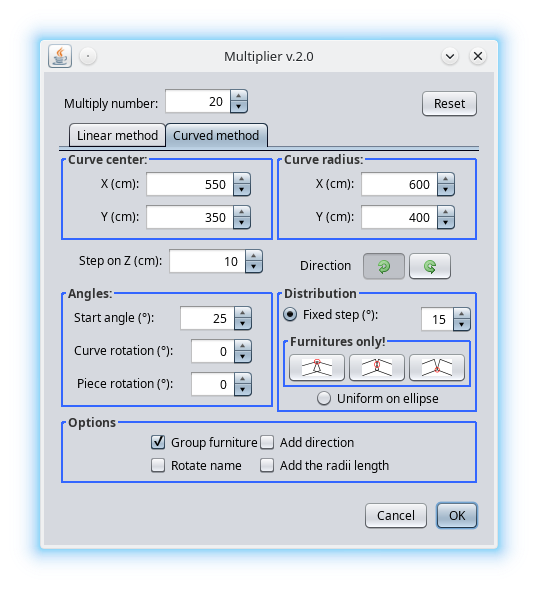
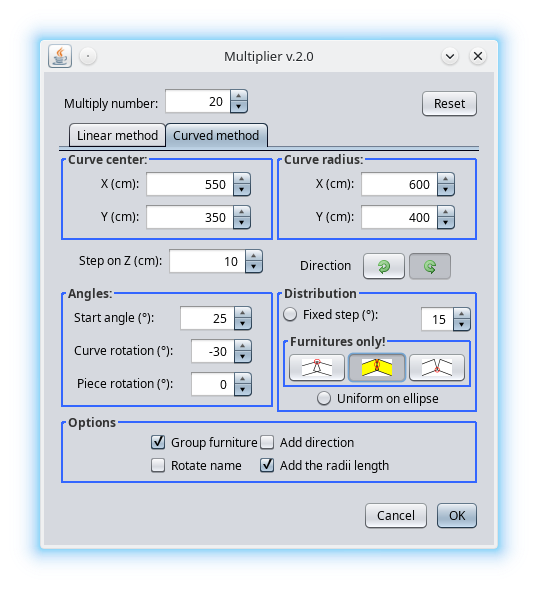
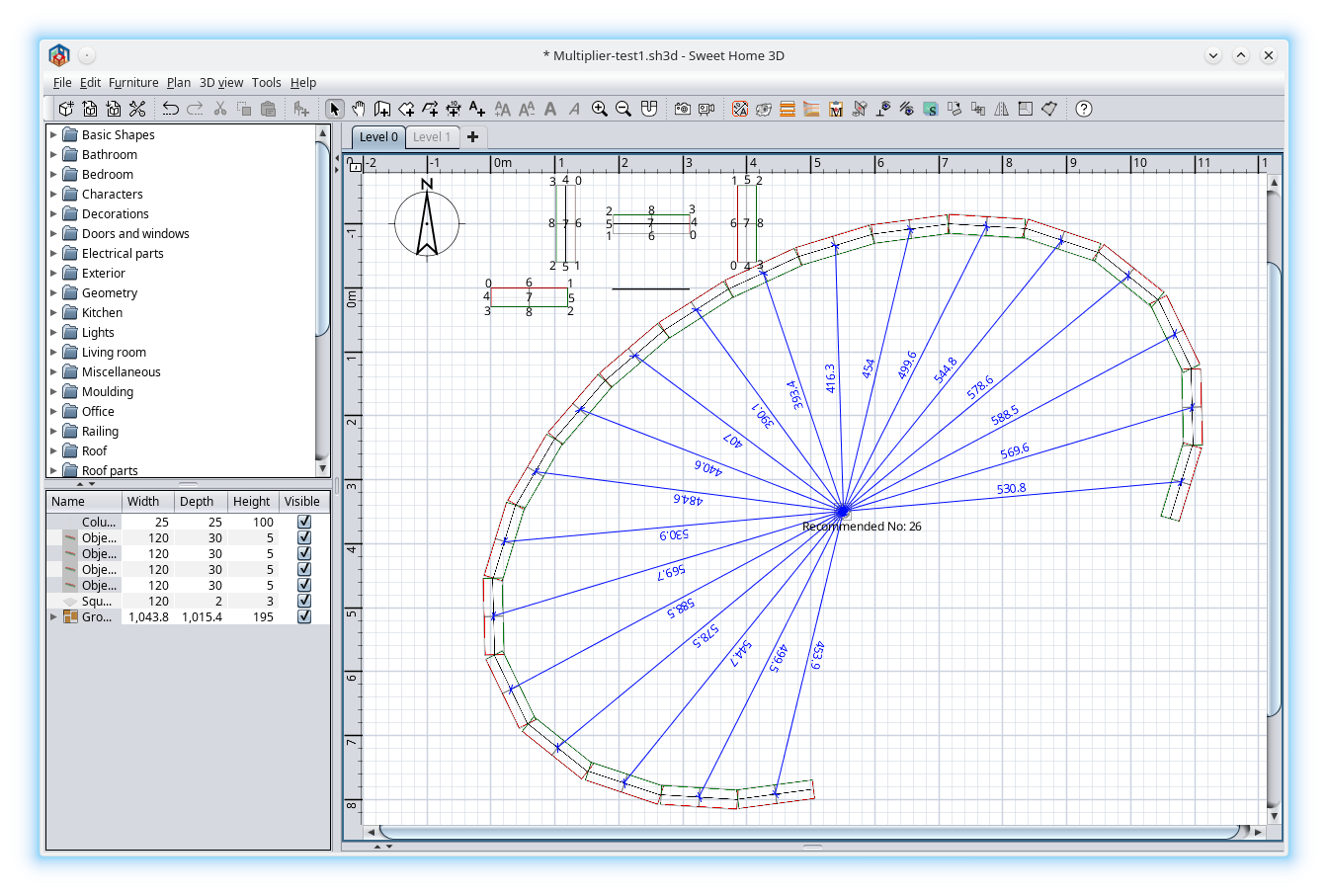
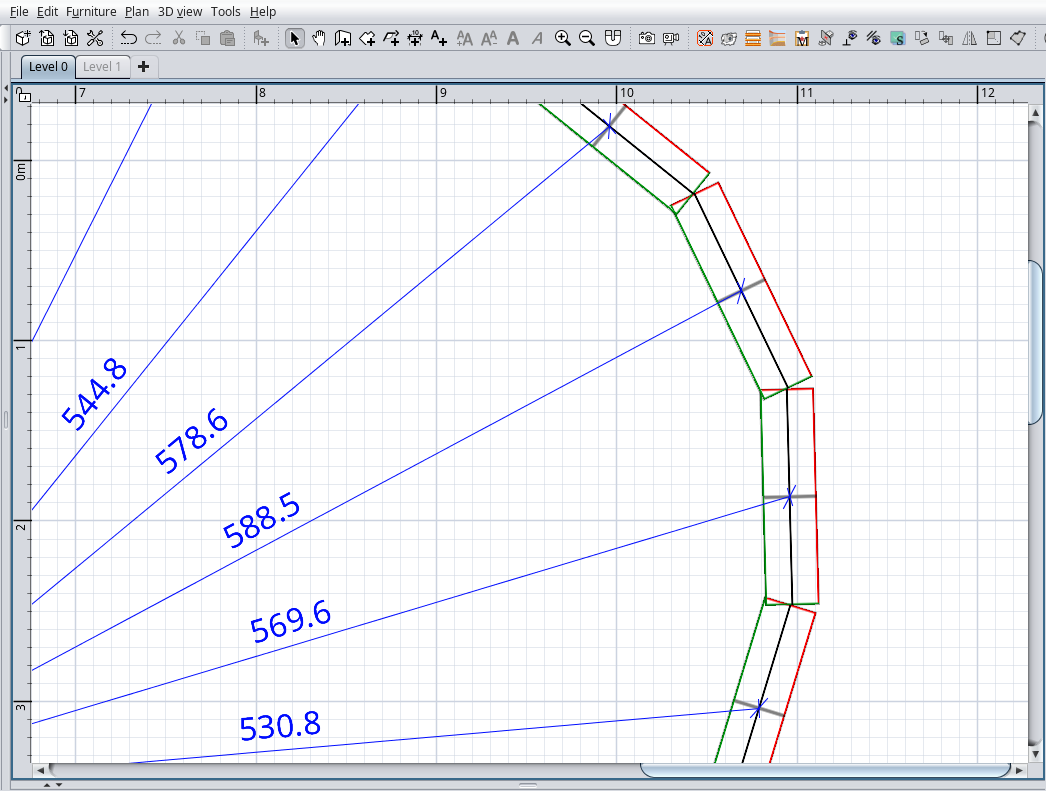
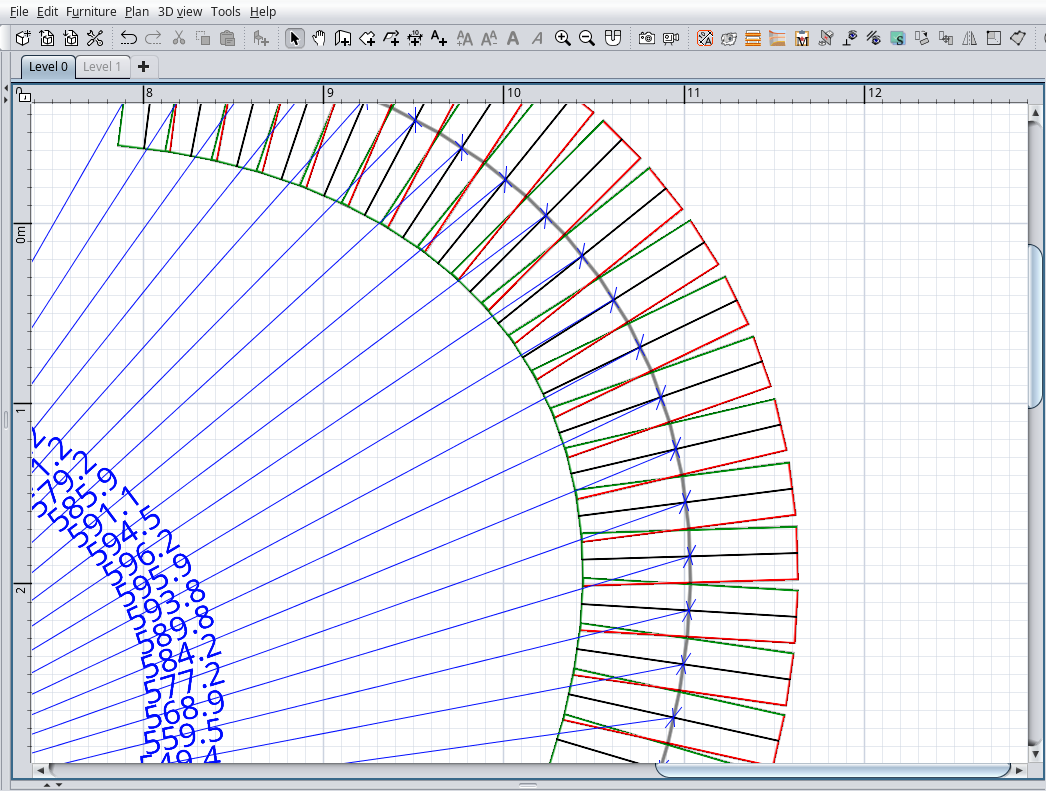
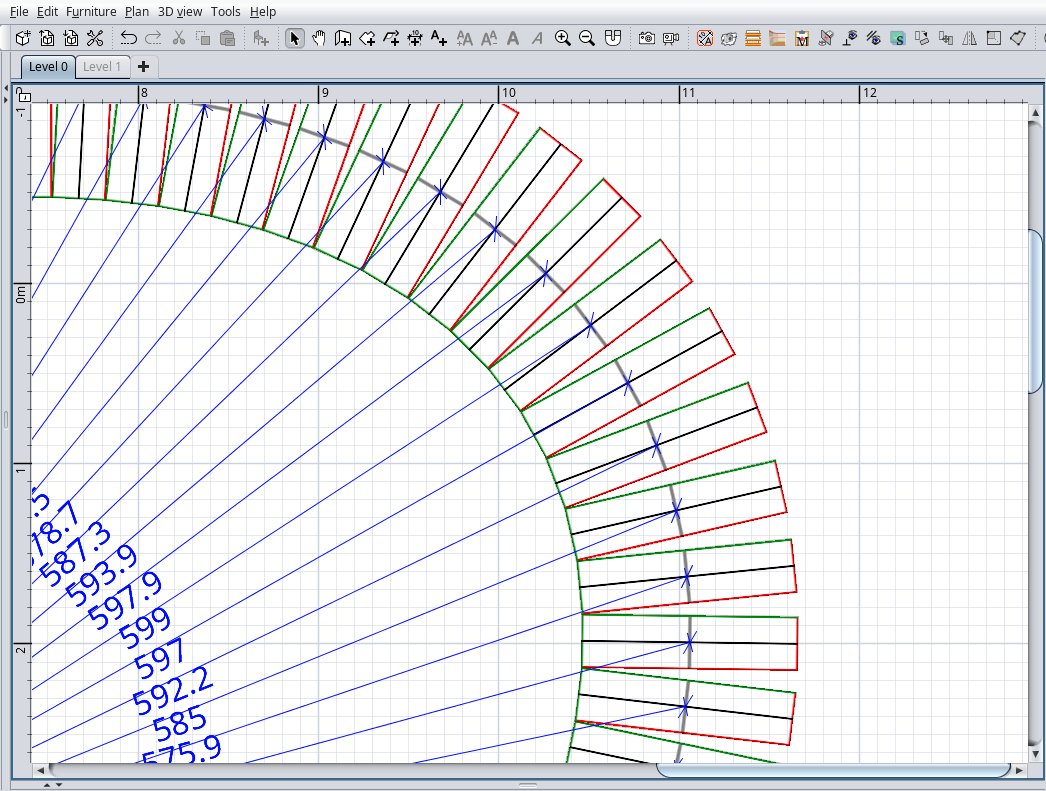
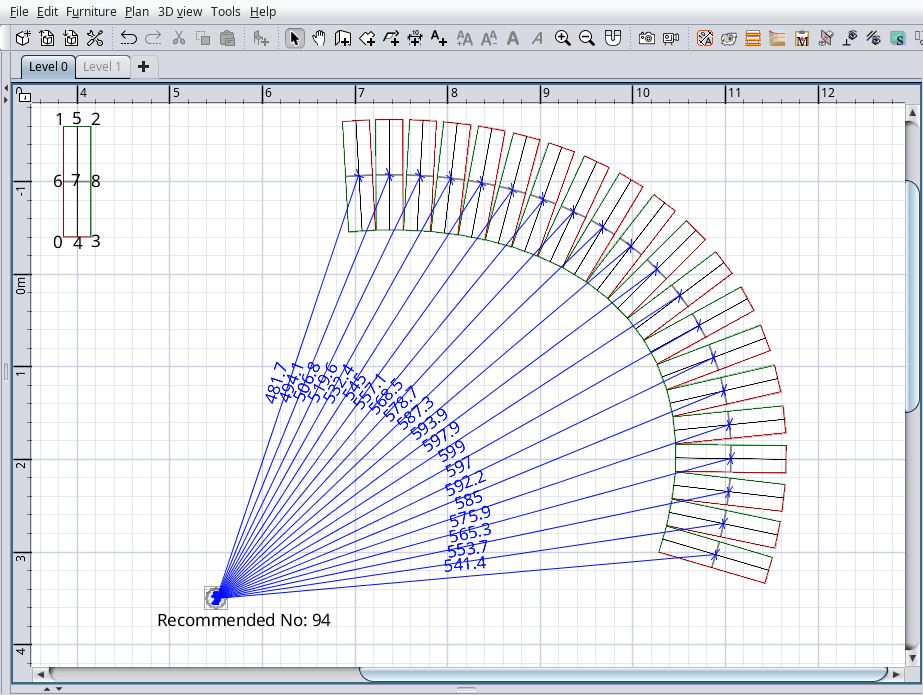
Re: Multiplier plugin New version 2.0 Special thanks to @Daniels118 who have made the entire hard work. A lot of math problems to which the answers can not be found even on the net. My part on this plugin was to confused him as much as possible. Not too much news for about four months of work: -Rewrite it from scratch; -Made the UI to look more austere by eliminating some useless items; -Add rotate for all items and rotate name; -Added few new features on curved method: --two direction buttons, CCW and CW; --curve rotate angle; --five radio buttons: ---1.Fixed step; ---2.Touch on top; ---3.Touch at middle; ---4.Touch on bottom; ---5.Uniform on ellipse; --Add the radii length; For options 2, 3, and 4, on plan, near the ellipse center, will appear a label with recommended number of pieces to exactly cover the entire ellipse. How to use it? Your imagination is the limit. Some screenshots: ![]() ![]() Good lack! Also on SourceForge ---------------------------------------- A computer program does what you tell it to do, not what you want it to do. Murphy's Law When all else fails, read the instructions. Murphy's Law If you don't like "AS IS", DIY. Dorin's law |
| Posted by Keet at Dec 7, 2023, 10:24:29 PM |
Re: Multiplier plugin That's is probably what was needed in this thread: https://sweethome3d.com/support/forum/viewthread_thread,12794As I had to use two different calculators to get the numbers for the segment coordinates I can understand that the math was not easy. I use this plugin quite often. Thank you to the both of you! ---------------------------------------- Dodecagon.nl 1300+ 3D models, manuals, and projects |
| Posted by hansmex at Dec 8, 2023, 10:31:46 AM |
|
Re: Multiplier plugin I see some non-consistent behaviour (if that's what it is) - Using the Linear Method the app adds the number of repetitions, groups them, with an offset as specified, so you end up with 1+13 items, regularly spaced - Using the Curved Method with 13 repetitions and standard settings, you end up with a group of 13, that starts ON TOP of the original. H ---------------------------------------- Hans new website - under constuction hansdirkse.info |
| Posted by dorin at Dec 8, 2023, 11:53:55 AM |
|
Re: Multiplier plugin I was sure I've mentioned somewhere: The multiply number NOT include the original piece(s). So, on both methods, you have to have on plan 1(the original) + a group of inserted numbers of pieces(only those which can be grouped). For the curved method try to move the original out side the curve, OR verify in the furniture list if the original is grouped with the multiplied items. I know it doesn't but who knows?? ---------------------------------------- A computer program does what you tell it to do, not what you want it to do. Murphy's Law When all else fails, read the instructions. Murphy's Law If you don't like "AS IS", DIY. Dorin's law |
| Posted by hansmex at Dec 8, 2023, 1:53:45 PM |
|
Re: Multiplier plugin I didn't explain myself well, I think. In Linear mode, the copies are grouped and shifted one step away from the original. In Curved mode, the copies are grouped and start on top of the original. In my view this behaviour should be the same in both modes. H ---------------------------------------- Hans new website - under constuction hansdirkse.info |
| Posted by dorin at Dec 8, 2023, 3:34:59 PM |
|
Re: Multiplier plugin Probably I'm too dump to understand. I've verified again: -In linear mod the pieces are positioned on X,Y,Z in respect with the selected piece. -In curved mod the pieces are positioned accordingly with the curve parameters and the start angle value. In this last case only the selected piece elevation count for the rest of the pieces. Anyway, you could post some pictures with the plugin settings, the result problems and eventually a demo file. Could help to understand the problem and fix it. ---------------------------------------- A computer program does what you tell it to do, not what you want it to do. Murphy's Law When all else fails, read the instructions. Murphy's Law If you don't like "AS IS", DIY. Dorin's law |
| Posted by Keet at Jan 18, 2024, 12:01:14 PM |
|
Re: Multiplier plugin Strange things happening with the Multiplier plugin. Single object: multiply several times. OK. Ctrl-Z to remove and try again with different parameters: OK Delete the multiplied group: OK multiple objects: multiply several times. OK. Ctrl-Z to remove and try again with different parameters: OK Delete the generated multiple objects: OK Now try the same with a group of objects: Group multiply: OK. (a group with groups is generated) Ctrl-Z: generated groups are removed from the furniture list but remain in the 3Dview. Delete: same, generated groups are removed from the furniture list but remain in the 3Dview. Even weirder: A generated group of groups disappears when you ungroup them! And of course it remains in the 3Dview. You have to restart Sweet Home 3D to get a correct 3Dview again without the removed multiplied groups. It looks like the problem is related to multiplying a group instead of a single object or not-grouped multiple objects. ---------------------------------------- Dodecagon.nl 1300+ 3D models, manuals, and projects |
| Posted by dorin at Jan 18, 2024, 7:01:43 PM |
|
Re: Multiplier plugin Thanks for testing and report it. I will try to reproduce it as you've explain. I've never test it in such way but now is the time to do it. I suspect it is my fault. I use a temporary group (with the name Group-T) for all the selected furniture. After move it in the desire position I've ungrouping it. Finally I grouping all furniture as Group-M. Probably I need to find an other solution. I'm open to any suggestions. Anyway it need also some improvements and corrections in other parts. ---------------------------------------- A computer program does what you tell it to do, not what you want it to do. Murphy's Law When all else fails, read the instructions. Murphy's Law If you don't like "AS IS", DIY. Dorin's law |
| Posted by Keet at Jan 18, 2024, 9:05:31 PM |
|
Re: Multiplier plugin I did some more testing and it's getting stranger. I multiplied a simple group of 5 boxes 5 times. The resulting M-group now contains 25 individual boxes AND 5 groups of 5 boxes. I can select one of the individual boxes in the M-group by clicking in the furniture list but I can not click in one of the generated groups. Trying to click a box in a group in the M-group selects the group, not the individual box. It's as if the group is empty but still lists 5 boxes. I suspect that is the basis for the problem. Either make sure the boxes remain in a group or don't multiply the groups but only the objects in it. It still gets weirder :D When I move the M-group in the 2Dview it looks like a copy of the M-group jumps all over the 3Dview while the original M-group remains displayed in the 3Dview. You can no longer select it so I assume that the display is no longer connected to an actual group/object. Worse, at some point I lost all levels except the current one. By-the-way, if you don't group in an M-group the problem is more or less the same: multiple individual objects and multiple generated groups. Now you can click on a box in a generated group: it will select the individual box that is supposed to be in that group :D There are two possible ways to solve this: 1. Make sure to first ungroup until you only have individual objects in the selection. 2. Try to really multiply with groups where the resulting M-group contains multiplied groups. @1: This is a quick fix that should be easy and should be in a fixed version very soon because my testing caused lost levels and the 3Dview gets messed up. (The levels returned after quit without save and reopening.) Make sure you also check and ungroup nested groups until you only have individual objects in the selection. @2. I have no idea if this is easy or difficult. If groups are handled properly like groups then all of the other problems will probably be solved. But that's different from how you now handle multiplying. It gets more complicated if the user selects a few single objects AND a group AND a group with other groups in it. When you start testing yourself also try to cut the boxes that are supposed to be in a group: The boxes are cut but the 'empty' group you want to past into also disappears. Somewhere a little of the parent-child relation of group and boxes is still there. I think the problem lies in the connection between the actual objects and the display in both the 2Dview and the 3Dview, and of course the furniture list. I can't reproduce it but after some moving I selected a box in the M-group and it showed an outline in the 2Dview where nothing was. The outline still represented an object and I could modify furniture and rotate. But of course there was nothing to see because the object didn't show in the 2Dview anyway, just the selection outline. I think that is where I lost the levels. The solution is probably making sure the objects that belong in a group really are stored in that group OR don't support groups at all. ---------------------------------------- Dodecagon.nl 1300+ 3D models, manuals, and projects |
| Posted by dorin at Jan 19, 2024, 8:10:18 AM |
|
Re: Multiplier plugin @Keet You've right! I've test it and I can seen the bad results. More than what you already observe I've seen more objects than I want when multiply groups. In the last Group-M it need to have ONLY others 5 Group-M but I have also another set of ungrouped items for every group. That's not good. I've also receive a lot of errors in the console. I will se what I can do. Until than a workaround: After undo and some ghost objects remain in 3D, try to minimize the 3D and restore it back (use the small arrows). The ghosts will disappear. It's a temporally solution. ---------------------------------------- A computer program does what you tell it to do, not what you want it to do. Murphy's Law When all else fails, read the instructions. Murphy's Law If you don't like "AS IS", DIY. Dorin's law |
| Posted by dorin at Jan 21, 2024, 12:57:41 PM |
|
Re: Multiplier plugin New version 2.1 -fix a bug (I hope) when it work with groups; -modify the UI to look better on macOS; TODO To improve the calculations for the touched furniture. In some circumstances could took even 10 seconds to have the results. Also on SourceForge . ---------------------------------------- A computer program does what you tell it to do, not what you want it to do. Murphy's Law When all else fails, read the instructions. Murphy's Law If you don't like "AS IS", DIY. Dorin's law |
| Posted by Keet at Jan 21, 2024, 1:35:08 PM |
|
Re: Multiplier plugin A quick test shows it's working perfectly fine now with groups, groups in a group, single object, AND a selection of all those at the same time. Very good work, and you managed to fix it fast. Thank you! ---------------------------------------- Dodecagon.nl 1300+ 3D models, manuals, and projects |
| Posted by Puybaret at Jan 22, 2024, 1:39:02 PM |
|
Re: Multiplier plugin Thanks Dorin for updating the UI. It looks much better on macOS now. ![]() ---------------------------------------- Emmanuel Puybaret, Sweet Home 3D creator |
| Posted by dorin at Feb 12, 2024, 11:23:51 AM |
|
Re: Multiplier plugin New version 2.2 -fixed a major error that occurs when no furniture is selected but only other plan components Also on Source Forge . ---------------------------------------- A computer program does what you tell it to do, not what you want it to do. Murphy's Law When all else fails, read the instructions. Murphy's Law If you don't like "AS IS", DIY. Dorin's law |
| Posted by dorin at Mar 9, 2024, 7:41:32 PM |
|
Re: Multiplier plugin New version 2.5 After a long dispute with Daniels118 (few months) I've finally make my self understandable and Daniele give me all the help I've needed. In fact he made (as usually) the hole hard work (math, code etc.). So, if something is good is their contribution; the wrong parts it's mine. Anyway we've made this plugin together. Partially that's could be the news: -improve the ellipse calculations to increase precision and reduce the response time; -reduce the plugin weight optimizing the needed files; -really fixed the major error that occurs when no furniture is selected but only other plan components; -add a German translation; -fixed few other bugs (I think). The users will not see big differences except the precision and the fast results. Also on Source Forge. ---------------------------------------- A computer program does what you tell it to do, not what you want it to do. Murphy's Law When all else fails, read the instructions. Murphy's Law If you don't like "AS IS", DIY. Dorin's law |
| Posted by Vinci68 at Mar 10, 2024, 1:07:17 PM |
|
Re: Multiplier plugin Oh, every now and then, a little argument between a couple adds a little spice to life. And it's all for the good of the SH3D community. But joking aside, thank you once again for all those little plugins that make our work so much easier... |
|
|
Current timezone is GMT Dec 16, 2025, 11:15:09 AM |