|
Sweet Home 3D Forum » List all forums » » Forum: Features use and tips » » » Thread: Rotation different between box and triangle |
|
| Print at Dec 19, 2025, 3:28:13 PM | View all posts in this thread on one page |
| Posted by bert.struik at Oct 19, 2020, 7:34:07 PM |
|
Rotation different between box and triangle Why do boxes and triangles rotated about the X axis act differently? When a box is shaped as a board with 1" width, 6" height and 48" depth, it's depth is along the Y axis. It will rotate about the X axis as expected. The dimensions make a board that would be flat against a vertical wall that is along the Y axis. When a triangle is shaped as a board with 6" width, 6" height and 1" depth, it's width is in the Y axis. It will rotate about the Y axis when a value is inserted in the X axis of the modify furniture menu. The dimensions make a triangle that would be flat against a vertical wall that is along the Y axis. |
| Posted by bert.struik at Oct 19, 2020, 7:54:29 PM |
|
Re: Rotation different between box and triangle It is probably that the coordinate system of the object is different than the coordinate system of the drawing. Sorry I did not figure that out before posting. |
| Posted by Puybaret at Oct 22, 2020, 11:05:05 AM |
|
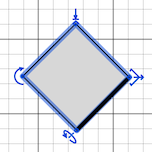
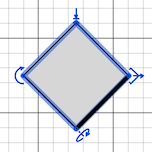
Re: Rotation different between box and triangle As you noticed, the axes of the horizontal rotation of the objects depends on how you already rotated around its vertical axis: their X rotation axis is parallel to the thick line drawn in front of the object in the plan, and their Y rotation axis is perpendicular to this thick line. The little arrow used to handle the rotation around a horizontal axis is also supposed to help you guess this axis. Object rotated around its X rotation axis: Object rotated around its Y rotation axis: ![]() ---------------------------------------- Emmanuel Puybaret, Sweet Home 3D creator |
|
|
Current timezone is GMT Dec 19, 2025, 3:28:13 PM |