Print at Dec 16, 2025, 11:15:11 AM
Posted by Puybaret at Apr 2, 2021, 5:27:04 PM
Side view plug-in
Hello,

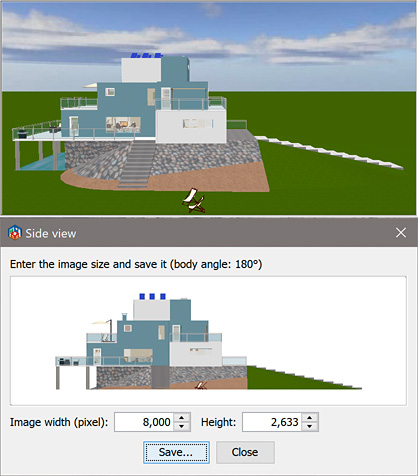
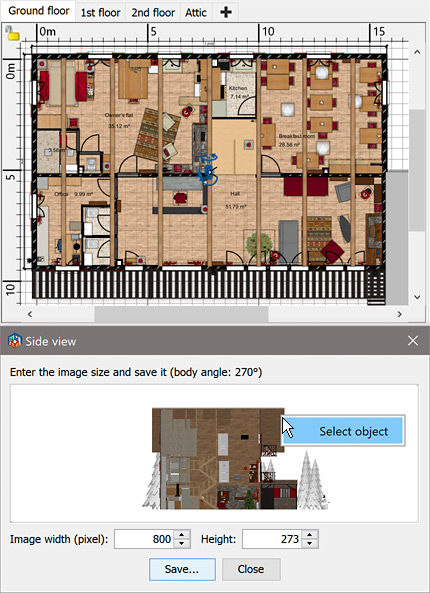
Here's the Side view plug-in (44 kB) which displays the edited home from one of its side using a parallel projection. Once this plug-in is installed, you may select the additional Tools > Display side view menu item (en français, le menu Outils > Afficher vue de côté) to view the side of your home in a separated dialog box. The viewed side will depend on the current body angle used in the 3D view, to let you choose an angle different from the classical 0°, 90°, 180° or 270° values.
Use the modification dialog box of the visual visitor to precisely adjust the body angle value.


While this dialog box is opened, you may still change the point of view in the plan or the 3D view to adjust the side view image, or edit your home and simultaneously view the changes in this dialog box.
You may also resize it and save the displayed image in a PNG file at the size of your choice. Finally, you may select the object under the cursor at the place where you'll right click (or toggle its selection if the Shift key is pressed).


The width of the displayed space depends on the total size of the visible items in your home, and as shown in the previous image, you may view some kind of cutting plane depending on the place of the point of view. Maybe, it will be possible to zoom in a future version.

Hope this plug-in will satisfy most needs regarding this long awaited feature smile

Download links for Side view plug-in:
Side view plug-in 1.1.1 was released on 08/28/2024
Side view plug-in 1.1 was released on 09/22/2022 with new features explained here
Side view plug-in 1.0 was released on 04/02/2021
----------------------------------------
Emmanuel Puybaret, Sweet Home 3D creator

Posted by hansmex at Apr 2, 2021, 7:43:41 PM
Re: Side view plug-in
Wow! This will be welcomed by many users. Can't wait to give it a try...

Thank you!

Hans
----------------------------------------
Hans

new website - under constuction
hansdirkse.info

Posted by VeroniQ at Apr 2, 2021, 8:05:06 PM
Re: Side view plug-in
Good news! Sweet Home 3D is very creative all these days!!

Posted by Mike53 at Apr 2, 2021, 8:17:08 PM
Re: Side view plug-in
Excellent work Puybaret, just drawing up plans for a new workshop we are moving to, can delete a side wall and print a view of inside now. applause

Posted by dmcclurg at Apr 5, 2021, 2:15:22 AM
Re: Side view plug-in
Much appreciated! Elevations are key to submitting to understanding a design. I like the flexible way you implemented this

Posted by Puybaret at Apr 5, 2021, 7:55:37 AM
Re: Side view plug-in
Thank you all for your feedback. I’m glad you like this plug-in smile
----------------------------------------
Emmanuel Puybaret, Sweet Home 3D creator

Posted by YGYL at Apr 5, 2021, 8:11:49 AM
Re: Side view plug-in
Wish for many years of function. Thank you very much.

It's tested. It works

Posted by VeroniQ at May 17, 2021, 3:50:05 PM
Re: Side view plug-in
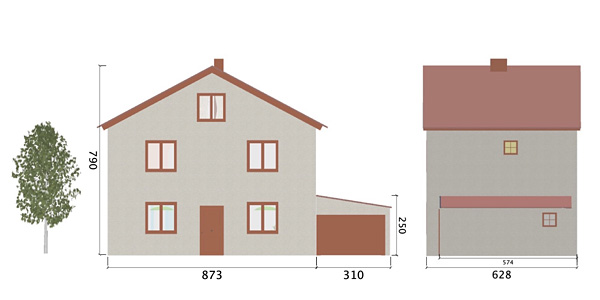
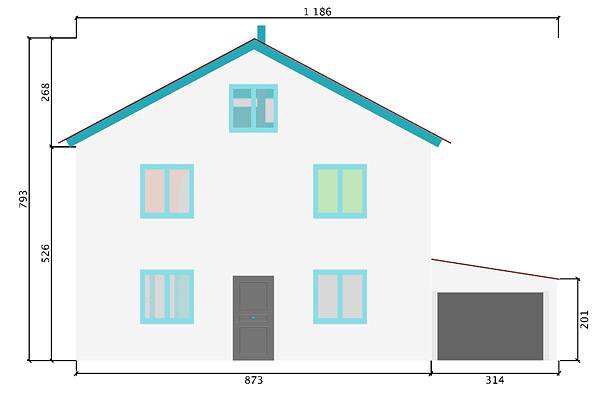
I combined this great new plugin with OKH ideas published in this old thread to realize this image.


The aim was to be able to add some dimension lines on side views of the house available in the demo #8, which I slightly changed.
With the plugin, I created two side views of the house in .png files, that I reimported in two new designs with the Plan > Import background image tool.
At the second step of the Background image wizard, I entered the main dimension of the house.
Then, in the Plan, I added some horizontal and vertical dimension lines with the Create dimensions tool. I had to increase the size of the dimension numbers.
In File > Page Set up dialog box, I only selected Print Plan and printed the plan in a PDF file.
I repeated this process for the second side view and finally, I neatly assembled the two images in an image processing piece of software to get the final image.

Posted by hansmex at May 18, 2021, 9:08:17 AM
Re: Side view plug-in
@Veronique

Dapper attempt to add dimensions to a sideview. But honestly, what we need is something as easy as Dorin's auto-dimensioning plugin.

Hans
----------------------------------------
Hans

new website - under constuction
hansdirkse.info

Posted by bitacovir at May 18, 2021, 4:54:57 PM
applause   Re: Side view plug-in
applause applause applause applause applause applause
Thank you very much for this plugin. For many years I consider Sweet Home 3D has a limited development, because it kept the same deliverables: Image of a Plan View and 3D renders. Now we have a more complete software. As an architect, I have used SH3D for concept design and sketching. Elevation views are a good complement to deliver a full presentation of an design idea, during the early design stage of a project.
I hope you can keep improving this plugin.
Regards.

PD: SweetHome3D is recommended for the OSArch Community https://wiki.osarch.org/index.php?title=AEC_Free_Software_directory

Posted by Gildaniel at May 24, 2021, 8:58:55 AM
Re: Side view plug-in
YAHOOOOO!!!!! love struck

Posted by Gildaniel at May 24, 2021, 9:32:09 AM
Re: Side view plug-in
It would be great to show inner views also, wall in the room; and put dimensions to view without exporting/importing procedure

Posted by bdfd at May 27, 2021, 6:22:07 AM
Re: Side view plug-in
Hi,

Good start for this plug-in.

Add perhaps an option which be to add the background of the original picture.

wink
.
----------------------------------------
Evil progresses when good people do nothing!
---
SH3D 7.1 and nothing else - W11 64b in 4K

Posted by bdom at Sep 6, 2021, 7:15:39 AM
applause   Re: Side view plug-in
un super outil pour la dépose des permis mais pas évident à appréhender
petit plus indispensable
- soit un petit point d'interrogation avec une aide contextuelle
- soit modifier la note au dessus
le menu vue 3D/modifier visiteur virtuel/double clic sur caméra/modifier angle du corps 0°, 90°, 180° ou 270°
- soit modifier l'angle dans la fenêtre

dans l'idéal
en plus du bouton enregistrer un bouton EDITER
- soit exportation et réimportation directe
- soit ouverture dans une mini appli basique pour des cotes et du texte

c"est génial mais pour l'instant limité aux experts

possibilité aussi de basculer dans cette vue avec un icône ( une image d'un coté de maison ) placé à doté des 4 flèches vertes de la vue 3D
avec bien sûr possibilité d'ajout de mesures

avec ce plug in je ne vais plus avoir à faire 5 plans différents pour les déposes de permis de la famille et des amis.

mais je pense à ceux qui ne maitrisent par exportation et réimportation en image arrière plan comme moi il y a peu

encore merci
----------------------------------------
mac mini 2020 plan technique plus que déco

Posted by Alex3D at Oct 24, 2021, 4:52:55 PM
Re: Side view plug-in
Very good !
Just missing the dimension lines (fr: "cotes") for being complete.
I know that there are workarounds, but it is quite complex (for me).
Thanks

Posted by YGYL at Dec 7, 2021, 3:02:36 AM
Re: Side view plug-in
It is recommended to change the background color. Or can read the sky texture
The wall is white, the sky is also white, you can not see the wall

Posted by krchel at Jan 31, 2022, 6:39:58 PM
Re: Side view plug-in
This is a good plugin, thank you!

Posted by svDemara at Feb 5, 2022, 11:36:21 AM
Re: Side view plug-in
Brilliant plugin. Merci.

I'm a newbie so there's probably a way I've not yet learned but I can't get it to include Daniels118's wiring product. Would be useful.

Also dimensions as mentioned.

Posted by Daniels118 at Feb 6, 2022, 10:04:56 AM
Re: Side view plug-in
@svDemara
At this time wirings and 3D dimension lines are only supported within the 3D view.

My plan is to create an evolution of the side view plugin that will automatically develop all the walls of a room to a single sheet. This plugin will also support wirings and 3D dimension lines.

Posted by Daniels118 at Feb 6, 2022, 10:58:52 AM
Re: Side view plug-in
@Puybaret
I think that initializing HomeComponent3DParallelProjection with the Object3DFactory instance used in the 3D view (instead of creating a new one) could be enough to make wirings and 3D dimension lines visible in the side view too.

Posted by Puybaret at Feb 6, 2022, 12:39:02 PM
Re: Side view plug-in
I had a look yesterday and wanted to try the same thing, but the factory is private. I know how to access private fields but don't want to use this part of Java and prefer to add an accessor in a coming version.
----------------------------------------
Emmanuel Puybaret, Sweet Home 3D creator

Posted by Daniels118 at Feb 6, 2022, 1:25:43 PM
Re: Side view plug-in
Adding an accessor would be great! Another great improvement would be to make the Object3DFactory extensible so that plugins can add their implementation instead of replacing it, so that multiple plugins can work together (which is how my 2 plugins actually work).

Posted by Marcelmacaire at Mar 26, 2023, 12:43:24 AM
Re: Side view plug-in
Merci aux concepteurs de ce logiciel, ainsi qu'aux contributeurs. Et bravo pour cette aide de Veroniq pour réaliser des plans de coupe A-A, ou B-B.
Je m'en sors plutôt bien avec sweet home 3d. Mais, je souhaiterais justement des améliorations sur la possibilité de créer des plans de coupe. D'autre part, au lieu de lister le mobilier d'un projet, il serait bien d'indiquer les matériaux utilisés pour réaliser un mur (le nombre de parpaings par exemple).
C'est peut-être trop demander, mais ça nous fidéliserait à notre logiciel plutôt que d'aller vers d'autres programmes assez difficiles à utiliser.
Encore félicitations pour cette merveille d'application !

Posted by Marcelmacaire at Mar 30, 2023, 2:57:33 AM
Re: Side view plug-in
Merci pour cette précision. Je télécharge immédiatement ce plugin.
Encore bravo pour tous ces efforts pour améliorer sweet home 3d.

Posted by Puybaret at Aug 9, 2023, 4:50:45 PM
Re: Side view plug-in
Hello,

A first Beta version of Sweet Home 3D 7.2 was released and its ability to view dimensions in the 3D view as well as to handle elevation dimensions was reused in a Beta version of Side view plug-in that I would like you to test before releasing it.
If you made dimension lines viewable in the 3D view, the plug-in will let you create directly images like the following one.


This version is also able to replace the side view of furniture with some cutomized images if you feel it necessary, for example to represent a shelf unit with a back panel using the same material as the shelves, or windows with limits that can't be distinguished well enough.


These images come from the properties named sideViewFrontImage, sideViewBackImage, sideViewLeftImage and sideViewRightImage which value is an image. You don't have to define the 4 images to make it work and will probably need only sideViewFrontImage or sideViewBackImage property most of the time.
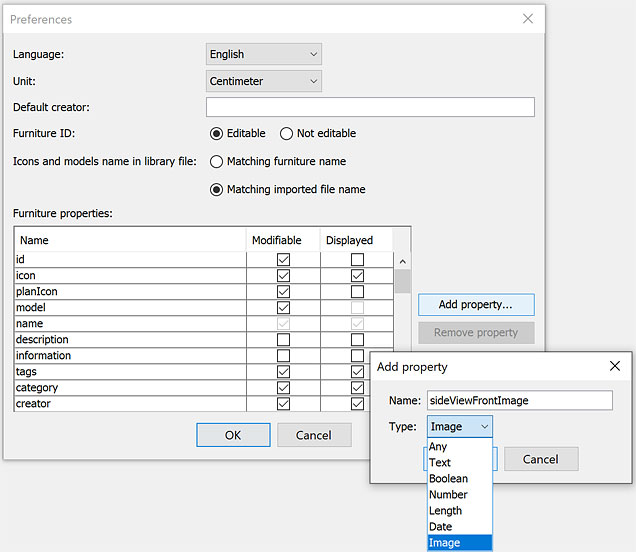
To help you define these images, you can use Furniture Library Editor 2.0 where you'll add in preferences the properties you need with an Image type.


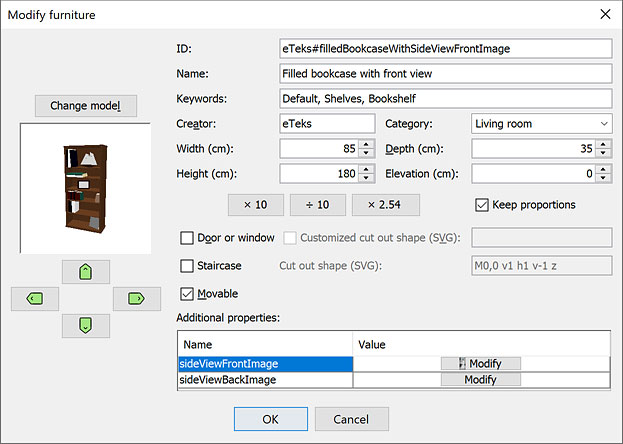
Once the properties are added, select the side view image(s) in the furniture modification dialog of each model you want to update.


Images can use transparency if necessary and will be scaled to fit the furniture side where they will be applied. As this feature works thanks to textures, their width and height should be ideally a power of two (64, 128, 256, 512...).
If you want to try this feature directly, the furniture library FilledBookcaseWithSideViewFrontImage.sh3f attached to this post defines the front image of the model named Filled bookcase with front view.

Note that this new version of the plug-in requires Sweet Home 3D 7.2 (Beta versions included) to work and it fixes also some issues with textures that could happen when you change them in Sweet Home 3D while the plug-in window is opened.
The selection contour of selected objects appear at screen in the plug-in window but are not saved in the final image.

[Note: the final verson of Side view plug-in 1.1 was released on 09/22/2023]
----------------------------------------
Attachment FilledBookcaseWithSideViewFrontImage.sh3f (37579 bytes) (Download count: 540)

----------------------------------------
Emmanuel Puybaret, Sweet Home 3D creator

Posted by dorin at Sep 5, 2023, 6:31:18 PM
Re: Side view plug-in
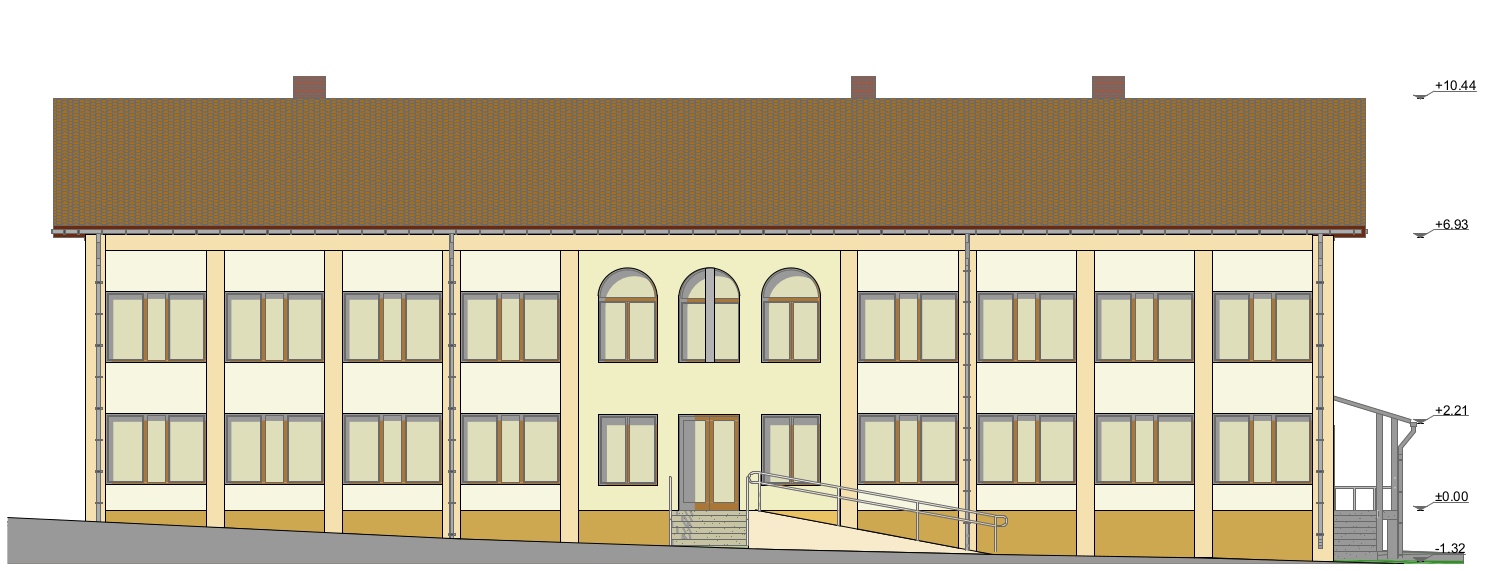
My first realization with this new plugin version.
Being inspired from this official plan


I've made this (slide to see also the right part of the image)


It is far to be satisfactory or easy to do but it is a start.
I've use only text vertically orientated and visible in 3D.
The heavy part was to manually edit and set every text label.

My wish could be to have this elevation point as a new kind of elevation dimension which look something like this.
----------------------------------------
A computer program does what you tell it to do, not what you want it to do. Murphy's Law
When all else fails, read the instructions. Murphy's Law
If you don't like "AS IS", DIY. Dorin's law

Posted by NIMAN at Nov 24, 2023, 1:17:26 AM
Re: Side view plug-in
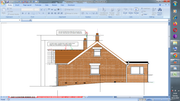
https://postimg.cc/w1WqZ7rD


Some background....

I have a restoration/extension idea for my small home here in the UK. Having been retired for a few years now my only possibility to get the plans approved and build what they will show is to both draw and build it nearly entirely by myself - good fun!!

Anyway, having been familiar with MS Excel in the "rat race" I decided to scale my survey measurements (1:50 & 1:100) for the required Planning Service / Building Control drawings and draw the required 2D lines, one line at a time, in an MS Excel chartsheet - I knew that I could then get them printed correctly to paper A2/A3 as is still required here by the relevant authorities (although Planning are going soft copy online imminently).

The property site has quite a slope and the 1958 build is a bit tricky too - being cavity wall the external DPC is OK (generally level throughout and around the required 150mm above external ground highpoint. The internal DPC (of the inner leaf of the external wall) is at around level to the external ground highpoint. The rooms are a mix of suspended wooden floors and concrete (around 50mm thick) laid directly on soil. The internal interface walls between the suspended and concrete floor rooms contain two DPC's - one at the level of the external leaf of the external wall and one at the level of the inner leaf of the external wall not talking

Yawn talk to the hand

the point is that my, hopefully, clever tanking slurry solution idea to make the proposed works conform to the relevant standards must be well depicted for Building Control.

After having produced reasonable external planning elevations in Excel it became apparent (a bit too late) just how horrendously complicated the task of producing a series of vertical sections within Excel would be.

In search for assistance I recently came across an excellent article (called "Small house design workflow with Open Source software (work in progress)" (by moniker bitacovir). Assuming that same moniker at this forum I was led to the post in this topic I (hope) this is now a reply to.

So, with a little initial experimentation, I am just starting to form an inkling that (with a lot more investigation) I just might be able to use Sweet Home 3D to extract the required series of vertical sections.

My question, for now, is to see if there could be an easy "nice to have" as follows:

In the attached thumbnail (parallel projection vertical section) the "side view" image of the vertical section displays the outside half of the walls in dark grey and the inside half in light grey - is there any way that I can make each half whatever colour I wish (e.g. black)?

PS
Many thanks to Puybaret for developing such an amazing piece of software and to the other contributors for adding significantly to it applause

Posted by Keet at Nov 24, 2023, 9:42:07 AM
Re: Side view plug-in
Use Modify Walls where you can give each side (left/right) of the wall a different color or texture and you can set a color for the top of the wall (no texture). This will show in the 3Dview and photo renderings. Look at the arrows on the wall when it's selected to see what is left and right. You can select multiple walls to give them all a different color at the same time.

You can also set a pattern for the top-view of the walls in the 2Dview. This way you can use different patterns for the inside and outside walls.

ETA: This is a default feature for walls and is available without the side view plugin.
----------------------------------------
Dodecagon.nl
1300+ 3D models, manuals, and projects

Posted by NIMAN at Nov 24, 2023, 10:29:35 AM
Re: Side view plug-in
Appreciate that Keet.

It's the sectional view (at camera location) of the front of the walls that i'd like to be black throughout. I (think I) already tried what you suggest - it had no impact.

Posted by NIMAN at Nov 24, 2023, 10:37:57 AM
Re: Side view plug-in
i.e. the cut portions of those walls in the thumbnail provided - hope that makes sense.

Is it possible to edit a post?

Posted by Puybaret at Nov 24, 2023, 11:41:38 AM
Re: Side view plug-in
Walls cut by the section aren't visible when their axis is parallel to the section normal , because objects are not double faced in Sweet Home 3D.
You may think you can see it, but what you see is actually the face joining the cut wall and the other perdendicular wall. If you remove the joined wall, the cut wall won't appear anymore in the side view plug-in.
----------------------------------------
Emmanuel Puybaret, Sweet Home 3D creator

Posted by NIMAN at Nov 24, 2023, 12:26:20 PM
Re: Side view plug-in
Appreciate that Emmanuel. Understood - i'm actually looking at the little portions of 45 degree wall at intersections with the rear walls.

That probably puts me in a bit of a pickle but will scratch my head a bit over a cup of tea thinking

Thanks again.

Posted by sjb007 at Nov 24, 2023, 11:25:47 PM
Re: Side view plug-in
This is a bit hacky. Do your section, then save to a bitmap image. I think the side view plugin only does images, not SVG. Then open the saved image up in an image editor (Gimp and Krita are free open source if you need suggestions) and just block out those wall ends with a simple filled rectangle.

Posted by NIMAN at Nov 25, 2023, 8:50:19 AM
Re: Side view plug-in
This is a bit hacky.

I know what you mean. Yes, have heard of Gimp but never used it though.

I also imagine that the Sweet Home bitmap could be inserted into an MS Excel chartsheet (I have an old 2007 version). If I have an appropriately sized/scaled box waiting in it the bitmap could be fitted into it exactly (the proportions of the bitmap can be maintained by holding down SHIFT while dragging its handle size) - of a little interest, to keep the centre of a picture in the same place and maintain its proportions CTRL+SHIFT while dragging the size handle works.

Drawn pictures in that version of Excel (also called vector drawings) are created from lines, curves, rectangles etc - those could be used to block the wall ends too.

I guess an easier way might just be to set up a series of 1 mm thick full wall width black boxes, within the appropriate walls, right in front of the Sweet Home 3D camera in the first place.

We'll see.

Thanks for your hint wink

Posted by Puybaret at Nov 25, 2023, 11:01:58 AM
Re: Side view plug-in
Another workaround could be to split the walls, setting the separation of walls in front of the camera.
----------------------------------------
Emmanuel Puybaret, Sweet Home 3D creator

Posted by sjb007 at Nov 25, 2023, 7:43:47 PM
Re: Side view plug-in
I've worked in IT all my life, and we have a saying that Excel is the wrong tool for every job, because it is so often misused for doing the strangest of tasks. It seems you have decided to embrace Excel and make it the only tool for every job!

Seriously, I can't imagine trying to do plans in Excel My brain hurts even thinking about it. Bitmap graphics in GIMP or Krita, vector graphics in Inkscape. Excel?... it's like using a chainsaw to trim your nose hair. It might get the job done, but it'll be a bloody mess.

As you are retired and abusing a very old version of Excel, is it fair to say that you are reluctant to learn new software? At the end of the day, use what works for you, but...

I do have to put my IT lecturing hat on for a moment though, and wag my finger at using such old, outdated applications (and possibly operating system). General support for Office 2007 ended in 2012. That is a more than a decade of potential exposure with zero security updates.

If you insist on using a spreadsheet tool to create plans, perhaps look into the free LibreOffice suite of applications. It will install on Windows, and it operates much like Excel. More importantly, you can keep it up to date at no cost, minimizing your risks. And yes... you can draw into the spreadsheet there too.

Posted by sjb007 at Nov 25, 2023, 7:52:06 PM
Re: Side view plug-in
Looking again at the image you posted, you are using either Windows Vista or Windows 7. Both also at least a decade out of support. And you are on the internet. You are playing Russian Roulette. I really, really hope you do not use that machine for anything even remotely sensitive.

Posted by NIMAN at Nov 26, 2023, 2:28:47 PM
Re: Side view plug-in

sjb007 wrote:
I've worked in IT all my life, and we have a saying that Excel is the wrong tool for every job, because it is so often misused for doing the strangest of tasks.

Excel is a fantastic tool for many jobs - even to create perfectly adequate planning permission plans/elevations (example image attached). Many people reach, first, for the tools they're familiar with.

sjb007 wrote:
It seems you have decided to embrace Excel and make it the only tool for every job!

You mustn't have read what I wrote earlier in this discussion, here it is again:

After having produced reasonable external planning elevations in Excel it became apparent (a bit too late) just how horrendously complicated the task of producing a series of vertical sections within Excel would be.

sjb007 wrote:
Seriously, I can't imagine trying to do plans in Excel My brain hurts even thinking about it.

You could try it someday. As you can see from my image, basic plans/elevations are not enough to hurt most brains. After that it does though.

sjb007 wrote:
but it'll be a bloody mess

I hope you are not referring to my image - the local planning officer said they are the basis for an entirely adequate application. Out of a little interest, Excel 2016 included support insertion/editing of SVG so I may splash out on a copy wink

sjb007 wrote:

As you are retired and abusing a very old version of Excel, is it fair to say that you are reluctant to learn new software? At the end of the day, use what works for you, but...

I've spent that last few days taking a relatively deep dive into Sweet Home 3D.

sjb007 wrote:

I do have to put my IT lecturing hat on for a moment though, and wag my finger at using such old, outdated applications

That was enjoyable - Sweet Home 3D is currently purring along on this Intel(R) Core(TM)i5-3320M CPU @2.60GHZ 4GB RAM and Win7 pro is, pretty much, solid as a rock.

sjb007 wrote:

General support for Office 2007 ended in 2012. That is a more than a decade of potential exposure with zero security updates.

laughing If you imagine M_S is not harvesting all that ou_tloo_kdo_tcom info for, godonlyknows what, well... in any case, I haven't, er, wasted, a penny on a new machine for 11 years. Some heavy duty photogrammetry calculations could cause me to update somewhat if I ever choose to look into that fascinating topic more thoroughly but, equally, if that was the case I might just look into M_S Azure (or similar) in a bit more detail and rent out a host of remote CPU's for as short a time as possible

sjb007 wrote:

If you insist on using a spreadsheet tool to create plans

As it is, i'd prefer to get everything done in Sweet Home 3D but suspect that will not happen. I'd also like not to have to put the effort into learning FREECAD (which I imagine could do it all) but, if possible, do not wish to expend the energy to do that.

So, if sucking a few bitmaps out of here into the old familiar (Excel) for a bit of finishing work/tidy up gets the job done, let's see.

sjb007 wrote:

perhaps look into the free LibreOffice suite of applications. It will install on Windows, and it operates much like Excel.

Appreciate that (I hope I don't need to though).

sjb007 wrote:

... you can draw into the spreadsheet there too.

That somehow reminds me, out of a little interest, FREECAD has a very interesting/useful Spreadsheet Workbench.

sjb007 wrote:

You are playing Russian Roulette

We all are - TCP/IP encapsulation (and/or whatever follows) makes that so. I'm amazed everytime I login to online banking and there's still a positive balance.

In summary - that "Excel is the wrong tool for every job" is patently untrue. I've used it to great effect over several decades even though the last version of VB / VBA was released in March 2017.

All of what you said was very enjoyable though - so thanks for the comment(s) cool


Emmanuel Puybaret wrote:

Another workaround could be to split the walls, setting the separation of walls in front of the camera.

Excellent. Nice and easy too - always like those

Thanks Emmanuel wink

Posted by sjb007 at Nov 26, 2023, 5:04:32 PM
Re: Side view plug-in

sjb007 wrote:
but it'll be a bloody mess

I hope you are not referring to my image - the local planning officer said they are the basis for an entirely adequate application.
I wasn't insulting the end result, more pointing out that it will be painful. A simple example... In Excel you have all your drawn elements on the top of the spreadsheet as just one big collection of drawn objects. Let's take Inkscape as an example: it lets you use layers for separating the objects of your drawing logical groupings, or maybe variations while working out options. Similar to how the levels in SH3D can be used to do the same thing. This is more about working with your plan, not the final output. Your screenshot looks good, but I suspect that is more down to your perseverance then Excels abilities as a technical drawing tool.


sjb007 wrote:

As you are retired and abusing a very old version of Excel, is it fair to say that you are reluctant to learn new software? At the end of the day, use what works for you, but...

I've spent that last few days taking a relatively deep dive into Sweet Home 3D.
Cool! It is awesome for helping firm up how you will arrange the layout and spaces in a building. It's good for representative images, and the plans are good too. Getting elevations is a bit more challenging, especially if you want them dimensioned. Getting them all onto a standard A2 at proper 1:50 scale with a proper info block is a lot more work and requires other software.


sjb007 wrote:

I do have to put my IT lecturing hat on for a moment though, and wag my finger at using such old, outdated applications

That was enjoyable - Sweet Home 3D is currently purring along on this Intel(R) Core(TM)i5-3320M CPU @2.60GHZ 4GB RAM and Win7 pro is, pretty much, solid as a rock.

sjb007 wrote:

General support for Office 2007 ended in 2012. That is a more than a decade of potential exposure with zero security updates.

laughing If you imagine M_S is not harvesting all that ou_tloo_kdo_tcom info for, godonlyknows what, well... in any case, I haven't, er, wasted, a penny on a new machine for 11 years. Some heavy duty photogrammetry calculations could cause me to update somewhat if I ever choose to look into that fascinating topic more thoroughly but, equally, if that was the case I might just look into M_S Azure (or similar) in a bit more detail and rent out a host of remote CPU's for as short a time as possible
This is not about the relative power of your PC, or Microsoft having God mode on your PC. This is about old unsupported software having unpatched vulnerabilities that malicious 3rd parties can exploit. They want three things from you:

  • your money,
  • your personal info (that they can sell for money)
  • your internet (that they can use to attack other systems for even more money)


sjb007 wrote:

If you insist on using a spreadsheet tool to create plans

As it is, i'd prefer to get everything done in Sweet Home 3D but suspect that will not happen. I'd also like not to have to put the effort into learning FREECAD (which I imagine could do it all) but, if possible, do not wish to expend the energy to do that.
On an application difficulty rating of 1-10 with SH3D being a 3 or 4, FreeCAD I'd put at a 10. Learning to use it to create final plans would be a huge time sink. But then, you are retired wink


sjb007 wrote:

You are playing Russian Roulette

We all are - TCP/IP encapsulation (and/or whatever follows) makes that so. I'm amazed everytime I login to online banking and there's still a positive balance.
shock You must have one of these angel


In summary - that "Excel is the wrong tool for every job" is patently untrue. I've used it to great effect over several decades even though the last version of VB / VBA was released in March 2017.

All of what you said was very enjoyable though - so thanks for the comment(s) cool
Granted, it is a bit of hyperbole, but I've seen people use Excel for managing a large project instead of MS Project when they already had access to the real thing! As dates moved they would sit in meetings painstakingly colouring in the cells of their gantt chart styled spreadsheet as everyone else waited... And don't get me started on "critical" business processes being coded up in Excel and saved on that one "computer genius" persons local hard drive... d oh

Posted by NIMAN at Nov 26, 2023, 8:13:41 PM
Re: Side view plug-in

I wasn't insulting the end result, more pointing out that it will be painful. A simple example... In Excel you have all your drawn elements on the top of the spreadsheet as just one big collection of drawn objects.

My previous Excel elevation has several "groups". Unsophisticated but perfectly straightforward to achieve, relatively, useful results relatively quickly. The previous image gable wall elevation darker brick portion being built from a single (rectangular) brick/copied twice / both selected / copied twice etc to form a single course. The course grouped / copied x 10. This copied x 2 and a wall is constructed in a minute or two. Layer management (of these groups) is also unsophisticated via Excel "send to front/send forward/send to back/send backward" but for a, relatively, small number of layers it is fairly straightforward to manage (while the "select objects" menu item and a little VBA permits identification of hidden objects in a straightforward fashion also).

By the way, if you draw on a worksheet and print - the output scale is distorted. You must print from a chartsheet to maintain that not to mention that a print size must be chosen before the dimension property of the chartsheet can be set to the desired size (A3/A2 etc)

It is a lot of overhead compared to Sweet Home 3D but familiarity, of course, breeds speed


Your screenshot looks good

Cheers smile


then Excels abilities as a technical drawing tool.

I haven't looked into it in any detail but it seems that VBA can be used to produce relatively sophisticated results (see commercial "Excel Draw" for example)


Getting them all onto a standard A2 at proper 1:50 scale with a proper info block is a lot more work and requires other software.

This is an Excel A3 chartsheet draft pdf used as the basis for a building notice application a few months ago - I hope you like that too?
https://i.postimg.cc/DyQmHwZ4/A3-Excel.png

This is not about the relative power of your PC, or Microsoft having God mode on your PC. This is about old unsupported software having unpatched vulnerabilities that malicious 3rd parties can exploit. They want three things from you:

  • your money,
  • your personal info (that they can sell for money)
  • your internet (that they can use to attack other systems for even more money)


If we think we are ahead in the evening it'll be reversed by the next morning - for the foreseeable I will, nervously, rely on scheduled AOMEI disc image backup and 2 step authentication everywhere else.

From my pespective, this is not the place to have further discussion on who is the bigger thief (Big IT/Small crook).

On an application difficulty rating of 1-10 with SH3D being a 3 or 4, FreeCAD I'd put at a 10. Learning to use it to create final plans would be a huge time sink.

Hence my current Sweet Home 3D focus.

But then, you are retired wink

Yes, but the real goal must be success in the physical project

shock You must have one of these angel

With upcoming Global CBDC implementations you'll have something dissimilar too (or starve) batting eyelashes

it is a bit of hyperbole, but I've seen people use Excel for managing a large project instead of MS Project when they already had access to the real thing! As dates moved they would sit in meetings painstakingly colouring in the cells of their gantt chart styled spreadsheet as everyone else waited... And don't get me started on "critical" business processes being coded up in Excel and saved on that one "computer genius" persons local hard drive... d oh

A reminder here of that last migration project from an MM3000 to SAP ERP. Thanks for reminding me just how happy I am to be out of that "rat race" wink

Posted by ContrActorLA at Mar 20, 2024, 10:51:58 PM
Re: Side view plug-in
Hello! I've downloaded all the plug-ins except the Furniture Library Editor. My Mac will not let me open it because it is from an "unidentified developer".

Do I need this to be able to see and edit my dimensions in 3D? I can add a couple dimensions, but cannot move or edit them in any way. And when I use the Side View tool, the dimensions do not show up. I've tried to follow all these threads closely and do as they instruct.

Also, I am unable to save the Side View image to my hard drive. I would only be able to create a screenshot of the view window.

What am I missing? Does it come down to the furniture plug-in? Thank you for your advice.

Posted by Keet at Mar 21, 2024, 9:33:09 AM
Re: Side view plug-in
The Furniture Library Editor is not a plugin but a separate application. The Texture Library Editor is also a separate application.
----------------------------------------
Dodecagon.nl
1300+ 3D models, manuals, and projects

Posted by ContrActorLA at Mar 21, 2024, 10:44:37 PM
Re: Side view plug-in
So the Furniture Library Editor has nothing to do with why my dimensions are not working in 3D nor showing up in side view? I'm curious with what is missing that these functions are not working.

Posted by Puybaret at Mar 21, 2024, 11:31:51 PM
Re: Side view plug-in
Do you use the last version of Sweet Home 3D?
----------------------------------------
Emmanuel Puybaret, Sweet Home 3D creator

Posted by ContrActorLA at Mar 22, 2024, 12:40:41 AM
Re: Side view plug-in
Yes, sir. 7.2.1 from the Mac App store.

Posted by Puybaret at Mar 22, 2024, 1:37:05 AM
Re: Side view plug-in
Then be sure to use the last version of the plug-in too and read this article.
With the Mac App Store version, the image can be saved only in the folder proposed when you click on Save button (or a subfolder), because of security reasons forced by Apple.
----------------------------------------
Emmanuel Puybaret, Sweet Home 3D creator

Posted by Tapi35 at Sep 5, 2024, 10:48:38 AM
Re: Side view plug-in
Hello,
Thanks for this great project, but it doesn't work in my case. I have a project with several levels, when I launch the side view, the preview remains white even if I change point of view or level. Do you have any idea of ​​the problem? I'm using sweet home 7.5 and sideview 1.1.

Thanks in advance

Posted by NIMAN at Jan 16, 2025, 12:43:56 PM
Re: Side view plug-in
I finished drawing my renovation/extension in SH3D last July with the idea to outline a set of SH3D plan / side view elevations jpg images in Inkscape for planning & building control applications when the chance arose.

The chance arose today.

SH3D is Version 7.2 and this is a Win 7 Pro 64bit 4GB RAM.

The plugin manager reports Side view 1.1.1 as installed.

I'm definitely rusty with SH3D after the lay off but can't see the side view plugin in the tools menu after (several) restart.

Any advice appreciated.

https://i.postimg.cc/dQX8zq8W/SH3-D-SIDE-VIEW-EXTENSION-MISSING.png

Posted by NIMAN at Jan 17, 2025, 10:32:35 AM
Re: Side view plug-in
Having installed the side view plugin from the homepage the issue is now resolved.