Maybe you could try it out.
Yes, why not...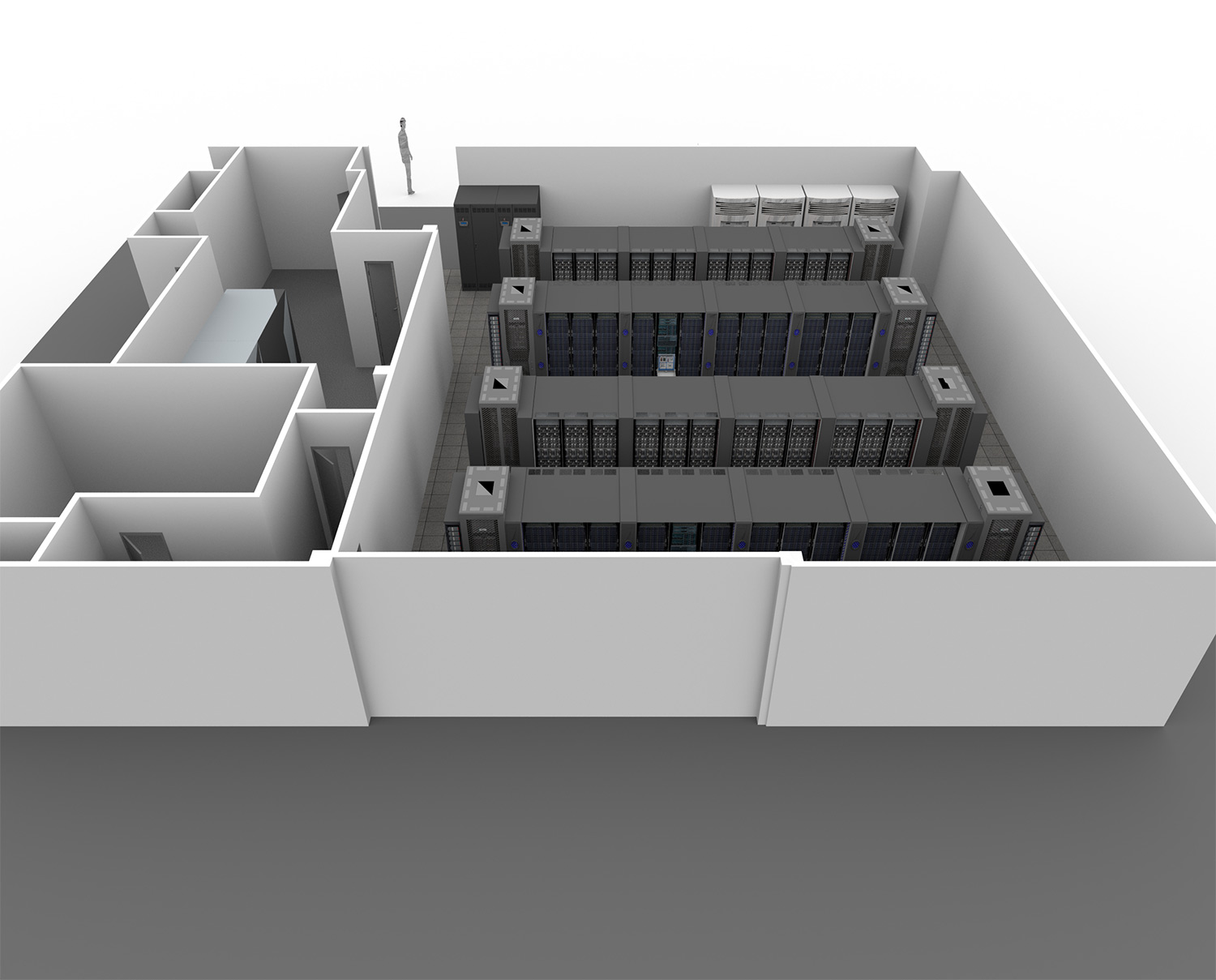
Ok, I understand what you mean. Your models and your textures are not very good.
Work a bit on your models, and try using some light panels. It might do the trick.
Cecilia
|
Sweet Home 3D Forum » List all forums » » Forum: Sweet Home 3D bar » » » Thread: A Better Render |
|
| Print at Sep 25, 2026, 12:03:15 AM | |
| Posted by stef.salmon at Jun 2, 2021, 3:28:30 PM |
|
A Better Render Hi, Is it possible to get a sharper render on this image? https://www.dropbox.com/s/e1lzanr828lgwxo/IBM_BCS1_NewNorth.png?dl=0 Thanks in advance. |
| Posted by hansmex at Jun 2, 2021, 3:40:06 PM |
|
Re: A Better Render Hard to say without knowing more... - Make the image larger (more pixels) - Use highest quality setting 4 H ---------------------------------------- Hans new website - under constuction hansdirkse.info |
| Posted by stef.salmon at Jun 2, 2021, 4:00:43 PM |
|
Re: A Better Render Hi, I always use the highest quality setting (4) but it always seems a bit grainy. I will try like you suggest and make the image larger. |
| Posted by stef.salmon at Jun 2, 2021, 4:51:30 PM |
|
Re: A Better Render I tried making the pixel width and height larger, but it just makes the image smaller and it is still grainy. You are only governed by what is visible in the 3D window. If you zoom in too much then the image starts to disappear. |
| Posted by Puybaret at Jun 2, 2021, 5:42:17 PM |
|
Re: A Better Render By "making the image larger", Hans meant to increase the number of pixels of the image width and height in the photo creation dialog box, not changing the point of view in the 3D view. ---------------------------------------- Emmanuel Puybaret, Sweet Home 3D creator |
| Posted by stef.salmon at Jun 2, 2021, 6:37:35 PM |
|
Re: A Better Render Yes sorry, that is what I did and it didn't make any difference on the quality of the rendered image. |
| Posted by Puybaret at Jun 2, 2021, 8:06:23 PM |
|
Re: A Better Render Did you try with default lens? ---------------------------------------- Emmanuel Puybaret, Sweet Home 3D creator |
| Posted by stef.salmon at Jun 3, 2021, 7:17:30 AM |
|
Re: A Better Render Yes it was using the default lens. This might be a stupid question, but there are many images from users where they have created a house or something similar and it has photographic quality? How is this achieved and with what rendering engine? |
| Posted by Puybaret at Jun 3, 2021, 10:11:56 AM |
|
Re: A Better Render Maybe you should read this tip or view this video. If this is not enough, share an image of your rendering. ---------------------------------------- Emmanuel Puybaret, Sweet Home 3D creator |
| Posted by stef.salmon at Jun 14, 2021, 9:17:48 AM |
|
Re: A Better Render Hi, I looked at the video and to be honest I don't think it's going to help. Like I said before how are people showing their designs and they look almost like a photograph? They are obviously not using Sweet Home 3D or not the rendering engine that is built it? I have put links in below. The first one is my image from SH3D and the second is from a competitor of ours and I don't know what package they used for rendering the floor layout but you can see its a lot sharper. Image 1 https://www.dropbox.com/s/b4cg0lwj5g4a7nf/IBM_BCS1_NewNorth.png?dl=0 Image 2 https://www.dropbox.com/s/jkatnuap391yqs8/Data%20Centre.png?dl=0 Thanks in advance. |
| Posted by Puybaret at Jun 14, 2021, 1:46:10 PM |
|
Re: A Better Render I don't really see the problem in your image. You're probably more critical because it's your own image. As already said, rendering a larger image then downscaling it would make it sharper. If you want some reflections on walls and floors like in the second image, make them shiny and choose the 3rd quality level. ---------------------------------------- Emmanuel Puybaret, Sweet Home 3D creator |
| Posted by UbuntuBirdy at Jun 14, 2021, 2:32:40 PM |
|
Re: A Better Render And set the time to 12:00. Your image seems to be rendered with a timesetting at the morning or the evening. ---------------------------------------- Pascal SH3D 6.6 / Ubuntu 22.04 (Mainline-Kernel) / Radeon RX580 / Ryzen 7 5800x |
| Posted by stef.salmon at Jun 14, 2021, 3:00:03 PM |
|
Re: A Better Render Hi, This is the image rendered at 12:00 hours. https://www.dropbox.com/s/ru8r0zmn221jo7z/IBM_BCS1_NewNorth%401200Hrs.png?dl=0 How can I get rid of shadows altogether? Thanks. |
| Posted by UbuntuBirdy at Jun 14, 2021, 3:19:46 PM |
|
Re: A Better Render Like Emmanuel mentioned before, try the lower quality levels. ---------------------------------------- Pascal SH3D 6.6 / Ubuntu 22.04 (Mainline-Kernel) / Radeon RX580 / Ryzen 7 5800x |
| Posted by Puybaret at Jun 14, 2021, 3:44:07 PM |
|
Re: A Better Render If you don't want shadows, choose a night hour and add lights in your design. ---------------------------------------- Emmanuel Puybaret, Sweet Home 3D creator |
| Posted by stef.salmon at Jun 14, 2021, 5:23:06 PM |
|
Re: A Better Render Hi, If I post a link to my rendered image of a Data Centre, which for some reasons has some issues and a link to the actual SH3D project file would you be able to take a look and see if you can render it any better? Thanks. |
| Posted by stef.salmon at Jun 14, 2021, 5:38:43 PM |
|
Re: A Better Render Hi, To be honest it's not too bad. There are some strange marks on the Data Racks which I can't understand. Rendered Image https://www.dropbox.com/s/qyn7fqpswvaddto/IBM_Data%20Centre.png?dl=0 Render Settings https://www.dropbox.com/s/3p8yrvemhtabp5j/Dat...ering%20Settings.png?dl=0 SH3D Project File https://www.dropbox.com/s/rhk7xdfmuc1yrsl/IBM_Data%20Centre.sh3d?dl=0 If you can see what's going on with the Data Racks and try and render it any better, I would really appreciate it. Thanks. |
| Posted by Puybaret at Jun 14, 2021, 6:00:44 PM |
|
Re: A Better Render If your 3D models come from Trimble 3D Warehouse or SketchUp, you should hide its back faces. See this thread for more details. ---------------------------------------- Emmanuel Puybaret, Sweet Home 3D creator |
| Posted by stef.salmon at Jun 14, 2021, 6:47:17 PM |
|
Re: A Better Render The 3D models do come from Trimble 3D Warehouse and when I double click on the model and check the materials, everything seems to be OK. The problem arises when I render the image. It must have something to do with the shadows as you can see strange colours in the preview on the Data Racks, which are all black. See link to a different image. https://www.dropbox.com/s/fzxxpr6d2oonst0/Image1.png?dl=0 I have to say this is getting frustrating as it should be pretty straight forward. Thanks. |
| Posted by Ceciliabr at Jun 14, 2021, 7:34:27 PM |
|
Re: A Better Render You could try to use this plugin: https://sourceforge.net/p/sweethome3d/plug-in...toVideoRendering-2.2a.zip For best result, select the Yafaray renderer. To get rid of the shadows, you can apply a white solid texture to the sky, select Enable sky lighting and set the time to midnight. Most of my images are rendered with 3440 px (width),and AA_minsamples set to 64. I use Ambient occlusion most of the time, and prefer Mitchel filter_type for indoors, and Lanczos for exteriors. But you should try experimenting with different settings. Cecilia |
| Posted by stef.salmon at Jun 14, 2021, 9:06:09 PM |
|
Re: A Better Render Hi, Thanks for the info. Can I not get rid of the shadows using the normal rendering engine? Did you see what I meant in this image in the preview window? https://www.dropbox.com/s/fzxxpr6d2oonst0/Image1.png?dl=0 |
| Posted by UbuntuBirdy at Jun 14, 2021, 9:36:46 PM |
|
Re: A Better Render Try quality level 1, it's the same like the preview window. ---------------------------------------- Pascal SH3D 6.6 / Ubuntu 22.04 (Mainline-Kernel) / Radeon RX580 / Ryzen 7 5800x |
| Posted by stef.salmon at Jun 14, 2021, 9:42:01 PM |
|
Re: A Better Render Hi, Just did that and it looks terrible! I just want to remove the shadows and get it to render properly. |
| Posted by stef.salmon at Jun 14, 2021, 9:44:22 PM |
|
Re: A Better Render It needs to be on quality setting 4. I can't see why it won't render properly. |
| Posted by stef.salmon at Jun 14, 2021, 9:49:32 PM |
|
Re: A Better Render It could be so good...but it fails at the last hurdle! https://www.dropbox.com/s/2ez62zuxwvkrt3z/IBM...ntre%20-%20Copy3.png?dl=0 I don't understand it. |
| Posted by Ceciliabr at Jun 14, 2021, 9:52:11 PM |
|
Re: A Better Render I just want to remove the shadows and get it to render properly. I saw your image. The plugin is using the same renderers as the ones that comes with SH3D, it just gives you a set of options that are not included in the simplified version you get with the program. It's completely safe. Try it, and you will be amazed! |
| Posted by stef.salmon at Jun 14, 2021, 9:56:23 PM |
|
Re: A Better Render Hi, I did try it and it was even worse. |
| Posted by stef.salmon at Jun 14, 2021, 9:58:51 PM |
|
Re: A Better Render Maybe you could try it out. https://www.dropbox.com/s/rhk7xdfmuc1yrsl/IBM_Data%20Centre.sh3d?dl=0 Thanks. |
| Posted by Ceciliabr at Jun 14, 2021, 10:54:57 PM |
|
Re: A Better Render Maybe you could try it out. Yes, why not...Ok, I understand what you mean. Your models and your textures are not very good. Work a bit on your models, and try using some light panels. It might do the trick. Cecilia |
| Posted by stef.salmon at Jun 15, 2021, 6:35:08 AM |
|
Re: A Better Render Hi Cecilia, That looks pretty good to me. Please could you do a screenshot of the settings you used? How did you get rid of the shadows? The models are from Trimble 3D Warehouse...I don't know how to do models. I'm looking for some decent ones for these Data Centres that we are doing. CTG trader have some good ones but when they are imported into SH3D they lose their quality. Do you know anyone that can do the 3D modelling of equipment? Many thanks. |
| Posted by Ceciliabr at Jun 15, 2021, 8:16:25 AM |
|
Re: A Better Render Please could you do a screenshot of the settings you used? Of course : I also did some small changes to your models. You can find the modified project file HERE . |
| Posted by stef.salmon at Jun 15, 2021, 9:02:07 AM |
|
Re: A Better Render Hi Cecilia, Thank you so much for doing this I really appreciate it. I just rendered it myself and it looks great. Will these settings work every time? I'd be interested to know how you changed the models? Many thanks, Stef |
| Posted by Ceciliabr at Jun 15, 2021, 4:45:01 PM |
|
Re: A Better Render I'd be interested to know how you changed the models? When you open the project file I linked to, you can see what I have done if you open Modify on your models: All the edge color instances have been set to Invisible. Sketchup models are a bit messy and need to be cleaned. My settings are quite universal, and will often render a nice image. If you open Modify 3D view , you will see that I have added a white solid texture to the sky. When selecting Enable sky lighting , you actually enable the sky to act as a source for image based lighting (IBL). You could have a look at THIS THREAD if you want to read more about IBL. You might also find some useful discussions and examples HERE. Cecilia . |
| Posted by stef.salmon at Jun 15, 2021, 9:42:31 PM |
|
Re: A Better Render Hi Cecilia, I can see what you've done with the models. I tried the same settings on another project and once again I have some weird shading on the Data Racks - See image (what would cause this)? https://www.dropbox.com/s/tnzv7aiba4nvr7j/IBM_Data%20Centre%20-%20SRS.png?dl=0 I created a white PNG 1000px x 1000px which I used for the floor and the sky but not sure if that's correct or the right size? I have included the link to the project below. https://www.dropbox.com/s/dqzt7l7lzylp4cb/IBM_Data%20Centre%20-%20SRS.sh3d?dl=0 Sorry to keep asking all these questions and thank you so much for your help on this. Stef |
| Posted by Ceciliabr at Jun 16, 2021, 7:04:34 AM |
|
Re: A Better Render I will have a look at it to night. |
| Posted by Puybaret at Jun 16, 2021, 8:29:33 AM |
|
Re: A Better Render As said before, these weird images are because of back faces in DAE / Collada files. Hide their material as you did for edges. ---------------------------------------- Emmanuel Puybaret, Sweet Home 3D creator |
| Posted by stef.salmon at Jun 16, 2021, 8:52:21 AM |
|
Re: A Better Render If I make the back invisible nothing happens and if I make the front invisible then the detail disappears totally. https://www.dropbox.com/s/fzxxpr6d2oonst0/Image1.png?dl=0 How is doing this supposed to make any difference? |
| Posted by Puybaret at Jun 16, 2021, 10:03:21 AM |
|
Re: A Better Render Hiding the back faces won't show any difference in the 3D view or at the two lowest quality levels. ---------------------------------------- Emmanuel Puybaret, Sweet Home 3D creator |
| Posted by stef.salmon at Jun 16, 2021, 10:45:12 AM |
|
Re: A Better Render I'm using level 4 and the YafaRay rendering engine as per Cecilia's recommendation. There is obviously something else I'm missing? |
| Posted by Puybaret at Jun 16, 2021, 11:08:25 AM |
|
Re: A Better Render The image you posted in your previous message shows the 3D view not a rendered image. ---------------------------------------- Emmanuel Puybaret, Sweet Home 3D creator |
| Posted by stef.salmon at Jun 16, 2021, 11:11:53 AM |
|
Re: A Better Render Yes I know. It was showing what it looked like when I made the face invisible. |
| Posted by Puybaret at Jun 16, 2021, 11:12:59 AM |
|
Re: A Better Render For example, if you hide the materials named "edge_color0002555", "edge_color353535255", "material" and "material_0" of "Data Server Tower" objects, it will render correctly. ---------------------------------------- Emmanuel Puybaret, Sweet Home 3D creator |
| Posted by stef.salmon at Jun 16, 2021, 11:30:52 AM |
|
Re: A Better Render I did what you suggested and it has rendered correctly apart from the object at the top of the image, but I guess that is also to do with something inside the object? See image. https://www.dropbox.com/s/84lf35m0oxbvww7/IBM_Data%20Centre%20-%20SRS1.png?dl=0 How did you know that was the problem and how can I avoid this in the future? Thanks. |
| Posted by Puybaret at Jun 16, 2021, 12:04:06 PM |
|
Re: A Better Render DAE files exported from SketchUp have often this problem. ---------------------------------------- Emmanuel Puybaret, Sweet Home 3D creator |
| Posted by stef.salmon at Jun 16, 2021, 1:45:54 PM |
|
Re: A Better Render which model files are better? Do you know of anyone that can produce decent models for use in SH3D? |
| Posted by Puybaret at Jun 16, 2021, 2:39:45 PM |
|
Re: A Better Render Aren’t the 3D models that you found decent enough, once you adjusted their materials? Do you know of anyone that can produce decent models for use in SH3D You could ask to Scopia but I don’t think they will design them for free. Designing 3D models is a long task.---------------------------------------- Emmanuel Puybaret, Sweet Home 3D creator |
| Posted by stef.salmon at Jun 16, 2021, 3:17:10 PM |
|
Re: A Better Render Yeah I guess they are good enough. Our company would pay to have them modelled. I will contact Scopia. Thanks. |
| Posted by stef.salmon at Jun 16, 2021, 3:55:00 PM |
|
Re: A Better Render The object at the top of the image that hasn't rendered correctly only has 3 editable items. What can I do in this case as I've tried to hide the edge_color585858255 but that makes no difference to the render? https://www.dropbox.com/s/84lf35m0oxbvww7/IBM_Data%20Centre%20-%20SRS1.png?dl=0 |
| Posted by Puybaret at Jun 16, 2021, 6:41:05 PM |
|
Re: A Better Render The faces associated to Color_007 material are probably double sided and fight with the face using PDU material. You should duplicate the object, move it 1 mm away and view only PDU material on the copy. ---------------------------------------- Emmanuel Puybaret, Sweet Home 3D creator |
| Posted by Ceciliabr at Jun 16, 2021, 6:47:30 PM |
|
Re: A Better Render Your models are really very simple constructions, thus very easy to re-construct in SH3D. Select a model, like the Data Server Tower. Export it as an obj-file. Choose a box, import it to your project, and select modify. Apply the same dimensions to the box, as the dimensions of the Data Server Tower, and select Modify. 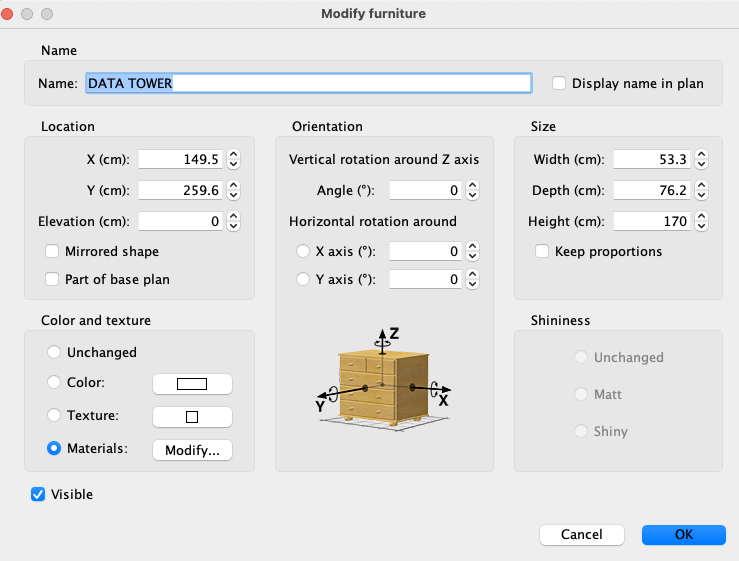 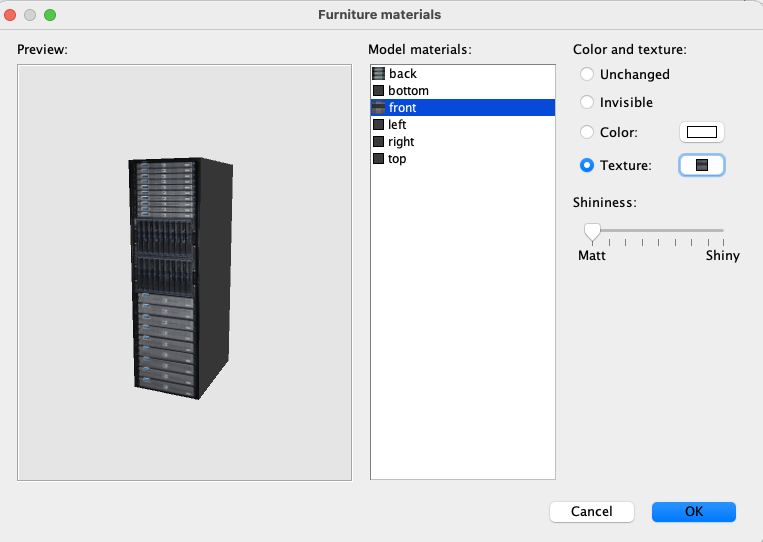 Apply a grey colour ( or whatever colour you prefer) to everything but the front and the back, and then select front. Click on texture, and select import. Find the image file that was exported with your model, and apply it to the front. Then do the same with the back. Make sure to set all shininess to zero. Select OK. Do the same for the PDU, and voila: Your models will now render just fine. 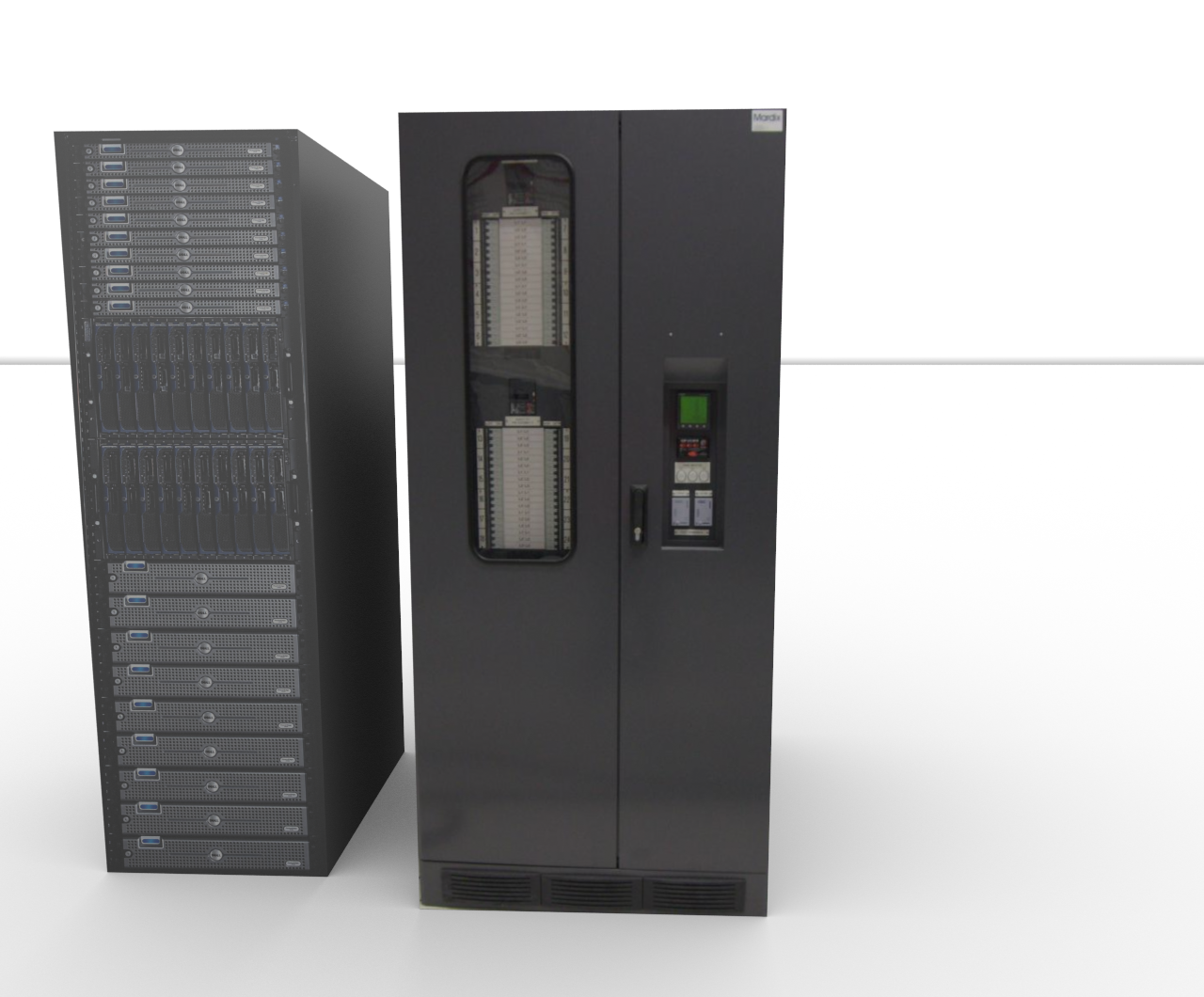 I have already done it for you: PDU+ServerTower . |
| Posted by stef.salmon at Jun 16, 2021, 7:01:30 PM |
|
Re: A Better Render Hi Cecilia, Thank you so much for all your help...Amazing! I will try it out for myself too, so I can try and get the hang of it. Once again, thanks. Stef |
| Posted by Xlance at Feb 26, 2022, 10:30:32 AM |
|
Re: A Better Render Notes: SH3D can Render upto 16384 x 16384 pixrls, so you have plenty of space to improve. If you plan on printing, you divide the number of pixels of rendered image by DPI (dot per inch) of printer to get print size. Example: Rendered image 6000x3000 pixels DPI = 300 (press quality) Size in Inch 6000/300 x 3000/300 = 20"x10" Getting photo realistic quality from renders requires practice not to mention a lot of test renders even with experienced people to get elements right (interior lights, sun, sky, textures, reflections, indirect shadows, shades ... etc. Cheers ---------------------------------------- Windows 64bit | Intel i7 | 8GB Ram | SH3D 7.5 + Plugins |

|
Current timezone is GMT Sep 25, 2026, 12:03:15 AM |