Hello plugin developers! What you think about having a plugin manager that can help users to find and keep updated your plugins?
I'm currently working on such a thing, here is a POC:

I'm open to any suggestion!
|
Sweet Home 3D Forum » List all forums » » Forum: Developers » » » Thread: Plugins manager |
|
| Print at Sep 26, 2026, 12:18:17 PM | |
| Posted by Daniels118 at Jan 26, 2022, 3:10:23 PM |
|
Plugins manager Hello plugin developers! What you think about having a plugin manager that can help users to find and keep updated your plugins? I'm currently working on such a thing, here is a POC: I'm open to any suggestion! |
| Posted by YGYL at Jan 27, 2022, 2:02:08 AM |
|
Re: Plugins manager It is recommended to solve multi-language support first Originally it was a manual translation version, but it is not good to automatically update it into an English version It is recommended that the language files be separated out |
| Posted by Daniels118 at Jan 27, 2022, 10:36:15 AM |
|
Re: Plugins manager @YGYL Do you mean you manually edited some plugins to include additional language files? If so, this "plugin manager" could also implement support for user made translations, at the condition that the managed plugins load the strings the "standard way", i.e. using .properties files with language specific suffix. The manager could implement a text merge tool to help the user identify only the strings that have been added or changed from the previous version, and let him manually translate them, doing automatic packaging and installing. Rollback/backup support could also be implemented. Could this meet your needs? |
| Posted by Puybaret at Jan 27, 2022, 6:45:39 PM |
|
Re: Plugins manager Don't know if you saw it, but there's already some tools and a DTD to follow updates in Sweet Home 3D. This can be also used for plug-ins, as shown in the last item of the current version of SweetHome3DUpdates.xml. Maybe it could be useful for your idea. ---------------------------------------- Emmanuel Puybaret, Sweet Home 3D creator |
| Posted by YGYL at Jan 28, 2022, 11:35:33 AM |
|
Re: Plugins manager @YGYL Do you mean you manually edited some plugins to include additional language files? If so, this "plugin manager" could also implement support for user made translations, at the condition that the managed plugins load the strings the "standard way", i.e. using .properties files with language specific suffix. The manager could implement a text merge tool to help the user identify only the strings that have been added or changed from the previous version, and let him manually translate them, doing automatic packaging and installing. Rollback/backup support could also be implemented. Could this meet your needs? Yes, I translated almost all the plugins into Chinese However, your plugin updates quickly and it doesn't come with Chinese language files. I had to change the Chinese language file again for each new version, which wasted some time |
| Posted by Daniels118 at Jan 28, 2022, 12:15:00 PM |
|
Re: Plugins manager @Puybaret thank you for the reference, it is a good starting point and of inspiration! @YGYL Well, so this plugin manager will help you a lot, not only with my plugins but with all the plugins ecosystem. |
| Posted by YGYL at Jan 28, 2022, 1:03:33 PM |
|
Re: Plugins manager @Puybaret thank you for the reference, it is a good starting point and of inspiration! @YGYL Well, so this plugin manager will help you a lot, not only with my plugins but with all the plugins ecosystem. Sweet Home 3D is a software for beginners. I think the plugins should have a unified multi-language graphical interface with instructions. The ability to import plugins in bulk with one click. |
| Posted by Daniels118 at Jan 29, 2022, 6:14:01 PM |
|
Re: Plugins manager Thinking better about your concerns, it would be better if you ask the plugin developers to add your language. My plugins already comes with about ten translations; I haven't added chinese just because I'm too bad in recognizing if the characters would render correctly, but if you can send me the working files it would be a pleasure for me to include them in the next releases of my plugins. |
| Posted by YGYL at Feb 12, 2022, 9:17:58 AM |
|
Re: Plugins manager Thinking better about your concerns, it would be better if you ask the plugin developers to add your language. My plugins already comes with about ten translations; I haven't added chinese just because I'm too bad in recognizing if the characters would render correctly, but if you can send me the working files it would be a pleasure for me to include them in the next releases of my plugins. Transfer link: https://cowtransfer.com/s/1de1535d55f444 passphrase: ohb824 |
| Posted by Daniels118 at Feb 12, 2022, 12:02:09 PM |
|
Re: Plugins manager Hello YGYL, and thank you for your contribution  I have added the translation to the latest versions of my 3 plugins; all of them have a new baseline version, which is 3.0. I've made just small changes to your files:
I've seen you credited yourself on the help buttons, I've taken one step further by crediting you on the release posts on SourceForge too. |
| Posted by YGYL at Feb 12, 2022, 2:38:31 PM |
 Re: Plugins manager
Hello YGYL, and thank you for your contribution Thank you! A unified and reusable multilingual support mechanism would be best This forum is troublesome to upload files, but also through the network disk to be able to |
| Posted by Daniels118 at Mar 14, 2022, 9:16:24 PM |
|
Re: Plugins manager The plugin manager is finally ready! I'm still populating the database, so not all plugins are already available, but they will be soon. Discover all its features here: http://daniels118.altervista.org/sh3d/pluginmanager/ Download it from here: Plugins Manager on SourceForge |
| Posted by Daniels118 at Mar 16, 2022, 5:33:07 PM |
|
Re: Plugins manager I've finished to populate the database, now all plugins can be found within the plugin manager. @developers I will do my best to keep the DB updated, however if you wish to customize how your plugins display within the Plugin manager (search keywords, icons, descriptions and so on), please send me a request through sourceforge to receive private credentials to handle your plugins by yourself. |
| Posted by YGYL at Mar 17, 2022, 3:01:25 PM |
|
Re: Plugins manager I've finished to populate the database, now all plugins can be found within the plugin manager. Thank you very much!!!!! A few issues were found. 1. about the page does not use <META HTTP-EQUIV="CONTENT-TYPE" CONTENT="text/html; charset=utf-8"> This will cause the translated page encoding to be displayed incorrectly 2. About the page, there is no file corresponding to multiple languages, so you can only force to overwrite the English file if you want to translate 3. The names of the plug-ins on the manager list do not take multilingual translations, they are all in English, but there are 2 exceptions. I do not know why. 4. The final version of the plug-in recognition is still incomplete Finally, it is recommended to add a batch import plug-in directory function, select a directory, automatic one-click import all the plug-ins in the directory |
| Posted by YGYL at Mar 17, 2022, 3:31:56 PM |
|
Re: Plugins manager Your programming skills are so good, I suggest you to implement a function that has not been implemented for a few years, all of which are very critical for SH3D One is to combine several objects and put them in the material library bar. And can be saved to the object library SH3F. For example, I have 1 kind of dining chair (1MB), 1 kind of dining table (1MB), 1 vase (1MB). If users use these objects, they have to put 6 dining chairs + 1 dining table + 2 vases by themselves, which is very troublesome If the default do a set of 6 dining chairs + 1 kind of dining table + 1 vase objects, then the object library will be a lot of wasted space (6MB + 1MB + 2MB = 9MB). So it would be impossible to give the user different quick object combinations If there is this function, the same 1 kind of dining chair (1MB), 1 kind of dining table (1MB), 1 vase (1MB), you can make dozens of colors and styles, dining chairs more or less, several different color schemes. This will greatly speed up the user's drawing speed, and may put a kitchen object in a few clicks This is very critical for SH3D. Also, the handling of textures. A texture can be converted to a variety of tones and light and dark |
| Posted by Daniels118 at Mar 17, 2022, 3:57:31 PM |
|
Re: Plugins manager Thank you for your feedback, here some observations: 1) ok, I will add it in the next release; 2) ok, I will fix it in the next release; 3) the plugin names in the list are not part of the plugin manger itself. They are downloaded from a remote repository that can be updated by me or by the plugin developer. Multilanguage is supported, but translating everything requires a lot of time. I may think of a collaborative approach, but it is a lot of work, I've no clear plans about this. 4) This happens if the installed version of the plugin isn't one in the database. The match is done using the plugin name, provider and version. If you have manually changed any of these fields within your sh3p files, then the plugin manager isn't able to recognize it. Unfortunately there is no workaround for this, unless you choose to build and mantain your own plugin repository. You can already do this by uploading a file like this one on your own server, and changing the repository accordingly in the Plugin manager settings. 5) This could be achieved by simply copying the directory content to the SH3D plugins folder. |
| Posted by YGYL at Mar 18, 2022, 6:39:37 AM |
|
Re: Plugins manager Many users who use SH3D cannot find the software user directory, so it is important to have batch installation |
| Posted by Daniels118 at Mar 18, 2022, 9:56:34 AM |
|
Re: Plugins manager combine several objects and put them in the material library bar. And can be saved to the object library SH3F I think this can be achieved with the Furniture Library Editor A texture can be converted to a variety of tones and light and dark You can do this with any image editor. I may suggest GIMP which is free, cross platform and open source. I have future plans for a texture editor, but it will be more oriented to tile arrangement than color management. My intent is to implement missing features that cannot be achieved with alternate methods, or at least would require too much effort or time, leading the users to prefer other softwares. The Plugin manager is an exception, its purpose is to help users to know that such features can be installed if needed. Of course your hints are welcome, but you understand implementing (and mantaining) features is a time consuming task and I have to choose with care which ones worth the effort. |
| Posted by YGYL at Mar 18, 2022, 12:57:47 PM |
|
Re: Plugins manager I think a lot of people who use SH3D are some real newbies and are not likely to use the furniture library editor. (And the furniture library editor doesn't have this feature.) And will not go to use the picture editing software. (That is, using it is also a very troublesome thing) The core of this thing is that an object is used multiple times and only occupies 1 file size. For example, as I said before, it is best to let the object library directly support the KMZ format (now the furniture library editor is all OBJ to save, as long as the same parts of the object KMZ is much smaller than OBJ, such as a large tree 3D model) And I'm talking about the advanced version of this kind of thing, not only the same object inside the same part to save space, and the object can be called by another combination of objects, as long as you can save a lot of time and file space I have been in contact with SH3D for more than 10 years, I think this is the most critical feature Because in my opinion the value of SH3D is a simple 3D model placement tool, and then a tool for drawing walls. It's not 10 years ago ~ the online platform of big companies is free and easy to use, the layout can be automated, the rendering effect is fast and good. If SH3D doesn't change, less and less people will use SH3D. 10 years I feel it very obvious~. |
| Posted by Daniels118 at Mar 18, 2022, 1:37:39 PM |
|
Re: Plugins manager Ok, I did misunderstand what you did mean, I was focused on the SH3F file. This feature sounds interesting, but again is something that can be partially achieved with the current tools. You can place the furnitures in the home, group them, and then use copy/paste to replicate the whole group; you still have the capability to select single items within a group to change textures and other options. And it wouldn't matter how many copies you have, they will always occupy the same space. Having such groups within a furniture library would be nice, but I think this is something a plugin cannot do, since the parsing of the SH3F files belongs to the core of the application. A plugin could eventually show an alternate furniture catalog that can support such feature, but this is out of my plans (at least not for free). |
| Posted by YGYL at Mar 20, 2022, 5:05:29 AM |
|
Re: Plugins manager Yes the object library related functions are the core of SH3D. Now there is also deformed furniture (wall bed, wall table, dual purpose coffee table) is also not possible, too much trouble to deform manually |
| Posted by Daniels118 at Mar 21, 2022, 5:25:01 PM |
|
Re: Plugins manager New version released! Changelog:
|
| Posted by dorin at Mar 22, 2022, 7:22:05 AM |
|
Re: Plugins manager Very useful tool! 1. On user side: The goods:
Less good:
Suggestions: - on Search tab filter the already installed and let only the rest. - for every plugin add a list with available translations. 2. On web page: - the link to World Installation map point ONLY to list NOT to map like few days ago (or this is only on my side?) - at login Firefox is complain "This connection is not secure" I don't care about this but maybe others. ---------------------------------------- A computer program does what you tell it to do, not what you want it to do. Murphy's Law When all else fails, read the instructions. Murphy's Law If you don't like "AS IS", DIY. Dorin's law |
| Posted by dorin at Mar 22, 2022, 8:13:10 AM |
|
Re: Plugins manager OK, I've just encounter a problem which I expected: RotateHomePlugin.sh3p is inside of a zip archive in dist folder. Plugin Manager downloaded the archive, delete my current installation but than it don't know what to do next. For me is not necessarily a problem, I could fix it for me but than I have to pay attention to not update it again. So, I suggest to have a minimal set of rules in make and publish plugin: - usually the source code are included in sh3p but if not, have to be published in two separate files(sh3p AND zip). Normal users need only sh3p. - some rules about license files and README file(s). - maybe to include also a CHANGE LOG file which could be translated Are only few suggestions and I expect more. ---------------------------------------- A computer program does what you tell it to do, not what you want it to do. Murphy's Law When all else fails, read the instructions. Murphy's Law If you don't like "AS IS", DIY. Dorin's law |
| Posted by Daniels118 at Mar 22, 2022, 12:57:42 PM |
|
Re: Plugins manager Hi Dorin, it make update only one at a time not multiple which mean You need to restart SH3D after every update (at least this happen to me) Even if you have to update one plugin at a time, you can update them all and then execute a single restart of SH3D, there is no need to restart for every single update. I could add a "update all" or "update selected" button in a future release, however I think once you have updated everything to the latest version, it will be very rare that there could be multiple plugins to update at once, unless you haven't used SH3D for several months.on Search tab filter the already installed and let only the rest. There is a reason for having even already installed plugins in the search tab. A plugin may offer several secondary features, some of which cannot be deduced by the plugin's name, but they could be listed in the plugin's keywords. An user could have installed a plugin to use a feature and he could not be aware of its other features. If - at a later time - the user search for such features using the search tab, he could get one of his installed plugins in the results, and learn from the description that this plugins also offer the feature he is looking for.for every plugin add a list with available translations This is already implemented. Look at this picture from the developer interface: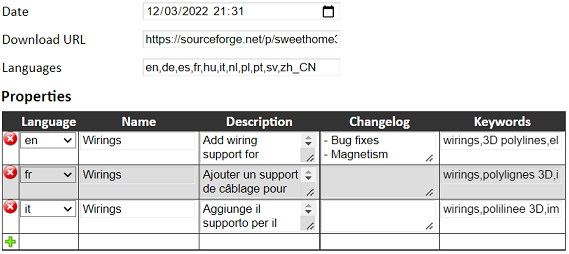 The "Languages" field is reported under the plugin description on the Plugin manager: 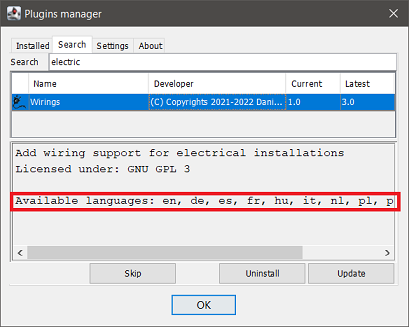 This is intended to inform the user about the plugin translations. The "Languages" field must not be confused with the "Language" column, which is related to the translations shown in the Plugin manager, not the plugin itself. the link to World Installation map point ONLY to list NOT to map like few days ago The world map is plugin specific, so you have to click on a plugin name from the list to see its map. What's changed from the previous days is just the aspect of the list.at login Firefox is complain "This connection is not secure" This is a terrible mistake I made initially when I published the links. You can switch to https: https://daniels118.altervista.org/sh3d/pluginmanager/I will implement a rule to automatically redirect to the secure connection. RotateHomePlugin.sh3p is inside of a zip archive in dist folder. There is already a set of rules, one of which is to have ApplicationPlugin.properties within the archive. This already excludes archive which contain in turn a sh3p file (dist) and a zip file (src), but I didn't manage sh3p+plain src folder.You have earned the bug reporter badge!  I will add the rule to avoid this case, however this means this plugin will leave the Plugin manager, unless we upload the sh3p file separately. I have to contact the plugin's author to ask him to fix the deliverable; only if I won't get any reply in a reasonable amount of time, I will upload the sh3p file by myself. - some rules about license files and README file(s). This is a good idea, but I won't implement it as a requirement, it will be mostly a guideline: I don't want to impose my rules beyond the ones provided by SH3D, unless they became part of SH3D itself (I don't like de facto standards).- maybe to include also a CHANGE LOG file which could be translated |
| Posted by dorin at Mar 23, 2022, 7:10:51 AM |
|
Re: Plugins manager This are usually happens when I typing before I think. With aid Your explanations it work ALL. It remind me what I've done few days ago (age???) I'm totally agree with "guideline" in place of "rules". I could add a "update all" or "update selected" button in a future release I don't think is necessarily. this means this plugin will leave the Plugin manager, unless we upload the sh3p file separately Unfortunately, BEFORE read Your answer, I've already repack and upload "AS IS" on Source Forge. Now I wait the owner reaction (I hope he doesn't beat me). ---------------------------------------- A computer program does what you tell it to do, not what you want it to do. Murphy's Law When all else fails, read the instructions. Murphy's Law If you don't like "AS IS", DIY. Dorin's law |
| Posted by Daniels118 at Mar 23, 2022, 8:46:35 AM |
|
Re: Plugins manager I've sent a private message to Michel MBEM to ask him if he wishes to upgrade his plugin or he agree with a change in ownership, so that we can continue his work. I would wait at least for 2 weeks before going on. |
| Posted by Daniels118 at Apr 1, 2022, 2:20:24 PM |
|
Re: Plugins manager Version 1.2 released! Changelog:
Updating to this version will also help to manage alpha and beta releases of other plugins. Enjoy! |
| Posted by YGYL at Apr 20, 2022, 6:39:27 AM |
|
Re: Plugins manager The new Simplified Chinese versions of the 30 plug-ins I translated are here Transfer link:https://cowtransfer.com/s/28d3ac9ca70c4e passphrase: acxy1d |
| Posted by YGYL at Apr 22, 2022, 9:46:43 AM |
|
Re: Plugins manager The Simplified Chinese versions of the ExportPlanImage-1.0 plug-ins Transfer link:https://cowtransfer.com/s/66b390c58db840 passphrase: ko369j |
| Posted by dorin at Apr 29, 2022, 8:05:47 PM |
|
Re: Plugins manager Thanks YGYL! You've made a hard work to support this community. I'm not joking wile, in the past, I've try to make translation and I knew what it's mean. It's not an easy task IF you want to do a good job. I will add You's translations to all my new versions of my plugins. Thanks!!! ---------------------------------------- A computer program does what you tell it to do, not what you want it to do. Murphy's Law When all else fails, read the instructions. Murphy's Law If you don't like "AS IS", DIY. Dorin's law |
| Posted by dorin at Apr 29, 2022, 8:13:06 PM |
|
Re: Plugins manager @Daniels118 What if You update version including here?(now v 1.5)??? ---------------------------------------- A computer program does what you tell it to do, not what you want it to do. Murphy's Law When all else fails, read the instructions. Murphy's Law If you don't like "AS IS", DIY. Dorin's law |
| Posted by Daniels118 at Apr 11, 2023, 1:49:19 PM |
|
Re: Plugins manager Hi, I'm happy to announce that the Plugin manager official repo now supports plugins within zip archives, so these plugins will show up in the Plugin manager without the need to update. |
| Posted by Keet at Apr 13, 2023, 3:01:46 PM |
|
Re: Plugins manager You should change the confirmation window that a plugin is updated to a always on top modal window. Currently if you updated a plugin and clicked next to the window the "plugin ready ..." window is hidden behind the manager window. Now it seems like the program hangs so you have to move the manager window to see the OK window. ---------------------------------------- Dodecagon.nl 1300+ 3D models, manuals, and projects |
| Posted by Daniels118 at Apr 15, 2023, 11:11:22 AM |
|
Re: Plugins manager @Keet thank you for reporting this bug, I will include the fix in the next release. |
| Posted by geewee at Dec 21, 2023, 10:22:04 AM |
|
Re: Plugins manager Hi, I installed the program manager without errors, but cannot run it. Clicking on Toold/Plugins manager gives this error message: "No enum constant it.ld.sh3dplugins.pluginmanager.UpdatesHandler.Tag.descriptor" I installed PluginManager 1.0 from sourceforge since download from http://daniels118.altervista.org/sh3d/pluginmanager/ failed with message "connection failed". Win 11 Home 22H2, Build 22621.2861 Sweet Home 3D 7.2 Java 3D 1.6.2a - JOGL 2.5.0 |
| Posted by Keet at Dec 21, 2023, 12:12:20 PM |
|
Re: Plugins manager Ah, if I had known you installed Plugins Manager 1.0 I wouldn't have send you to this thread. That is an old version of the Plugins Manager. Get the latest version here . As on this forum on sourceforge posts go from first to last so the post with the last version is somewhere at the end, in this case on page 2. The link is for a direct download of version 1.5.2. That should work a lot better ;) ---------------------------------------- Dodecagon.nl 1300+ 3D models, manuals, and projects |
| Posted by geewee at Dec 21, 2023, 3:22:44 PM |
|
Re: Plugins manager Tahnks, that one works now! |
| Posted by Daniels118 at Jan 12, 2024, 11:49:07 AM |
|
Re: Plugins manager Version 1.5.3
Thanks to EncoNyito for bug reports! |
| Posted by Keet at Mar 14, 2024, 9:11:21 PM |
|
Re: Plugins manager @Daniele You might want to check the "Replace furniture" plugin in the plugin list since it doesn't seem to work anymore and blocks Sweet Home 3D from starting beyond the splash screen. At least my 7.2. on Linux doesn't work with it. Maybe remove it from the list if it also doesn't work on other systems so other users will not run into the same problem. ---------------------------------------- Dodecagon.nl 1300+ 3D models, manuals, and projects |
| Posted by Puybaret at Mar 15, 2024, 10:57:35 AM |
|
Re: Plugins manager The "Replace furniture" is incompatible with Java 1.8, the reason why it blocks Sweet Home 3D launch for you Keet. I reported this issue to Olivier Martinez, and even if there's a property foreseen in plug-ins to handle incompatibilities, I made a change in Sweet Home 3D to avoid blocking the program if this property is not correctly set. ---------------------------------------- Emmanuel Puybaret, Sweet Home 3D creator |
| Posted by Keet at Mar 15, 2024, 12:33:27 PM |
|
Re: Plugins manager Would it be possible to display a modal dialog with an error message when a plugin fails to load (or produces an error) and after clicking an OK button continue loading Sweet Home 3D without loading the offending plugin? This has the benefit that Sweet Home 3D continues to load and the user knows which plugin is not loaded because of an error. ---------------------------------------- Dodecagon.nl 1300+ 3D models, manuals, and projects |
| Posted by Puybaret at Mar 15, 2024, 1:20:22 PM |
|
Re: Plugins manager I don’t think that this dialog box is such a good idea but the error will appear in the logs. This error is due to the plug-in programmer who didn’t pay attention to Java compiler options and plug-in parameters before delivering his plug-in. There’s a warning in plug-ins developer’s guide about this and I just improved the comment in case developer’s environment doesn’t support Java 1.5 target anymore. ---------------------------------------- Emmanuel Puybaret, Sweet Home 3D creator |
| Posted by PeterW at May 14, 2025, 5:36:36 PM |
|
Re: Plugins manager Is this still a valid plugin manager? Mine indicates updates needed on 2 plugins (autodimensioning and multiplier) but when I click update I get a popup: X Received fatal alert:Handshake_failure |
| Posted by Keet at May 15, 2025, 10:42:52 AM |
|
Re: Plugins manager This error message has nothing to do with the Plugin Manager, it's an SSL certificate error. There are several possible reasons for this but it will probably resolve itself when a new certificate is issued on the originating server. It can also be caused by the browser that can't resolve the trusted certificate path which can be resolved with a browser update (which updates the trust store). Also check that you have the latest Plugin Manager: version 1.5.3. @Daniels118: check if the SSL certificate on your site is up-to-date and valid. ---------------------------------------- Dodecagon.nl 1300+ 3D models, manuals, and projects |
| Posted by Daniels118 at May 17, 2025, 9:37:57 AM |
|
Re: Plugins manager If the plugin manager tells you that there are plugins/updates available, it means that the program communicates without problems with my own website. When you click install/update, the plugin is downloaded directly from it's original source (with very few exceptions). Both Auto dimensioning and Multiplier plugins are downloaded from SourceForge, so the handshake problem should lie there. Try to download the plugin directly using this link, and check if you get the same alert from your browser: https://sourceforge.net/p/sweethome3d/plug-in...AutoDimensioning-1.6.sh3p If you get the error, that means that you have to install the CA certificate which has released the certificate for SourceForge; usually this is not required, most of the times it's because the whole system is outdated and needs an upgrade. If you get no error, then the problem is that the JRE you are using to run SH3D uses it's own truststore, and this is outdated. Since nobody else has faced this problem, it could be that you have installed SH3D from the system package manager; if this is the case, please uninstall SH3D, and then download and install the one from the official website. |
| Posted by sjb007 at May 17, 2025, 1:56:32 PM |
|
Re: Plugins manager Actually, I had to D/L a couple of plugins manually because of this handshake error. I'm using Ubuntu Linux, 22.04 release. SweetHome3D 7.5 directly downloaded from the website, and I'm using the standard start script which uses the bundled JRE which is 1.8.0_202-b08. Perhaps there is some commonality with PeterW's system. |
| Posted by sjb007 at May 17, 2025, 5:01:50 PM |
|
Re: Plugins manager Hmmm. Should add that it was Dorin's plugins that caused me issues (not that I'm blaming him, it's just another data point). StairBuilder-1.0.sh3p and GenerateRoof-4.7.1.sh3p |
| Posted by dorin at May 20, 2025, 8:24:41 AM |
|
Re: Plugins manager I tried it on a fresh SH3D 7.5 installation under Linux. Plugin manager plugin was successfully installed by opening it with SH3D. After rebooting I tried to install, one by one each plugin. They were installed: 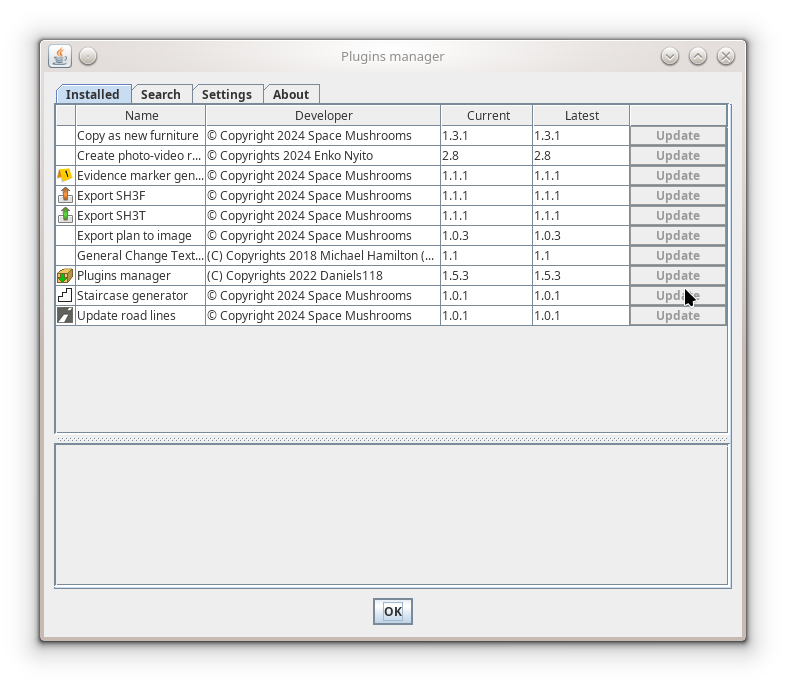 All the rest give: 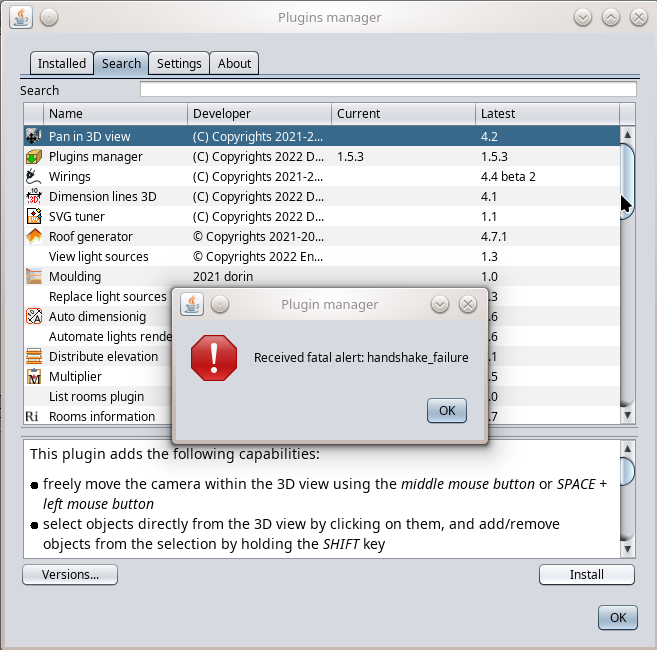 ---------------------------------------- A computer program does what you tell it to do, not what you want it to do. Murphy's Law When all else fails, read the instructions. Murphy's Law If you don't like "AS IS", DIY. Dorin's law |
| Posted by dorin at Sep 30, 2025, 7:57:13 AM |
|
Re: Plugins manager After I've read several times the Daniels118 post I suppose I've find a fix for linux. I've downloaded the last JRE (jre1.8.0_461) and replace the runtime folder content with the content of jre1.8.0_461. Now, the Plugin Manager, it works including with Eclipse. Case closed! (At least for me) ---------------------------------------- A computer program does what you tell it to do, not what you want it to do. Murphy's Law When all else fails, read the instructions. Murphy's Law If you don't like "AS IS", DIY. Dorin's law |
| Posted by supseb at Jan 5, 2026, 12:12:53 PM |
|
Re: Plugins manager Very good news! Excellent work! It works fine on SH3D 7.5, and it saves me a lot of time (I was just trying to update each plugin, one by one, to start 2026 with updated installation. And also the plugin library is a great tool, many thanks!!! There's just a bug with ExportToXMLObj plugin, it cannot reach the file. Just a few comments: - have a 'update all' button - have a link, or a button, taht send to an 'official' webpage for the plugin, or athread in forum, or... Thanks! |

|
Current timezone is GMT Sep 26, 2026, 12:18:17 PM |