Print at Dec 20, 2025, 9:09:41 AM
Posted by Puybaret at Jun 23, 2022, 6:43:39 PM
Sweet Home 3D 7.0
Hi,

Here's a first beta version of Sweet Home 3D 7.0.

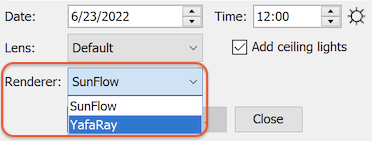
This new version includes YafaRay rendering engine which you can activate with the new Renderer dropdown list shown in photo and video creation dialog boxes (which can be resized now). The default engine remains SunFlow at the moment but this might change in the future if the YafaRay is a fully stable solution.


It includes also the following features:
- Magnetism can be activated and deactivated with a button in the toolbar (this button won't appear on small screens).


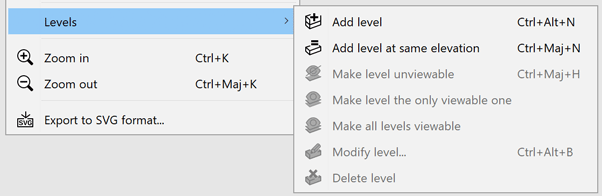
- Plan menu items handling levels were moved to the Levels sub menu to reduce the length of this menu:


- The virtual visitor is represented with a camera symbol at a fixed size in the plan when the default virtual visitor gets too small.


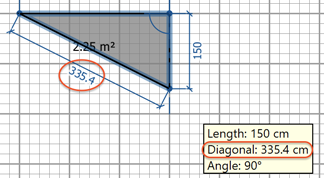
- It's possible to enter the diagonal value for the current point in the room creation tool tip to be able to draw rooms by triangulation:


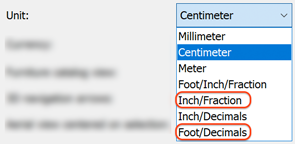
- Inch/Fraction and Foot/Decimals units were added to preferences pane. Inch/Fraction displays lengths in inches followed by the closest eighth inch fraction and Foot/Decimals unit displays lengths in feet followed by decimals of a foot.


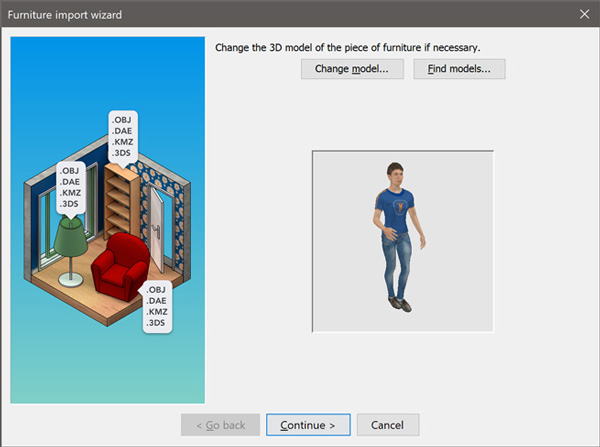
- The Hide model edges check box was added to the second step of the Furniture import wizard to hide easily edges of DAE files available at Trimble warehouse (this option is visible only for 3D models with material names starting with edge_color). The following screenshots show the difference when this new option is actived or deactivated.
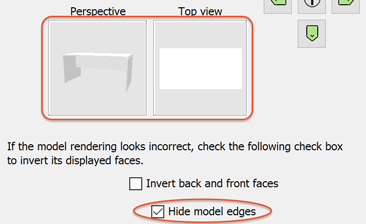


- The last step of the Furniture import wizard lets you now zoom and rotate the model around two axes to get a nicer icon of the imported model.
- It's now possible to select a material directly in the 3D preview in Material modification dialog box. If you want to select more materials just press the Crtl key (cmd key under macOS) while clicking in the 3D preview.
- A mirror of the background image is copied at the bottom of the horizon to avoid a dark line in rendered images.
- The size of frustrum of the 3D view was again modified to set the front clip distance according to the point of view elevation and improve the rendering of very large scenes seen from a high point of view, like the 2 following screenshots comparing the 3D view of a highway scene displayed with version 6.6 and version 7.0.

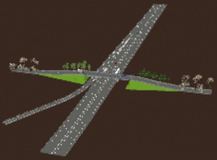
 

- The size of dividers between the 4 Sweet Home 3D panes was increased under Windows to make their one touch size buttons more usable.
- The com.eteks.sweethome3d.checkUpdates System property was added to the application. When set to false, this property removes from Sweet Home 3D the ability to check updates availability, and this is the case when /checkUpdatesDisabled installer argument is added to the command line of Windows installer, as requested by Sand0411.
- Years after years, users keep reporting some issues about some weird triangles which appear in the 3D view (like in bugs #505 or #1095). As you may know, this issue comes from the fact that Sweet Home 3D tries to compute a sloping ceiling for rooms at the last level, as soon as they are surrounded with walls of different heights.
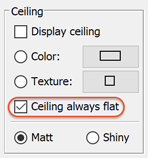
To avoid this behavior (which doesn't work so well anyway), the Ceiling always flat check box was added to the room modification dialog box to prevent Sweet Home 3D from trying to compute such slopping ceilings. By default, any new room will have this option checked, i.e. the elevation of their ceiling will be located at the highest wall at the last level. If you want to try the slopping ceiling, just uncheck it.


- New prefixes were added to 3D model shapes to specify the possible moves of shapes relative to other moving shapes.
Following the conventions added in version 6.0, naming sub shapes able to translate or rotate according to other moving shapes follows this rule:
Like in previous versions of Sweet Home 3D, the name of rail, hinge and ball shapes should be prefixed with sweethome3d_rail_, sweethome3d_hinge_ and sweethome3d_ball_ followed by an index number starting from 1 (and followed by whatever text your want).
If they are attached to another shape you should add the separator _and_ + the prefix used for moving shapes sweethome3d_opening_on_rail_, sweethome3d_opening_on_hinge_ or sweethome3d_arm_on_ball_ followed by the index number of that shape.
For example, sweethome3d_ball_1_and_sweethome3d_opening_on_hinge_1 or sweethome3d_ball_1_description_and_sweethome3d_opening_on_hinge_1 should be used to attach the ball numbered 1 to the hinge numbered 1.
The MultiAxesTest 3D model attached to this message demonstrates this new feature.


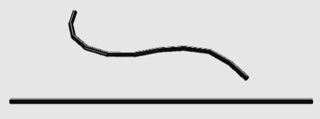
There's no limit in the depth of the shapes tree you may build with this rule. For example, you can build the model of a flexible hose with ten segments or more if you have the patience to design it.


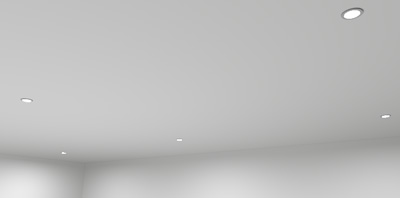
- The lightSourceMaterialName# property was added to PluginFurnitureCatalog.properties of SH3F furniture libraries to define the material(s) of shapes which should be used in a 3D model as light sources at the two best quality rendering levels, for example to define a light panel or a ceiling mini spot with a thin light surface.


The default power of such light sources depends on the brightness of their color and their surface. To be able to compare their power with existing light sources, the power of a 10 cm wide sphere used as a light source will be the same as a white light source which is initially set to 10 cm diameter in Sweet Home 3D default catalog.
As a shape used as a light source may have a very large surface, you may have to enter a small Power value in its furniture modification dialog box to make it usable, the reason why you may enter a decimal value in Power spinner now.

The color of this kind of light source will come from the default color of its material (for example, using Kd parameter in a MTL file) or the color set by the user in Sweet Home 3D furniture or marterials dialog boxes. If this material is set as fully transparent (for example, using d 0 parameter in a MTL file), the shape(s) using this material will emit some light in the rendered scene but won't be visible in the rendering.
Note also that the shapes used as light sources are note double faced, and if you want the both sides of a shape to emit some light, its 3D model should define both faces (generally with vertices cited in reverse order for the opposite face).

To help you start with this new feature, I created the furniture library LightShapes.sh3f with 5 different kinds of light shapes: a double faced Light panel, a one faced Invisible light panel (but visible in the 3D view when selected), an Invisible light sphere equivalent to default catalog light source (but this one will emit the color you will choose in its modification dialog box), an Invisible inward light half sphere which may be used to light a scene with soft shadows, and a mini spot as seen in previous screenshot.

You may also experiment this feature on an existing SH3D file, by editing its Home.xml file and adding lightSourceMaterial child element(s) to light elements to specify the material name(s) used as light source(s), for example:
<light ...>
<lightSourceMaterial name='fluorescent_tube'/>
</light>
If the light element contains some lightSource elements, they won't be used in version 7.0 as soon as a lightSourceMaterial child element exists.
You may even transform a piece of furniture into a light by renaming its pieceOfFurniture element as light and adding a lightSourceMaterial child element to it (don't forget the </light> closing tag if necessary).

- Finally, this new version fixes also many bugs among which room floors and ceilings drawing order and too small fonts under Windows 11 HiDPI.

Thanks to Enkonyito for programming a first version of light panels in his plug-in. His use of mesh lights in SunFlow and YafaRay was helpful to start implementing this feature in Sweet Home 3D smile

Hope to read your feedback soon...

[Note from developer: Sweet Home 3D 7.0 was released on July 13, 2022]
----------------------------------------
Attachment multiAxesTest.zip (2812 bytes) (Download count: 48180)

----------------------------------------
Attachment flexibleHose.zip (13808 bytes) (Download count: 937)

----------------------------------------
Attachment LightShapes.sh3f (83409 bytes) (Download count: 26459)

----------------------------------------
Emmanuel Puybaret, Sweet Home 3D creator

Posted by YGYL at Jun 26, 2022, 3:01:32 PM
Re: Sweet Home 3D 7.0
MultiAxes improvement is very important!!!

Posted by enkonyito at Jun 26, 2022, 10:12:56 PM
Re: Sweet Home 3D 7.0
Concerning the SunFlow and YafaRay rendering engines, their parameters can be modified in a SweetHome3D.l4j.ini file by adding the prefix "-Dcom.eteks.sweethome3d.j3d.PhotoRenderer." or "-Dcom.eteks.sweethome3d.j3d.YafarayRenderer." .
----------------------------------------
EnkoNyito

Posted by bdfd at Jun 27, 2022, 7:11:38 AM
applause   Re: Sweet Home 3D 7.0
Hi,

It's a good thing for everyone ! wink
.
----------------------------------------
Evil progresses when good people do nothing!
---
SH3D 7.1 and nothing else - W11 64b in 4K

Posted by Puybaret at Jun 27, 2022, 7:57:49 AM
Re: Sweet Home 3D 7.0
Concerning the SunFlow and YafaRay rendering engines, their parameters can be modified in a SweetHome3D.l4j.ini file by adding the prefix "-Dcom.eteks.sweethome3d.j3d.PhotoRenderer." or "-Dcom.eteks.sweethome3d.j3d.YafarayRenderer." .
...and you'll find the properties that may follow these prefixes in the PhotoRenderer.properties and YafarayRenderer.properties files.

Thanks for your feedback smile
----------------------------------------
Emmanuel Puybaret, Sweet Home 3D creator

Posted by Puybaret at Jun 29, 2022, 9:56:43 AM
Re: Sweet Home 3D 7.0
Hello,

Here's the version 7.0 Beta 2.

This update brings the following modifications:
- I made some changes to ensure the current version of AdvancedSettings_PhotoRendering plug-in still works with SunFlow renderer.
- The color of light panels was adjusted in YafaRay renderer to get a effect similar to SunFlow renderer.
- Support for controller / skin XML tags in DAE format was added to be able to import 3D models exported from MakeHuman open source software:


----------------------------------------
Emmanuel Puybaret, Sweet Home 3D creator

Posted by supseb at Jul 6, 2022, 4:41:40 PM
Re: Sweet Home 3D 7.0
Wow, that's really great all thi improvments!
Could you also provide a protable version please?
I will show your v7 + ScratchHome this weekend at the Nantes Maker Campus : http://nantesmakercampus.fr/

Posted by Puybaret at Jul 7, 2022, 2:46:36 PM
Re: Sweet Home 3D 7.0
Hello,

Here's the version 7.0 Beta 3.

This update includes translations of new features in French, Portuguese, Italian, German, Dutch, Swedish, Finnish, Czech, Greek, Bulgarian, Vietnamese, Chinese and Japanese.
If you speak Polish and wish to help for the translations in this language, please write to me. [note: GHR424, the Polish contributor, finally answered :-)]

Have a nice demo supseb!
----------------------------------------
Emmanuel Puybaret, Sweet Home 3D creator

Posted by bdfd at Jul 11, 2022, 6:16:28 PM
Re: Sweet Home 3D 7.0
Hi,

I think that I saw an anomaly.

When I make visible an object1 already present in the list, everything is fine.
I move the object1.
When I make visible an object2, present in the list but below object1, it is object1 which becomes invisible again.

wink
.
----------------------------------------
Evil progresses when good people do nothing!
---
SH3D 7.1 and nothing else - W11 64b in 4K

Posted by Puybaret at Jul 12, 2022, 8:14:36 AM
Re: Sweet Home 3D 7.0
I tried to reproduced the issue you described with a simple list of two pieces of furniture, but didn't succeed. Would there be an other condition to get this bug?
----------------------------------------
Emmanuel Puybaret, Sweet Home 3D creator

Posted by bdfd at Jul 12, 2022, 9:20:31 AM
Re: Sweet Home 3D 7.0
I tried to reproduced the issue you described with a simple list of two pieces of furniture, but didn't succeed. Would there be an other condition to get this bug?

Well, I'll use french langage.

Le problème apparait au bout de la 2eme action ou en plein milieu d'un projet.
Conditions initiales :
objet1 et 2 invisibles
Actions :
objet1 rendu visible (fenetre bas gauche) et déplacement avec alt (fenetre haute droite).
objet2 rendu visible (fenetre bas gauche) impossible car c'est objet1 qui redevient invisible.
Je pense à un problème de focus persistant sur l'objet précédent.

wink
.
----------------------------------------
Evil progresses when good people do nothing!
---
SH3D 7.1 and nothing else - W11 64b in 4K

Posted by Puybaret at Jul 12, 2022, 12:52:50 PM
Re: Sweet Home 3D 7.0
Ok, I could reproduce this issue under Windows. There's another condition: you have to press the Alt key before pressing the mouse button to drag the object.
The problem comes from the behavior of Alt key used as shortcut menu under Windows and it interferes with Sweet Home 3D shortcut used to toggle magnetism.
----------------------------------------
Emmanuel Puybaret, Sweet Home 3D creator

Posted by Puybaret at Jul 13, 2022, 9:43:40 PM
Re: Sweet Home 3D 7.0
@bdfd I found a way to fix the issue you reported.

Sweet Home 3D 7.0 was released this afternoon. The portable version will be released in the coming days.
Thanks for your tests and feedback smile
----------------------------------------
Emmanuel Puybaret, Sweet Home 3D creator

Posted by bdfd at Jul 14, 2022, 6:13:39 PM
Re: Sweet Home 3D 7.0
Hi,

This v7.0 works fine now !
Bravo...

wink
.
----------------------------------------
Evil progresses when good people do nothing!
---
SH3D 7.1 and nothing else - W11 64b in 4K

Posted by OhioLefty at Jul 14, 2022, 8:51:39 PM
Re: Sweet Home 3D 7.0
I found a glitch in v7.0 that doesn't exist in v6.6 that I have been using. In v6.6, when I use ctrl+alt+y to view 3D, it works flawlessly whether I'm using virtual visitor view or aerial view. In v7.0, it works the first time I use ctrl+alt+y but does not work again until I restart the program. I'm running Windows 10 32 bit (x86) with 32GB of RAM.

Thanks

Posted by bdfd at Jul 15, 2022, 7:37:43 AM
Re: Sweet Home 3D 7.0
I found a glitch in v7.0 that doesn't exist in v6.6 that I have been using. In v6.6, when I use ctrl+alt+y to view 3D, it works flawlessly whether I'm using virtual visitor view or aerial view. In v7.0, it works the first time I use ctrl+alt+y but does not work again until I restart the program. I'm running Windows 10 32 bit (x86) with 32GB of RAM.

Thanks

Just a little longer to see but none issue on my PC.

wink
.
----------------------------------------
Evil progresses when good people do nothing!
---
SH3D 7.1 and nothing else - W11 64b in 4K

Posted by YGYL at Jul 15, 2022, 11:56:21 PM
Re: Sweet Home 3D 7.0
There are individual university teachers in China who are having their film students do shot breakdowns in Sweet Home 3D. But Sweet Home 3D is too difficult to do character movement adjustment.
I spent a lot of time last month researching how to make Sweet Home 3D easier for character creation, including trying MakeHuman, but of course the version was not ideal and there were no clothes.
I also tried other software, such as
MikuMikuDance+MMDBridge plugin
VRoidStudio+PmxExport+blender
blender character plugin

With Sweet Home 3D 7.0 let MakeHuman method become the optimal solution. Thank you very much!
Of course it is better to support MikuMikuDance format, because there are many characters and it is convenient to support the simple physical fluttering effect of clothes

Posted by sjb007 at Jul 19, 2022, 12:28:54 AM
Re: Sweet Home 3D 7.0
@Emmanuel I have a bit of a gripe/complaint about the plan, in tandem with the svg plan output. Now I also switched to 64 bit, so I'm not sure if that caused this, or if the rendering of plans was tweaked for 7.0, but now the plan looks much worse.

I have rooms with sections where the ceiling doesn't match the floor. i.e. there are areas that are double height. I have worked around this by having two rooms - one with just the floor and one with just the ceiling, and they can have their own unique shapes. The ceiling is now rendered a much heavier grey (translucent white?) in the SH3D plan, and completely solid in Inkscape, hiding the real floor. The overlay effect before was much more subtle, just causing a slight darkening effect of what was underneath.

The ceiling shape is also below other furniture. So my outline of the void areas is obscured by furniture which looks weird.

When a single room with both floor and ceiling is used SH3D does the "right" thing, only rendering the floor. I'm not quite sure what the "right" thing is when the ceiling is a separate room like this. Ideally it would be transparent with a dashed line, and drawn at the top layer over all the furniture.

Posted by Puybaret at Jul 19, 2022, 10:18:46 AM
Re: Sweet Home 3D 7.0
@sjb007 The issue you report is not bound to 32 / 64 bit architecture, but is an effect of the bug I fixed about room drawing order. This ceiling should have been always visible to inform the user about the existence of its room just by seeing the plan. But even if half transparent, the gray used to draw such rooms might darkens too much the drawing and a lighter gray might be better as I suggested here. If needed, you may copy paste the room with its ceiling visible in a separated level that you won't view when exporting to SVG format.

Rooms are always drawn before furniture in the plan where rooms / walls / furniture / polylines / dimension lines / texts / selection outlines are drawn in this order. The plan 2D view doesn't use any algorithm able to handle hidden faces like the 3D view is able.
----------------------------------------
Emmanuel Puybaret, Sweet Home 3D creator

Posted by sjb007 at Jul 19, 2022, 4:17:40 PM
Re: Sweet Home 3D 7.0
I can actually manipulate the svg directly in Inkscape, changing fill and stroke, and the Z-order. It just behaves a little funky so is a bit non-intuitive and needs a little trial and error to get the right effect.

If you saw how many levels my model already has, you would probably start backing away from the crazy person, not tell me to create more! ~53 spread over 4 rows at the moment. Yes, I have an addiction problem - tabs.

Oh to have a unified Collections/Objects tree like in Blender... wink

Posted by Puybaret at Jul 31, 2022, 7:13:27 PM
Re: Sweet Home 3D 7.0
I just released the version 7.0.2 which makes room ceilings more transparent and fixes some issues in transparency handling in SVG exported files.
Thanks sjb007 for your help!
----------------------------------------
Emmanuel Puybaret, Sweet Home 3D creator

Posted by bdfd at Aug 13, 2022, 12:45:55 PM
Re: Sweet Home 3D 7.0
Hi,

bug appeared (at 90%) on 7.0 (after the 6.x versions):
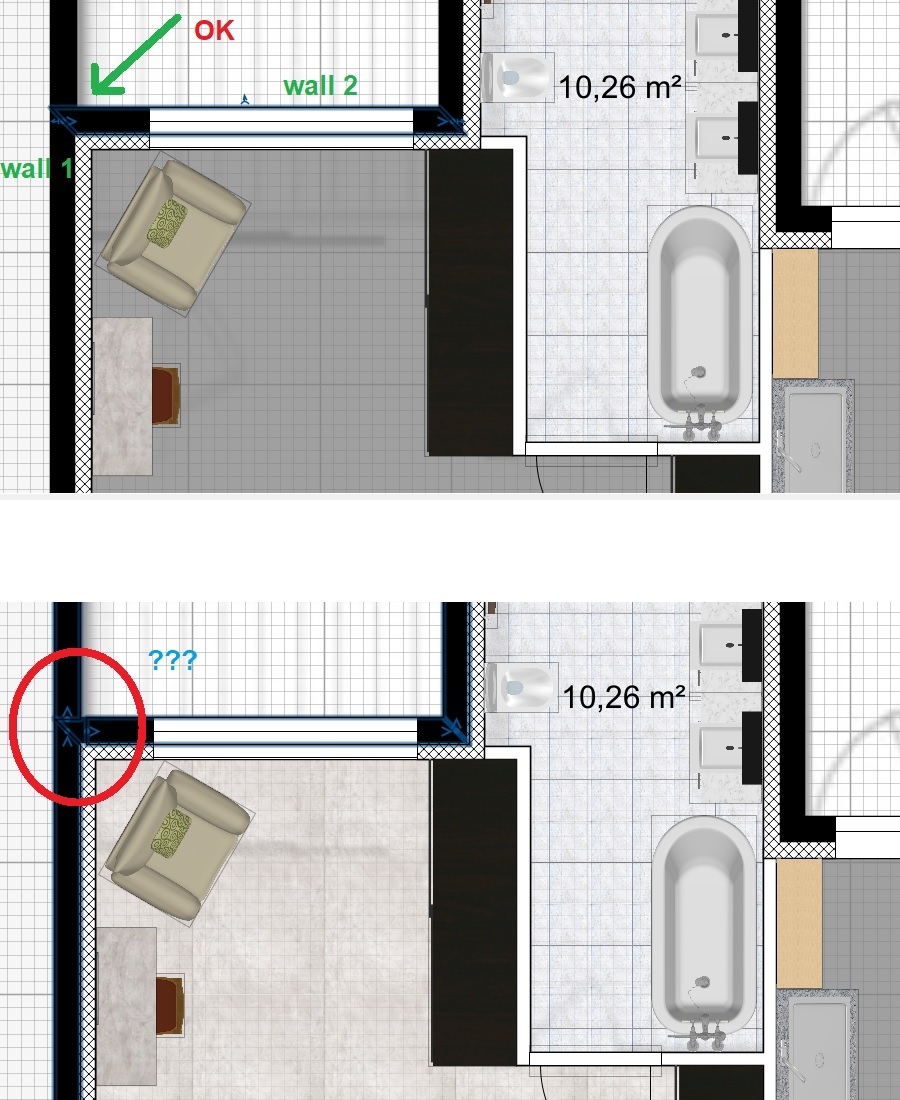
Walls 1 and 2 are joined.
I modify the room and after validation, a piece of triangular wall appears between walls 1 and 2!
The vertical wall does not change the bug.
Why ?


Up of the picture : before update

Down of the picture : after update

----------------

bug apparu (à 90%) sur les post 7.0 (après les versions 6.x) :
Les murs 1 et 2 sont joints.
Je modifie la pièce et après validation, un bout de mur triangulaire apparait entre les murs 1 et 2 !
Le mur vertical ne change rien au bug.
Pourquoi ?

wink
.
----------------------------------------
Evil progresses when good people do nothing!
---
SH3D 7.1 and nothing else - W11 64b in 4K

Posted by MOURET at Dec 23, 2022, 5:28:18 PM
Re: Sweet Home 3D 7.0
I am a beginner, someone would be available to help me understand how to put light on an object?

Posted by Puybaret at Jan 2, 2023, 5:43:50 PM
Re: Sweet Home 3D 7.0
What didn’t you understand in the description and the examples given in the first post of this thread?
----------------------------------------
Emmanuel Puybaret, Sweet Home 3D creator

Posted by enkonyito at Jan 13, 2023, 12:50:22 AM
Re: Sweet Home 3D 7.0
I had updated these light libraries to be compatible with the new version of Sweet Home 3D based on the provided library LightShapes.sh3f.

While doing some tests recently, I discovered an intriguing operation.

When I create a new file and save it with my new lights, the model material is light and the object emits light in the default photo panel.
When I close this file and open it again, the model material is default and the object does not emit any light in the default photo panel although its power is > 0.

Here is the information contained in the Home.xml file after saving the project:
<light id='light-1422e91d-a799-41fe-ad90-dc46b39de09e' catalogId='EnkoNyito#opaquePanel' name='Opaque panel' creator='Enko Nyito' model='1' icon='0' x=' 25.0' y='0.05' elevation='10.0' width='50.0' depth='0.1' height='100.0' modelSize='342' description='permanent_TriangleMeshLight type' dropOnTopElevation='-0.01' power='0.05'>
<lightSourceMaterial name='light'/>
</light>


With lights from the LightShapes.sh3f library, the model material is light and the object emits light in the default photo panel after reopening a project.
Its Home.xml file contains this information:
<light id='light-35ed9266-e2f8-4413-b267-4e2b292bf9bc' catalogId='Puybaret#lightPanel' name='Light panel' creator='Emmanuel Puybaret' model='1/lightPanel.obj' icon='0 ' x='25.0' y='0.0' elevation='10.0' pitch='1.5707964' width='50.0' depth='100.0' depthInPlan='0.0010043712' height='0.001' heightInPlan='100.0' modelSize='1096 'dropOnTopElevation='-999.99994' power='0.05'>
<lightSourceMaterial name='light'/>
</light>

----------------------------------------
EnkoNyito

Posted by enkonyito at Jan 14, 2023, 3:50:01 PM
Re: Sweet Home 3D 7.0
When a project is opened, the program calls the OBJLoader.java file to load the 3D scene.

With my new lights, the material of the first geometry is 'light' but the appearance of it is null so the function getAppearance(String material) returns 'default'.
----------------------------------------
EnkoNyito

Posted by Puybaret at Jan 16, 2023, 3:40:18 PM
Re: Sweet Home 3D 7.0
You forgot to add the property multiPartModel# set to true in PluginFurnitureCatalog.properties. By default, this property is false, meaning that all the files depending on the main 3D model file won't be saved (here, MTL files won't be saved, and only the OBJ file will be saved at root of the SH3D file).
----------------------------------------
Emmanuel Puybaret, Sweet Home 3D creator

Posted by enkonyito at Jan 17, 2023, 8:37:38 PM
Re: Sweet Home 3D 7.0
Indeed, for the material to be properly taken into account when reopening SH3D-7.0, the multiPartModel# property must be true and the OBJ and MTL files of the light must be in a separate folder from the PluginFurnitureCatalog.properties file.
----------------------------------------
EnkoNyito

Posted by YGYL at Feb 23, 2023, 7:28:48 AM
Re: Sweet Home 3D 7.0
The lightSourceMaterialName# property was added to PluginFurnitureCatalog.properties of SH3F furniture libraries to define the material(s) of shapes which should be used in a 3D model as light sources at the two best quality rendering levels, for example to define a light panel or a ceiling mini spot with a thin light surface.

Can you add a function to specify the brightness of this light-emitting material (recommended brightness). It can also be turned on or off by default. Avoid a light fixture made with this method, too bright or rendering too slow (crystal lights can be turned off directly)

Posted by Tutmozis at Nov 24, 2023, 11:31:39 PM
Re: Sweet Home 3D 7.0
What didn’t you understand in the description and the examples given in the first post of this thread?


Well, we are confused as newbies where to put that... at objects .mtl ? I would like my simple box what I use as ceiling to shine if possible... where to put that light command ?

#
# Generated by Sweet Home 3D - Sat Nov 25 00:26:22 CET 2023
# http://www.sweethome3d.com/
#

newmtl bottom
illum 2
Ka 0.4 0.4 0.4
Kd 1.0 1.0 1.0
Ks 1.0 1.0 1.0
Ns 128.0

newmtl top
illum 2
Ka 0.4 0.4 0.4
Kd 1.0 1.0 1.0
Ks 0.3 0.3 0.3
Ns 60.0

newmtl left
illum 2
Ka 0.4 0.4 0.4
Kd 1.0 1.0 1.0
Ks 0.3 0.3 0.3
Ns 60.0

newmtl right
illum 2
Ka 0.4 0.4 0.4
Kd 1.0 1.0 1.0
Ks 0.3 0.3 0.3
Ns 60.0

newmtl back
illum 2
Ka 0.85882354 0.85882354 0.85882354
Kd 0.85882354 0.85882354 0.85882354
Ks 0.46875 0.46875 0.46875
Ns 60.0

newmtl front
illum 2
Ka 0.4 0.4 0.4
Kd 1.0 1.0 1.0
Ks 0.3 0.3 0.3
Ns 60.0


Posted by Keet at Nov 25, 2023, 7:58:45 AM
Re: Sweet Home 3D 7.0
Why not add a lightpanel to the ceiling instead of the box (or to cover the bottom of the box)? That would be the easiest way.

If you really want to change a box into a light you don't change anything in the .obj or .mtl files. Their formats don't support properties for lights.
If you look a few posts back (enkoyito Jan 13, 2023, 1:50:22 AM) you see that the specific properties that make an object a light are in the Home.xml file. The Home.xml file is a file in the .sh3d zip file.

You can edit the Home.xml file but the correct way would be to add a box to a Furniture Library and set the properties for a light. After import of the Library the properties for a light will be taken from the PluginFurnitureCatelog.properties file in the Library so you can reuse the light box where ever you want.

But... you have essentially created another lightpanel, so why not use that in the first place? No need to reinvent the wheel smile


By-the-way 1: The latest version is 7.2, not 7.0.
By-the-way 2: You should have created a new thread for this question. If needed you could reference to this thread or even the post. With a new thread the essence (Q&A) of the post (lights) will be easier to find for other users.
----------------------------------------
Dodecagon.nl
1300+ 3D models, manuals, and projects

Posted by Tutmozis at Nov 25, 2023, 9:15:19 AM
Re: Sweet Home 3D 7.0
Why not add a lightpanel to the ceiling instead of the box (or to cover the bottom of the box)? That would be the easiest way.


Thanks for answer.

Yes I do that, but want to know where is the home.xml and how to do it :)

Posted by Keet at Nov 25, 2023, 10:22:48 AM
Re: Sweet Home 3D 7.0
Your .sh3d file is a zipped archive and the Home.xml file is one of the files in it. You can unzip the .sh3d file and edit the Home.xml file and then zip it again and rename .zip to .sh3d.

A light looks like this:
<light id='light-35ed9266-e2f8-4413-b267-4e2b292bf9bc' catalogId='Puybaret#lightPanel' name='Light panel' creator='Emmanuel Puybaret' model='1/lightPanel.obj' icon='0 ' x='25.0' y='0.0' elevation='10.0' pitch='1.5707964' width='50.0' depth='100.0' depthInPlan='0.0010043712' height='0.001' heightInPlan='100.0' modelSize='1096 'dropOnTopElevation='-999.99994' power='0.05'>
<lightSourceMaterial name='light'/>
</light>

Find your box in the Home.xml file, change "<pieceOfFurniture" at the start to "<light", and add the "power=" and "<lightSourceMaterial" parts. The name you use for the lightSourceMaterial is the material name you have for your box.
As I said before, it's better to go through a Furniture Library to avoid having to edit the Home.xml file. It could corrupt your whole project.
----------------------------------------
Dodecagon.nl
1300+ 3D models, manuals, and projects