Print at Dec 19, 2025, 6:19:04 AM
Posts: 16   Pages: 2   [ Previous Page | 1 2 ]
View all posts in this thread on one page
Posted by k005 at Aug 24, 2022, 9:53:35 AM
Re: Volume Plugin
I compiled it again. I copied it to the plugin folder. I ran sweethome3d. But it crashed... when I deleted the volumePlugin I created, it popped up.

I'm making a mistake on a small point, but I haven't found it yet.

Posted by Puybaret at Aug 24, 2022, 10:21:22 AM
Re: Volume Plugin
A JAR file is actually just a ZIP file. Could you list here its content with a ZIP utility?
----------------------------------------
Emmanuel Puybaret, Sweet Home 3D creator

Posted by k005 at Aug 24, 2022, 1:37:15 PM
Re: Volume Plugin
I am adding my work that caused the lock by archiving it. The compiled jar file is also included.


https://www.dosya.tc/server38/u4bxxl/VolumePlugin.rar.html

*****************************************************************


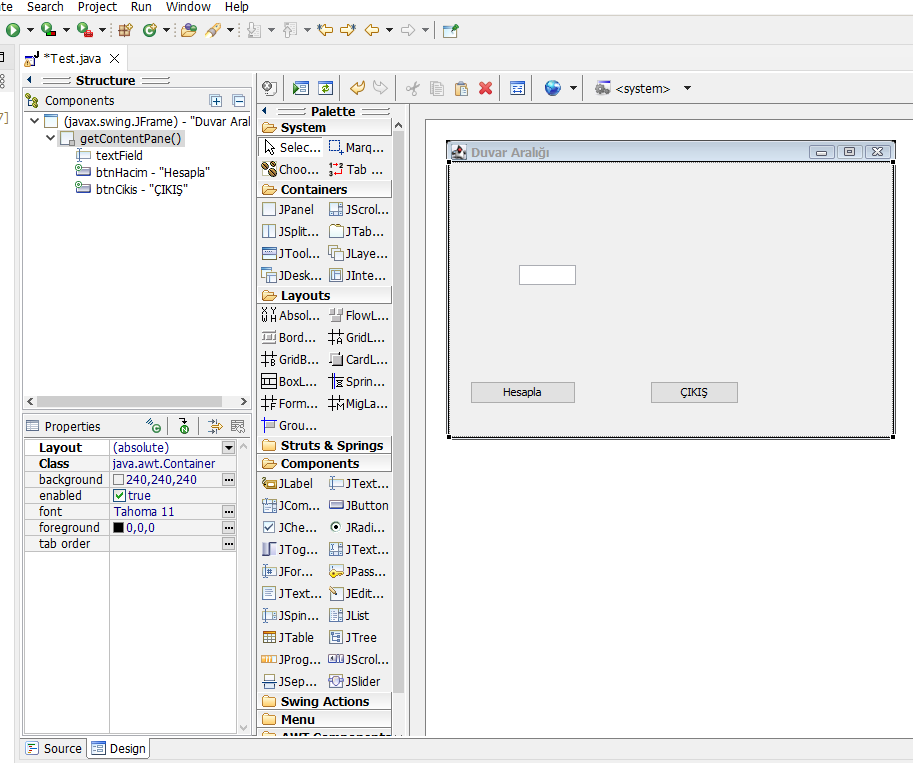
Actually, I just need an icon-shaped starter frame that is placed in the tools menu for now and added to the toolbar. like the frame I gave below.

how should i run it from Sweet Home. I will develop it later.

this will be the map to me...


Thank you.


Posted by Puybaret at Aug 24, 2022, 2:18:49 PM
Re: Volume Plugin
Your plug-in is correct but you compiled it with a more recent version of Java.
In the properties of your project, change the Compiler compliance level to 1.8.
----------------------------------------
Emmanuel Puybaret, Sweet Home 3D creator

Posted by k005 at Aug 24, 2022, 2:30:57 PM
Re: Volume Plugin
Ok. Thank you very much. Worked.

***

Can you send a sample project like in my second question?

I can also go through the volumePlugin... but it has menu placement. There is no toolbar!

Posted by Puybaret at Aug 24, 2022, 5:39:54 PM
Re: Volume Plugin
You could use the method showInputDialog in JOptionPane class (see tutorial here).
----------------------------------------
Emmanuel Puybaret, Sweet Home 3D creator

Posts: 16   Pages: 2   [ Previous Page | 1 2 ]