|
Sweet Home 3D Forum » List all forums » » Forum: Features use and tips » » » Thread: Pb on focus with 22h2 |
|
| Print at Dec 18, 2025, 1:35:54 PM | |
| Posted by bdfd at Oct 7, 2022, 4:46:33 PM |
|
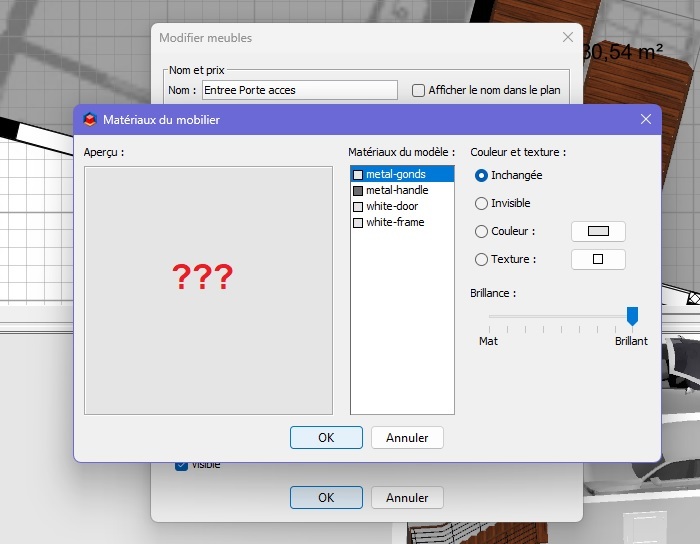
Pb on focus with 22h2 Hi, Since installing 22h2 (?), the view 3D of furniture doesn't appear. Object is visible when you go out an another soft (ge explorer) and go back into sh3d. Can you see/update this problem ? . ---------------------------------------- Evil progresses when good people do nothing! --- SH3D 7.1 and nothing else - W11 64b in 4K |
| Posted by bdfd at Oct 9, 2022, 8:43:16 AM |
|
Re: Pb on focus with 22h2 The furniture appears after 30 sec !!! . ---------------------------------------- Evil progresses when good people do nothing! --- SH3D 7.1 and nothing else - W11 64b in 4K |
| Posted by bdfd at Oct 19, 2022, 9:58:45 AM |
|
Re: Pb on focus with 22h2 Did you see the issue ? It's a true penality to use... Perhaps an evolution in java ? . ---------------------------------------- Evil progresses when good people do nothing! --- SH3D 7.1 and nothing else - W11 64b in 4K |
| Posted by bdfd at Oct 23, 2022, 7:24:29 PM |
Re: Pb on focus with 22h2Always none answer after 17 days ? . ---------------------------------------- Evil progresses when good people do nothing! --- SH3D 7.1 and nothing else - W11 64b in 4K |
| Posted by Puybaret at Oct 23, 2022, 9:00:07 PM |
|
Re: Pb on focus with 22h2 I didn’t find how to update to 22h2 ---------------------------------------- Emmanuel Puybaret, Sweet Home 3D creator |
| Posted by bdfd at Oct 24, 2022, 8:12:37 AM |
|
Re: Pb on focus with 22h2 I didn’t find how to update to 22h2 MDR, LOL ! 22h2 is the latest update of windows 11. . ---------------------------------------- Evil progresses when good people do nothing! --- SH3D 7.1 and nothing else - W11 64b in 4K |
| Posted by Puybaret at Oct 24, 2022, 9:59:31 AM |
|
Re: Pb on focus with 22h2 I know, but it's not proposed on the Surface I've got. I read some articles about how to force this update to be installed but it's not very tempting if at the end, I get a computer which will run too slow. ---------------------------------------- Emmanuel Puybaret, Sweet Home 3D creator |
| Posted by bdfd at Oct 24, 2022, 1:27:55 PM |
|
Re: Pb on focus with 22h2 I know, but it's not proposed on the Surface I've got. I read some articles about how to force this update to be installed but it's not very tempting if at the end, I get a computer which will run too slow. 2 choices for future: 1. ask to a friend 2. buy a new pc. . ---------------------------------------- Evil progresses when good people do nothing! --- SH3D 7.1 and nothing else - W11 64b in 4K |
| Posted by Puybaret at Mar 2, 2023, 1:36:00 PM |
|
Re: Pb on focus with 22h2 I tried to reproduce your issue, but didn't experience any problem under Windows 22H2. Would the 3D preview be updated when you resize the dialog box or select a material in the list? ---------------------------------------- Emmanuel Puybaret, Sweet Home 3D creator |
| Posted by bdfd at Mar 2, 2023, 5:09:50 PM |
|
Re: Pb on focus with 22h2 I tried to reproduce your issue, but didn't experience any problem under Windows 22H2. Would the 3D preview be updated when you resize the dialog box or select a material in the list? Always the same problem. The first object takes 20 to 30 seconds to appear. The following depends on their origin: 1. internal objects appear after 5 sec 2. objects imported after 10 sec. Resizing the window does not change anything. . ---------------------------------------- Evil progresses when good people do nothing! --- SH3D 7.1 and nothing else - W11 64b in 4K |
| Posted by Puybaret at Mar 3, 2023, 6:26:53 AM |
|
Re: Pb on focus with 22h2 And during these 30 seconds, are you able to select a material and change it? Said another way, does the whole program or only the 3D view seem to be blocked? ---------------------------------------- Emmanuel Puybaret, Sweet Home 3D creator |
| Posted by bdfd at Mar 3, 2023, 9:54:43 AM |
|
Re: Pb on focus with 22h2 And during these 30 seconds, are you able to select a material and change it? Yes.Said another way, does the whole program or only the 3D view seem to be blocked? only the 3D view. . ---------------------------------------- Evil progresses when good people do nothing! --- SH3D 7.1 and nothing else - W11 64b in 4K |
| Posted by Vinci68 at Mar 3, 2023, 11:08:33 AM |
|
Re: Pb on focus with 22h2 Maybe it has nothing to do with it but lately I had to uninstall and reinstall SH3D several times because the 3D display and the navigation between the tabs of the different floors of my house were blocked. (since 2 years I'm using SweetHome I never had any problem). I isolated the problem by re-installing the plugins one after the other and testing between each one. Everything worked fine until I reinstalled DimensionLines3D. And then everything froze again. So now I have to do without it (which I regret because it was very useful!!!) Maybe in your case this plugin brings you this problem ? I work under W10 x64 21H1 on an I5-8300 with 32Gb of ram and a NVidia GTX graphic card. |
| Posted by bdfd at Mar 3, 2023, 12:36:20 PM |
|
Re: Pb on focus with 22h2 It was an idea, but no ! I moved all plugin sh3p in other directory, and the problem goes on... Damned. . ---------------------------------------- Evil progresses when good people do nothing! --- SH3D 7.1 and nothing else - W11 64b in 4K |
| Posted by hanabi at Mar 4, 2023, 9:05:02 AM |
|
Re: Pb on focus with 22h2 Does your system use an Nvidia graphics driver? If so, try downgrading to an older version of the graphics driver. |
| Posted by Vinci68 at Mar 4, 2023, 4:29:41 PM |
|
Re: Pb on focus with 22h2 You are confused. The problems are with AMD Adrenaline drivers, not with NVidia drivers.. |
| Posted by hanabi at Mar 4, 2023, 11:50:28 PM |
|
Re: Pb on focus with 22h2 Ah yes that's right; I'm thinking of the display corruption problem, not slow 3D rendering. Apologies for the misdirection bdfd. When I had slow 3D rendering trouble previously it was because SH3D was using the CPU for rendering and not my computer's NVidia graphics card. The solution was to force SH3D to use the graphics card by adding an entry within NVidia Control Panel software (in the "Manage 3D settings") section. |
| Posted by bdfd at Mar 5, 2023, 6:38:03 AM |
|
Re: Pb on focus with 22h2 Hi, Well, it's not perfect but it's better ! Together, 7.1 and Nvidia panel reduce time. 1. for standard furniture : 3 to 5 sec 2. for imported furniture : 2 to 4 sec. We are on the way. . ---------------------------------------- Evil progresses when good people do nothing! --- SH3D 7.1 and nothing else - W11 64b in 4K |
| Posted by hanabi at Mar 5, 2023, 12:07:20 PM |
|
Re: Pb on focus with 22h2 Good to hear. It sounds like it had indeed switched to using the CPU for 3D for some reason. |
| Posted by MarioSambol at Jan 17, 2025, 10:50:28 PM |
|
Re: Pb on focus with 22h2 What kind of 3D object is it, how many polygons does it have? If it has a huge number of polygons, it is normal for it to load slowly. |
| Posted by MarioSambol at Jan 21, 2025, 12:46:08 AM |
|
Re: Pb on focus with 22h2 Sweet home 3D software like no other 3D software does not work well with unoptimized models with a huge number of polygons. The problem is not in the upgrade windows, rather the problem is in the model itself. |
|
|
Current timezone is GMT Dec 18, 2025, 1:35:54 PM |