 ROOF WINDOW / VELUX WINDOWS
good morning
i'm trying to find how to insert a ROOF WINDOW
i can find the velux object but I cannot get to change the angle
to make if fit the roof angle
any idea ?
thanks
|
Sweet Home 3D Forum » List all forums » » Forum: 3D models and textures » » » Thread: ROOF WINDOW / VELUX WINDOWS |
|
| Print at Aug 24, 2026, 11:19:14 PM | |
| Posted by besyag at Dec 2, 2022, 9:00:02 AM |
|
ROOF WINDOW / VELUX WINDOWS good morning i'm trying to find how to insert a ROOF WINDOW i can find the velux object but I cannot get to change the angle to make if fit the roof angle any idea ? thanks |
| Posted by dorin at Dec 2, 2022, 9:34:27 PM |
|
Re: ROOF WINDOW / VELUX WINDOWS Welcome on board! 1. You can't! Well, not really simple BUT it's possible like in this picture:  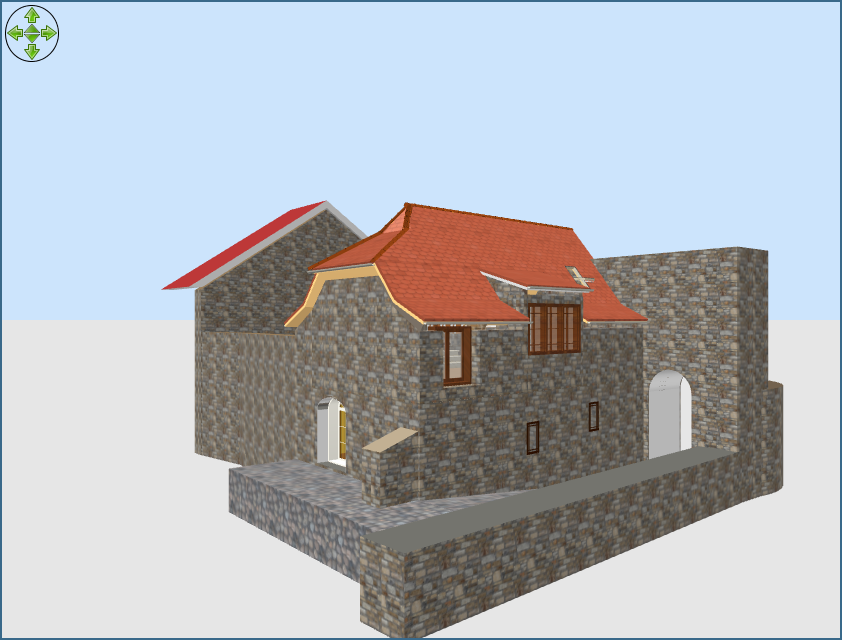  i can find the velux object but I cannot get to change the angle to make if fit the roof angle Export the window as object; Import it as furniture( NOT as doors&windows); Elevate it at 1m than rotate it how you like; IMPORTANT! Don't expect to act as a window in the wall. Will don't cut the necessarily hole in your roof. At this moment it can't even on my roof. ---------------------------------------- A computer program does what you tell it to do, not what you want it to do. Murphy's Law When all else fails, read the instructions. Murphy's Law If you don't like "AS IS", DIY. Dorin's law |
| Posted by sjb007 at Dec 3, 2022, 8:17:47 PM |
|
Re: ROOF WINDOW / VELUX WINDOWS An alternative is to draw your roof on it's side as a tall wall assuming the shape is fairly simple like a 45 degree pitched roof. Then you can insert window objects and have them snap in. I just used simple fixed windows as "velux". You then export the whole lot as an object, and reimport it as a new furniture object rotated into the correct orientation. If your windows are not symmetrical they will end up the wrong way round. You could fix this by doing an export, import as normal object, rotate object to correct orientation, export, import as a window before inserting into the walls. It is a bit long winded, and you have zero flexibility with the new furniture object. i.e. you couldn't move the "window" as it is now just geometry in the larger roof object in SH3D. |
| Posted by sjb007 at Dec 3, 2022, 8:43:33 PM |
|
Re: ROOF WINDOW / VELUX WINDOWS Holy cow! I just exported and reimported a side rotated velux, and the opening mechanism still worked. I tested adding it to a sideways on wall, and the snapping all worked. I did not expect that. But... Exporting the whole roof and reimporting it back in the velux windows didn't quite preserve their capabilities. The initial closed look is fine. The rotation is a strange twisting motion, not the tilt of a velux. I suspect the window export of a snapped and rotated at import object is messing up that openable mechanism. Also, trying to open one window opens both windows. (I added two to test this.) Still, the windows look good if you don't want to open and close them! |
| Posted by sjb007 at Dec 3, 2022, 8:51:59 PM |
|
Re: ROOF WINDOW / VELUX WINDOWS Well that is interesting. A single velux in the imported roof object works perfectly. So it the clash of having more than one opener mechanism in a single object that causes the problems. I've no idea how that could be fixed, but it is an interesting observation. |
| Posted by Keet at Dec 4, 2022, 11:30:56 AM |
|
Re: ROOF WINDOW / VELUX WINDOWS Also, trying to open one window opens both windows. (I added two to test this.)them! That's probably because both windows have the "sweethome3d_hinge_1_..." in it's object source. You could edit the OBJ file and change one of the window hinges to "sweethome3d_hinge_2_..." and change the movable parts of that window to "sweethome3d_opening_on_hinge_2_...".---------------------------------------- Dodecagon.nl 1300+ 3D models, manuals, and projects |
| Posted by Keet at Dec 4, 2022, 11:36:00 AM |
|
Re: ROOF WINDOW / VELUX WINDOWS The rotation is a strange twisting motion, not the tilt of a velux. I suspect the window export of a snapped and rotated at import object is messing up that openable mechanism. Most likely the export/import changed the direction of the hinge movement. It will take some experimenting but moving the "sweethome3d_hinge_1" string to a different side of the hinge part would solve that. I have encountered the same with hinges and changing the hinge side solved it.---------------------------------------- Dodecagon.nl 1300+ 3D models, manuals, and projects |
| Posted by sjb007 at Dec 4, 2022, 1:54:22 PM |
|
Re: ROOF WINDOW / VELUX WINDOWS As I said in my last post, a single window in the roof object behaves correctly, i.e. no twisting, opening in the correct manner. It is specifically adding multiple opening windows to the roof object that causes them to twist once they are exported and imported in the new orientation. Maybe my scatter of posts caused confusion about that. Very interesting info there Keet about the naming of the hinge objects. I should take a look at the obj file, because even if I can't move the location of the window after importing, being able to add and open multiple windows would still be a cool effect. |
| Posted by Keet at Dec 4, 2022, 2:01:32 PM |
|
Re: ROOF WINDOW / VELUX WINDOWS As I said in my last post, a single window in the roof object behaves correctly, i.e. no twisting, opening in the correct manner. It is specifically adding multiple opening windows to the roof object that causes them to twist once they are exported and imported in the new orientation. Object deformations are explained in this thread: http://www.sweethome3d.com/support/forum/viewthread_thread,8704_offset,8Maybe my scatter of posts caused confusion about that. Very interesting info there Keet about the naming of the hinge objects. I should take a look at the obj file, because even if I can't move the location of the window after importing, being able to add and open multiple windows would still be a cool effect. It also explains how to use multiple deformations in the same piece of furniture. ---------------------------------------- Dodecagon.nl 1300+ 3D models, manuals, and projects |
| Posted by sjb007 at Dec 4, 2022, 2:36:15 PM |
|
Re: ROOF WINDOW / VELUX WINDOWS Didn't even look at that thread  I just followed your simplified instructions, and now both windows hinge properly. Top man, Keet! |
| Posted by sjb007 at Dec 4, 2022, 2:47:10 PM |
|
Re: ROOF WINDOW / VELUX WINDOWS Hmmm. A feature request for the obj exporter would be to track hinges (or rails) and make sure they are unique within the export. i.e. if a hinge_1 already exists in a previous object, and the next object in the export also contains a hinge_1, then rename this next object to use hinge_n, where n is the next unused number. This would avoid the need to manually edit the files. |
| Posted by Keet at Dec 4, 2022, 5:05:10 PM |
|
Re: ROOF WINDOW / VELUX WINDOWS Hmmm. A feature request for the obj exporter would be to track hinges (or rails) and make sure they are unique within the export. i.e. if a hinge_1 already exists in a previous object, and the next object in the export also contains a hinge_1, then rename this next object to use hinge_n, where n is the next unused number. This would avoid the need to manually edit the files. Mmmm, and what if you want them to act as one hinge? The current way works just fine, you just have to be carefull when combining multiple hinges. What I do is just create a copy and edit it for the 'next' hinge and then combine them. This way you can easily keep track of the different hinges.Particularly handy when creating a dresser with 6 drawers  I just create a drawer, add the rail for deformation, and export the drawer including the rail. Import the first drawer to test. You can do that because the rail is included. If it's ok, copy the obj and mtl files and edit it for the next drawer. This is easy because you have just a single drawer to handle. When all are finished 'insert' them at the correct position into the base of your furniture and export the whole thing. You can't test the other drawers by themself because they don't have the first rail so wait until you have tem all together and they should work fine. ---------------------------------------- Dodecagon.nl 1300+ 3D models, manuals, and projects |
| Posted by sjb007 at Dec 4, 2022, 9:22:11 PM |
|
Re: ROOF WINDOW / VELUX WINDOWS Respectfully, I think that sounds like more of a corner case use than mine  I'm stumped why you would want to slide out all the drawers at once in say a 6 drawer unit. I'd also guess this only works if the rails are all oriented in the same direction too. To each their own, I suppose. |
| Posted by Keet at Dec 4, 2022, 10:28:36 PM |
|
Re: ROOF WINDOW / VELUX WINDOWS Respectfully, I think that sounds like more of a corner case use than mine A little misunderstanding: I don't want all drawers to open with the same movement. The dresser I created has all drawers open individually. I tried to explain how to go about combining different parts with each their own deformation into a single piece of furniture by editing their source before you combine. As you have found out combining identical objects can result in strange deformation movements when the angle changes. You would want to keep control over that yourself. Once you understand how it works it's pretty easy.I'm stumped why you would want to slide out all the drawers at once in say a 6 drawer unit. I'd also guess this only works if the rails are all oriented in the same direction too. To each their own, I suppose. ---------------------------------------- Dodecagon.nl 1300+ 3D models, manuals, and projects |
| Posted by sjb007 at Dec 4, 2022, 11:48:25 PM |
|
Re: ROOF WINDOW / VELUX WINDOWS Oh I understood how to edit and fix the issue. It's the previous message I seem to have misunderstood. And that's the thing. I don't get strange deformation when there is just a single hinge object in the export/import. I don't get strange deformation when following your explanation either. So for me it is far simpler all round to have the application take care of ensuring multiple objects with hinges do not use the same hinge number. The most trivial way is to use a generator to spit out an incrementing number every time a hinge/rail is encountered in the export process, and use that unique number for that rail/hinge. I raised the problem as #1147, although I um'd and er'd over whether it was a bug or an enhancement. |
| Posted by Keet at Dec 5, 2022, 9:00:41 AM |
|
Re: ROOF WINDOW / VELUX WINDOWS Oh I understood how to edit and fix the issue. It's the previous message I seem to have misunderstood. I explained how I created 6 separate drawers before integrating them in a dresser base because that makes handling a single deformation easy. Your proposal to automatically renumber deformations would make that impossible because, no matter what rail number I assign to a drawer, with integration they would be renumbered, most likely NOT in the order I want them to be. So at most it would have to be optional. The order and number is particularly important when you have chained deformations. And that's the thing. I don't get strange deformation when there is just a single hinge object in the export/import. I don't get strange deformation when following your explanation either. So for me it is far simpler all round to have the application take care of ensuring multiple objects with hinges do not use the same hinge number. The most trivial way is to use a generator to spit out an incrementing number every time a hinge/rail is encountered in the export process, and use that unique number for that rail/hinge. I raised the problem as #1147, although I um'd and er'd over whether it was a bug or an enhancement. Besides that it requires very complex code to keep the correct parts to the correct hinge with renumbering. It's not only the hinges themselves, it's also important that the parts that deform to a specific hinge stay connected to that hinge. The issue you raised is more about the change of a deformation itself. In your velux window example the angle of the window probably changes the direction of the hinge. From this blog post: The axis direction of the hinge x is guessed from the largest dimension of the global bounding box of the hinge parts. Thus, if the largest dimension of a hinge is its height, the axis will be vertical, if its largest dimension is its depth the axis will be horizontal in Y direction and if its largest dimension is its width the axis will be also horizontal but in X direction. Changing the angle of the window most likely changed what the largest dimension was and thus changed the deformation direction. Exporting, importing as non-window, change angle, exporting, and importing as window could have caused that.---------------------------------------- Dodecagon.nl 1300+ 3D models, manuals, and projects |
| Posted by sjb007 at Dec 5, 2022, 2:44:50 PM |
|
Re: ROOF WINDOW / VELUX WINDOWS Yeah, I'm understanding how the hinging gets messed up now. I can see a way to write a post process script that would fixup the hinges and rails, but there's a problem with delineating the objects in the exported file. For whatever reason SH3D does not export with "o" lines. It only uses "g" lines for the groups. So there is no way to tell one window object from another in the export. The objects are at least added in a serial fashion, so there is no intermixing of the objects' groups. Then there can also be multiple mesh groups with hinge_1 for example in a single object so it makes it tricky (but not impossible) to write a script. I think the logic would be something like: if hinge_1 has been used in an opening_on_hinge_1 and a new hinge_1 line is encountered, then this is a different hinge. (The multiple hinge_1 lines in a single object have so far always, all preceeded the opening_on_hinge_1 lines in my tests of the doors and windows. Ideally SH3D would add "o" to exports, and split into separate objects on imports where "o" is used. This would immediately fix the export/import workflow for these kinds of workarounds. In the absence of this, I might bash something together out of python (my poison of choice). This would also keep it a semi-manual, optional task. At the end of the day, I'm just scratching my own itch. |
| Posted by Keet at Dec 5, 2022, 3:45:45 PM |
|
Re: ROOF WINDOW / VELUX WINDOWS There's a wish in another thread to add the o line to object exports. Since this doesn't interfere with the g groups I assume that we will see that in one of the coming new versions. Currently I add the o lines manually if I need to bisect an object in Blender because that's a requirement to being able to bisect. Bisecting is one of the few things I can't do in SweetHome3D and I'm hoping that with the introduction of o lines this will become available in the future. What would make it perfect is if exports used the name you gave it in the plan for the o line (and not something like 'box'). HINT HINT, that's a big and important wish! That would make it much easier to distinguish between multiple objects in furniture. That would also make it a lot easier to create an auto number script if you wanted to. It still doesn't solve the changing directions but at least you can programmatically locate the parts that belong to a specific hinge without having to rely on the order of g lines. ---------------------------------------- Dodecagon.nl 1300+ 3D models, manuals, and projects |
| Posted by sjb007 at Dec 5, 2022, 7:25:57 PM |
|
Re: ROOF WINDOW / VELUX WINDOWS Yeah. That was me  https://sourceforge.net/p/sweethome3d/feature-requests/1084/ I also wrote a working patch attached to the feature request, that also included adding a "separator" character in the "o" line. And I wrote a patch for the blender legacy python obj importer so that objects with the seperator were grouped into collections in blender by elevation, levels and groups. Walls, ceilings and floors were grouped in their own blender collections too. Finally, groups were assigned to the blender objects as vertex groups. I didn't touch the SH3D import code though - I'm not a Java dev, so just doing the exporter was hard enough. If you go here you can see a screengrab of the blender patch hierarchy result: https://developer.blender.org/D16095 The blender guy wanted to re-do it in the C++ importer... <drums fingers>  |
| Posted by sjb007 at Dec 5, 2022, 7:33:06 PM |
|
Re: ROOF WINDOW / VELUX WINDOWS It still doesn't solve the changing directions but at least you can programmatically locate the parts that belong to a specific hinge without having to rely on the order of g lines. If both export and import paid attention to the o line, I think the hinges would not change direction, as I don't believe mechanisms in one object can affect the mechanism in another. It is just the loss of objects and "crushing" of the objects down to a single one in the export/import that cause the misbehaviour. |
| Posted by Keet at Dec 5, 2022, 9:12:09 PM |
|
Re: ROOF WINDOW / VELUX WINDOWS If both export and import paid attention to the o line, I think the hinges would not change direction, as I don't believe mechanisms in one object can affect the mechanism in another. It is just the loss of objects and "crushing" of the objects down to a single one in the export/import that cause the misbehaviour. followin the quote I posted earlier: The axis direction of the hinge x is guessed from the largest dimension of the global bounding box of the hinge parts. Thus, if the largest dimension of a hinge is its height, the axis will be vertical, if its largest dimension is its depth the axis will be horizontal in Y direction and if its largest dimension is its width the axis will be also horizontal but in X direction. If I read that correctly the direction is "from the largest dimension of the global bounding box of the hinge parts". I suspect what happens is when you combine two hinges into a single piece of furniture the bounding box changes in size because now two hinges set the bounding box. I suspect this because just last week I had this happening with two vertical cylinders on top of each other, each as a hinge for their own half circle turn table. Individually they worked fine but after combining and changing one hinge from 1 to 2 they turned wrong and I had to move the sweethome3d_hinge_ designator to the next g group of each cylinder to correct the deformation. The only reason I can guess at is that by combining the total height made for a different "largest dimension of the global bounding box of the hinge parts". I still have to experiment with defining hinges using sweethome3d_hinge_1_top and sweethome3d_hinge_1_bottom because from the thread explaining the hinges that should also work and will probably set the direction fixed between the two points. I think you're on the right track with using the o line. If the bounding box used for the direction calculation limits itself to the actual o part bounding box (for a single hinge) there's far less of a chance that the drirection changes. ---------------------------------------- Dodecagon.nl 1300+ 3D models, manuals, and projects |
| Posted by sjb007 at Dec 6, 2022, 12:55:36 AM |
|
Re: ROOF WINDOW / VELUX WINDOWS Ugh. The exporter checks for "valid" chars in the group name, but ignores the whole string if there is a single invalid char. Instead you end up with a number (i++) as the group name. Of course this breaks lots of things if the naming is part of a hinge/rail that gets reimported. It's a shame we only have the option to do this export/import malarky using the prehistoric obj format. |
| Posted by Keet at Dec 6, 2022, 7:15:00 AM |
|
Re: ROOF WINDOW / VELUX WINDOWS Ugh. The exporter checks for "valid" chars in the group name, but ignores the whole string if there is a single invalid char. Instead you end up with a number (i++) as the group name. Of course this breaks lots of things if the naming is part of a hinge/rail that gets reimported. Nothing wrong with the exporter checking for valid chars, I wouldn't have programmed it any other way if I had to do it. It's essential that you can rely on exporting an object that is not corrupted by invalid naming.It's a shame we only have the option to do this export/import malarky using the prehistoric obj format. Prehistoric? Hardly. Just try to implement the hinges/rails in any other format and have them retained when exchanging the object between Sweethome3D and Blender. It's open source, very generic, widely supported, and in a plain text format which allows easy editing. For software like Sweethome3D it's an almost perfect format. The only thing is that only a relatively small set of the features is implemented in Sweethome3D through it's user interface and export/import. For example the d for transparency and Ni for optical density (glass refraction!) properties should be made available through the user interface just like shininess. ---------------------------------------- Dodecagon.nl 1300+ 3D models, manuals, and projects |
| Posted by sjb007 at Dec 6, 2022, 10:47:21 PM |
|
Re: ROOF WINDOW / VELUX WINDOWS I'm cursed with only getting half the thought from my head to the screen. I don't have a problem with character validity checking. It is the action that is the problem. Better to remove, or change the problem character to an OK one. Currently export drops the entire name. Example: the "small window" model, a window (hinged), roller shutter (rail), and a roller shutter crank (hinged). The line: g sweethome3d_opening_on_hinge_2_Roller_Shutter_Crank_Cylinde.000fails because of the ".", and just becomes "15" or some such number. This breaks the hinging. It also makes it impossible to detect when hinge_2 was used, meaning you cannot watch for the hinge being redefined. .obj was first created around 1990. As far as I'm aware there is no body or organisation managing the spec. There doesn't even seem to be a golden source for the spec. It seems it has acreted additional features over time that as far as I can tell are adopted ad-hoc. Many libraries and loaders of varying feature sets, speed, and quality. Then there are all the programs that roll their own code to load/save. So yeah... I stick by prehistoric. There are people out there writing code for this spec where the coder is much fresher than the spec! So actions speak louder than words: 1. Amend my export patch to stop nuking the entire name. 2. Amend my export patch to make the hierarchy renaming an option. 3. Write a simple script to make the hinges not clash when exporting/importing. 4. (Stretch-goal) Change my export patch into a plugin. |
| Posted by dorin at Dec 7, 2022, 9:06:38 AM |
|
Re: ROOF WINDOW / VELUX WINDOWS From my point of view, at this moment, the problem could have an applicable solution: Note: the velux windows have to remain separate selectable objects. 1. Create roofs from walls and add windows as described above. 2. Make invisible all windows materials (not the entire object). Will remain holes in walls. 3. Select all and export/import roof. 4. Insert again the windows as objects (not as DoorOrWindow) and make them feet in roof holes. 5. Optionally you could than group roof with windows. I know it's not so simple and need a lot of work. Until we will have roofs objects which will act as actually walls (insert widows) we will have to wait. ---------------------------------------- A computer program does what you tell it to do, not what you want it to do. Murphy's Law When all else fails, read the instructions. Murphy's Law If you don't like "AS IS", DIY. Dorin's law |
| Posted by sjb007 at Dec 7, 2022, 3:14:52 PM |
|
Re: ROOF WINDOW / VELUX WINDOWS Hmmm. OK, so basically the hinging and rails are broken for any object where the hinge/rail component is rotated away from one of the world axis'. It seems the objects rotational transformation is not taken into account when moving the opening_on parts. Sometimes you're lucky and the hinge/rail lines up with a world axis in your model. If not, you get weird movements. I can see this even without doing an import/export: Add the "Small window" with shutter and crankshaft. Rotate it in the plan to 45 degrees. Then try and move the crank. It will snap to one of the world axis and move diagonal to the window frame. If I export/import it, for adding to a loft roof, it is worse, because now all three movable parts are not world axis aligned, and they all behave wrong. It is just a fluke that my method for constructing a loft roof with veluxes (once my script fixes the hinge/rail numbers) results in the velux hinges being world axis aligned, and they behave correctly. I think this needs raising as its own bug. |
| Posted by sjb007 at Dec 7, 2022, 3:37:21 PM |
|
Re: ROOF WINDOW / VELUX WINDOWS Raised bug #1150 |
| Posted by manu292 at Mar 23, 2026, 10:12:09 AM |
|
Re: ROOF WINDOW / VELUX WINDOWS Hey there! I'm new here. The "Generate Roof"- Plugin is great! But I have issues placing a roof window, although I follow this instructions: https://www.sweethome3d.com/support/forum/viewthread_thread,11330_offset,240 Whatever I do, the windows don't show up in the roof. Plugin Version: 5.1 (the newer versions throw error "cannot read field parent because comp is null") Roof windows 0.2 (tried 0.3) as well SH3D: 7.5.37 OS: Mac Sequoia 15.7.4 Thanks for your help! |
| Posted by dorin at Mar 23, 2026, 10:21:35 AM |
|
Re: ROOF WINDOW / VELUX WINDOWS There are two issues here: 1. Why aren't the latest versions of the plugin working? -Try running it in a terminal and post whatever appears there. -Install the latest free version (7.5) from this site and let me know if the same thing happens. 2. After positioning the roof windows, you need to select the roof and regenerate it. That’s how it works for now. ---------------------------------------- A computer program does what you tell it to do, not what you want it to do. Murphy's Law When all else fails, read the instructions. Murphy's Law If you don't like "AS IS", DIY. Dorin's law |
| Posted by Keet at Mar 23, 2026, 11:28:37 AM |
|
Re: ROOF WINDOW / VELUX WINDOWS There are two issues here: I suspect that these kind of problems will occur more often over time. Why? Because the plugin developers are working with the open source 7.5 version and not the closed source paid versions put out by spacemushrooms. I hope they are slowly beginning to understand that over time they will lose all plugin support.---------------------------------------- Dodecagon.nl 1300+ 3D models, manuals, and projects |
| Posted by manu292 at Mar 23, 2026, 3:04:22 PM |
 Re: ROOF WINDOW / VELUX WINDOWS
Hey there, thanks for your suggestions! 1. This is what it gave out: WARNING: An illegal reflective access operation has occurred WARNING: Illegal reflective access by javax.media.j3d.JoglPipeline (file:/Applications/Sweet%20Home%203D.app/Contents/app/j3dcore.jar) to method sun.awt.AppContext.getAppContext() WARNING: Please consider reporting this to the maintainers of javax.media.j3d.JoglPipeline WARNING: Use --illegal-access=warn to enable warnings of further illegal reflective access operations WARNING: All illegal access operations will be denied in a future release DynamicPluginLoader: plugin.classpath property not set java.lang.NullPointerException: Cannot read field "parent" because "comp" is null at java.desktop/java.awt.Container.addImpl(Container.java:1117) at java.desktop/java.awt.Container.add(Container.java:997) at ro.dorin.plugins.generateroof.UIpanel.<init>(UIpanel.java:42) at ro.dorin.plugins.generateroof.GenerateRoofPlugin.generateRoof(GenerateRoofPlugin.java:355) at ro.dorin.plugins.generateroof.GenerateRoofPlugin.generateNewRoof(GenerateRoofPlugin.java:283) at ro.dorin.plugins.generateroof.GenerateRoofAction.execute(GenerateRoofAction.java:89) at it.ld.sh3d.devtoolkit.DynamicAction.execute(DynamicAction.java:62) at com.eteks.sweethome3d.swing.HomePane$ActionAdapter.actionPerformed(Unknown Source) at com.eteks.sweethome3d.swing.ResourceAction$AbstractDecoratedAction.actionPerformed(Unknown Source) at java.desktop/javax.swing.AbstractButton.fireActionPerformed(AbstractButton.java:1967) at java.desktop/javax.swing.AbstractButton$Handler.actionPerformed(AbstractButton.java:2308) at java.desktop/javax.swing.DefaultButtonModel.fireActionPerformed(DefaultButtonModel.java:405) at java.desktop/javax.swing.DefaultButtonModel.setPressed(DefaultButtonModel.java:262) at java.desktop/javax.swing.AbstractButton.doClick(AbstractButton.java:369) at java.desktop/com.apple.laf.ScreenMenuItem.actionPerformed(ScreenMenuItem.java:129) at java.desktop/java.awt.MenuItem.processActionEvent(MenuItem.java:690) at java.desktop/java.awt.MenuItem.processEvent(MenuItem.java:649) at java.desktop/java.awt.MenuComponent.dispatchEventImpl(MenuComponent.java:375) at java.desktop/java.awt.MenuComponent.dispatchEvent(MenuComponent.java:363) at java.desktop/java.awt.EventQueue.dispatchEventImpl(EventQueue.java:775) at java.desktop/java.awt.EventQueue$4.run(EventQueue.java:721) at java.desktop/java.awt.EventQueue$4.run(EventQueue.java:715) at java.base/java.security.AccessController.doPrivileged(AccessController.java:391) at java.base/java.security.ProtectionDomain$JavaSecurityAccessImpl.doIntersectionPrivilege(ProtectionDomain.java:85) at java.base/java.security.ProtectionDomain$JavaSecurityAccessImpl.doIntersectionPrivilege(ProtectionDomain.java:95) at java.desktop/java.awt.EventQueue$5.run(EventQueue.java:745) at java.desktop/java.awt.EventQueue$5.run(EventQueue.java:743) at java.base/java.security.AccessController.doPrivileged(AccessController.java:391) at java.base/java.security.ProtectionDomain$JavaSecurityAccessImpl.doIntersectionPrivilege(ProtectionDomain.java:85) at java.desktop/java.awt.EventQueue.dispatchEvent(EventQueue.java:742) at java.desktop/java.awt.EventDispatchThread.pumpOneEventForFilters(EventDispatchThread.java:203) at java.desktop/java.awt.EventDispatchThread.pumpEventsForFilter(EventDispatchThread.java:124) at java.desktop/java.awt.EventDispatchThread.pumpEventsForHierarchy(EventDispatchThread.java:113) at java.desktop/java.awt.EventDispatchThread.pumpEvents(EventDispatchThread.java:109) at java.desktop/java.awt.EventDispatchThread.pumpEvents(EventDispatchThread.java:101) at java.desktop/java.awt.EventDispatchThread.run(EventDispatchThread.java:90) --> that's now with Version 7.5, not the latest version from App Store 2. with the latest version from App Store still it didn't work, but with the software version 7.5 + generate Roof 5.1 it is now working :) thank you! |
| Posted by dorin at Mar 23, 2026, 4:44:31 PM |
|
Re: ROOF WINDOW / VELUX WINDOWS Before jumping to conclusions, please also check the free 7.5+GR-5.2 combination (it’s the latest one, for now). Based on your results, I think it might be a compatibility issue with the iOS version. SH3D and some plugins try to maintain a consistent look with the operating system. Sometimes the operating system doesn’t follow its own principles. I could send you a version without the iOS-specific adaptations. It will certainly look ugly, but it will probably work. ---------------------------------------- A computer program does what you tell it to do, not what you want it to do. Murphy's Law When all else fails, read the instructions. Murphy's Law If you don't like "AS IS", DIY. Dorin's law |

|
Current timezone is GMT Aug 24, 2026, 11:19:14 PM |