|
Sweet Home 3D Forum » List all forums » » Forum: New versions » » » Thread: Staircase generator plug-in |
|
| Print at Dec 16, 2025, 6:26:00 PM | |
| Posted by Puybaret at Dec 13, 2022, 9:48:33 AM |
|
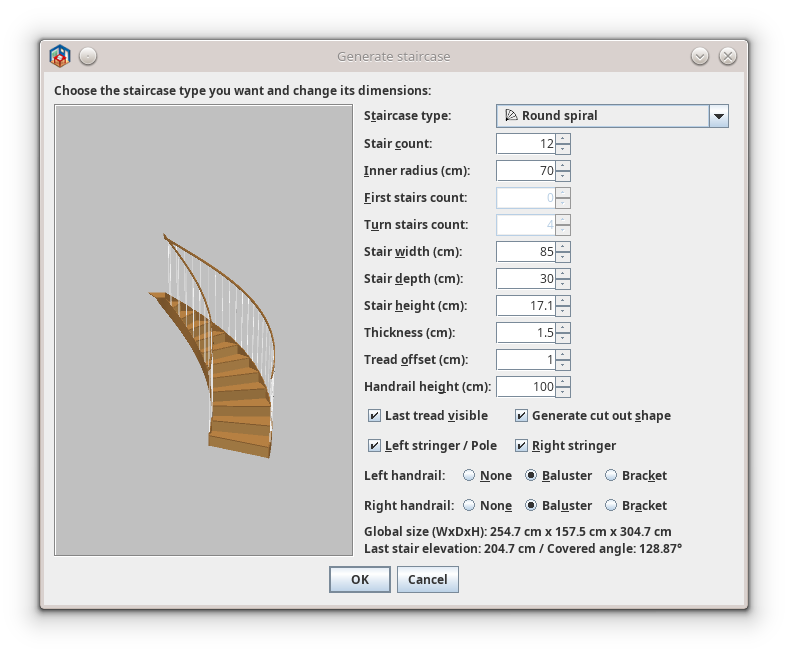
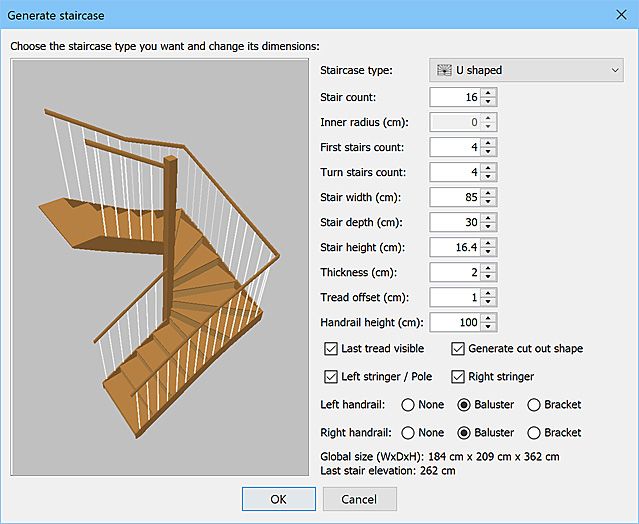
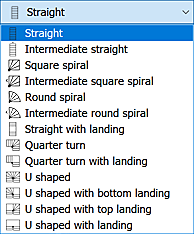
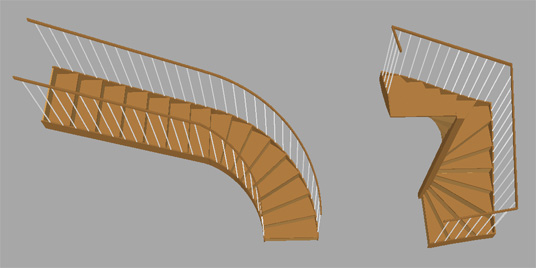
Staircase generator plug-in Hello, I'm very happy to present you the new staircase generator plug-in, one of the main missing plug-ins in Sweet Home 3D. The dialog box shown by its Tools > Generate staircase menu item allows you to create the staircase of your choice from the number of stairs you want and their size. It allows to quickly design straight staircases, square spiral staircases, spiral staircases, quarter turn staircases and U shaped staircases. For quarter turn and U shaped staircases, you may specify the number of stairs before the first turn and the number of stairs in the turn. If the model you want doesn't exist, you may also assemble basic staircases, the reason why intermediate straight, square spiral and spiral staircases are proposed. These models have longer handrails and connections at the end of their stringers to connect them to another staircase (actually, quarter turn staircases and U shaped staircases are themselves made of intermediate staircases). For example, this allows you to build a staircase with a round part or a triple winder staircase. The plug-in lets you choose whether you want some stringers and handrails at the left or right of the generated staircase, but you may also customize the look of the staircase afterwards by changing its materials as explained in this article. As texture coordinates are also generated with a little random offset for each tread and riser, you'll be able to get a nice wooden staircase where treads and risers don't repeat exactly the same texture. If you want turns in the opposite direction, just choose the Plan > Flip horizontally menu item or the Mirrored shape option in the furniture modification pane. Note also that the plug-in proposes a Generate cut out shape check box that you may unselect if the default generated cut out shape in the ceiling doesn't match the one you want. In that case, you'll have to draw a room at the upper level which will surround the staircase to get a correct hole. Finally, for users who want super precise values, keep in mind that the additional decimals you may enter in number text fields are not ignored but just not displayed once a value is entered (typing "2.61" will display 2.6 even if 2.61 is actually stored). When you need to compute some values like stair height or elevations, you may also find practical to enter a formula like "262 / 15", if you need to compute the stair height of a 262 cm high staircase with 15 stairs. I hope that you'll like this plug-in and that it will match most of your needs. Many thanks to the SNPS (French forensics) for their financial contribution to this plug-in. ---------------------------------------- Emmanuel Puybaret, Sweet Home 3D creator |
| Posted by VeroniQ at Dec 13, 2022, 12:47:40 PM |
|
Re: Staircase generator plug-in Yeah! A good solution for short staircases (half levels...) ! Thank you. |
| Posted by Keet at Dec 13, 2022, 1:15:35 PM |
|
Re: Staircase generator plug-in As texture coordinates are also generated with a little random offset for each tread and riser, you'll be able to get a nice wooden staircase where treads and risers don't repeat exactly the same texture. Now that's the kind of detail that makes the difference between just good and excellent!With the intermediate types we can now create almost any staircase. I know how much work it is to create a functional staircase (see my library with public staircases) so this should make it a lot easier in the future. Thank you for this well though out new plugin. ---------------------------------------- Dodecagon.nl 1300+ 3D models, manuals, and projects |
| Posted by JonnyD at Dec 13, 2022, 3:16:39 PM |
|
Re: Staircase generator plug-in Brilliant! Now…. If we can just have the ability to remove only the handrails etc on either the stairs or landing plus with or without the string , it’ll be perfect. This would give the ability to create just about anything. Well done! |
| Posted by sjb007 at Dec 13, 2022, 11:04:13 PM |
|
Re: Staircase generator plug-in Wow... I was reading this thinking, "I bet it can't reproduce my double quarter landing U shaped staircase." But it only blooming well did. I just had to set "Turn stairs count" to 1. Very nice! One small cosmetic detail is that the risers are sloped at the turns in both this method, and the "U shaped with top/bottom landing" options when "Turn step count" is set to 1. Looks a bit odd, but not a deal breaker. Some helpful native British Englishman suggestions: "Step count" rather than "Stair count" "First flight step count" rather than "First stairs count" (step is optional here) "Turn step count" rather than "Turn stair count" "Tread width" rather than "Stair width" "Tread depth" rather than "Stair depth" "Riser height" rather than "Stair height" "Nosing depth" rather than "Tread offset" "Left stringer / newel post" rather than "Left stringer / pole" Do I detect a little "official business"? So I take it the French police are using SH3D in crime scene presentations or something like that? Cool! |
| Posted by sjb007 at Dec 13, 2022, 11:09:45 PM |
|
Re: Staircase generator plug-in One small cosmetic detail is that the risers are sloped at the turns in both this method, and the "U shaped with top/bottom landing" options when "Turn step count" is set to 1. Looks a bit odd, but not a deal breaker. And I of course meant to say that the stringers were sloped, not the riser. No matter how many times I check before posting... ![]() |
| Posted by crackwood01 at Dec 14, 2022, 12:14:27 AM |
|
Re: Staircase generator plug-in Donated as a THANK YOU!! |
| Posted by Vinci68 at Dec 14, 2022, 11:15:32 AM |
Re: Staircase generator plug-inMerci et encore... merci. Vraiment du bon boulot et un plugin oh combien utile ! La demande de JonnyD ne me parait pas inintéressante, ce pourrait être une évolution utile, mais sans être indispensable... |
| Posted by Puybaret at Dec 14, 2022, 11:32:49 AM |
|
Re: Staircase generator plug-in Thanks for your feedbacks and Kevin, for your donation. @Keet Your comments from someone who also spent a lot of time on designing staircases 3D models are really appreciated. If we can just have the ability to remove only the handrails etc on either the stairs or landing plus with or without the string , it’ll be perfect. I hesitated to use some different material names for each part of the handrails and balusters, but for U shaped staircases, it would make many materials with the risk of confusion for beginners. Maybe, I could add an option for a limited list or a full list of materials.@sjb007 Thanks for the translations. As English style used in Sweet Home 3D is more American English than British English, do you think it would be the same in American English? One small cosmetic detail is that the stringers are sloped at the turns in both this method, and the "U shaped with top/bottom landing" options when "Turn step count" is set to 1. I agree this is a little odd, but it's for aesthetic reasons so the stringers look better connected and more continuous. Otherwise I could have added a pole like in the U shaped with landing staircase.Do I detect a little "official business"? So I take it the French police are using SH3D in crime scene presentations or something like that? Cool! Yes, the French police have used Sweet Home 3D to model crime and road scenes for a few years, and they agreed to contribute to some improvements and additional 3D models. See this article and their interview (in French).---------------------------------------- Emmanuel Puybaret, Sweet Home 3D creator |
| Posted by Keet at Dec 14, 2022, 12:46:26 PM |
|
Re: Staircase generator plug-in I hesitated to use some different material names for each part of the handrails and balusters, but for U shaped staircases, it would make many materials with the risk of confusion for beginners. Maybe, I could add an option for a limited list or a full list of materials. Better a long list than not having the option. That's why I did this with the public staircases I published. With those you can even differentiate between the first and second landing and choose two different baluster types (panels or glass). This is important for the different positions where the staircase is placed against a wall or not. Sure, it's a long list of options but you don't see that in the plan, only when modifying the textures. It's not about being able to set a different color or texture, it's required to allow making a part invisible, that's important.I agree with the name changes sjb007 proposed. Specifically because generally "Stairs" is considered the complete staircase and not a part of it. The proposed names are less confusing. Here's a diagram with (US) part names for a staircase: https://www.stair-parts.com/parts-of-a-stairc...list-of-stair-part-names/ Landings can also be called platform. Could you share how to set randomized coordinates for the textures as you did for the threads and risers? I wanted to do that for the public staircases I created but didn't want to have a property for each separate thread and riser. That would make the material list a 'little' too long (although it would allow to create rainbow steps )---------------------------------------- Dodecagon.nl 1300+ 3D models, manuals, and projects |
| Posted by Mike53 at Dec 14, 2022, 1:47:01 PM |
|
Re: Staircase generator plug-in Very Nice, excellent work Emmanuel, thank you :) |
| Posted by sjb007 at Dec 14, 2022, 4:14:31 PM |
|
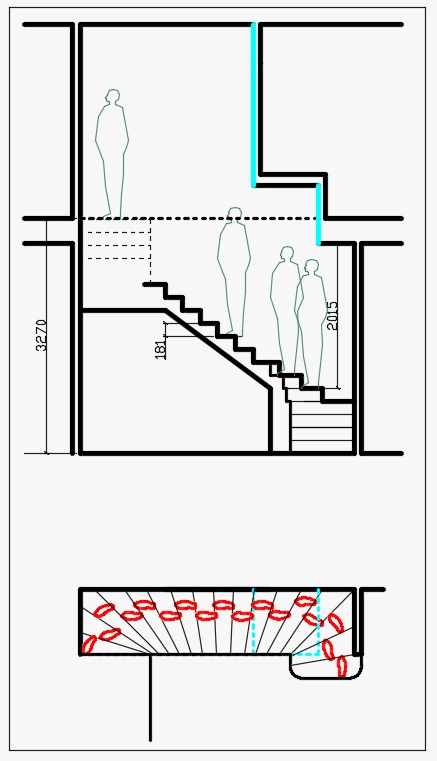
Re: Staircase generator plug-in re: American vs. British English As far as I'm aware we use the same naming. I also double checked my naming before posting (always important ) and I didn't notice any differences between how the US and UK named these parts. In truth, I did pay more attention to UK based pages though. Keet agrees with me though, and that is money in the bank! For the stringers, in the special case of turn steps=1, the outside stringers at the quarter turn should really be level. For me the nicest look would be to extend the upper flights stringer downwards to the same level at the turns step, so most of the top of the riser is level with the quarter turn step, with just a little triangle where it joins the upper flight. Hopefully that makes sense. Maybe this would be better handled in the "U shaped with top landing" entries. But if so, could we also have a "U shaped with top and bottom landing" option? And while I'm thinking of things it would be cool if the settings for the stair are stored in the created object, so you could reopen the dialog, tweak the setting for that stair object, then update/replace it. This would allow easier experimentation. I found it hard to configure an exact 180 degree spiral for example.This one is a real stretch, but here goes: It would be amazing if you could draw lines with a configured height above the steps pitch rising from the noses of the steps. Here's a diagram of the minimum headroom requirement in the UK. Being able to visualise this would really help in redesigning awkward buildings, (i.e. like mine.) This image is from this nice page that summarises the UK regs. From there, another idea would be if the pitch in degrees could be displayed at creation time as it is mandated to be no greater than 42 degrees. Maybe even the ability to set limits on the configured values (or calculated figures) so that the program could warn you if the staircase is not permitted. No collision detection style stuff, just if x < value < y then mark value in red type thing. i.e. our tread depth must be at least 220mm and our riser height can be no greater than 220mm. Still with me? Looking at that page I have just spotted a possible change in wording. Stair/Tread depth would actually be Going and Step/Riser height would just be Riser. However, I don't think the US use Going, and these are probably less confusing left as Tread depth and Riser height. |
| Posted by Keet at Dec 14, 2022, 4:40:20 PM |
|
Re: Staircase generator plug-in And while I'm thinking of things That would be a great advantage while designing the stairs. It's something I also wish could be done with the Generate 3D Shape tool: right click the shape and read it back into the tool window. For the Staircase Generator it might be even more desirable. it would be cool if the settings for the stair are stored in the created object, so you could reopen the dialog, tweak the setting for that stair object, then update/replace it. This would allow easier experimentation. I found it hard to configure an exact 180 degree spiral for example.Maybe the best option is to have a function to save the configuration to a file and have the option to read back such a configuration (i.e. save as <staircasename>.scc StairCaseConfig). Such a workflow could be used for similar generators as well. Regulations differ per country/state so it's impossible to incorporate them by default. There are even different rules depending on the place and function of the stairs. I did some heavy research when I designed my public staircases and I tried to stay as close as possible to the most common regulations for public staircases, which differ greatly from the regulations for home staircases. I suggest that anyone who wants to stay close to the regulations for his country to just look them up and use them as a guide line to create the staircase. The most important ones are min/max sizes of threads and risers, the min/max depth of the staircase for a set elevation (i.e. the number of threads before a landing is required). One 'advise' for public staircases I didn't follow was adding a nose that extends over the previous thread. That's not advisable for public staircases for safety reasons. That's also why you can make them invisible ![]() As it is the Staircase Generator plugin is great. Any finetuning can only make it better. ---------------------------------------- Dodecagon.nl 1300+ 3D models, manuals, and projects |
| Posted by ndorigatti at Dec 15, 2022, 10:30:24 AM |
|
Re: Staircase generator plug-in Wow, Amazing! I have to be honest, I'm not using SH3D since months, I do have to try this one. For my use case, I have a semi stair (0 to 150cm) that connects like an "S", i'll have to try how the plugin behaves (i did on my self with blender months ago). My stair is white steps-structure + glass wall handrail, so will not be exact for sure, but i'll try to do a test! |
| Posted by Puybaret at Dec 15, 2022, 6:07:14 PM |
|
Re: Staircase generator plug-in I might provide a longer list of materials in a coming version since some of you think it's really necessary. I'll update the translation at that moment. Could you share how to set randomized coordinates for the textures as you did for the threads and risers? Source code is included in the plug-in so you can have a look by yourself. It's just a random offset added to x and y texture coordinates, a different offset being drawn for each tread and riser. In Sweet Home 3D, you can change the texture offsets in the texture modification dialog box and in Blender, you can move texture coordinates in UV editor yourself but in both cases, it won't be different for each staircase. If you want to configure the size of a spiral staircase, you can check the angle covered by the staircase directly in the plug-in dialog box. It's written after the dimensions label and changing the stair/tread depth will change this angle. As finding the right value is a boring try and check process, I wondered if I should add buttons beside the depth field to compute the depth for 90° and 180° angles. If you want a staircase with top and bottom landings, just select a U shpaed staircase type and set the Turn stairs count / Turn step count to 1. About storing the staircase data to make it editable, I'm not really found of this at the moment. In case you didn't pay attention to it, the last entered values in the plug-in are kept until you quit the program, making it easy to update the last generated staircase by deleting it and opening the plug-in dialog box again. Storing entered values could be done simply with properties, but being able to reuse these values for each staircase would imply either an additional Modify staircase menu item, or modifying them from the current furniture modification dialog box, something which is not possible in the current version of Sweet Home 3D. I'm thinking about adding the ability to change the existing user interface from a plug-in, but fear it might get dangerous and provoke some instabilities. Maybe, just proposing an additional menu item in the contextual menu would be sufficient but many people don't use contextual menu (particularly under macOS). But proposing this additional contextual menu item implies modifications in Sweet Home 3D too. Adding information about the slope or pitch angle shouldn't be difficult except that this angle varies along square spiral staircases, but we could display an average angle for them. Taking into account regulations is probably out of reach just because regulations are different from a country to the other, as Keet noticed also. ---------------------------------------- Emmanuel Puybaret, Sweet Home 3D creator |
| Posted by Keet at Dec 15, 2022, 9:05:29 PM |
|
Re: Staircase generator plug-in About storing the staircase data to make it editable, I'm not really found of this at the moment. I'm aware of that, it's the same with the Generate 3D Shape tool. I use that tool frequently because you can create nice cut corners instead of butting two box shapes together. Texturing looks much better that way. And I save the data for shapes.... by making a screenshot of the tool window In case you didn't pay attention to it, the last entered values in the plug-in are kept until you quit the program, making it easy to update the last generated staircase by deleting it and opening the plug-in dialog box again. It's a clumsy way but the only thing available at the moment. Saving the data is one of the things that makes the Generate Terrain plugin so useful. You can delete the terrain object, select the room, and make further changes. I don't think saving the source data in that way would work for shapes and staircases but I see it like importing an object, only in the tool window, not in the plan. I haven't looked at the source code yet but I'm willing to bet that if the generated object has detailed naming you might even have enough for a clean re-import. Something to think about because eventually there will come a next generator and a standardized way to re-import generated objects back into the generator would be a good thing for maintainability. For now screenshots work too and for staircases that's not a problem because you usually are creating a single staircase. I'd much sooner want it for the shapes because I use multiple shapes for combinations so the data of the last shape is often useless. ---------------------------------------- Dodecagon.nl 1300+ 3D models, manuals, and projects |
| Posted by sjb007 at Dec 15, 2022, 11:49:36 PM |
|
Re: Staircase generator plug-in If you want a staircase with top and bottom landings, just select a U shaped staircase type and set the Turn stairs count / Turn step count to 1. Yeah. That's what I did. I just thought the omission of a top and bottom option was strange. Now thinking about it, I see why the options you have were needed. Those couldn't work with the U type. Adding information about the slope or pitch angle shouldn't be difficult except that this angle varies along square spiral staircases, but we could display an average angle for them. θ = arctan (riser height/tread depth) I don't see the need to complicate it any more than that. Taking into account regulations is probably out of reach just because regulations are different from a country to the other, as Keet noticed also. I think there will be a lot of common basic rules though. Max pitch. Min tread depth/width. Max riser height. Max steps in a single flight (i.e. between to landing zones). Min nosing. These could all be simple numerical min/max values that the user can configure for their own locale. Sure, the head height one was a bit more exotic, but I did say it was a stretch ![]() One minor side niggle with the current version is the tread thickness maxing out at 30 mm. It is possible to approximate an open tread staircase by hiding the risers, but the 30 mm max tread depth means you can't emulate the kind of modern thick block floating staircase. A look at the code looks like this is an arbitrary figure you chose that felt right, but perhaps it is a limit forced by the code. It'd be nice to have the option to go higher. Are you happy to accept patches to this plugin that add any of these things? |
| Posted by dorin at Dec 17, 2022, 11:14:31 AM |
|
Re: Staircase generator plug-in Many thanks for this Christmas present ![]() I have to thank you for at least one reason: - You've save me for a lot of work! BUT "No good deed goes unpunished!" So: 1. About regulations: 1.1. The local regulations have to be known and respect by the locals. That's the way a society works. 1.2. We have to respect also some generals rules (mathematics, ergonomic, etc.). There is some ideal standards and there are some recommendations when you input some custom value: Recommendations: Deviation from the sufficient comfort level formula 49,49 % We recommend to increase the amount of steps 2 Stair depth is sufficient Not an ideal stair angle (slope) 29,1° , less 30° We recommend to shorten the overall run X to 49 mm Or use different dimensions for your staircase Uncomfortable staircase Something similar could be shown in plugin. Warnings not limitations! 2. About limitations: 2.1. The tread thickness maxing out at 30 mm it's not enough but not more than 60 mm. 2.2. The stair height has to be limited at max. 40 cm. More than that you have to climb not to step. 3. About properties: 3.1. From my side could be good to have an Modify stairs entry active when a staircase generated with this plugin are selected. 3.2. On this new window we could personalize some parts with aid of some specific library (hand rails, balusters, several types of steps) 3.3. If we have this kind of approach I could (I really want to) use it on Generate Roof for similar purpose. 4. About Look & feel: 4.1. It's an very old problem: all staircases looks unreadable in 2D plan regardless of the texture or color you use. 4.2. An suggestion is to add some black edges OR to have an more performant image generator. If you don't sleep already, I wish You all a Happy New Year! ![]() ---------------------------------------- A computer program does what you tell it to do, not what you want it to do. Murphy's Law When all else fails, read the instructions. Murphy's Law If you don't like "AS IS", DIY. Dorin's law |
| Posted by captaincook at Jan 13, 2023, 5:18:39 PM |
|
Re: Staircase generator plug-in Bonjour Emmanuel. C'est par hasard que je viens de découvrir ce nouveau sujet créé par vous. Comme l'a écrit Dorin, c'est un beau cadeau de Noël que vous nous faites là , tant il était difficile sans cette aide de créer l'escalier correspondant à son besoin personnel. C'est un nouveau gros plus qui aidera très certainement nombre d'utilisateurs de SHW3. Je vais me dépêcher d'apprendre à me servir de ce super plug-in. Un grand merci à vous et une excellente nouvelle année. ![]() |
| Posted by captaincook at Jan 14, 2023, 2:24:14 PM |
|
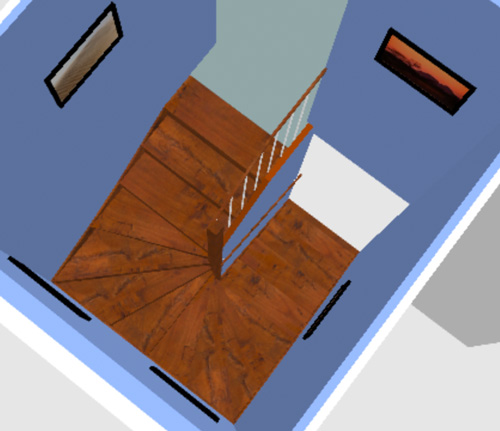
Re: Staircase generator plug-in Bonjour Emmanuel. Alors j'ai testé ce super plugin et j'avoue qu'il est très pratique, tant il y a de possibilités de modifier les différentes dimensions que celles permettant de modifier l'aspect général (contre marches ou pas, rambardes, limon, etc...). Une petite remarque cependant concernant l'escalier demi tournant. On peut modifier le nombre de premières marches mais ça modifie d'autant celles d'arrivée. Il reste donc symétrique. Chez moi, j'ai un escalier du même type (celui couleur bois rouge) mais avec moins de marches du côté départ que du côté arrivée sans que ça augmente le nombre de marches au tournant. Il est donc asymétrique. ![]() Ci dessous les caractéristiques de celui couleurs claires. ![]() Pourrait il être possible alors de pouvoir aussi choisir le nombres de marches d'arrivée ? Quoiqu'il en soit, c'est super. Encore merci pour votre travail. |
| Posted by Puybaret at Jan 16, 2023, 5:32:43 PM |
|
Re: Staircase generator plug-in Special cases can be created by assembling intermediate staircases. For example, if you need a handrail with brackets along a wall then a handrail with a balluster, you can assemble an intermediate straight staircase, two intermediate square spiral staircases and a simple straight staircase. Happy New Year to you all ![]() ---------------------------------------- ---------------------------------------- Emmanuel Puybaret, Sweet Home 3D creator |
| Posted by captaincook at Jan 17, 2023, 4:20:32 PM |
|
Re: Staircase generator plug-in Bonjour Emmanuel. Et bien j'ai suivi vos conseils à la lettre et le résultat est pratiquement identique à mon escalier d'origine. J'ai simplement recopier la rambarde d'origine sur le nouveau. ![]() Bonne journée et encore un grand merci. |
| Posted by Keet at Mar 11, 2023, 7:31:08 PM |
|
Re: Staircase generator plug-in The staircase generator sets the system PC user as the creator of the generator staircase. This is NOT something you want to happen if you share your created home here on the site. I suggest that the generator dialog includes a field to set the creator name. Oh, and the Roof generator does the same. Something for Dorin to fix ![]() ---------------------------------------- Dodecagon.nl 1300+ 3D models, manuals, and projects |
| Posted by Keet at Mar 12, 2023, 11:26:40 AM |
|
Re: Staircase generator plug-in Daniels118 found the source of the problem: HomePieceOfFurniture roofPiece = new HomePieceOfFurniture(new CatalogPieceOfFurniture(null, roofName, null, iconContent, modelContent, size.x, size.z, size.y, 0, true, null, System.getProperty("user.name"), true, null, null));(In the roof generator thread: https://sweethome3d.com/support/forum/viewthread_thread,11330_offset,150#57817 ) Dorin tested with replacing the value with null which worked and will be avialable in the next update. Maybe the same solution could be used for the roof generator. ---------------------------------------- Dodecagon.nl 1300+ 3D models, manuals, and projects |
| Posted by Puybaret at Mar 12, 2023, 10:19:25 PM |
|
Re: Staircase generator plug-in I consider that when you want to share a model, you prefer to have some kind of credit. If you fear your login may be disclosed, just edit the OBJ file and replace your login by whatever you want. ---------------------------------------- Emmanuel Puybaret, Sweet Home 3D creator |
| Posted by Keet at Mar 13, 2023, 8:10:15 AM |
|
Re: Staircase generator plug-in I consider that when you want to share a model, you prefer to have some kind of credit. Sorry, but I see that the other way around: never disclose a login name, it's a security leak. In many cases it will not be the name you want to use to get credit with anyway. If I want credit under a specific name I can edit the object file to insert that name but I don't want to edit EVERY object I want to share, and again with updates.If you fear your login may be disclosed, just edit the OBJ file and replace your login by whatever you want. My username is different on PC and laptop and none are 'Keet', the name I would use to get credit for a shared object. Similar situations will go for most users I believe. To explain the severity of the problem besides it being a security leak: For several years now I am creating dozens of different houses for a valley/island with most of the furniture, doors, windows, etc. custom made. This problem means I will have to edit every single house. When I have shared the projects (in a year or two) I will have to do all of that again every time I have updated houses and share again. I'm a software developer. I can create a script or program to run over all houses and do the editing but most other users will not be capable to correct something that the software shouldn't have done in the first place. It's also easy to forget such a last run over the projects before sharing. If I ever disclosed usernames in software output I would be out of business, please change this to something else. The most perfect way would be to have a preference setting where you can set a name for credit in exports but anything other than a login name would do. Changing 'System.getProperty("user.name")' to '"creator"' is probably the easiest bug fix you have ever done ![]() ---------------------------------------- Dodecagon.nl 1300+ 3D models, manuals, and projects |
| Posted by Puybaret at Mar 13, 2023, 4:09:54 PM |
|
Re: Staircase generator plug-in As some other plug-ins may use this way of doing and you don’t want it, you could try to set the user.name property to another value with the Java option -Duser.name=myname (this option can be set using the same way as the -Xmx option used to increase memory and explained in the FAQ). This should fix this way of doing that you consider as a security leak. ---------------------------------------- Emmanuel Puybaret, Sweet Home 3D creator |
| Posted by Keet at Mar 13, 2023, 6:09:29 PM |
|
Re: Staircase generator plug-in As some other plug-ins may use this way of doing and you don’t want it, you could try to set the user.name property to another value with the Java option -Duser.name=myname (this option can be set using the same way as the -Xmx option used to increase memory and explained in the FAQ). That works! (Although I'm still of the opinion that it's a serious security leak that should not have been introduced in the first place.)This should fix this way of doing that you consider as a security leak. I also found a second way around this which might be usefull for other users: Use the furniture library editor for every single object you create where you can set the creator name for each object. Once you add furniture in your plan that is imported through a furniture library the name is used as set in the library. This also allowes to use multiple different creator names if you wish to do so. ---------------------------------------- Dodecagon.nl 1300+ 3D models, manuals, and projects |
| Posted by Tungmeister at Jul 29, 2023, 9:34:43 AM |
|
Re: Staircase generator plug-in I might provide a longer list of materials in a coming version since some of you think it's really necessary. I'll update the translation at that moment. Could you share how to set randomized coordinates for the textures as you did for the threads and risers? Source code is included in the plug-in so you can have a look by yourself. It's just a random offset added to x and y texture coordinates, a different offset being drawn for each tread and riser...Could you help me remove the random values please? My stairs have a stair runner on them so I need the texture to be uniform across all the steps. I downloaded the source and replaced the random values with 0s however after compiling and adding the plugin sweethome just hangs on the splash screen and I can't work out what I'm doing wrong. |
| Posted by Puybaret at Jul 29, 2023, 6:47:31 PM |
|
Re: Staircase generator plug-in Did you compile the plug-in with Java 8 or options to generate Java bytecode compatible with Java 8 (or Java 11 or 15 if you use Sweet Home 3D with those versions)? You could also create the stair runner with a smaller staircase without stringers and handrails. Just elevate it a bit to make it appear on top of the stairs of the main staircase, like in the following example. ![]() ---------------------------------------- Emmanuel Puybaret, Sweet Home 3D creator |
| Posted by Tungmeister at Jul 30, 2023, 9:11:05 AM |
|
Re: Staircase generator plug-in Thanks for the help, it was the java version that was the issue. It's working perfectly now (though I need to adjust my texture a bit) ![]() |
| Posted by crackwood01 at Aug 8, 2023, 5:24:25 PM |
|
Re: Staircase generator plug-in Hi Emmanuel, i must say it: you've absolutely nailed it! :) |
| Posted by architectech at Jan 15, 2024, 9:05:33 PM |
|
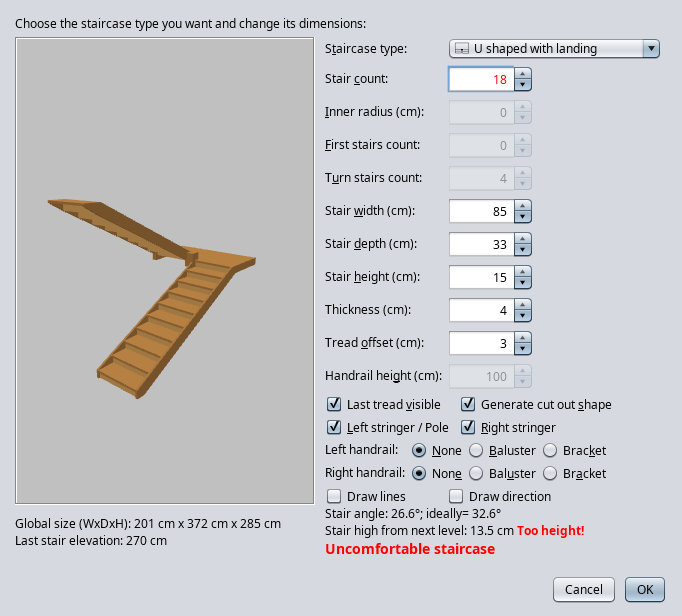
Re: Staircase generator plug-in Hi: As I mentioned elsewhere, I am an architect. That is the base of my problems. I think in structures, not in rooms, etc. -- Now I have a problem with the generate_staircase plugin. --When I, as an architect start to plan a staircase, I take the vertical floorplan to floorplan distance. Here is the example: Distance=2.70. Stair count=18 (two flights of 9 stairs; U shaped with landing; landing counts as one stair) Stair height=15 > because 18 x 15 = 2.70. --The result I got last time is: "Global size (WxDxH): 1.816 x 2.924 x 3.70 Last stair elevation: 2.70--Last stair TOP should be 2.70) I have tried to change things, but the staircase is always higher or lower than the floor level distance, never fits. Of course, I don't know what do you mean by thickness. I think in concrete, and it looks like a wooden staircase. I guess I don't get it what the "thickness" has to do with the section shape of the staircase. (It should be 15 high and 33 deep. I use the old formula: 2 x height + 1 x depth = 63 cm) -- If you have some user guide, please give it to me. I could not find one. Your software makes very fine staircases, I just don't know how to handle it. There must be a way. Thanks in advance! |
| Posted by Keet at Jan 15, 2024, 10:54:50 PM |
|
Re: Staircase generator plug-in At the bottom the Last stair elevation is displayed so you can adjust the parameters to fit your required height. The global size is the size of the object, i.e. including the handrails, pole, etc. So the global height is higher when there is a handrail. Last stair elevation 2.70 + handrail 100cm = global height 3.70. Same with the width: stair width + stringers left and right = global width (for a straight staircase). Thickness is the thickness of the thread board. It doesn't change the step height because the riser height decreases when the thread thickness increases. Unfortunately it only goes up to 3 cm where I usually have threads of 4 or sometimes 5 cm thick. If I can't get to the exact height I try to get as close as possible. After generating the staircase I simply adjust the height of the object so it fits flush with the floor. Put a camera pointed at the top of the stairs.Use the ⤓ handle at the corner of the staircase in the 2Dview to drag the height until it is flush with the top of the floor. While you drag in the 2Dview you can see in the 3Dview the height change. Make sure you are fully zoomed in in the 2Dview so you get the smallest height change for the drag. Thread offset is how much the thread stick out over the riser. For public staircases 0 this should be 0. For a simple concrete staircase without railing/handrails: Create a box for 1 step and use the multiplier plugin to create a staircase by simply generating the other steps. Give it a concrete texture and you're done. You can create a box sized to 1 mm precision. (For the multiplier set the Y value to 0, the Z value to the height of the step, and the X value to the offset for the steps (thread depth where the step itself is of course deeper). It's a wonderful tool although I always custom create my staircases. I use it for quick prototyping and sometimes as as an easy calculator for the different sizes. ---------------------------------------- Dodecagon.nl 1300+ 3D models, manuals, and projects |
| Posted by architectech at Jan 16, 2024, 7:17:44 PM |
|
Re: Staircase generator plug-in Hi: Thanks for your insights. I copied and saved your post for study, and read thru a couple of times. --One question directly: you wrote "Last stair elevation 2.70" I think that elevation in SH3D always means the bottom of an object. I need last (highest) stair TOP to be 2.70. So, if I got it right, Last stair elevation should be 2.70 minus the height of one stair. Please, tell me, if that is so or not. --The Multiplyer plugin approach for concrete staircase could work, but of course, I need the handrails. And mostly I need the very conservative U-shaped-with-landing-in-the-middle (two-flight) staircases, which I can't see how to do with the multiplier. There seems to be columns for handrails, but no handrails. (Also, I could not find concrete texture.) --As an architect, I actually drew lots of staircases with pencil on paper. Then went over to ArchiCAD. Now my free access ended, hence I am working with SW3D. I am doing visual plans only nowadays. --Please, tell me how you "custom create" your staircases, if it is not a trade secret. Best wishes Erik |
| Posted by Keet at Jan 16, 2024, 9:35:38 PM |
|
Re: Staircase generator plug-in So, if I got it right, Last stair elevation should be 2.70 minus the height of one stair. No, in this case the display at the bottom "Last stair elevation" means the top of the last step or riser.With concrete: For a U shape you create a small (9 steps?) staircase, group the objects and copy the group. Create a single box for the landing. Elevate the landing and one of the staircases to the correct height. Of course first rotate one staircase to get the U shape in combination with the landing. Just like furniture libraries you can import texture libraries. The AmbientCG library listed on this page is large and very good and has several different concrete textures. I think there is a handrail in the furniture catalog but otherwise you can create them using cylinders. --Please, tell me how you "custom create" your staircases, if it is not a trade secret. It's no trade secret, just a lot of learning and getting experience. Lots of users here create their own furniture instead of downloading ready made models. I am such a nutcase that I create ALL my furniture myself, including doors, windows, and of course staircases.How? That's a long answer. Some time ago I started to create a manual for creating furniture but it soon was clear that it would become more of a book than a simple manual. I gave up on that, it became too much like real work Basically you use objects like box, cylinder, and triangle and even walls and rooms. Or you can create custom shapes with the Generate 3D Shape tool. Resize, combine, and export to create furniture. There's much more to it of course but it is a little like drawing line by line only you use parts to create furniture. In some cases you need to use Blender because there are a few things you can't do in Sweet Home 3D. Blender can import and export the obj/mtl format so that's easy. It's also easy to edit the obj/mtl files to change material names but you have to learn how. My basic process is to create parts, export, edit material names, import. Next part. Then combine all parts and export/import as the finished furniture. In this thread I offered a library with custom created public staircases: https://www.sweethome3d.com/support/forum/viewthread_thread,11998 . Not my the best work and it took way too much time. Nowadays I can do better and much faster. Maybe I'll update the library one day but it will give you an idea of what is possible. There are many more examples on the Sweet Home 3D site. On the sourceforge Sweet Home 3D many more examples are offered. ---------------------------------------- Dodecagon.nl 1300+ 3D models, manuals, and projects |
| Posted by dorin at Jan 17, 2024, 6:48:03 AM |
|
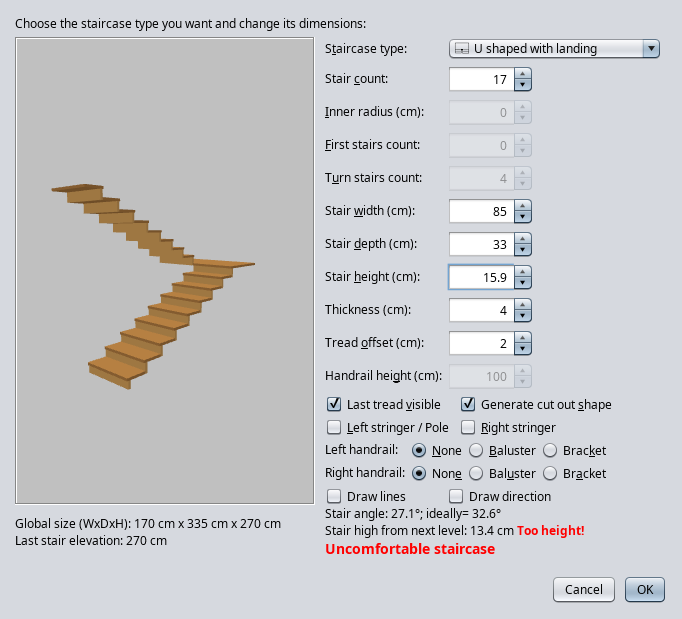
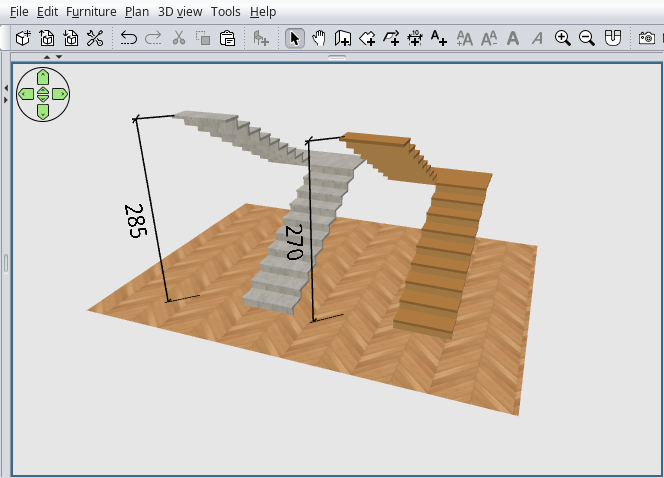
Re: Staircase generator plug-in @architech I've tried to reproduce your issue with U shape with landing. 1. I'm not a math like I'm not an architect but Distance=2.70. Stair count=18 (two flights of 9 stairs; U shaped with landing; landing counts as one stair) Stair height=15 > because 18 x 15 = 2.70. The U shape staircase (at this moment) accept an odd numbers of stairs and one of them in the landing.So 9*2=18; 18+1=19 OR 8*2+1=17. 2. The plugin warning you about the incorrect input number (in red) but you choose to ignore it. Consequently the plugin ignore your input (18) and use 19 with the accordingly results. 3. The last stair elevation is where the last step end (at TOP). 4. You don't need to hide baluster like I've did because you have the last stair elevation. 5. There is 3 concrete texture in library name as Wall concrete. ![]() To have exactly 2.70 the Stair height have to be 15.89 ![]() The concrete one is created with your settings. ![]() ---------------------------------------- A computer program does what you tell it to do, not what you want it to do. Murphy's Law When all else fails, read the instructions. Murphy's Law If you don't like "AS IS", DIY. Dorin's law |
| Posted by Keet at Jan 17, 2024, 8:24:35 AM |
|
Re: Staircase generator plug-in One thing to keep in mind: the height of a staircase is the room height + the floor thickness. So if your level height is 2.50m and floor thickness is 20cm your staircase should be 2.70m. What I do is adjust the parameters to get as close as possible to the required height and if there is a minor difference after generating I correct that by changing the height of the staircase object. You can use two decimals in the number fileds and the calculation will use them. Just remember that the display of the number in the field will revert to one decimal (mm) once you leave the field. Using that it's almost always possible to get within a millimeter of the required height. ---------------------------------------- Dodecagon.nl 1300+ 3D models, manuals, and projects |
| Posted by architectech at Jan 17, 2024, 9:20:10 PM |
|
Re: Staircase generator plug-in Thanks! Yet again I copied your answer for study. I am really grateful for your detailed descriptions. What I feel now is that I will have another try, and if I am no good, then I will get some other CAD software made directly for architects. My fault is that I can hardly wrap around my brains to that kind of thinking that the SH3D has. Thanks again, I think I won't disturb you anymore. |
| Posted by Keet at Jan 17, 2024, 10:15:03 PM |
|
Re: Staircase generator plug-in You won't disturb anyone, that is what this forum is for. There's almost always someone to help with any kind of problem. My fault is that I can hardly wrap around my brains to that kind of thinking that the SH3D has. You have to understand that originally Sweet Home 3D was for interior design. Over the years it has evolved into much more. Where at the beginning you had to almost exclusively depend on the offered models you can now create your own very detailed furniture. Furniture that can deform if created that way: opening doors and windows, rotating or sliding furniture parts (opening drawers!). Lights that you can manage for creating great photos and video. There is even a tool to create a terrain around a house.But, as with any advanced software, there is a learning curve. What Sweet Home 3D offers is that you can start immediately with just trying but if you want something specific you have to learn how to do that. It completely depends on your own wishes how much learning there is to do. ---------------------------------------- Dodecagon.nl 1300+ 3D models, manuals, and projects |
| Posted by dorin at Jan 18, 2024, 6:43:11 PM |
|
Re: Staircase generator plug-in @architectech As Keet said You don't disturb anyone. I considering you as a friend and, as friend, I prefer to talk with you short and frankly, not politically correct. Probably I'm wrong. I'm sorry if I offense you somehow! Somewhere you've said "My problem is I'm an architect". That's not a problem, not your true problem. I think your expertise in this area is invaluable for us, for the majority of SH3D users. You could help and advice us in this sense. IMO your true problem is that you came from ArchiCAD with the accordingly heritage. I think it is like you have drive last past 10 years a modern fully automatic car and, for some reasons, you can't used anymore (let say irremediable broken). Someone give you for free an old but functionally car. Well, is not the same: Have clutch, only 4 manual gear, no break and direction aid and assistance BUT fit the main condition: exist. Next optionally conditions: work and is free. Well, it don't came totally free of problems. You have to remember the old times when you've drive something like this. That's is! Just for my curiosity: how long took to you to learn to use ArchiCAD?? and how many help you've received from the ArchiCAD community? I've tried to use it in the past (~20 years ago) but I've quickly realize I'm too dump for this. It need more brain and knowledge (architecture studies) and I'm in lack of both. So for me the SH3D is the perfect compromise. With SH3D I'm able to make planes very close as those made by some of my colleagues with ACAD. Indeed with more work and effort in some parts. Finally I hope you will still be here at least time-to-time with some advice's for us. ---------------------------------------- A computer program does what you tell it to do, not what you want it to do. Murphy's Law When all else fails, read the instructions. Murphy's Law If you don't like "AS IS", DIY. Dorin's law |
| Posted by kregai at Mar 7, 2024, 11:43:11 AM |
|
Re: Staircase generator plug-in Wonderful plugin. Thanks. Wanted to check if the following is possible I want a staircase with three flight around and elevator. The outer dimensions of the elevator hoistway is 5'x6'x5'. The total ceiling height is 11'. The staircase should go in the clockwise direction. Many thanks in advance for any input or direction that anyone has/provides. |
| Posted by greatway at Jul 21, 2024, 8:37:58 PM |
|
Re: Staircase generator plug-in thank you :) |
| Posted by Segadreamer at Jul 24, 2024, 9:59:40 PM |
|
Re: Staircase generator plug-in Just came to say thank you!! |
| Posted by rococo22 at Oct 8, 2024, 7:46:01 PM |
|
Re: Staircase generator plug-in Thank you for this!!! |
| Posted by Xlance at Nov 18, 2024, 8:43:16 AM |
|
Re: Staircase generator plug-in Good Day I managed to add to the plugin 4 more parameters for stair generation. 4 more are work in progress (actually all are welcomed to complete the task as it's a bit beyond my expertise ;-) Working: * Sides Count : Controls number of sides of Baluster (ex: 4 sides for square, 2 sides for thin glass panels, 32 sides for circular ... etc.) * Handrail Width : Controls width of upper Handrail. * Foot Depth : Controls depth of footing under first step. * Baluster Gap : Controls spacing between balusters. Need to be completed -Left Stringer Thickness -Right Stringer Thickness -Handrail Bracket Diameter -Handrail Bracket Height If interested drop me a line and I'll send the updated version. https://imgur.com/a/b6tn0jG ---------------------------------------- Windows 64bit | Intel i7 | 8GB Ram | SH3D 7.5 + Plugins |
| Posted by Xlance at Nov 18, 2024, 8:46:42 AM |
|
Re: Staircase generator plug-in OR simply download the plugin from: https://www.mediafire.com/file/mzhxnv1ngwfl3d...Generator-1.1.0.sh3p/file ---------------------------------------- Windows 64bit | Intel i7 | 8GB Ram | SH3D 7.5 + Plugins |
| Posted by dorin at Feb 3, 2025, 6:08:06 PM |
|
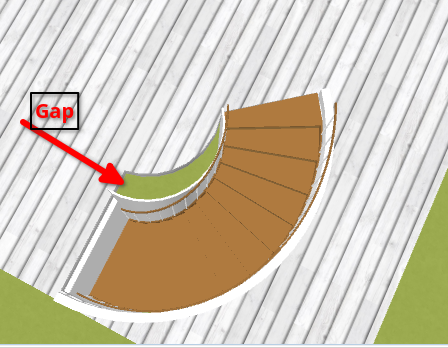
Re: Staircase generator plug-in Could someone verify this? With this input data: ![]() I have this output for cut out shape ![]() I suppose the problem is between lines 1149~1156 It happened only in this range 90~180 degrees with inner radius > half pole. As you can see there is a lot of math which I don't know. Any opinion (or help) is highly appreciated. Thanks in advance! ---------------------------------------- A computer program does what you tell it to do, not what you want it to do. Murphy's Law When all else fails, read the instructions. Murphy's Law If you don't like "AS IS", DIY. Dorin's law |
| Posted by Daniels118 at Feb 4, 2025, 5:39:51 PM |
|
Re: Staircase generator plug-in What measurement is "half pole"? |
| Posted by dorin at Feb 4, 2025, 8:23:35 PM |
|
Re: Staircase generator plug-in Hi Daniele, At line 1078 float poleWidth = getDefaultPoleWidth(StaircaseType.ROUND_SPIRAL, treadThickness, treadThickness);At line 2246~2249 private static float getDefaultPoleWidth(StaircaseType staircaseType,In my sample Thickness = 1.5 cm. (default value) That mean half pole = 1.5*5/2=3.75 cm. If inner radius is bigger than half pole the plugin will don't compute an cylindrical pole but a hole in the center of the spiral staircase. In the part for generating cut out shape strings this two cases are treated separated. The major problem is with the end point of the second arc. In some circumstances even the end point of the first arc is not quite accurate. A workaround is to set the X of the end point of the second arc like: (width-(spiralStairOuterRadius - spiralStairInnerRadius)) / width---------------------------------------- A computer program does what you tell it to do, not what you want it to do. Murphy's Law When all else fails, read the instructions. Murphy's Law If you don't like "AS IS", DIY. Dorin's law |
| Posted by Daniels118 at Feb 4, 2025, 10:59:59 PM |
|
Re: Staircase generator plug-in Parenthesis at wrong position at line 1154. Here's the correct way: + " A " + spiralStairInnerRadius / width + "," + spiralStairInnerRadius / height + " 1 0,1 " + (-cosAngle * spiralStairOuterRadius + spiralStairInnerRadius) / width + "," + (height - treadDelta) / heightJoke: ![]() |
| Posted by dorin at Feb 5, 2025, 6:32:42 AM |
|
Re: Staircase generator plug-in 1) Thanks! I will test it today. 2) The joke is a test. There is at least 10 differences. ---------------------------------------- A computer program does what you tell it to do, not what you want it to do. Murphy's Law When all else fails, read the instructions. Murphy's Law If you don't like "AS IS", DIY. Dorin's law |
| Posted by dorin at Feb 5, 2025, 9:05:48 AM |
|
Re: Staircase generator plug-in 1) Of course it work! 2) +2. Probably that's all. ---------------------------------------- A computer program does what you tell it to do, not what you want it to do. Murphy's Law When all else fails, read the instructions. Murphy's Law If you don't like "AS IS", DIY. Dorin's law |
| Posted by dorin at Feb 5, 2025, 5:01:27 PM |
|
Re: Staircase generator plug-in 1) There is another line to be corrected in the plugin: 1325 - float cosSpiralStairAngle = (float)Math.sin(spiralStairAngle);+ float cosSpiralStairAngle = (float)Math.cos(spiralStairAngle);2) Uh, the age. It's more. ![]() ---------------------------------------- A computer program does what you tell it to do, not what you want it to do. Murphy's Law When all else fails, read the instructions. Murphy's Law If you don't like "AS IS", DIY. Dorin's law |
| Posted by Daniels118 at Feb 5, 2025, 6:01:02 PM |
|
Re: Staircase generator plug-in 1) Glad it works! 2) The joke was about finding small unnoticeable differences, like the position of a parenthesis in a formula, or a "sin" that should be a "cos". Well, you got the point! :) |
|
|
Current timezone is GMT Dec 16, 2025, 6:26:00 PM |