Print at Dec 20, 2025, 9:41:24 AM View all posts in this thread on one page
Posted by maumab4x4 at Dec 24, 2009, 7:19:16 AM
3D model for pocket door
Hi All,
Does anyone know where can I find a 3D model about a pocket door?

Thanks in advance
/M.

Posted by hansmex at Dec 24, 2009, 10:48:30 AM
Re: 3D model for pocket door
Mau,

Even Google Images doesn't know what a "pocket door" is, (images.google.co.uk), so how do you expect an answer here?

It seems to be a door with some kind of subdivisions or panels, some of which may be glass.

There are several doors in the 3D models that would answer such a general description. (http://www.sweethome3d.eu/importModels.jsp)

If that's not good enough, you can make your own door with wood and glass using the files provided here (http://www.sweethome3d.eu/support/forum/viewthread_thread,1228) and here (http://www.sweethome3d.eu/support/forum/viewt...96_lastpage,yes#lastpost).

Good luck,

Hans
----------------------------------------
Hans

new website - under constuction
hansdirkse.info

Posted by Puybaret at Dec 24, 2009, 2:03:36 PM
Re: 3D model for pocket door
From this article found on the web, a pocket door seems to be a sliding door that slides into the wall thickness.
If I were you, I would use a service hatch:
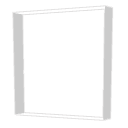


or a door frame:



to create an opening in the wall.


Then I would place a partio glass door:


imported from 3D models import page.
----------------------------------------
Emmanuel Puybaret, Sweet Home 3D creator

Posted by maumab4x4 at Dec 31, 2009, 4:27:07 PM
Re: 3D model for pocket door
Thanks Emmanuel,
Your definition is correct. I'll follow your suggestion and I compose the object. It'll be an object composed by two other object is there any function that works like "group" in MS office?

Thanks and happy new year!

Maurizio

Posted by hansmex at Jan 2, 2010, 3:46:21 PM
Re: 3D model for pocket door
Hello Mauma,

There is no "group" function in SH3D, but there is a workaround.

In a separate sheet, draw the entire pocketdoor. Then export it using 3D view -> export to OBJ format. Now import your model using Furniture -> Import furniture and make sure that you click and activate Door or window in the third screen. That way you can insert the completed pocket door in your wall.

The same procedure also works well to make you own furniture.

Hans
----------------------------------------
Hans

new website - under constuction
hansdirkse.info