|
Sweet Home 3D Forum » List all forums » » Forum: 3D models and textures » » » Thread: Light refraction and mirror effect rendering. |
|
| Print at Feb 8, 2026, 5:46:17 AM | |
| Posted by Walter125 at Oct 2, 2023, 12:15:11 PM |
|
Light refraction and mirror effect rendering. Hi, I have downloaded a greenhouse 3D model on internet. But I'm unable to render it correctly when I make a photo at the higher quality. There are 2 problems: - The surfaces have a too much pronounced mirror effect. - The light changes direction when it passes throught the curved surfaces. So the objects in the greenhouse are displayed deformed. Here is the .mtl definition of the transparent surface of the greenhouse: newmtl Translucent_Glass_Blue.001I tried modifying it with various values, but it didn't solved my problems. Does someone know: - How to reduce the mirror effect of a surface ? - How to reduce the deformation of objects inside or behind a curved transparent surface ? |
| Posted by Keet at Oct 2, 2023, 1:32:13 PM |
|
Re: Light refraction and mirror effect rendering. Here are the specifications for MTL files: https://www.loc.gov/preservation/digital/formats/fdd/fdd000508.shtml and a more extended version: http://www.paulbourke.net/dataformats/mtl/ I use this for normal glass: newmtl GlassKs states the shiny/reflection of the material. Usually between 0 and 1, values outside that range will effect reflectivity. Ni is the refraction factor, i.e. the deformation when looking through glass. d is the opacity with a value between 0 and 1: 0.0 = fully transparent, 1.0 = fully opaque. • Your d value is pretty high for glass. • It's normal that light breaks (changes direction) through glass. Adjust your Ni value if it seems too much. Lowering the d value might also help in lowering the refraction. Greenhouses usually use cheaper glass which will refract more than window glass. • In real life curved glass will distort (refract) a little more than flat glass depending on the quality of the glass, adjust the Ni factor if it's too much. • You will have to experiment with the different values to get what you want. What you see in the 3D view is not exactly the same as when you render a photo, photo rendering is much more sensitive to the mtl values. ---------------------------------------- Dodecagon.nl 1300+ 3D models, manuals, and projects |
| Posted by Walter125 at Oct 2, 2023, 5:21:13 PM |
|
Re: Light refraction and mirror effect rendering. Thanks for the informations. My d value is high because it is a plastic cover. I started to design myself the greenhouse with curved cover, using only SweetHome3D and a text editor, exporting some objects, like a curved wall, to .obj, and importing it as a standard object. The 3D model I have designed is correctly rendered with a Ni value of 1.0. So it seems the problem comes from the 3D model I have downloaded. It doesn't render correctly even after a lot of experiments in the .mtl file. |
| Posted by Keet at Oct 2, 2023, 5:54:17 PM |
|
Re: Light refraction and mirror effect rendering. Have you tried importing the downloaded model, exporting it from Sweet Home 3D, and then importing it again? Optionally after adjusting the values in the mtl file. The models should be the same either way, but I have found out with other models that this is often not the case, especially concerning the materials. Of course creating your own models is absolutely the best, I custom create ALL my models with just a few from the furniture libraries from the Sweet Home 3D site until I can replace those too. ---------------------------------------- Dodecagon.nl 1300+ 3D models, manuals, and projects |
| Posted by Puybaret at Oct 2, 2023, 6:04:25 PM |
|
Re: Light refraction and mirror effect rendering. You could also try how the same transparency parameters are rendered by changing the renderer, either SunFlow or YafaRay. ---------------------------------------- Emmanuel Puybaret, Sweet Home 3D creator |
| Posted by Walter125 at Oct 3, 2023, 8:37:46 AM |
|
Re: Light refraction and mirror effect rendering. @Keet I tried your suggestion, but there are still the same problems. @Puybaret I tried SunFlow, and there are also the same problems. I openned the original DAE/Collada file with Blender, and it showed some mechanical objects only viewable with blender. There was also some misplaced points for the greenhouse object. I think I have finished my own model of greenhouse, it is a very basic model, and seems to render correctly. I made it modulable, one duplicable element for the middle, and one element for the begining and the end of the greenhouse. So with these two elements, I can make a greenhouse of the lenght I want. However the model isn't as well worked than the one I have downloaded, there are no doors in the plastic cover, at the beginning and the end on the greenhouse. |
| Posted by Keet at Oct 3, 2023, 9:31:59 AM |
|
Re: Light refraction and mirror effect rendering. I created a commercial greenhouse some time ago maybe you can use it to create your own. It's still a work in progress but you're free to use and adapt it for your own use. You can't see it in the images but you can open all doors and multiple rows of windows in the shell. https://www.mediafire.com/view/bap769enr8kmeqa/greenhouse.png/file https://www.mediafire.com/view/d9on1j3lfc047ox/greenhouse-objects.png/file https://www.mediafire.com/view/y1rcp43ydgajwv...e-with-furniture.png/file Zip with all objects Zip with the project ---------------------------------------- Dodecagon.nl 1300+ 3D models, manuals, and projects |
| Posted by Walter125 at Oct 3, 2023, 2:48:12 PM |
|
Re: Light refraction and mirror effect rendering. @Keet Thanks for the files, I will have a look a it. My model still have some problems, maybe related to normals. Because I'm using the same .mtl definition for the curved cover, and for the flat cover at the beginning and the end of the greenhouse. The curved cover is rendered correctly. I have created it from a curved wall in SweetHome3D, exported to .obj. But the flat cover has been created from a room that fit the curved wall, also exporting the room to .obj. This flat cover doesn't render correctly, the light change direction when it goes into it. I tried some basic normals changes in the .obj file, and the light took other directions, but it didn't solve the problem. If someone have the time to test and help me, here is the .mtl file of the flat cover: newmtl coverAnd .obj file, that needs to be rotated to vertical, when importing it: mtllib greenhouse-end.mtl |
| Posted by Keet at Oct 3, 2023, 3:28:59 PM |
|
Re: Light refraction and mirror effect rendering. If possible don't use a room for the flat cover but try it with a resized box or wall. You can see in the .obj file that a room is constructed in a completely different way. If you apply a normal texture you will also see that the sides aren't textured correctly, probably because it's assumed that you don't see the sides of a floor. A box or a wall is better suited to create glass or semi-transparent plastic. In your case you might try using a wall because you also use a wall for the curved plastic. The same mtl should give the same result. ---------------------------------------- Dodecagon.nl 1300+ 3D models, manuals, and projects |
| Posted by Walter125 at Oct 3, 2023, 5:56:42 PM |
|
Re: Light refraction and mirror effect rendering. Thanks for advices. I have finally got it working. It seems the problem was that my flat cover had only 2 faces, the front and the back. So I have created the same room at a higher level, because a higher level room have a configurable thickness. I set the thickness to 0.1 cm. And exported the room to an .obj file. It worked. The greenhouse seems to be rendered correctly. But I divided it into 4 parts, in order I can build greenhouses of different lenght: 2 parts for the metal skeleton, and 2 parts for the plastic cover. |
| Posted by Keet at Oct 3, 2023, 6:18:58 PM |
|
Re: Light refraction and mirror effect rendering. Exporting rooms is a little different than with other objects. With only one level and elevation left at 0 a room has only one face (or two if a ceiling is included) if there are no extra levels. This is because a room "sinks" into the level below. If there is no level below there is just a single flat face. If you want to export a room that has a thickness >0 just add a level -1 below level 0 and uncheck the ceiling display of the room. Unchecking the ceiling is important because otherwise export will generate a separate face at wall height above the floor. After export/import you can adjust the thickness so no need to set a floor thickness before export. But I divided it into 4 parts, in order I can build greenhouses of different lenght: 2 parts for the metal skeleton, and 2 parts for the plastic cover. That's what I did too, a single part open on both ends and a part closed on one side with doors that can be used as the ends for a row of open parts. See the files I made available.---------------------------------------- Dodecagon.nl 1300+ 3D models, manuals, and projects |
| Posted by Walter125 at Oct 4, 2023, 7:40:39 AM |
|
Re: Light refraction and mirror effect rendering. I had a look at the greenhouse you designed, it is a great work. With my 3D model, I still have a too much mirror effect on the surfaces. When the surface faces the camera, perpendicular to the camera direction, there is a few mirror effect. But the more the surface is mear to be parallel to the camera direction, the more there is a mirror effect. I tried to set d value to 1.0, and there was no mirror effect at all. But, for a d value of 0.99, there is the mirror effect. |
| Posted by Walter125 at Oct 4, 2023, 7:56:56 AM |
|
Re: Light refraction and mirror effect rendering. I have inverted the normals of the back and front faces of the flat cover, and now there is no mirror effect at all. It seems to be linked to normals, I will have to investigate this. |
| Posted by YGYL at Nov 28, 2023, 3:19:55 PM |
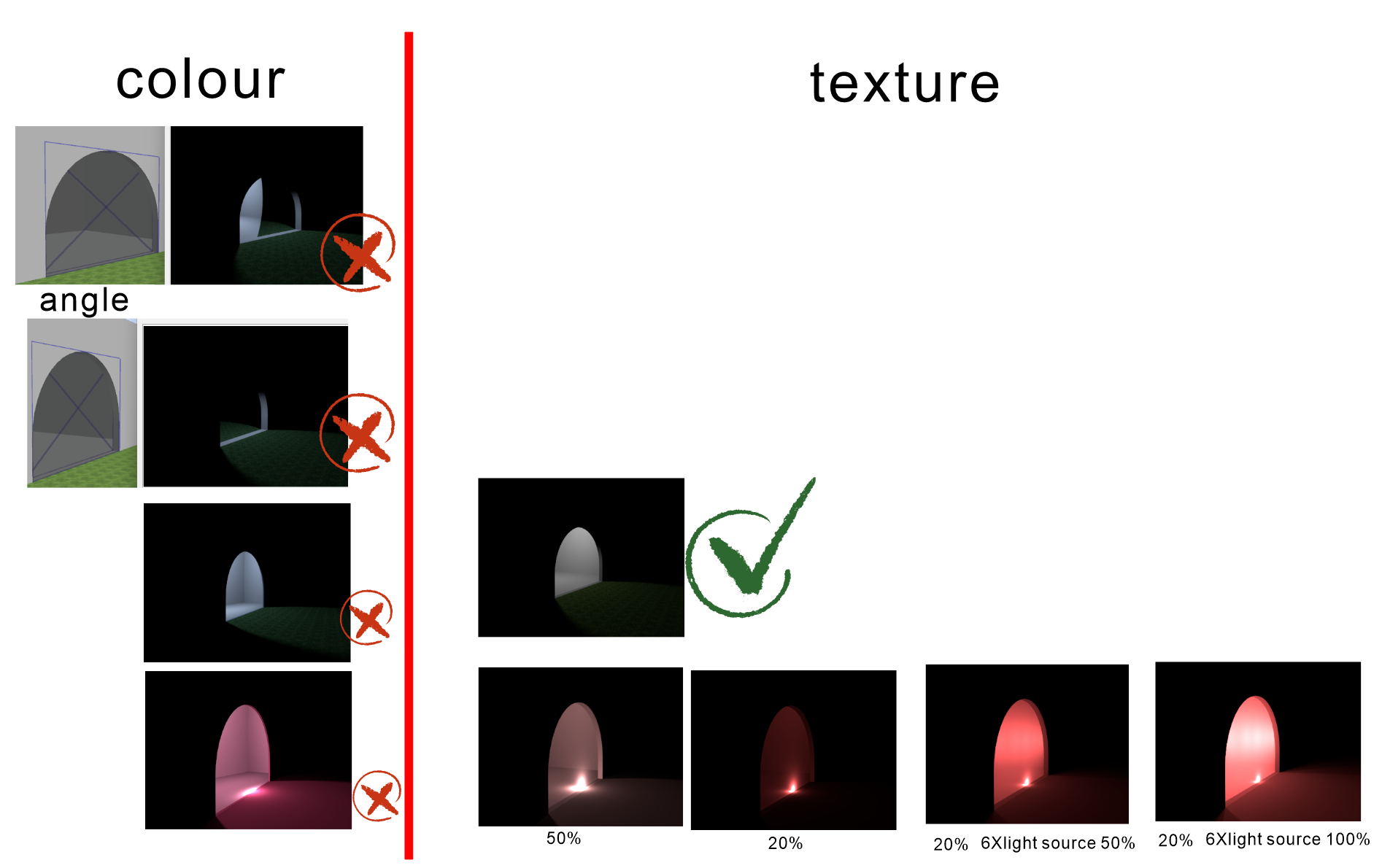
Re: Light refraction and mirror effect rendering.I have inverted the normals of the back and front faces of the flat cover, and now there is no mirror effect at all. It seems to be linked to normals, I will have to investigate this. https://www.mediafire.com/view/ufljos54lgigj74/20231128224736.png/file Since I've briefly looked into this before, let me tell you about it This is supposed to be a bug in the JAVA rendering engine. it triggers when the view angle is large. First of all, this rendering engine doesn't support many parameters in .mtl. It only supports the most basic 3 parameters, so no matter how you change them in .mtl, it will be the same. The D parameter inside .mtl has to be as low as 0.1 to have any effect. And the same problem of incorrect refraction To solve this problem is not difficult, there is a simple way: replace the default glass color with a translucent solid color texture. The downside is that the throughput is greatly reduced, which requires adding a few times the brightness of the light. I hope that the official feature of "replacing the default glass color with a solid color texture" will be added. |
|
|
Current timezone is GMT Feb 8, 2026, 5:46:17 AM |