Print at Dec 16, 2025, 7:42:09 PM
Posted by enkonyito at Jan 14, 2024, 10:32:19 PM
Dynamic translation of a plug-in
@Puybaret

As I am working on an overhaul of the public version of the PhotoVideoRendering plug-in (back to the roots of Sweet Home 3D), I am returning to a problem that dates back several years.

After changing the language in the preferences, the title of the dialog boxes is only taken into account after closing them, the menu title and the name of the plug-in actions are only taken into account after restarting the software.

Coming across this topic, I would like to know what to do for dynamic translation.
----------------------------------------
EnkoNyito

Posted by Daniels118 at Jan 15, 2024, 8:31:16 AM
Re: Dynamic translation of a plug-in
Maybe Emmanuel will give a more comprehensive response, however here is mine.
getUserPreferences().addPropertyChangeListener(UserPreferences.Property.LANGUAGE, new PropertyChangeListener() {
public void propertyChange(PropertyChangeEvent evt) {
ResourceBundle resource = ResourceBundle.getBundle("your.package.properties_file_without_extension", Locale.getDefault(), getClass().getClassLoader());
uiElement1.setText(resource.getString("elem1_property_name"));
uiElement2.setText(resource.getString("elem2_property_name"));
etc. etc.
}
})


Posted by Puybaret at Jan 15, 2024, 9:43:48 AM
Re: Dynamic translation of a plug-in
Yes, that's the idea, but you should rather use a separate static class for the listener to ensure the garbage collector can work correctly when you close a home (see LanguageChangeListener in PhotoRender and many other classes). The preferences instance exists during the whole life of Sweet Home 3D application, so binding to it a home object for example through an anonymous listener created in a plug-in could prevent the home object from being garbage collected.
----------------------------------------
Emmanuel Puybaret, Sweet Home 3D creator

Posted by enkonyito at Jan 16, 2024, 11:31:10 PM
Re: Dynamic translation of a plug-in
Thanks to both of you for the information, it works for the photo creation panel (title, components).

Based on the ResourceAction class, dynamic translation works for plug-in actions, but the menu remains unchanged despite the new value.

public SimplePhotoRenderingAction(PhotoVideoRendering photoVideoRendering) {
// modification start PVR-2.7
ResourceBundle resource = ResourceBundle.getBundle("sh3dPlugin.ApplicationPlugin", Locale.getDefault(), getClass().getClassLoader());
putPropertyValue(Property.NAME, photoVideoRendering.getUserPreferences().getLocalizedString(HomePane.class, "CREATE_PHOTO.Name")
+ " (PVR-" + photoVideoRendering.getVersion() + ")");
putPropertyValue(Property.SHORT_DESCRIPTION, photoVideoRendering.getUserPreferences().getLocalizedString(HomePane.class, "CREATE_PHOTO.ShortDescription"));
putPropertyValue(Property.MENU, resource.getString("SimplePhotoRenderingAction.MENU"));
setEnabled(true);

SimplePhotoRenderingAction.photoVideoRenderingPlugin = photoVideoRendering;

photoVideoRendering.getUserPreferences().addPropertyChangeListener(UserPreferences.Property.LANGUAGE
, new LanguageChangeListener(this));
// modification end PVR-2.7
}


// addition start PVR-2.7
// Based on https://sourceforge.net/p/sweethome3d/code/84...g/ResourceAction.java#l89 (SH3D-7.1)
/**
* Preferences property listener bound to this action with a weak reference to avoid
* strong link between preferences and this action.
*/
private static class LanguageChangeListener implements PropertyChangeListener {
private final WeakReference<SimplePhotoRenderingAction> pluginAction;
public LanguageChangeListener(SimplePhotoRenderingAction pluginAction) {
this.pluginAction = new WeakReference<SimplePhotoRenderingAction>(pluginAction);
}

public void propertyChange(PropertyChangeEvent ev) {
// If action was garbage collected, remove this listener from preferences
SimplePhotoRenderingAction pluginAction = this.pluginAction.get();
if (pluginAction == null) {
((UserPreferences)ev.getSource()).removePropertyChangeListener(
UserPreferences.Property.LANGUAGE, this);
} else {
ResourceBundle resource = ResourceBundle.getBundle("sh3dPlugin.ApplicationPlugin", Locale.getDefault(), getClass().getClassLoader());
pluginAction.putPropertyValue(Property.NAME, ((UserPreferences)ev.getSource()).getLocalizedString(HomePane.class, "CREATE_PHOTO.Name")
+ " (PVR-" + SimplePhotoRenderingAction.photoVideoRenderingPlugin.getVersion() + ")");
pluginAction.putPropertyValue(Property.SHORT_DESCRIPTION, ((UserPreferences)ev.getSource()).getLocalizedString(HomePane.class, "CREATE_PHOTO.ShortDescription"));
pluginAction.putPropertyValue(Property.MENU, resource.getString("SimplePhotoRenderingAction.MENU"));
}
}
}
// addition end PVR-2.7


I could have put the plug-in actions in the existing 3D View menu, but I prefer to avoid doing so so that there is no confusion with the default actions of Sweet Home 3D.
----------------------------------------
EnkoNyito

Posted by Puybaret at Jan 17, 2024, 12:16:30 AM
Re: Dynamic translation of a plug-in
Translation of plug-in menu items is not handled in HomePane class, they won’t change in the user interface.
----------------------------------------
Emmanuel Puybaret, Sweet Home 3D creator

Posted by Daniels118 at Jan 17, 2024, 9:45:34 AM
Re: Dynamic translation of a plug-in
It would be nice if the plugin wouldn't need to deal with the translation of the main menu entry, at least if one means to put it in one of the default menus.
For example, for some plugins I put entries in the Help menu, so I have to code tenths of lines such these:
Help.MENU=Help
Help.MENU=Aide
etc...

It would be nice if the program could check if the menu name matches one of the predefined menu names in English language, and, if so, put the new entry in the proper main menu regardless of the current language.
If there is no match, it must behave like now.
This behavior would be backward compatible with existing plugins, and plugin programmers shouldn't worry about finding the exact translation of the main menus in SH3D's properties files.

The program could also define additional main menu entries for common cases that would be added on demand, such as "Tools". Right now, if a user installs 2 plugins, one of which has just the English entry "Tools", and the other has both English "Tools" and French "Outils", as long the user uses SH3D in English there is no problem, but if he uses French, then the 2 plugins would generate 2 different main menus, which is very ugly. Having optional entries for common cases would solve this problem too. Moreover, being default entries, they would be translated instantly when the user changes the language, which solves the problem raised by EncoNyito, at least for common cases.

Posted by Puybaret at Jan 17, 2024, 3:41:13 PM
Re: Dynamic translation of a plug-in
Thanks for the suggestions. I had some similar ideas to get a better presentation of menu items.
----------------------------------------
Emmanuel Puybaret, Sweet Home 3D creator

Posted by enkonyito at Jan 18, 2024, 2:57:14 AM
Re: Dynamic translation of a plug-in
Translation of plug-in menu items is not handled in HomePane class, they won’t change in the user interface.

Would this ever be possible?
----------------------------------------
EnkoNyito

Posted by Puybaret at Jan 18, 2024, 7:47:45 AM
Re: Dynamic translation of a plug-in
Not sure it’s worth the effort, who changes preferences language once he chose the translation he wants?
On the other hand, adapting menu items to existing menus in the user interface would avoid this ugly languages mix in the menu bar.
Note that these requests are very recent and as far as I remember, no user ever complained of this behavior until now.
----------------------------------------
Emmanuel Puybaret, Sweet Home 3D creator

Posted by Waldemar.Hersacher at Jan 18, 2024, 9:16:15 AM
Re: Dynamic translation of a plug-in
I noticed that also when I made German translations.
Emmanuel you are right that a normal user is not affected because he sets his language once.
Developers, translators and those who change the language for screenshots for help in the forum are affected. As enkonyito wrote it would avoid to exit SH3D each time we change the language.

BTW: Multiple instances will not help. Changing the language in one instance will also change in the other instance (only tested with Linux).

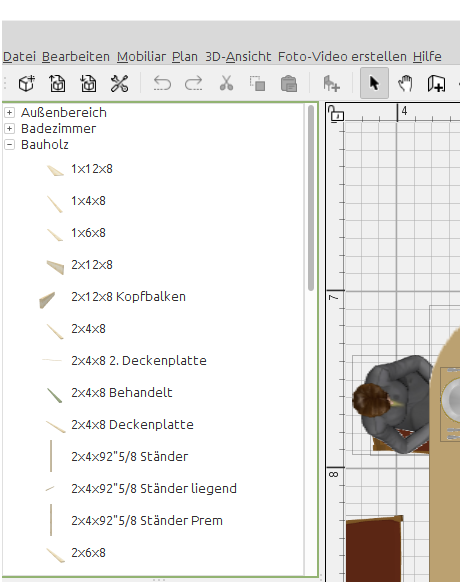
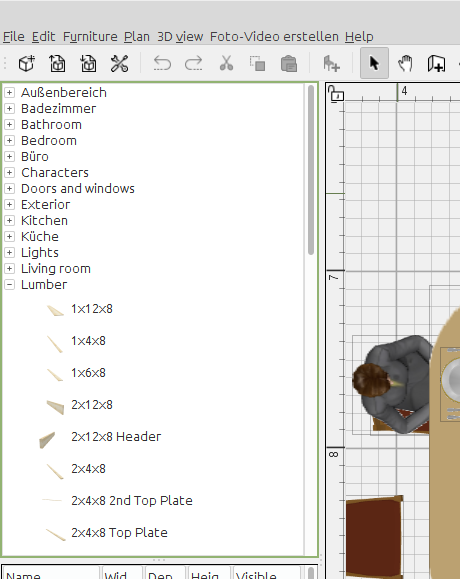
In the category view the German texts of the standard libraries will also not be removed when changing to English. With imported libraries this will happen.

German:


After changing to English:

----------------------------------------
MSI GP60, Linux Mint 21.3 Virginia base: Ubuntu 22.04 jammy, SH3D 7.5 with Photo-video rendering 2.8

Posted by Puybaret at Mar 4, 2024, 5:53:03 PM
Re: Dynamic translation of a plug-in
Translation of plug-in menu items is not handled in HomePane class, they won’t change in the user interface.

Would this ever be possible?
Wondering if it wasn't too complicated to program, I looked at HomePane class and discovered that the translation of plug-in menu items has been supported since day 1! I completely forgot that I programmed that.
Your code might not work because you don't use the expected class loader in ResourceBundle.getBundle call. But I'm not sure and hope you'll find by comparing your code to the one in the new version 1.1 of ExportTOSH3F plug-in where I programmed this feature.

It would be nice if the program could check if the menu name matches one of the predefined menu names in English language, and, if so, put the new entry in the proper main menu regardless of the current language.
I programmed this feature and it will be available in the next version.
The handling of the Tools menu will wait.
----------------------------------------
Emmanuel Puybaret, Sweet Home 3D creator

Posted by Daniels118 at Mar 5, 2024, 5:39:49 PM
Re: Dynamic translation of a plug-in
I programmed this feature and it will be available in the next version.
The handling of the Tools menu will wait.

Awesome, thank you!

Posted by enkonyito at Mar 10, 2024, 3:47:11 AM
Re: Dynamic translation of a plug-in
Your code might not work because you don't use the expected class loader in ResourceBundle.getBundle call. But I'm not sure and hope you'll find by comparing your code to the one in the new version 1.1 of ExportTOSH3F plug-in where I programmed this feature.
This has been working since version 2.7 of the plug-in.

The handling of the Tools menu will wait.
I still used the expected class loader in the ResourceBundle.getBundle call in anticipation of future plug-in menu handling.
----------------------------------------
EnkoNyito

Posted by Puybaret at Mar 11, 2024, 2:29:47 PM
Re: Dynamic translation of a plug-in
I thought you first spoke about menu items and wanted them to be updated when preferences language is modified (in French, we rarely make the difference between "menus" and "menu items" and call all them "menus").
But actually, you would like that menus are updated too after a language change. This is a more difficult context to handle because there could be some conflicts between plug-ins when they appear in the same menu, and this is problably why I didn't program anything for that.
----------------------------------------
Emmanuel Puybaret, Sweet Home 3D creator

Posted by dorin at Apr 4, 2024, 8:27:48 PM
Re: Dynamic translation of a plug-in
Probably I'm not quite the right person to give advises here but...
1. Thanks Emmanuel for the new ExportTOSH3F plugin.
I've adapted to two of my plugins which use some of the already existent menus and works very good(for me) even under v.7.2.
That's means:
1.1 The plugins load under the defined menu entry without the needs of other translations in AplicationPlugin or package file in all languages.
1.2 When switch the language the plugin name and the corresponding texts inside are updated without a restart.
1.3 Until now I don't seen a reason to re-code something for this purpose.

2. That encouraged me to define (for me and my plugins) a template:
2.1 Put in the PluginAction all the things I don't want to be touched by the translators: menu entry, icon and toolbar;
2.2 Add the LanguageChangeListener class provided by Emmanuel;
2.3 Put the AplicationPlugin.properties file in the root of the plugin only with the necessary entry to plugin to work. It wont be translated.
2.4 Under the default plugin package make a new package named "locales"
2.5 In this package(folder) put all the localized files with a chooses name+(plugin acronim)+locale symbol(_fr, _it, _ru ...).properties;
Mine looks like: pakageSHU_it.properties or pakageDE_de.properties.
2.6 Pay attention to set the correct path to this in plugin class.

3. For the rest of the plugins which use "Tools" as menu entry I'm still thinking.
Probably I will test if TOOLS_MENU.Name exist and, if not, I will use "Tools" for all the languages. I'll see.

4. In this context my wishes:
4.1 I prefer to have an unitary translation for the "Tools" inside of HomePane class to be used by the plugins(who thinks so).
4.2 The option to add sub menu(or contextual menu) to an exiting one or to a new one.
(If it wasn't programed already long time ago and I don't found it yet) sad
----------------------------------------
A computer program does what you tell it to do, not what you want it to do. Murphy's Law
When all else fails, read the instructions. Murphy's Law
If you don't like "AS IS", DIY. Dorin's law

Posted by Waldemar.Hersacher at Apr 4, 2024, 8:58:14 PM
Re: Dynamic translation of a plug-in
Do we really need to define the translations for the country? I think we don't need to differentiate e. g. between DE_de, AT_de and CH_de.

BTW: which country is SHU? I didn't find it in the ISO 3166-1 list of countries.
----------------------------------------
MSI GP60, Linux Mint 21.3 Virginia base: Ubuntu 22.04 jammy, SH3D 7.5 with Photo-video rendering 2.8

Posted by sjb007 at Apr 5, 2024, 1:00:43 AM
Re: Dynamic translation of a plug-in
Waldemar.Hersacher

en_GB != en_US != en_CA != en_AU and so on.

Yes, we need countries! Mostly because Americans can't spell. They also don't have a sense of humour... tongue

Posted by dorin at Apr 5, 2024, 7:21:05 AM
Re: Dynamic translation of a plug-in
Probably I wasn't explicitly enough.
The main localization file (en):
pakageSHU.properties or pakageDE.properties
-for German (de) :
pakageSHU_de.properties or pakageDE_de.properties
-for Chinese (zh_CN):
pakageSHU_zh_CN.properties or pakageDE_zh_CN.properties
As I've write in the post +(plugin acronym)+:
-SHU mean SelectHideUtility
-DE mean DistributeElevation
-packageSHU name could be whatever you want but it need to be the same for all 18 or more files followed by the country code(_fr, _it, _de etc)
-I've choose this form to distinguished between the same file on different plugins.
In this way a translator could send me multiple files for different plugins at once.

I will publish soon the new version of Distribute Elevation plugin which I intend to use as template.
BTW I've discovered few days ago I've already used the FURNITURE_MENU.Name in this plugin in 2020 but I've forgot.

Sorry for the disturbance!
----------------------------------------
A computer program does what you tell it to do, not what you want it to do. Murphy's Law
When all else fails, read the instructions. Murphy's Law
If you don't like "AS IS", DIY. Dorin's law