Print at Dec 19, 2025, 3:05:10 AM
Posted by BobMcL at Jun 7, 2024, 11:04:34 PM
Library for metal construction objects
Was wondering if anyone can tell me if there is a library I can download with metal objects for example: angle iron, H iron, channel iron, solid round bar, solid flat bar etc etc.
Thanks
Bob

Posted by Keet at Jun 8, 2024, 9:33:39 AM
Re: Library for metal construction objects
I don't know if such a library exists but most of the objects should be really easy to create with boxes and cylinders. There are multiple metal textures if you you look through the excellent AmbientCG texture libraries (download here: https://github.com/fabien-michel/sweethome3d-textures-ambientcg )

Once you have created a model you can change the material names and add your model to a furniture library. Here's a manual about how to change material names:
https://dodecagon.nl/Docs/ChangeMaterialNames/Change_Material_Names.pdf
https://dodecagon.nl/Docs/ChangeMaterialNames...ial_Names_files.zip

If you know how to use Blender you can create models and/or rename materials with that too.

This way you can create your own metal construction library.
If you have a particular model that you find difficult to create then post an image and the dimensions and I'm sure there are multiple members here that will help you to create it.

About objects/models: most rectangular and cylindrical shapes are easy to use and small enough in size to use a lot of them in a project. When you want a detailed threaded bolt you need to remember that those are huge in object size and a project probably uses dozens if not hundreds of them. You project will blow out of size pretty fast. Try instead to only use a bolt head and make it as simple as possible (and thus small in object size).
Where possible make faces ("sides") that are hidden by other faces invisible before you export a model. That eliminates vertices/faces you can't see anyway.

If you do some searching there are multiple single models you can download but they are not compiled in a Sweet Home 3D library. You can add these to your own library but check the license before you share your library with other users.
----------------------------------------
Dodecagon.nl
1300+ 3D models, manuals, and projects

Posted by hansmex at Jun 8, 2024, 11:53:32 AM
Re: Library for metal construction objects
channel iron
angle iron
H iron
solid round bar
----------------------------------------
Hans

new website - under constuction
hansdirkse.info

Posted by captaincook at Jun 8, 2024, 12:19:45 PM
Re: Library for metal construction objects
Bonjour Bob.
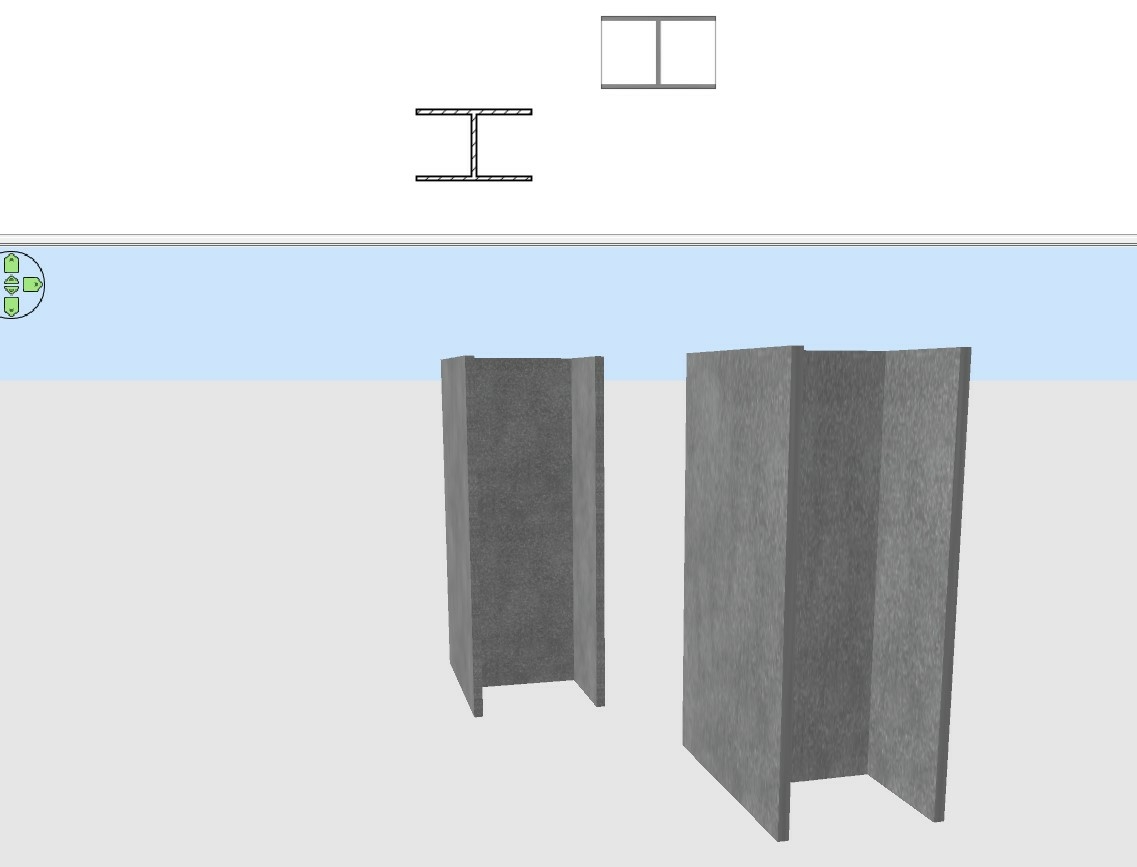
Un simple exemple pour un fer en H.

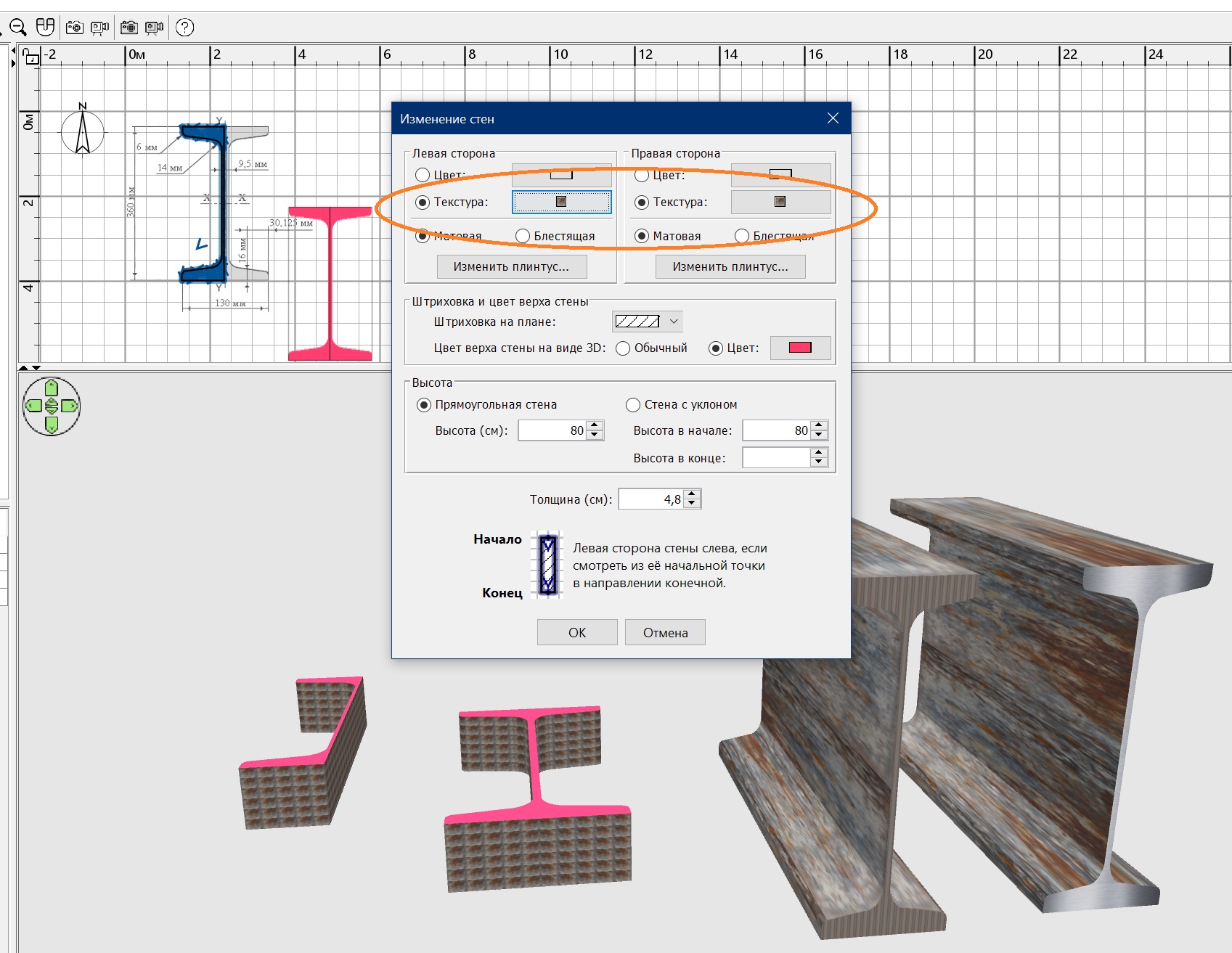
A partir de murs aux dimensions que vous souhaitez (à gauche sur l'image), vous pouvez exporter l'ensemble au format .OBJ puis le ré importer en tant que "meuble" (à droite sur l'image).
Et modifier les dimensions ainsi que les textures.


Vous pouvez ainsi créer toutes les sections que vous souhaitez.

Posted by Keet at Jun 8, 2024, 2:59:38 PM
Re: Library for metal construction objects
I would use boxes instead of walls.
Look at this image (and the image from captaincook):


First notice the diagonal texturing on the center part. That is not only a problem with walls but also with vertically placed boxes as you can see in the top examples of both walls and boxes.
The bottom right beam is as the result should be: no diagonal lines in the center part and overall correct texturing. That result is created with two horizontal boxes that were textured and exported as 'partA'. Then the center part was created with a box but oriented horizontaly (in the 2D pane) like the first two boxes, then textured and exported as partB.
Both partA and PartB were imported and partB rotated and placed at the correct position in partA. Both together were then exported and imported as 'Beam'.
The same could have been done with walls: texture the center part with a horizontally placed wall and export/import separately from the other two walls. Then combine like I did with the boxes.
The diagonal texture problem is caused by the Texture Vertices in the obj file (vt lines). By texturing and exporting a part when it is positioned horizontally the texture vertices are calculated correctly and don't cause diagonal lines.

This means that with either walls or boxes the same result can be achieved. But...

Look at the text on the right in the image. The numbers should say enough. The example created with boxes is smaller. With 10 beams you won't notice the difference but when you create big construction project the number of beams increases rapidly andd with that the number of vertices and faces that must be rendered. Then count other parts that are created with either walls or boxes and the difference in numbers increases even more.
I could have made the left and right faces of the center box invisible (you can't see them) to reduce the number of faces with 2 but for this example I left them in.
There are a few more tricks to optimize models, like merging all groups with the same material, but you need to use Blender for that.

I spend most of last year re-designing all my custom created furniture to decrease the shown numbers because my large projects started to get incredibly slow and became even impossible to show in the html-export. I got a lot of experience in decreasing object sizes and I'm still not even halfway with all I have to re-design.
The thing is: I managed to reduce the size of most models to only half or one third of what they were before. That's a huge difference. Do it right from the start so you don't have to spend many hours re-designing when you run into size problems like I did.
----------------------------------------
Dodecagon.nl
1300+ 3D models, manuals, and projects

Posted by BobMcL at Jun 8, 2024, 3:15:01 PM
Re: Library for metal construction objects
Thanks everyone - I now have what I needed.

Posted by captaincook at Jun 9, 2024, 12:39:07 PM
Re: Library for metal construction objects
Bonjour Keet.

Pour revenir sur le problème des textures apparaissant en diagonale dont vous parlez dans votre message, j'ai constaté qu'en appliquant ces textures sur les 3 murs avant de convertir l'ensemble en objet, le problème n'existait plus. Initialement, j'avais appliqué la texture après avoir crée l'objet.


L'autre avantage de concevoir la pièce finale à partir de murs est qu'on peut, si besoin, courber les murs.

Par contre effectivement vous avez raison, l'objet crée à partir de murs pèse plus lourd en octets que celui crée avec des boites.

Bon dimanche.

Posted by Keet at Jun 9, 2024, 3:50:54 PM
Re: Library for metal construction objects
@captaincook
Je n'ai peut-être pas été assez clair dans ma réponse : appliquez des textures aux différentes parties avant de les exporter. C'est une bonne chose que vous l'ayez signalé pour les autres utilisateurs.

Il est vrai que la conception avec des murs présente certains avantages, notamment l'arrondi que vous avez mentionné. J'ai créé un siège pour des tribunes de stade en utilisant des murs uniquement en raison de la possibilité d'arrondir et d'incliner deux moitiés pour donner un peu d'inclinaison au haut du dossier. D'ailleurs, l'"arrondi" n'est rien d'autre que l'inclinaison de plusieurs sections d'un mur pour simuler un arrondi. Le problème est que le point de jonction entre deux sections présente souvent des faces de part et d'autre de la jonction. Comme les murs fonctionnent avec la moitié du côté de l'extrémité pour chaque côté du mur, cela fait 8 faces à l'intérieur du mur par connexion que vous ne voyez pas.
Après avoir construit un stand avec des centaines de sièges, j'ai importé les sièges dans Blender et j'ai supprimé toutes les faces "à l'intérieur" des murs et j'ai remplacé les faces doubles du côté de l'extrémité par des faces simples. J'ai également supprimé toutes les autres faces invisibles. Le résultat est moins de la moitié de la taille précédente. Un stade complet comporte des milliers de sièges de ce type, de sorte que chaque octet économisé est important.

Un jour, je découvrirai comment définir une véritable courbe, car les spécifications OBJ le permettent. Il faudra alors voir ce que cela donne au niveau du temps de rendu. Je m'attends à ce que ce soit plus rapide que le rendu de plusieurs sections d'un arrondi, mais je n'en suis pas certain.

Traduit avec DeepL.com (version gratuite)

[English]
Perhaps I didn't make that clear in my response: apply textures to individual parts before export. It's good that you pointed that out for other users.

It's true that designing with walls has some advantages, especially the rounding you mentioned. I created a seating for stadium stands using walls just because of the option of rounding and sloping two halves to give the top of the back a little pitch. By the way, 'rounding' is actually nothing else than multiple sections of a wall at a slight angle to simulate a rounding. The problem is that often the connection point between two sections has faces on both sides of the connection. Because walls work with half of the end-side for each side of the wall that is 8 faces inside the wall per connection that you don't see.
After building a stand with hundreds of seats I imported the seats in Blender and removed all the faces 'inside' the walls and replaced the doubled end-side faces with single faces. I also removed any other faces that you can't see. The result was less than half of the previous size. A full stadium has thousands of these seats so every single byte saved is important.

One day I'm going to figure out how to define a real curve because the OBJ specifications support that. Then I'll have to see what that does to the rendering time. My expectation is that it is faster than rendering multiple sections of a rounding but I don't know that for sure.
----------------------------------------
Dodecagon.nl
1300+ 3D models, manuals, and projects

Posted by captaincook at Jun 9, 2024, 6:05:36 PM
Re: Library for metal construction objects
Oui Keet, on parle bien de la même chose et on est bien du même avis smile

Et concernant le "poids" différent selon la méthode appliquée, j'ai fait la comparaison avec 20 pièces en H.

Le fichier avec les H réalisés à partir de murs faisait 2 fois plus d'octets que celui avec des H réalisés avec les boites.

Posted by GaudiGalopin3324 at Jun 10, 2024, 9:48:48 PM
Re: Library for metal construction objects
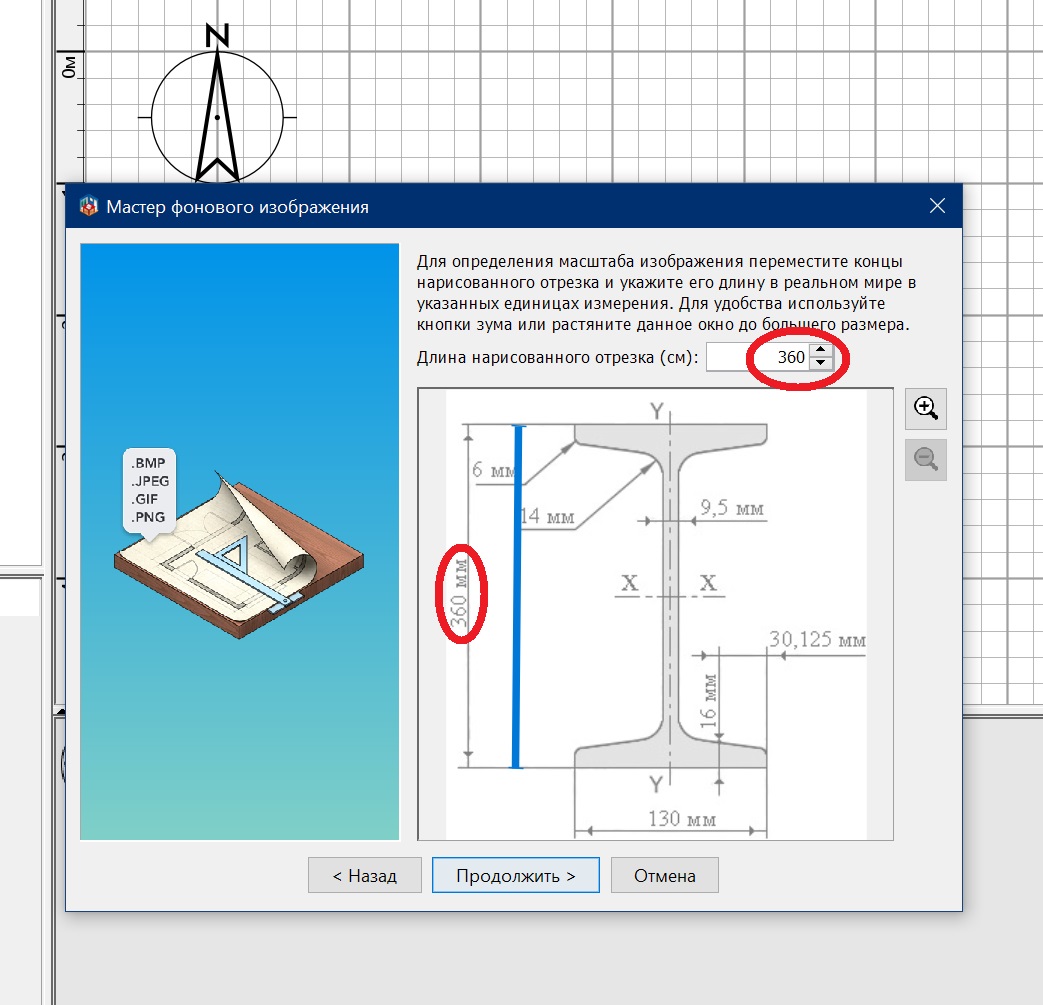
Thanks a lot for the advice to assign texture to surfaces before exporting! I would like to share my way to create any channel profile, it may be useful for those who do not know how to make more complex models. You need to find the drawing on the Internet and make it a background image. instead of dimensions in millimeters, set the background image 10 times larger, in centimeters with the same numbers. It is more convenient for building later.


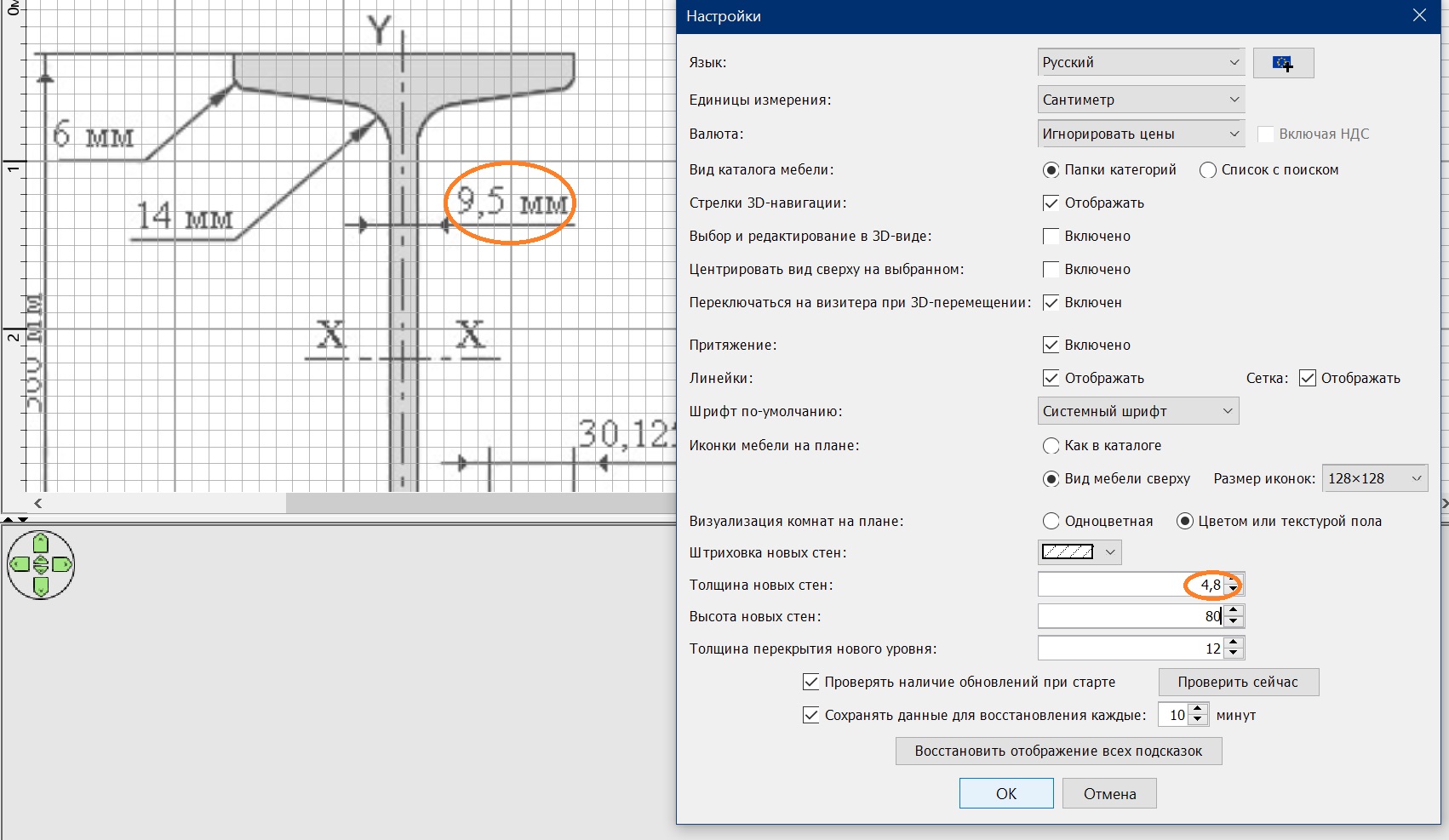
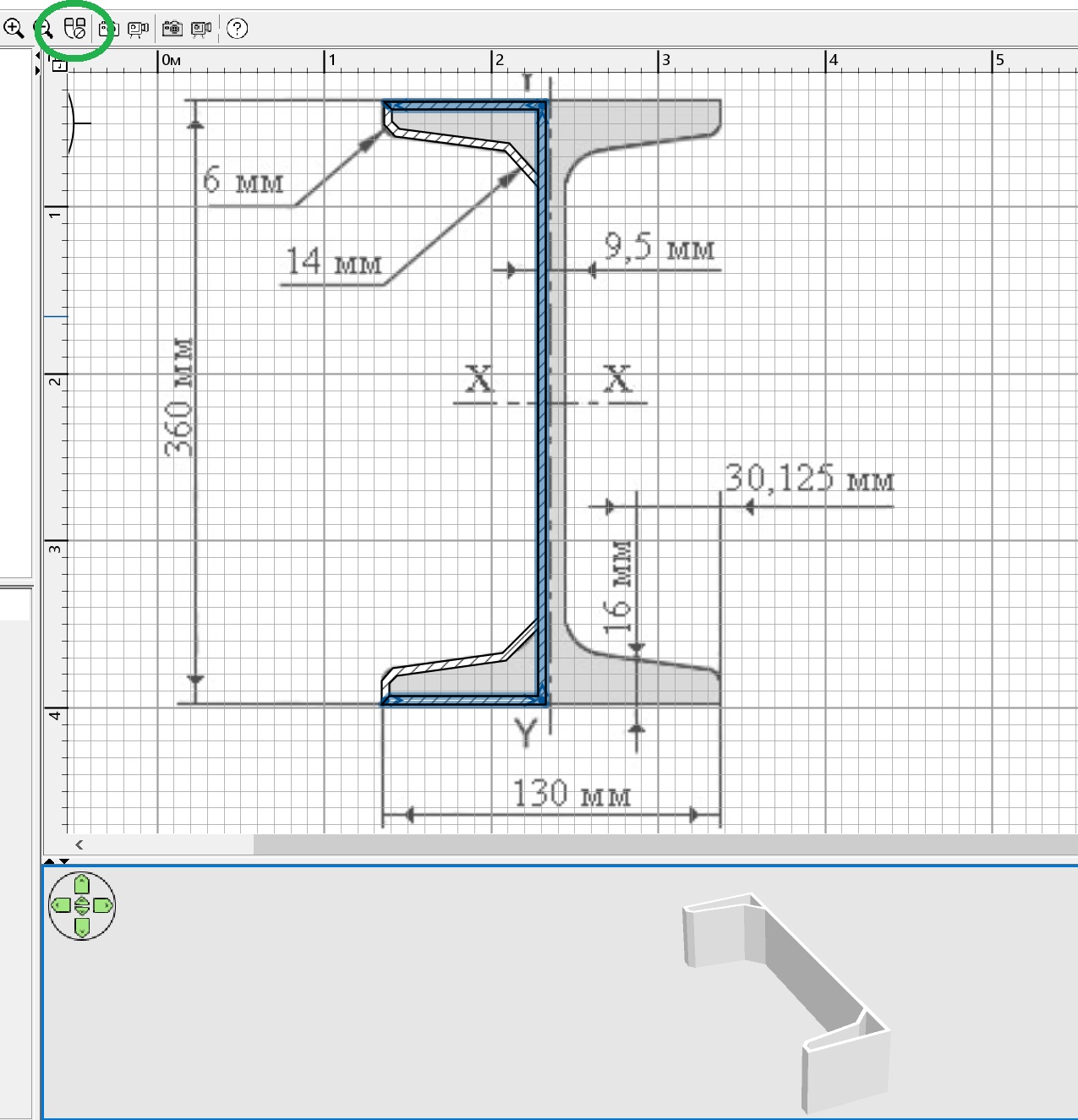
if the drawing is correct, then my instructions are correct. But I fell for a SCHEME where there are incorrect proportions. It is necessary to carefully select the initial drawing. So you need to choose the wall thickness settings according to the dimensions in the drawing. If there are difficult directions of the surfaces, then it is necessary to remove the magnet. You need to make a contour for half of the I-beam. You can make the entire perimeter at once, but it will be smoother this way.


you need to round the walls according to the background drawing, then fill all the voids with the same walls.


and now you need to highlight everything that you have done with the walls and assign texture settings for the left and right surfaces of all these walls. And you can assign a color to the top of the walls.


Now you can export to OBJ and import back as furniture. Copy and mirror the halves, connect, align. Again, export-import as a whole symmetrical model. Rotate the model along the X axis by 90. My observation is that the texture scale for such models should be from 1000 and more. Otherwise there will be a cage. And the top of the walls - the I-beam section - will have a second texture only on the upper surface, the lower surface of the wall is not adjustable, there will be a texture for the side surface. You need to copy, expand and glue the two models again so that you can get a texture on the cut from both sides of the I-beam (outside the upper surfaces of the walls). Export-import again. That's it. My main conclusion is that you need to carefully select the initial drawing so as not to do all the work incorrectly from the very beginning, as I did. The proportions of this I-beam are wrong in the end.

Posted by GaudiGalopin3324 at Jun 10, 2024, 10:01:02 PM
Re: Library for metal construction objects
this wall model weighs 94KB

Posted by Puybaret at Jun 10, 2024, 11:49:40 PM
Re: Library for metal construction objects
Nice tutorial!
There’s also a metal beam among the free 3D models.
----------------------------------------
Emmanuel Puybaret, Sweet Home 3D creator

Posted by GaudiGalopin3324 at Jun 11, 2024, 1:04:03 AM
Re: Library for metal construction objects
Thank you Emmanuel! If it will be useful for the model library, then here is the OBJ file, I have corrected the proportions.
https://www.mediafire.com/file/8t6aexjva4dht1b/I-beam.obj/file

Posted by Keet at Jun 11, 2024, 9:30:03 AM
Re: Library for metal construction objects
this wall model weighs 94KB
This is an extreme example of the both the ease and usefullness of using walls but at the same time it shows the incredible inefficiency in model size. (It's a 119kb obj file.)
You can create great and very detailed furniture in Sweet Home 3D but avoid using walls if possible.

I used Blender to clean up the I-Beam. Here's the same I-Beam but reduced in size to a 14.4kB obj file. That is a huge difference! Basically I removed everything that is hidden inside the beam (caused by using walls) and only left the outside skin that is visible.
https://dodecagon.nl/upload/objects/I-Beam.zip
----------------------------------------
Dodecagon.nl
1300+ 3D models, manuals, and projects

Posted by GaudiGalopin3324 at Jun 11, 2024, 10:39:51 AM
applause   Re: Library for metal construction objects
Interesting!! Productive!! But!)) I have a strong feeling that working with the SH 3d program is interesting precisely for its primitive primitive simplicity. Robinson Crusoe, when he got to a desert island, had only a minimal set of tools. He didn't have a Makita grinder and a Bosch screwdriver. There was a stone, a goat, a grain of wheat and a piece of glass from a watch. And it helped him create his own name empire and survive. And then get into the book)). I keep thinking about how to really enjoy the simplicity of the process with maximum incredible effect in the final. And I always have my night as an ally. The time spent visiting other programs seems like a surrender to me. Yes, it turns out a reduction in size, Improvement, and Speed of loading. There, on the Mainland, everything is better, more diverse, there are many supermarkets, but there is no certainty that you need to return back to "your little island". I keep thinking about doing everything with the help of a goat and a stone, it's more interesting to me, it brings more joy and satisfaction. And go to bed to get your unexpected harvest in the morning. The computer is a piece of hardware, he doesn't have to sleep. I'll see what's grown there in the morning. You don't have to get everything before going to bed. This is my interest, sports). I'm afraid to go to the Blender. And what if I don't come back))). I am happy to replace some things in SH3D with an illusion, a deception of the viewer, which is why I was so inspired by the invisible box method. This method is ideal for SH3D, it helps to keep up with the night for rendering. Helps to avoid unnecessary visits to the dentist)). I don't want to hurt anyone. These are my problems in my head. love struck

Posted by captaincook at Jun 11, 2024, 10:52:53 AM
Re: Library for metal construction objects
Bonjour.

Excellente explication de la création de ce profilé en H faite par GaudiGalopin.
Je me suis amusé à la reprendre mais avec quelques petites différences.


A partir de l'image de fond, j'ai tracé des murs fins mais cette fois à l'extérieur de la moitié du profilé.
Puis j'ai copié cette première moitié et l'ai retourné horizontalement pour respecter la symétrie.


J'ai ensuite crée la surface à l'intérieur de ces murs et désactivé le plafond ainsi que l'affichage de sa surface.
Enfin j'ai crée un nouveau niveau (arbitrairement de 200 cm d'épaisseur) sur lequel j'ai copié la surface précédemment crée.


Ne restait plus qu'à appliquer la texture de son choix et exporter la pièce au format .OBJ.
Puis la ré importer en tant que meuble et lui donner les dimensions finales souhaitées.

Bonne journée à tous.

Posted by GaudiGalopin3324 at Jun 11, 2024, 10:59:38 AM
Re: Library for metal construction objects
Excellent!!!! Merci!! blushing

Posted by Keet at Jun 11, 2024, 11:23:40 AM
Re: Library for metal construction objects
You guys think to complex for a simple I-Beam laughing

If I had to create it 100% in Sweet Home 3D I would do it like this:
Draw the walls like previously shown but make sure that the inside of the walls measure as what the I-Beam must be. Create a room inside the walls.
Export the room and after import stretch it to the required height. Done. One I-beam with an object size of 7.5kB.

The only problem is that the texturing of the center is diagonal but that could be solved by only using a room to create the top part. Texture, export, import. Copy and flip vertically. Put a box between them for the center. Texture the box before export and after import you have a perfect I beam with nice rounded curves and a minimal object size. And completely created in Sweet Home 3D!
----------------------------------------
Dodecagon.nl
1300+ 3D models, manuals, and projects

Posted by GaudiGalopin3324 at Jun 11, 2024, 1:50:53 PM
rose   Re: Library for metal construction objects
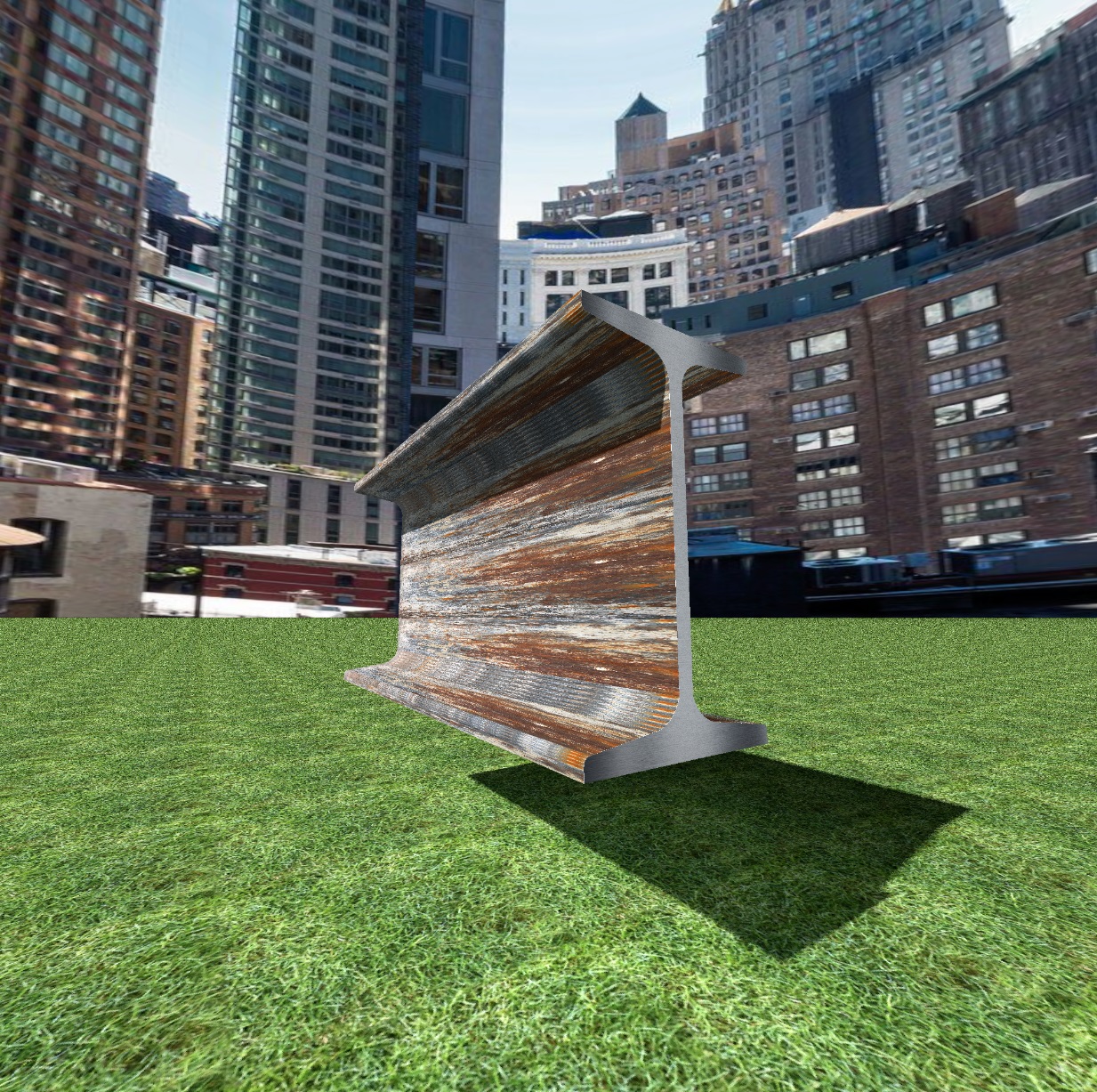
biggrin We are rapidly approaching the ideal))). Dear Keet, you seem to have forgotten about the texture before exporting. Then the diagonal does not appear on the vertical wall of the I-beam. I did something in between all the options, I put a thin model from the room, 0.1 cm, on the end of the slice. Then we have two textures - for the I-beam and for the end section. The size of the model is now 23KB. The only drawback of the room in front of the wall model is that the texture lies in small strips on rounded sections, along the segments of the curvature of the wall. But the principle of nowhere from the island is maintained))). Everything is via SH3D.


Posted by Keet at Jun 11, 2024, 2:36:47 PM
Re: Library for metal construction objects
Yep, it is better to have a separate material for the ends. Looks a lot better.
I didn't have that texture problem in the curvature, only a slight diagonal distortion but barely noticable because it's a small area. Maybe because I exported/imported before setting a texture.
----------------------------------------
Dodecagon.nl
1300+ 3D models, manuals, and projects

Posted by captaincook at Jun 11, 2024, 2:47:18 PM
Re: Library for metal construction objects
Dernière remarque.

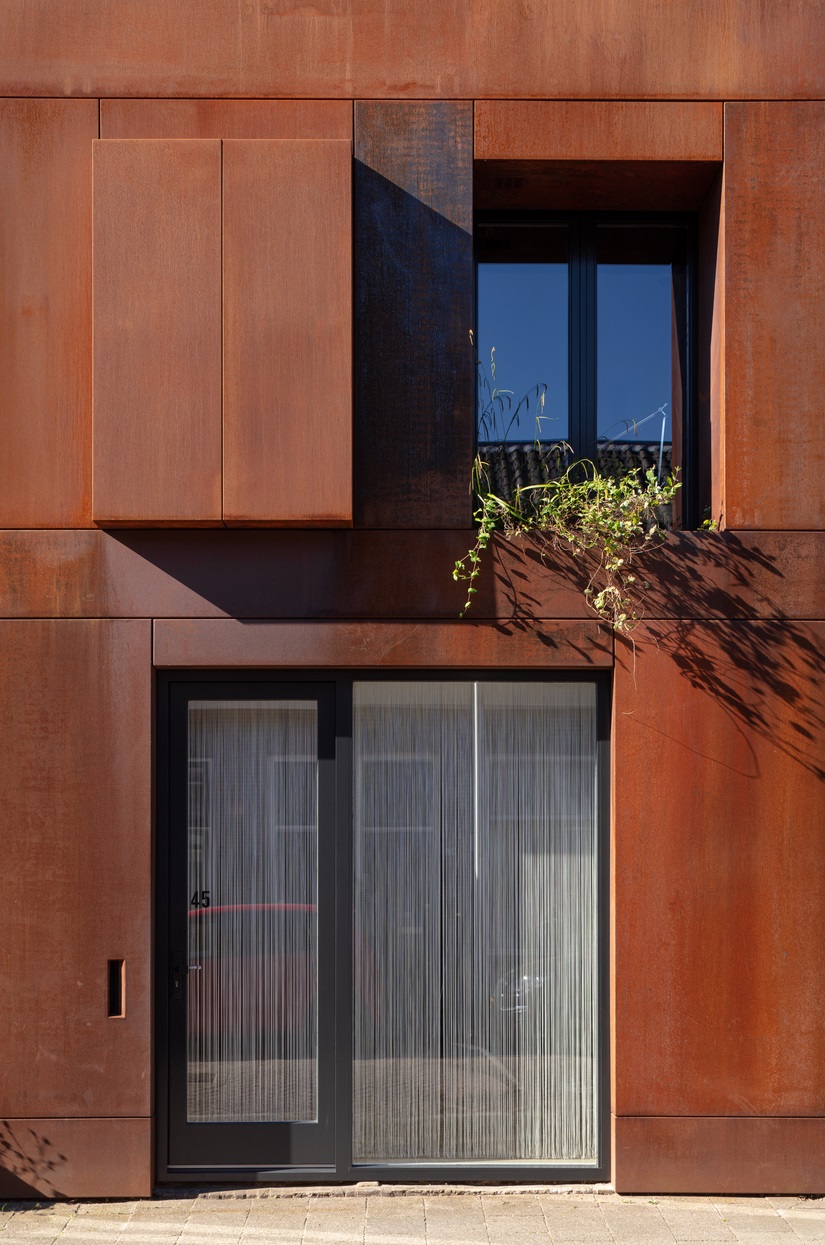
Est'il raisonnable d'installer des poutres neuves qui sont déjà oxydées ?

Je sors >>>>>>> laughing laughing

Posted by GaudiGalopin3324 at Jun 11, 2024, 3:04:21 PM
rose   Re: Library for metal construction objects
Cor-Ten steel . Corten Steel is an alloy with a special composition. The rust formed on its surface closes all the pores in the metal, and further corrosion processes stop. By changing the color and texture, the material retains them for a long time without losing strength.
Taken from the Internet))