Print at Dec 19, 2025, 4:42:17 AM View all posts in this thread on one page
Posted by bashnprint at Jun 18, 2025, 6:34:37 PM
Making a custom door look like the stock door in plan view
Hey everyone!

Just a quick question about doors. The doors that come pre-loaded with SH3D have a distinct shape that shows where the door swings open to. This of course is great when you're making a blueprint style layout to show where the door opens.

However, when I load in a custom door (yes I can check "Door or Window" in the furniture import window) it doesn't show the active area that the door will swing open to.


I've mostly started layering the stock door over top of a custom door so it ends up looking like my custom door has this section, but of course when doing a 3D render I have to remember to hide the stock door.

Is there a way to add this swinging area to a custom door I import myself?
Posted by Keet at Jun 18, 2025, 7:02:06 PM
Re: Making a custom door look like the stock door in plan view
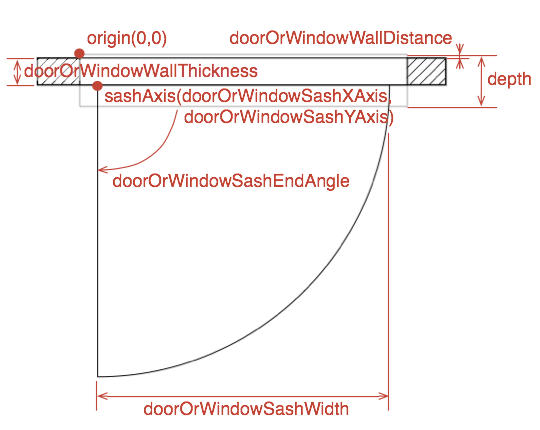
You need extra properties for your door/window that are not available in the obj/mtl definition. Fortunately we have the Furniture Library Editor and that allows us to add multiple extra properties, among which properties for the display of sashes.
Check this forum post for an explanation.

In short: you have to add your door/window to a Furniture Library (.sh3f file) and set the properties for the sashes. (You can create your own library.)
And here is an image (also in the same thread) that shows what-is-what.

----------------------------------------
Dodecagon.nl
1300+ 3D models, manuals, and projects

Posted by Waldemar.Hersacher at Jun 19, 2025, 10:15:53 AM
Re: Making a custom door look like the stock door in plan view
You can have multiple property files for different languages in the library. PluginFurnitureCatalog.properties is the default name for English.

You can add an underscore and the language code to the filename (not the extention), e. g. PluginFurnitureCatalog_de.properties for German or PluginFurnitureCatalog_fr.properties for French.
----------------------------------------
MSI GP60, Linux Mint 21.3 Virginia base: Ubuntu 22.04 jammy, SH3D 7.5 with Photo-video rendering 2.8

Posted by Keet at Jun 19, 2025, 11:58:48 AM
Re: Making a custom door look like the stock door in plan view
@Waldemar.Hersacher
You can have multiple property files for different languages in the library. PluginFurnitureCatalog.properties is the default name for English.

You can add an underscore and the language code to the filename (not the extention), e. g. PluginFurnitureCatalog_de.properties for German or PluginFurnitureCatalog_fr.properties for French.
There's a nice translation guide with detailed instructions.
----------------------------------------
Dodecagon.nl
1300+ 3D models, manuals, and projects

Posted by bashnprint at Jun 19, 2025, 9:54:50 PM
Re: Making a custom door look like the stock door in plan view
Sorry, I don't follow how this relates to my question about adding the "sashes" to doors...?

Maybe I'm not following something. Sorry.

Posted by bashnprint at Jun 19, 2025, 9:55:33 PM
Re: Making a custom door look like the stock door in plan view
This is perfect. With some fiddling around of those settings I was able to get it to work how I had in mind.

Thank you so much for the quick response!