|
Sweet Home 3D Forum » List all forums » » Forum: New versions » » » Thread: Sweet Home 3D 2.4 |
|
| Print at Dec 16, 2025, 12:43:21 PM | |
| Posted by Puybaret at May 18, 2010, 10:50:17 PM |
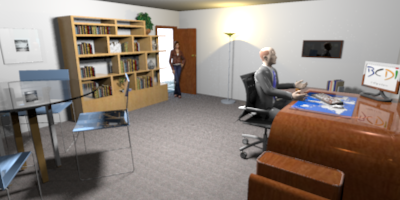
Sweet Home 3D 2.4The first Beta of Sweet Home 3D 2.4 is available as a Java Web Start application. At this time, its main new feature is the support for DAE/Collada file format: this means you have now access to Google 3D Warehouse and its huge library of 3D models! For example, the following image contains only furniture and characters imported from Google 3D Warehouse: This Beta version fixes also a few other things, among which: - objets exported at OBJ format then reimported in Sweet Home 3D have now the same look (see this thread), - the support for transparent textures was added, - the bug that prevented overlapping floors to be correctly displayed is fixed. Expect more features in the next Beta updates. ![]() Developer comment: Sweet Home 3D 2.4 was released on 05/25/2010. ---------------------------------------- Emmanuel Puybaret, Sweet Home 3D creator |
| Posted by db4tech at May 18, 2010, 11:44:07 PM |
|
Re: Sweet Home 3D 2.4 Wow thanks! ![]() One question is this a small bug or should it now be showing a full description path for the virtual vistor? ![]() Also and this is something really small, the program icon is corrupt on Windows 7. It is fine with version 2.3. Here is a 200% enlargement to help show the problem (the blue background was from my current desktop background and is not part of the icon) ![]() db4tech |
| Posted by hansmex at May 19, 2010, 5:40:33 AM |
|
Re: Sweet Home 3D 2.4 Emmanuel: Both are the same on Ubuntu 10.04. Hans ---------------------------------------- Hans new website - under constuction hansdirkse.info |
| Posted by Puybaret at May 19, 2010, 7:27:18 AM |
|
Re: Sweet Home 3D 2.4 One question is this a small bug or should it now be showing a full description path for the virtual vistor? It's a bug and I fixed it.I noticed also that transparent textures don't work at this time at highest rendering quality level. I'll have to check if SunFlow can support that. By the way, the DirectX version of Sweet Home 3D 2.4 Beta is also available. Also and this is something really small, the program icon is corrupt on Windows 7. It is fine with version 2.3. Thank you for mentioning it. If you run Sweet Home 3D 2.3 from its installer version, I guess this is a bug in Java Web Start. ---------------------------------------- Emmanuel Puybaret, Sweet Home 3D creator |
| Posted by db4tech at May 19, 2010, 1:22:07 PM |
|
Re: Sweet Home 3D 2.4 Thank you for the fixes. I'm not a programmer but was the virtual visitor long description showing because a semicolon had been missed, separating the code description from the code? One thing that may put people off testing the new version, this warning always shows (unless the 'Always trust...' box is ticked) with both the web start version and the DirectX version on Windows 7. ![]() What are yours and others thoughts on moving a couple of things? The Preferences from the File menu to the Edit menu. (Since changing preferences is editing something, plus most other programs have preferences found on the edit menu. Will help new users if preferences are where they are used to finding it, regular users will soon adapt to the change) Also Moving the Export to OBJ format... from the 3D view menu to the File menu since clicking on Export to OBJ format... always saves the full model and not just what is visible in the 3D view. I was going to make these suggestions with version 2.3 but then thought you were busy with other things, so now is the perfect time when coding a new version. db4tech Edit: To fix a couple of typos. |
| Posted by db4tech at May 19, 2010, 11:32:40 PM |
|
Re: Sweet Home 3D 2.4 Also while you are coding your new version. Do you know about the growing Furniture catalog view: bug, causing all other windows to shrink? it happens with both versions 2.3 and 2.4, seems to happens for both Category folder and Searchable list options. It only seems to happen when in full screen mode (maybe it's because I'm using a wide-screen display?) If it's helpful I have made a tiny low resolution 18 seconds video to let you see what happens to the display each time a file is saved then opened again. Sorry about giving you more work while you are busy working on advanced Uber shaders (just kidding!)db4tech ---------------------------------------- |
| Posted by hansmex at May 20, 2010, 7:40:33 AM |
|
Re: Sweet Home 3D 2.4 Gentlemen: I cannot reproduce this bug on my PC (Ubuntu 10.04, screen 1680x1050, SH3D v2.4b2) or on my laptop (Windows Vista, screen ?, SH3D v2.3) Hans ---------------------------------------- Hans new website - under constuction hansdirkse.info |
| Posted by Puybaret at May 20, 2010, 9:07:58 AM |
|
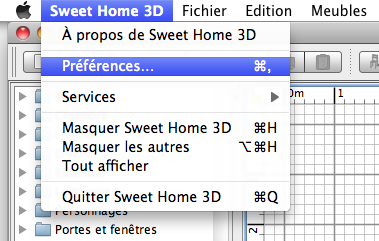
Re: Sweet Home 3D 2.4 was the virtual visitor long description showing because a semicolon had been missed, separating the code description from the code? It's just a misplaced end of line delimiter in the resource file that gives the menu names displayed in English.One thing that may put people off testing the new version, this warning always shows (unless the 'Always trust...' box is ticked) with both the web start version and the DirectX version on Windows 7. This security dialog is displayed for any Java Web Start version of Sweet Home 3D and for the online version too.In a way, it's not normal that the installer versions under Windows and Linux don't display such a dialog, because the user should always be warned about the risks of launching a program able to write on the disk, run DLLs... The only improvement I can do in this dialog is about the "cannot be verified" text: if I buy a Java Code Signing Certificate, it will say "has been verified", but this certificate costs at least 200 $/year! Not sure it's worth it for a free program... What are yours and others thoughts on moving a couple of things? My stupid answer would be "use Mac OS X"! The Preferences from the File menu to the Edit menu. (Since changing preferences is editing something, plus most other programs have preferences found on the edit menu. Will help new users if preferences are where they are used to finding it, regular users will soon adapt to the change) ![]() Under Mac OS X, they solved this problem by proposing the Preferences item in the application menu displayed for each program. Here's the French application menu for Sweet Home 3D: On other systems, I miserably didn't see any common rule; Preferences are sometimes in a Tool menu, sometimes in the File menu, sometimes in the Edit menu or elsewhere, and often it's named Options and not Preferences! So sorry I won't move it. Moving the Export to OBJ format... from the 3D view menu to the File menu since clicking on Export to OBJ format... always saves the full model and not just what is visible in the 3D view. This remark is applicable to the Export to SVG format... menu item too, and any Export to ... format that will appear in the future. ![]() Even if these menu items handle files, I chose to put these items in the Plan and 3D view menus to suggest to beginners what kind of information would be exported. Do you know about the growing Furniture catalog view: bug, causing all other windows to shrink? I'm not aware of this problem. Do you mean that the Furniture catalog view grows without doing anything like in the video??? When does it stop growing? ---------------------------------------- Emmanuel Puybaret, Sweet Home 3D creator |
| Posted by db4tech at May 20, 2010, 3:27:18 PM |
|
Re: Sweet Home 3D 2.4 Hi Emmanuel and Hans, Each frame (or window position change) in the video shows what happens when a Sweet Home file is saved, the Sweet Home program is closed, next the file is opened again, file is saved (without making a changes) close the program, open the file and save the file again and so on. Each frame of the video shows one screen capture when the Sweet Home file is opened. Under normal use the windows only change (jump) once and I drag them back to the original positions before doing any work on the Sweet Home building before saving. The video was created to see just how far the windows would keep moving if the user didn't keep dragging them back. Hope this makes sense. Emmanuel, to answer your question, the end of the video shows the maximum distance the windows seem to travel. To help isolate what might be causing this (in case it was a hardware driver problem or operating system issue) I have just tested it for you using XP Pro under visualization (completely different OS and drivers for virtual hardware) and also a slightly older version of java and it does exactly the same thing, in windowed mode everything stays the same but once the program is full screen the widows change/jump positions (only) once, as soon as a file is opened. I'm using a 16x9 aspect ratio display if it's helpful. PS: I don't think I will be buying a Mac just so the preferences show in a different place. ![]() db4tech |
| Posted by db4tech at May 20, 2010, 3:38:32 PM |
|
Re: Sweet Home 3D 2.4 Moving the Export to OBJ format... from the 3D view menu to the File menu since clicking on Export to OBJ format... always saves the full model and not just what is visible in the 3D view. This remark is applicable to the Export to SVG format... menu item too, and any Export to ... format that will appear in the future. ![]() Even if these menu items handle files, I chose to put these items in the Plan and 3D view menus to suggest to beginners what kind of information would be exported. Ah but Export to SVG format... makes sense under the Plan menu option as it is just the plan view that is converted to SVG. The Export to OBJ format... differs as the whole model (not just what is visible in the 3D view is converted to an obj file) since it is located under the 3D view menu I thought new users might think only what they see in the 3D view is converted to an obj. db4tech |
| Posted by db4tech at May 20, 2010, 6:26:50 PM |
|
Re: Sweet Home 3D 2.4 Hans please will you do the following test for me using Vista,
Thank you in advance. db4tech |
| Posted by Puybaret at May 20, 2010, 8:01:20 PM |
|
Re: Sweet Home 3D 2.4 db4tech, I was aware that the Java Web Start security dialog may put some people off running Sweet Home 3D with Java Web Start, but your remark made me realize that if I couldn't get rid of this dialog, it might be possible to display it earlier before all the Sweet Home 3D files are downloaded by users. At least, that would spare some bandwidth for all the users that refuse to run Sweet Home 3D. As more than the half of the 1.7 TB consumed each month on the web server is for Sweet Home 3D Java Web Start, you can guess that I wouldn't mind to reduce bandwidth used for nothing! So the new Beta version of Sweet Home 3D 2.4 I released today changes the way Sweet Home 3D is installed with Java Web Start. For programmers interested by the technical part, I set all Sweet Home 3D jars as lazy downloaded parts in the JNLP file and I added a tiny bootstrap jar containing a new main class that downloads lazy parts and calls the Sweet Home 3D main method I used before. At the first run, the end users accepting to launch Sweet Home 3D will see now two download progress dialogs instead of one before, but this is really not annoying. ![]() ---------------------------------------- Emmanuel Puybaret, Sweet Home 3D creator |
| Posted by Puybaret at May 20, 2010, 8:06:02 PM |
|
Re: Sweet Home 3D 2.4 The Export to OBJ format... differs as the whole model (not just what is visible in the 3D view is converted to an obj file) since it is located under the 3D view menu I thought new users might think only what they see in the 3D view is converted to an obj. Sorry, it's not true: only furniture checked as visible in the furniture list will be exported in the OBJ file. Thank you db4tech, you gave the final reason why I won't move the Export to OBJ format... to an other menu. ![]() ---------------------------------------- Emmanuel Puybaret, Sweet Home 3D creator |
| Posted by db4tech at May 20, 2010, 9:34:27 PM |
|
Re: Sweet Home 3D 2.4 Thank you db4tech, you gave the final reason why I won't move the Export to OBJ format... to an other menu. Hey you're welcome!![]() Ah, it's so nice to be able to help people, gives me that warm fuzzy feeling. ![]() Goes off to dream about Advanced Uber shader rending instead. db4tech |
| Posted by hansmex at May 21, 2010, 7:25:43 AM |
|
Re: Sweet Home 3D 2.4 db4: As per your instructions, I did exactly what you asked, and, lo and behold, SH3D displays on my laptop the same quirky behaviour as you described. The vertical divider moves from approx. the left of F5 to the right of F6. Hans ---------------------------------------- Hans new website - under constuction hansdirkse.info |
| Posted by Puybaret at May 21, 2010, 4:57:57 PM |
|
Re: Sweet Home 3D 2.4 Today's update brings some big improvements on memory usage, and better performances for some DAE/Collada files. ![]() ---------------------------------------- Emmanuel Puybaret, Sweet Home 3D creator |
| Posted by Puybaret at May 23, 2010, 10:35:35 AM |
|
Re: Sweet Home 3D 2.4 By the way, I noticed that the improvements on memory usage speed up the performances of 3DS files imported from ZIP files, when you move or rotate them. ![]() ---------------------------------------- Emmanuel Puybaret, Sweet Home 3D creator |
| Posted by Puybaret at May 25, 2010, 12:13:47 AM |
|
Re: Sweet Home 3D 2.4 I fixed the growing catalog view bug in Sweet Home 3D 2.4 Beta 5. Thank you db4tech for your detailed description. It helped to fix this bug. ---------------------------------------- Emmanuel Puybaret, Sweet Home 3D creator |
| Posted by db4tech at May 25, 2010, 10:34:55 AM |
|
Re: Sweet Home 3D 2.4 Hi Emmanuel, I am sorry to report I am still seeing the growing furniture catalog view with version 2.4 beta 5 ![]() Maybe these files will help you identify exactly what is changing and why.
These files will show you how much the furniture catalog view changed through the 5 'Test' saves. db4tech ---------------------------------------- ---------------------------------------- ---------------------------------------- ---------------------------------------- ---------------------------------------- |
| Posted by Puybaret at May 25, 2010, 12:14:11 PM |
|
Re: Sweet Home 3D 2.4 Sorry, it was fixed in source code repository, but I made an error when I released the Beta 5. It's correct in Sweet Home 3D 2.4 Beta 6 now. ---------------------------------------- Emmanuel Puybaret, Sweet Home 3D creator |
| Posted by db4tech at May 25, 2010, 6:42:07 PM |
Re: Sweet Home 3D 2.4I can indeed confirm that the bug is now fixed. ![]() While you are getting ready for your next release when you get chance you'll have to update your splash screen, replacing the old style TV for a new LCD TV, the up-lighter can now be illuminated and atmospheric lighting could be added (drawing attention to the new lighting capabilities) oh! Also don't forget to change the date to 2007-2010 ![]() Maybe something like this? ![]() db4tech |
| Posted by Puybaret at May 25, 2010, 10:26:46 PM |
|
Re: Sweet Home 3D 2.4 Nice image db4tech! ![]() I released version 2.4 tonight. I'll have to update Advanced rendering plug-in. ---------------------------------------- Emmanuel Puybaret, Sweet Home 3D creator |
| Posted by hansmex at May 25, 2010, 11:35:56 PM |
|
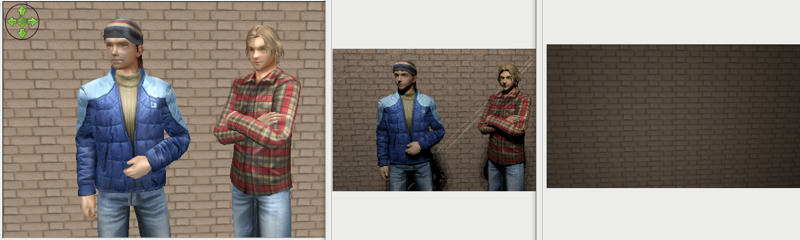
Re: Sweet Home 3D 2.4 Emmanuel: Maybe I'm too quick with this post of my test with v2.4. ![]() From left to right: - The standard render in the 3D pane - The "old" photo render - The new Phong render (all 3 plug-ins have this problem) The gentlemen are zip-files from the Google Sketchup library in the Collada file format. Nevertheless, you've done a terrific job once again! Hans ---------------------------------------- Hans new website - under constuction hansdirkse.info |
| Posted by db4tech at May 26, 2010, 12:46:04 AM |
Re: Sweet Home 3D 2.4Emmanuel congratulations on your 2.4 release. You've been busy! Thank you for your kind remarks about the render, please feel free to use it if you want to. I might export the picture of the lady and add a background to it, then import and re-render, at the moment with the picture just being an outline it causes multiple shadows making the picture look like it's out of focus. Might also alter the desk lamp so it isn't so bright. ![]() Hans, After reading your post I also gave the figures a try and concur they render (or rather they don't) as invisible. with any of the 3 new advanced shaders. Emmanuel, Once again congratulations, thank you for all your hard work! db4tech |
| Posted by Puybaret at May 26, 2010, 5:15:23 PM |
|
Re: Sweet Home 3D 2.4 Thank you guys for your remarks and help! I know why the plug-ins don't work with DAE/Collada models, and will release a new version soon. ---------------------------------------- Emmanuel Puybaret, Sweet Home 3D creator |
| Posted by Puybaret at May 26, 2010, 6:51:29 PM |
|
Re: Sweet Home 3D 2.4 Here are the updated plug-ins able to support models at DAE/Collada format: http://www.sweethome3d.com/plugins/AdvancedRendering-1.3.sh3p http://www.sweethome3d.com/plugins/AdvancedRendering-PhongShader-1.3.sh3p http://www.sweethome3d.com/plugins/AdvancedRendering-UberShader-1.3.sh3p AdvancedRendering-1.3.sh3p is a new file. AdvancedRendering-PhongShader-1.3.sh3p and AdvancedRendering-UberShader-1.3.sh3p replace the previous files. ---------------------------------------- Emmanuel Puybaret, Sweet Home 3D creator |
| Posted by db4tech at May 26, 2010, 7:50:19 PM |
|
Re: Sweet Home 3D 2.4 Thank you Emmanuel for the fixes, I can indeed confirm that the models render okay with every shader version (apart from some silver surfaces using Uber, please see below) With you being very busy releasing version 2.4 I do hope my updated post on the lighting shader test thread (about a possible solution to the grey/silver leaves and furniture) will be helpful for the next version of Uber. Couple of quick questions. Why did you choose to remove the advanced photo plug-in page from the front page? I have tried looking for it but so far haven't found it. Also with you releasing 2.4 yesterday what's your thoughts on the release date reading 25th instead? I know the date doesn't really matters just thought I'd ask. Thank you for your time and especially for your hard work, db4tech |
| Posted by Puybaret at May 27, 2010, 8:49:12 AM |
|
Re: Sweet Home 3D 2.4 Why did you choose to remove the advanced photo plug-in page from the front page? I just removed the link to the article about Advanced rendering plug-in. I prefer to keep the home page not to big: lots of people don't have big screens and I even saw people using Sweet Home 3D on a netbook! Recent news can be accessed from the blog link, and I mentioned the update of the Advanced rendering plug-in in the article about Sweet Home 3D 2.4. The first link returned by a search for "plug-in" points to the article about Advanced rendering plug-in too. Also with you releasing 2.4 yesterday what's your thoughts on the release date reading 25th instead? That's an error. Thank you for reporting it. ![]() ---------------------------------------- Emmanuel Puybaret, Sweet Home 3D creator |
| Posted by db4tech at May 29, 2010, 8:15:58 PM |
|
Re: Sweet Home 3D 2.4 I can indeed confirm that the bug is now fixed. ![]() db4tech After further tests I and sorry to report the bug is still there but to a much smaller extent. The catalog view still creeps down the the screen and across by only a small percentage, maybe about 5 pixels at a time. Watching the program open I would guess you programmed in a negative jump distance so as the windows try to reposition/jump it should end up back where is started. Is that how you did it? If it is helpful I have attached a couple of files to show how far the windows move after 10 saves Save 1 The reference point to gauge against. Save 10 is the last save I did. If I did more saves the windows would creep further but I thought 10 saves was enough to let you see what is still happening. Sorry to report a bug ![]() db4tech ---------------------------------------- ---------------------------------------- |
| Posted by Puybaret at May 29, 2010, 11:27:53 PM |
|
Re: Sweet Home 3D 2.4 I know it's still not perfect, but the way Sweet Home 3D is programmed prevents me to easily fix it and this behavior varies from one system to the other (I prefer to avoid too much technical details here). The workaround is to resize the window with the mouse to get a size as large as the screen's size without using the maximize icon. ---------------------------------------- Emmanuel Puybaret, Sweet Home 3D creator |
| Posted by db4tech at May 30, 2010, 12:53:48 AM |
|
Re: Sweet Home 3D 2.4 When I conducted my original tests, I did try enlarging the interface without using the maximize button, to see if the window positions stayed constant, which they do, the only problem is, it is very easy to forget when switching applications, if instead of minimizing Sweet Home, I just move the interface window slightly off screen (so some of the desktop is available) then on returning to use Sweet Home, without thinking double click anywhere the title bar which is my preferred method to maximize an application. I can understand you not wanting to get too technical, so keeping it simple, which is prefect for me! With the windows positions creeping (or changing) I'm guessing their current horizontal and vertical positions aren't defined by a percentage calculation when the interface is maximized? As that figure would never change no mater what the users screen resolution or aspect ratio.Thank you for your reply and offering a workaround. db4tech |
| Posted by db4tech at Jun 2, 2010, 11:11:49 PM |
|
Re: Sweet Home 3D 2.4 Emmanuel: Hi Emmanuel and Hans,Maybe I'm too quick with this post of my test with v2.4. ![]() From left to right: - The standard render in the 3D pane - The "old" photo render - The new Phong render (all 3 plug-ins have this problem) The gentlemen are zip-files from the Google Sketchup library in the Collada file format. Nevertheless, you've done a terrific job once again! Hans I just discovered a different type of rendering bug with shiny parts on some Google Sketchup models. Here's how the models appear in the 3D quick view. ![]() This is the inbuilt photo render. ![]() Advanced photo render ![]() Uber photo render. ![]() Apart from no colours Uber came the closest rendering the helmet but that could simply be because there are no colours? It is a shame all Google Sketchup human figures are very low poly, I don't have time to try this at the moment but I guess the only way around that would be to export them as .obj files, smooth them then import them again? Don't want to cause any problems with the model designers though. PS: I didn't do a render for Phong, after discovering Phong's limitations with my floor tests I uninstalled and stopped using it. db4tech |
| Posted by Puybaret at Jun 2, 2010, 11:48:32 PM |
|
Re: Sweet Home 3D 2.4 I've seen this problem on a (human) model too, but didn't find how to fix it yet. As it appears only in SunFlow, it's either a bug in the code I wrote that transforms Java3D shapes to SunFlow shapes, or a bug in SunFlow. It is a shame all Google Sketchup human figures are very low poly At least these models exist, and Sweet Home 3D users can use them even if Google 3D Warehouse models are not distributed under a free license. Personally, I found them quite nice, and I appreciate that many models in Google 3D Warehouse use a medium resolution. Most Sweet Home 3D users don't need 3D models with too much details.I don't have time to try this at the moment but I guess the only way around that would be to export them as .obj files, smooth them then import them again? Don't want to cause any problems with the model designers though. I tested it and it didn't change anything. ![]() ---------------------------------------- Emmanuel Puybaret, Sweet Home 3D creator |
| Posted by db4tech at Jun 4, 2010, 4:25:34 AM |
|
Re: Sweet Home 3D 2.4 I've seen this problem on a (human) model too, but didn't find how to fix it yet. You are a very clever programmer, it is just a matter of time. As it appears only in SunFlow, it's either a bug in the code I wrote that transforms Java3D shapes to SunFlow shapes, or a bug in SunFlow. I don't have time to try this at the moment but I guess the only way around that would be to export them as .obj files, smooth them then import them again? Don't want to cause any problems with the model designers though. I tested it and it didn't change anything. ![]() ![]() 3D quick view, looking smooth ![]() Same scene Advanced photo render ![]() Exported, smoothed then imported model. Once the UV textures are corrected should look good? ![]() Location photo shoot ![]() ![]() Right off to bed, very busy day tomorrow, Oops! I mean today! db4tech |
| Posted by Puybaret at Jun 9, 2010, 1:13:50 PM |
|
Re: Sweet Home 3D 2.4 db4tech, I found a way to fix the problem you mentioned above. Please update to plug-in version 1.4. ---------------------------------------- Emmanuel Puybaret, Sweet Home 3D creator |
| Posted by db4tech at Jun 9, 2010, 8:04:17 PM |
|
Re: Sweet Home 3D 2.4 You sir are a genius! So users can see the difference with the Google Sketchup models. Here is the exact same scene rendered with the two different shader versions Old: advanced photo render 1.3 ![]() New: advanced photo render 1.4 Wow! ![]() She said she is feeling much better now, so both Her & I would like to thank you. db4tech Edit: Updated the pictures, I attached a colour profile to the original ones by mistake, so they looked a bit pale in comparison. |
| Posted by Puybaret at Jun 9, 2010, 8:18:07 PM |
|
Re: Sweet Home 3D 2.4 You're welcome ![]() ---------------------------------------- Emmanuel Puybaret, Sweet Home 3D creator |
|
|
Current timezone is GMT Dec 16, 2025, 12:43:21 PM |