Print at Dec 19, 2025, 3:36:27 PM
Posted by Puybaret at Jun 8, 2010, 12:26:48 AM
Furniture Library Editor released
Hi,

I'm proud to announce the public release of the Furniture Library Editor, a long awaited tool that will help Sweet Home 3D users create and manage SH3F files.


The program is available as a 14 MB JAR executable file (see the end of this post for updated links), and requires you installed Java 6 or a more recent Java version on your machine (or reuse the Java version embedded with Sweet Home 3D installer when available).
The easiest way to launch it is to double-click on the file. If this method fails, choose open or launch with Java in its contextual menu, or open a Terminal window and run the command:

java -jar FurnitureLibraryEditor-2.2.jar

Supported system are Windows, Mac OS X 10.4 to 14, Linux 32 bit and 64 bit.
If you look for a nice icon for it, take this one based on a nice 3D model made by Pencilart:


This tool will let you import more than a piece of furniture at a time either with a classic file dialog displayed by the Import furniture tool, or by dropping the files in the window of the tool if your system supports this feature.
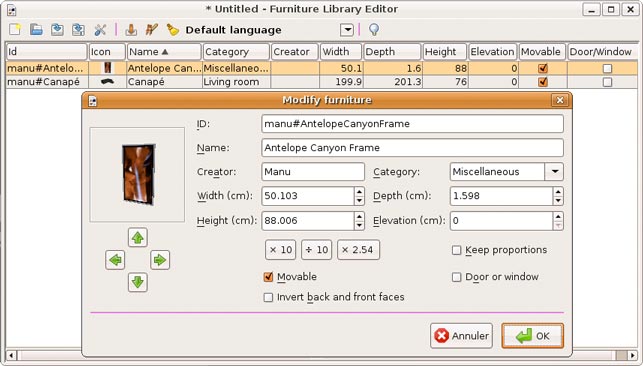
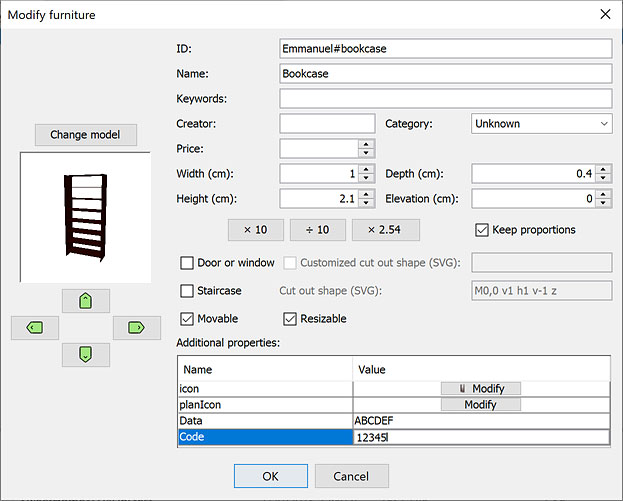
Once they are imported, you may modify each piece one by one, or by group after selecting them. As the screen capture shows, the modification dialog displays all the attributes of a piece of furniture (for those interested it's even possible to edit prices or resizable attribute after a small modification in program).
Compared to the Import Furniture wizard available in Sweet Home 3D, I also added the optional ID text field (when a piece has an ID, any other piece with the same ID won't appear in the furniture catalog of Sweet Home 3D), 3 buttons to multiply size by common values (x 10, ÷ 10, x 2.54), the ability to change 3D model file and fields to edit doors or staircases cut out shape. The 3D preview allows zoom and rotation around two axes, and each time you drag and drop the mouse in the 3D preview a new icon is created for the current piece.
Once a SH3F library is saved, you can import it in Sweet Home 3D with its Furniture > Import furniture library menu item, or a double click under Windows and Mac OS X.

This tool is also a translation tool that will help translators to localize more easily SH3F files: the name and the category entered in the modification dialog depends on the language chosen in the tool bar, and when you select a new language in this drop down list, all the categories belonging to the 12 default categories of Sweet Home 3D are automatically translated into the selected language, if the language belongs to the 21 ones supported by Sweet Home 3D at this time.

Caution, there's no undo/redo feature. I didn't feel it was really necessary. As always create backups to ensure you won't loose your work.

Note that from version 1.26, this tool is also able to open Sweet Home 3D default catalog contained in the Furniture.jar file. In case you want to update this catalog (deleting items, renaming them, changing their default size...), remove Furniture.jar from Sweet Home 3D installation folder, edit it with the Editor, save it as a SH3F file and reimport the new library in Sweet Home 3D.

For interested programmers, source code is committed in the FurnitureLibraryEditor SVN module separated from SweetHome3D one.
Furniture Library Editor project is derived from Sweet Home 3D project and uses a similar MVC architecture.
Project contains a README.TXT file with compilation directions.

I hope this tool will be useful and that you'll like it. biggrin

Updated links to Furniture Library Editor JAR executable:
Furniture Library Editor 2.2 was released on 08/21/2024
Furniture Library Editor 2.1 was released on 04/04/2024
Furniture Library Editor 2.0 was released on 09/22/2023 with new features described here
Furniture Library Editor 1.31 was released on 03/03/2023
Furniture Library Editor 1.30 was released on 07/31/2022
Furniture Library Editor 1.29 was released on 07/13/2022
Furniture Library Editor 1.28 was released on 07/27/2021
Furniture Library Editor 1.27 was released on 04/23/2021
Furniture Library Editor 1.26 was released on 03/02/2021
Furniture Library Editor 1.25 was released on 04/15/2020
Furniture Library Editor 1.24 was released on 01/22/2019
Furniture Library Editor 1.23 was released on 10/11/2018
Furniture Library Editor 1.22 was released on 01/25/2018
Furniture Library Editor 1.21 was released on 09/06/2017
Furniture Library Editor 1.20 was released on 11/16/2016
Furniture Library Editor 1.19 was released on 02/17/2016
Furniture Library Editor 1.18 was released on 10/05/2015
Furniture Library Editor 1.17 was released on 07/19/2015
Furniture Library Editor 1.16 was released on 02/02/2015
Furniture Library Editor 1.15 was released on 10/22/2014
Furniture Library Editor 1.14 was released on 06/12/2014 and updated under the same file name on 06/14/2014
Furniture Library Editor 1.13 was released on 01/14/2014
Furniture Library Editor 1.12 was released on 10/30/2013
Furniture Library Editor 1.11 was released on 06/03/2013
Furniture Library Editor 1.10 was released on 03/21/2013
Furniture Library Editor 1.9 was released on 10/25/2012
Furniture Library Editor 1.8 was released on 09/06/2012
Furniture Library Editor 1.7 was released on 04/28/2012
Furniture Library Editor 1.6 was released on 12/20/2011
Furniture Library Editor 1.5 was released on 07/26/2011
Furniture Library Editor 1.4 was released on 04/22/2011
Furniture Library Editor 1.3 was released on 02/13/2011
Furniture Library Editor 1.2 was released on 11/30/2010. I removed the ID column and the ID info for newly added furniture as it's useful for only very special cases.
Furniture Library Editor 1.1 was released on 08/23/2010
Furniture Library Editor 1.0 was released on 06/21/2010
----------------------------------------
Emmanuel Puybaret, Sweet Home 3D creator

Posted by hansmex at Jun 8, 2010, 10:04:06 AM
Re: Furniture Library Editor Beta released
Emmanuel:

Merci! MERCI!
Ca foncionnait la premiere fois! Ma vie sera plus aise des aujourd'hui!

Hans
----------------------------------------
Hans

new website - under constuction
hansdirkse.info

Posted by Puybaret at Jun 8, 2010, 11:36:27 AM
Re: Furniture Library Editor Beta released
Hans, it's great you like it.
I fixed a few bugs in it this morning, so please download the update (the about dialog will display version 1.0 Beta 6).
----------------------------------------
Emmanuel Puybaret, Sweet Home 3D creator

Posted by hansmex at Jun 8, 2010, 1:11:06 PM
Re: Furniture Library Editor Beta released
Emmanuel:

The version 1.0 beta 5 has the following small problems:
- When you right-click in the list with imported items, the last selection says "Selectionner tout". I guess that should be "Select all"
- I make a new library by importing the models with "Import furniture" and then I save it with "Save library in a different file". "Create a new library" seems to work as a "clear screen" command, and only deletes the library that is in memory? Maybe the names of these command should be changed?

Hans
----------------------------------------
Hans

new website - under constuction
hansdirkse.info

Posted by Puybaret at Jun 8, 2010, 1:28:13 PM
Re: Furniture Library Editor Beta released
Thank you Hans for your feedback. I updated the editor accordingly.
This editor is a mono window application, so when you click on Create a new library or Open a library tools, the current furniture list is discarded (after a warning if you didn't save it).
----------------------------------------
Emmanuel Puybaret, Sweet Home 3D creator

Posted by hansmex at Jun 8, 2010, 3:51:08 PM
Re: Furniture Library Editor Beta released
Emmanuel:

Having this Furniture Library Editor (FLE) I can imagine that some people, including myself, will want to build large furniture libraries. And, as always, introducing a new feature leads to requests for even more features:
- a Texture Library Editor, modeled in exactly the same way as the FLE;
- subcategories for FLE and TLE, so that large sets of models and/or textures are easier to manage. Example: the category Living Room can have the subcategories Tables, Chairs, Couches, Cupboards, etc.

Hans
----------------------------------------
Hans

new website - under constuction
hansdirkse.info

Posted by db4tech at Jun 9, 2010, 10:37:47 AM
Re: Furniture Library Editor Beta released
Thank you Emmanuel!! smile

Only had a very quick go with it so far, initial thoughts, what a great application!
Will you also be adding it to Sweet Home as a plug-in or is it staying as a standalone?

Once again thank you!
db4tech

Posted by Puybaret at Jun 9, 2010, 1:33:38 PM
Re: Furniture Library Editor Beta released
At this time, I think it will remain a standalone application for a while...
----------------------------------------
Emmanuel Puybaret, Sweet Home 3D creator

Posted by pencilart at Jun 10, 2010, 6:20:36 PM
Re: Furniture Library Editor Beta released
Works nicely.
I wanted to make a desktop launcher (on my Linux system) but I couldn't get the command right so that did not work. Right now, I just have to remember where the file is and right click that and select to open with java.

Posted by Puybaret at Jun 14, 2010, 4:25:23 PM
Re: Furniture Library Editor Beta released
I just updated the Beta version of the Furniture Library Editor with the fix for better DAE/Collada support.
This tool will probably be released in the coming days with Sweet Home 3D 2.5.
I updated the Beta version of Sweet Home 3D 2.5 too, and now you can import again existing SH3F or SH3T files without being obliged to relaunch Sweet Home 3D.
----------------------------------------
Emmanuel Puybaret, Sweet Home 3D creator

Posted by Puybaret at Jun 16, 2010, 1:24:25 AM
Re: Furniture Library Editor Beta released
I updated Sweet Home 3D 2.5 to Beta 4 to avoid problems with temporary working files that were wrongly deleted (this happens rarely).
Now, these files are stored in the work directory of your personal application directory (eTeks\Sweet Home 3D\work under Windows, eTeks/Sweet Home 3D/work under Mac OS X and .eteks/sweethome3d/work under Linux).
Please can you confirm it works correctly on your system and that temporary files are deleted once you exited the program?
----------------------------------------
Emmanuel Puybaret, Sweet Home 3D creator

Posted by hansmex at Jun 16, 2010, 2:32:52 AM
Re: Furniture Library Editor Beta released
Emmanuel:

Under Ubuntu, I can see a new subdirectory called "work", next to "furniture" and "plugins". Judging by their size and number, on opening SH3D, the files from the "furniture" directory are copied into it, and deleted as soon as SH3D is closed.

Hans
----------------------------------------
Hans

new website - under constuction
hansdirkse.info

Posted by Puybaret at Jun 16, 2010, 11:22:27 AM
Re: Furniture Library Editor Beta released
Thanks Hans, the behavior you describe is the expected one. smile
----------------------------------------
Emmanuel Puybaret, Sweet Home 3D creator

Posted by db4tech at Jun 16, 2010, 9:46:43 PM
Re: Furniture Library Editor Beta released
Hi Emmanuel,

First chance I have had to try this..

Under Windows 7 The 'work' folder is created with a subdirectory containing temp files but the contents remain once the Sweet Home beta 5 is closed, next time Sweet Home beta 5 is launched another subdirectory with temp files is created and that remains once the app is closed.

Maybe it's just a Windows 7 thing?

Will try XP under visualization when get chance.

db4tech

Posted by Puybaret at Jun 17, 2010, 8:24:57 PM
Re: Furniture Library Editor Beta released
db4tech, the behavior you describe is normal under Windows.
----------------------------------------
Emmanuel Puybaret, Sweet Home 3D creator

Posted by pencilart at Jun 27, 2010, 7:56:31 PM
Re: Furniture Library Editor Beta released
ok, as you might know, I'm running a new SuSE system. The library editor will no longer launch for me. This is what happens when I try to run it in the terminal:
java -jar FurnitureLibraryEditor-1.0.beta.jar
Unable to access jarfile FurnitureLibraryEditor-1.0.beta.jar

Then I tried it like this:
java FurnitureLibraryEditor-1.0.beta.jar
Exception in thread "main" java.lang.NoClassDefFoundError: FurnitureLibraryEditor-1/0/beta/jar
Caused by: java.lang.ClassNotFoundException: FurnitureLibraryEditor-1.0.beta.jar
at java.net.URLClassLoader$1.run(URLClassLoader.java:217)
at java.security.AccessController.doPrivileged(Native Method)
at java.net.URLClassLoader.findClass(URLClassLoader.java:205)
at java.lang.ClassLoader.loadClass(ClassLoader.java:319)
at sun.misc.Launcher$AppClassLoader.loadClass(Launcher.java:294)
at java.lang.ClassLoader.loadClass(ClassLoader.java:264)
at java.lang.ClassLoader.loadClassInternal(ClassLoader.java:332)
Could not find the main class: FurnitureLibraryEditor-1.0.beta.jar. Program will exit.

-----
Edit:
I had to do this in a terminal:
cd /home/<username>/OBJs/SH3Dplugins/
then the java -jar FurnitureLibraryEditor-1.0.beta.jar command.
On the old system, I could just open the terminal and be in that directory already. I gotta get used to this.

Posted by pencilart at Jul 21, 2010, 6:40:58 PM
Re: Furniture Library Editor Beta released
The problem was solved.
I don't remember now how I did it, but I associated the .jar file with the java -jar command (I think it was: right click, "open with" and I filled out the form) and now the file works with a desktop icon.

Posted by JaimeLF at Aug 14, 2010, 12:05:43 AM
Re: Furniture Library Editor Beta released
This is really awesome. I generally prefer to have my furniture categorized by type (table, chair, etc.) rather than by room. I've been going through and making new categories and editing furniture.

My problem is that I have several items of furniture in my Sweet Home 3d list that I don't know how to edit. I believe that these stragglers are the original furniture items that came with the program (not imported). Are they in an sh3f file? Where can I find them? (I have Mac OS X.)

Thanks,

Jaime

Posted by Puybaret at Aug 14, 2010, 10:19:30 AM
Re: Furniture Library Editor Beta released
I should deliver the default catalog as a SH3F file too. smile

At the moment, you can quite easily get rid of the default furniture catalog of Sweet Home 3D, by following these steps:
- Ensure you installed Sweet Home 3D from its installer (not with Java Web Start).
- Remove the file named Furniture.jar from Sweet Home 3D installed files. Under Windows and Linux, this file can be found in the lib subdirectory of Sweet Home 3D installation directory ; under Mac OS X, choose first Show Package Contents item in the contextual menu of Sweet Home 3D application icon, and go to the subfolders Contents > Resources > Java to remove Furniture.jar.
- Relaunch Sweet Home 3D, all default furniture will be gone.

Reusing the furniture contained in the Furniture.jar file is less easy ; here are the big steps:
- rename Furniture.jar as DefaultFurniture.zip,
- in Furniture.zip rename the entry com/eteks/sweethome3d/io/DefaultFurnitureCatalog.properties as PluginFurnitureCatalog.properties (in root directory),
- rename DefaultFurniture.zip as DefaultFurniture.sh3f, and use this file as any SH3F file.

If you can't achieve it, you'll have to wait the release of a SH3F file containing default furniture (this may happen in the coming weeks).
----------------------------------------
Emmanuel Puybaret, Sweet Home 3D creator

Posted by JaimeLF at Aug 21, 2010, 11:07:17 PM
Re: Furniture Library Editor Beta released
Ok, I got this far: under Mac OS X, choose first Show Package Contents item in the contextual menu of Sweet Home 3D application icon, and go to the subfolders Contents > Resources > Java. I see Furniture.jar, but I can't make any changes to it or even delete it. It tells me "'Java' cannot be modified."

I made a copy of the Furniture.jar file onto my desktop to try to make the sh3f file. (don't even know whether it could work this way) I tried to follow the steps and I tried to tweak a couple, but when I opened the end-result sh3 file in the Furniture Library program there is no furniture.

Of course, I don't *really* know what I'm doing. Other people may be able to get it to work. I've had my Mac for a few years now, but I am still learning its intricacies. Plus, I'm not a programmer, so I'm really not much help. sad

I do have one concern about this default furniture catalog thing. I've used several pieces of its furniture in my home model. Would they just disappear? It wouldn't be the end of the world or anything, I'm just wondering if I will need to re-measure my real furniture. confused

Posted by JaimeLF at Nov 29, 2010, 10:09:37 PM
Re: Furniture Library Editor Beta released
Any idea as to why my Mac won't allow me to remove Furniture.jar?

Also, has there been (or will there be) a release of an SH3F file containing default furniture?

Posted by hansmex at Nov 29, 2010, 10:23:44 PM
Re: Furniture Library Editor Beta released
Jaime,

To answer your second question: look here ....

Hans
----------------------------------------
Hans

new website - under constuction
hansdirkse.info

Posted by Puybaret at Nov 29, 2010, 11:45:25 PM
Re: Furniture Library Editor Beta released
Any idea as to why my Mac won't allow me to remove Furniture.jar?
Probably, because the program is still running or Sweet Home 3D.app folder is protected. There can't be other reasons.

has there been (or will there be) a release of an SH3F file containing default furniture?
Hans, I think that by "default" JaimeLF means the furniture that is available in Sweet Home 3D default catalog, not the additional known SH3F files.
JaimeLF, I can write an Ant script that would build a SH3F file for the default furniture. Why do you need it?
----------------------------------------
Emmanuel Puybaret, Sweet Home 3D creator

Posted by JaimeLF at Nov 30, 2010, 4:36:23 AM
Re: Furniture Library Editor Beta released
Oh! I've now deleted the Furniture.jar file (I had to remove the app from the dmg).

I tried to 'reuse' the Furniture.jar file as outlined in Puybaret's 8/14/10 post. I still can't get that to work right. When I open my resulting file with FurnitureLibraryEditor, it's empty. confused

Anyway, I just wanted to be able to change the categories and properties of the default furniture (like I can with the imported furniture).

Thanks,
Jaime

Posted by furnituremodeler at Sep 15, 2011, 3:37:56 PM
Re: Furniture Library Editor Beta released
I love it Emmanuel. It works great and it really helps build large furniture libraries. Thanks for the sweet tool!
----------------------------------------
Craig Stein

Posted by pencilart at Dec 21, 2011, 1:48:21 PM
Re: Furniture Library Editor Beta released
I have a question about the editor:

The library editor has a checkbox for the doors & windows, will it have one for stairs too, now that you've so nicely made it possible for the stairs to punch a hole in the floor of the room? Or is that not needed?

Posted by Puybaret at Dec 21, 2011, 2:11:57 PM
Re: Furniture Library Editor Beta released
There is a check box for staircases in Furniture Library Editor 1.6 released yesterday.
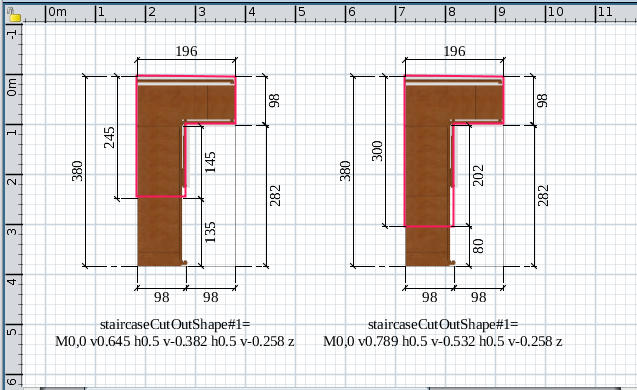
For the most audacious users, there's even an accompanying text field to enter the cut out shape of the staircase using the SVG path syntax.


This shape should be closed and fit in a square spreading from (0, 0) to (1, 1) which will be scaled afterwards to the real size of the staircase. The default value:
M0,0 v1 h1 v-1 z
matches a square of that size, and will compute a hole in upper levels matching the staircase width and depth.
But you can enter a much more complicated shape like the pie matching the spiral staircase available in the default catalog:
M0,0.35 h0.47 l0.375,-0.35 l0.088,0.118 A0.5,0.5 0 1,1 0,0.35 z

In case you enter a wrong shape, it will appear in red in the text field (but don't worry it won't make crash Sweet Home 3D if you don't fix it).

Good luck! smile
----------------------------------------
Emmanuel Puybaret, Sweet Home 3D creator

Posted by pencilart at Dec 21, 2011, 6:40:08 PM
Re: Furniture Library Editor Beta released
I think I just found a bug and filed a bug report.

Basically, what I've found (in 1.6) is that "Modify furniture" is not coming up, either when I double click on the piece of furniture, or when I right click on it and select "Modify furniture" from the menu that comes up with that.

I wonder what happened :(

Posted by Puybaret at Dec 21, 2011, 8:59:43 PM
Re: Furniture Library Editor Beta released
Sorry, it was mnemonic managements that I didn't check (I could catch this error under Mac OS X because it's the OS I daily use and it doesn't support mnemonics).
I just released again a modified version of the Furniture Library Editor with the same version 1.6.
Hope nobody will mind. smile
----------------------------------------
Emmanuel Puybaret, Sweet Home 3D creator

Posted by paseutel at Jun 10, 2012, 1:48:59 PM
Re: Furniture Library Editor Beta released
Hi! I'm facing a problem on launching FurnitureLibraryEditor-1.7.jar
When I double click the jar file or right click => open with Java, nothing happens.
I'm sure that my 32-bit Windows 7 runs the latest version of Java.
Here is the screenshot:


Looking forward to your reply,
Thank you in advance :)

Posted by damcar at Jan 19, 2013, 4:02:24 PM
Re: Furniture Library Editor Beta released
Hi Puybaret,Hans and others

I'm new to Sweet Home 3D and realy like it, but for the moment, I’m not getting very far!

I have downloaded and installed the latest version of Sweet Home 3D (Version 3.7 Java Web Start). I have the latest Java version installed (1.7.0_09). And it works OK.

I downloaded FurnitureLibraryEditor-1.9.jar and when I double-click on it My Nokia Suite opens!

So I next tried to open the file with the same java file that Sweet Home 3D uses (javaws.exe) but I get a window “Application Error. Unable to launch the application” with two buttons [OK] & [Details]
When I click on “details”:
Under “launch file” it says “PK”.
Under “Exception”, it says:
JNLParseException[ Could not parse launch file. Error at line 0.]
at com.sun.javaws.jnl.XMLFormat.parse(Unknown Source)
at com.sun.javaws.jnl.LaunchDescFactory.buildDescriptor(Unknown Source)
at com.sun.javaws.Main.launchApp(Unknown Source)
at com.sun.javaws.Main.continueInSecureThread(Unknown Source)
at com.sun.javaws.Main.access$000(Unknown Source)
at com.sun.javaws.Main$1.run(Unknown Source)
at java.lang.Thread.run(Unknown Source)
and under “Wrapped Exception” it says:
Failed to find the '<' charater that marks the end of a CDATA element. Exception parsing xml at line 0
at com.sun.deploy.xml.XMLParser.skipPCData(Unknown Source)
at com.sun.deploy.xml.XMLParser.nextToken(Unknown Source)
at com.sun.deploy.xml.XMLParser.parse(Unknown Source)
at com.sun.javaws.jnl.XMLFormat.parse(Unknown Source)
at com.sun.javaws.jnl.LaunchDescFactory.buildDescriptor(Unknown Source)
at com.sun.javaws.Main.launchApp(Unknown Source)
at com.sun.javaws.Main.continueInSecureThread(Unknown Source)
at com.sun.javaws.Main.access$000(Unknown Source)
at com.sun.javaws.Main$1.run(Unknown Source)
at java.lang.Thread.run(Unknown Source)

also tried to open it with javaw.exe – nothing happens!
Also tried to open it with javacpl.exe – and I get the Java Control Panel opening!
Also tried to open it with java.exe – and I get what looks like a DOS window open for about half a second, then nothing.
Also tried to open it with jabswitch.exe – and nothing happens!
There are other “exe” files in the same folder (C:\Program Files (x86)\Java\jre7\bin) but none of them have the “java” logo.

I then tried, on the “run” command (Win 7Pro 64 bit): java -jar FurnitureLibraryEditor-1.9.jar and got the DOS window open for about half a second, then nothing.

I have read each entry on each of the three pages in the forum, but can’t see any other suggestions referring to my problem.

Does anybody have any ideas?
Best regards,
DamCar

Posted by Puybaret at Jan 20, 2013, 3:31:18 PM
Re: Furniture Library Editor Beta released
Don't use javaws.exe.
Use java -jar followed with the full path of FurnitureLibraryEditor-1.9.jar
----------------------------------------
Emmanuel Puybaret, Sweet Home 3D creator

Posted by damcar at Jan 21, 2013, 9:15:10 AM
Re: Furniture Library Editor Beta released
Thanks for the reply, Puybaret.

Got it - but not the first time! I thought it might help others if I explain what I had to do…

So as you suggested, I pasted in the run command “java -jar D:\Downloads\architecture_sweet home\FurnitureLibraryEditor-1.9.jar” (without the “” and got what looked like a DOS window for about half a second, then nothing.

I tried launching SH3D and then running the command prompt again. Still no better.

I then copied the file FurnitureLibraryEditor-1.9.jar onto the C drive and ran the command “java -jar C:\FurnitureLibraryEditor-1.9.jar” and it worked!

So either the file needs to be on the same drive as java **OR** my path was too long for the thing to work.
Thanks again for your help.
Best regards
DamCar.

Posted by Puybaret at Oct 15, 2013, 11:45:17 AM
Re: Furniture Library Editor Beta released
As requested by okh, here's a beta of the next version 1.12 of the Furniture Library Editor with a quick description of the updates/bug fixes it brings:
- Added the Merge tool to merge the current library with an other one
- Fixed a bug that always changed the category of an edited set of furniture belonging to different categories
- Fixed a bug that didn't updated furniture sort and selection when localized data was changed
- Added the ability to reset the value of optional fields for items edited individually
- Added the Keywords/Tags column available to add some searchable words
- Limited decimal count to 5 in saved numbers (count of decimals for 1/16' = 0.15875 cm)
- Didn't reset staircase cut out shape to its default value when multiple models with a different shape are modified.
----------------------------------------
Emmanuel Puybaret, Sweet Home 3D creator

Posted by okh at Oct 15, 2013, 12:30:25 PM
Re: Furniture Library Editor Beta released
Thanks - and congratulations. Downloaded and peeked at, will have a closer look later.

In addition to the bugfixes, I am especially pleased about the Keywords/Tags!

In fact, the more properties are available, the better. Even if it is true that it probably would be confusing for many. Maybe a compromise could be a function that simply opened PluginFurnitureCatalog.properties in the default editor? That way accessing remaining properties would be much quicker for those so inclined.

You really have been busy - know it is appreciated.

ok

Posted by Puybaret at Oct 15, 2013, 11:55:44 PM
Re: Furniture Library Editor Beta released
Forgot to mention that the beta version of the Furniture Library Editor doesn't erase the new doorOrWindowCutOutShape# property.
----------------------------------------
Emmanuel Puybaret, Sweet Home 3D creator

Posted by Puybaret at Oct 29, 2013, 10:09:32 PM
Re: Furniture Library Editor Beta released
The beta 2 of the next version 1.12 of the Furniture Library Editor lets you edit the cut out shape of doors and windows, when one object is modified. Will be happy to read your feedback about it... smile
----------------------------------------
Emmanuel Puybaret, Sweet Home 3D creator

Posted by okh at Oct 30, 2013, 9:14:26 AM
Re: Furniture Library Editor Beta released
Meaning that changing to SVG window paths at the same time will delete the others?

Thanks. Looks good. Much easier than opening .properties file.

ok

PS I guess users who edit SVG cutouts, may also want to change other doorOrWindow properties (and lightsource), so I don't think you should be too afraid of including the more advanced properties too (especially ID which is a pain to add manually), just put them far down in the window saying "optional/advanced".

Posted by Puybaret at Oct 30, 2013, 11:47:20 AM
Re: Furniture Library Editor Beta released
Thanks for your tests smile

Meaning that changing to SVG window paths at the same time will delete the others?
Of course not, it means that if you select two or more items in the furniture list and try to modify them, then the Customized cut out shape fields for doors and windows won't appear in the modification dialog box.

I don't think you should be too afraid of including the more advanced properties too (especially ID which is a pain to add manually), just put them far down in the window saying "optional/advanced".
I didn't include these properties in the Furniture Library Editor because I fear they would be complicated to understand and handle, but because it would take some time to program a modification dialog box able to display and manage these properties in the Editor. But if you and others are interested, that should appear one day...
At the opposite, if you need to edit IDs, I can easily deliver to you a special version of the program that will let you edit that information (it's just an hidden information).
----------------------------------------
Emmanuel Puybaret, Sweet Home 3D creator

Posted by okh at Oct 30, 2013, 11:58:05 AM
Re: Furniture Library Editor Beta released
Thanks.

Yes, please, special version with ID would be a great help (especially for sharing models later).

ok

Posted by okh at Nov 5, 2013, 9:21:26 AM
Re: Furniture Library Editor Beta released
The fields for SVG cutout shapes are very small. 20 characters is not very much for the customised cutouts... :-)

No problems with the Beta so far (except the lightsource properties vanished once, but have not been able to recreate so I probably entered a wrong comma or something in the .properties file).

ok

PS: If you have link to the 'special version with ID' it would be great.

Posted by Puybaret at Nov 6, 2013, 2:33:40 PM
Re: Furniture Library Editor Beta released
You can type more than 20 characters even if the text field shows only 20 characters, but I'll try to change the layout of the dialog to show a larger text field in a coming version.

If you have link to the 'special version with ID' it would be great.
I sent you a link to that special version. I'll try to add a preference in a future version to change the list of editable columns.
----------------------------------------
Emmanuel Puybaret, Sweet Home 3D creator

Posted by okh at Nov 7, 2013, 5:16:47 PM
Re: Furniture Library Editor Beta released
Thank you, downloaded, much appreciated and enjoyed. Of course, I know I can type more than 20 characters, but my head is spinning (in elliptical arcs, they can be a pain). And seeing the entire path would make it (slightly) easier. But as I doubt adding SVG paths will be a common user pastime, I don't really think it needs to be on your priority list. Will look at more SVG this evening. Thanks for all your prompt responses to silly questions. (And thanks to hansmex for his input. Noted, will do. And .odt is just fine, not need to use .doc/docx ...:-) - will test .odt support for SVG illustrations ...)

ok

PS noticed a very slight Arc offset when specifying SVG (but I suspect the inaccuracy may stem from the .obj file, will check) - if it remains a problem, I will report it.

Posted by okh at Nov 11, 2013, 5:47:07 PM
Re: Furniture Library Editor Beta released
PS noticed a very slight Arc offset when specifying SVG (but I suspect the inaccuracy may stem from the .obj file, will check) - if it remains a problem, I will report it.
Never mind. False alarm. Not the .obj file, it was a 1 in the rotation parameter (instead of large-arc-flag) that caused the confusion. Stupid, and I wasted 1/2 looking in the wrong place... :-(

Actually, SH3d deals beautifully with every SVG path I've been able to think of.

ok - overjoyed with the SVG path function in FurnitureLibraryEditor.

Posted by nathalyann at Dec 1, 2013, 6:15:41 PM
smile   Re: Furniture Library Editor released
Bonjour,

J'aimerais savoir si, dans un futur rapproché, l'application "Furniture Library Editor" sera disponible pour le Mac OS X 10.9 ?

Merci

Nathaly-Ann
----------------------------------------
--
⊰ Nathaly-Ann ⊱​
​​​​☯ ⚖ ♥ ∞​ ☮

Posted by Puybaret at Dec 2, 2013, 9:57:50 AM
Re: Furniture Library Editor released
Please, use English in this forum (even if issued from automatic translation).

Furniture Library Editor already works under Mac OS X 10.9, but you may have to download and install Java to make it run, for example using the update available at http://support.apple.com/kb/DL1572
----------------------------------------
Emmanuel Puybaret, Sweet Home 3D creator

Posted by hfrmobile at Feb 17, 2014, 10:12:23 PM
Re: Furniture Library Editor released
Downloaded the latest version (FurnitureLibraryEditor-1.13.jar). App runs. But when I open a furniture file the List keeps empty.

So I renamed exterior-door-03.zip to exterior-door-03.sh3f (since it is simply a zip file containing model data files) voilà ...

But I have no idea how to draw door opening/angle (for 2D plan).

Posted by hfrmobile at Feb 17, 2014, 10:13:53 PM
Re: Furniture Library Editor released
Door swing in plan ...

Posted by okh at Feb 25, 2014, 8:57:46 AM
Re: Furniture Library Editor Beta released
No problems with the Beta so far (except the lightsource properties vanished once, but have not been able to recreate ...
This happened again - light source properties had disappeared from the PluginFurnitureCatalog.properties file. Using Furniture Library Editor Version 1.12 ID, Java version 1.7.0_51.

In the sh3f file posted the modern street light no longer has light source properties, whereas the file I sent you by e-mail (created from the previous version of the .sh3f file) has light-source properties.

But exactly what I did, I cannot remember, sorry (I may have edited the model properties: height).

ok

Posted by okh at Feb 28, 2014, 4:29:54 PM
Re: Furniture Library Editor Beta released
This happened again - light source properties had disappeared from the PluginFurnitureCatalog.properties file.
Pesky LightSourceProperties, another small bug reported in bugs/441: Leading zeros in colour hex triplet disappear... Probably has no practical implications (think file is read correctly), except confusing amateurs like your truly... confused

ok

Posted by okh at Jun 14, 2014, 1:49:34 PM
Re: Furniture Library Editor Beta released
'special version with ID' it would be great.

I sent you a link to that special version. I'll try to add a preference in a future version to change the list of editable columns.

You shouldn't by any chance keep one of those ID specials 1.14 lying around smile ? (Clearly not a priority, but it was very nice.... But then, you have probably guessed that I prefer as many options as possible to avoid having to open the .properties file all the time.)

Posted by Puybaret at Jun 14, 2014, 2:19:02 PM
Re: Furniture Library Editor Beta released
Here's the special version 1.14 of the editor with IDs. Maybe, one day I'll add the list of editable columns in editor's preferences… wink

[Note from developer: the special version with IDs was updated on 01/19/2017]
----------------------------------------
Emmanuel Puybaret, Sweet Home 3D creator

Posted by okh at Jun 14, 2014, 3:10:25 PM
Re: Furniture Library Editor Beta released
Perfect, thanks.
Maybe, one day I'll add the list of editable columns in editor's preferences…
It has my vote smile - or just an "Open .properties file in Editor...". But I do understand it is not a priority. ok

Posted by Puybaret at Jun 14, 2014, 3:28:50 PM
Re: Furniture Library Editor Beta released
Caution! There was a regression in version 1.14 where lights with multiple sources weren't saved correctly anymore. I fixed the bug and released the source and jar files of the Furniture Library Editor (including the special version with IDs) under the same file names, but changed the version displayed in the About dialog box to 1.14a.
Sorry for any problem it may have cause. sad
----------------------------------------
Emmanuel Puybaret, Sweet Home 3D creator

Posted by sree.arun.kr at Jun 14, 2014, 6:18:57 PM
Re: Furniture Library Editor Beta released
Next time updating please include build version like v1.14.02 and it is mandatory to add 'zero' for lower versions to avoid confusion.
angel.
----------------------------------------


Posted by Puybaret at Jun 14, 2014, 6:48:54 PM
Re: Furniture Library Editor Beta released
There's no absolute rule on version numbering.
My current rule is to use a letter when I overwrite a very recent update, and this letter appears only in About dialog and source code, to let users check their version.
----------------------------------------
Emmanuel Puybaret, Sweet Home 3D creator

Posted by TNTDAVID at Jul 24, 2014, 4:45:51 PM
Re: Furniture Library Editor Beta released
Sorry from my incorrect English.

I am French and my job is 3D Computer graphic designer.
I work under SketchUp and I wish to share collections of kitchen furniture IKEA on 3D Sweet home.

With Library Editor 1.14, I have 3 problems

1) The import of one 3D models with a compound name of more than 2 figures is always reappointed: example: " BA 115 " will be called to " BA 11 "

How to avoid this error ?

2) The recording of libraries in the format "sh3f" is sometimes impossible.
Is it of for an excess large number of models in the library ?
If yes how many models are authorized at the most?

3) When I import a file "sh3f" create with library Editor on 3D Sweet man, the file is imported with the "Unknown" name.

How to attribute a name to the library for example " KITCHEN IKEA "?

Thank you in advance for your answers.

Cordially

David Barros
----------------------------------------
On www.composant-dynamique.com create the kitchen of your dreams.

Posted by Puybaret at Jul 24, 2014, 9:25:04 PM
Re: Furniture Library Editor Beta released
I'm not sure you use this tool correctly...
First be sure to install a .sh3f file in Sweet Home 3D with Furniture > Import furniture library menu item.
In the Furniture Library Editor, if the default names of the 3D models you imported don't match what you expect, simply rename them by double clicking on the line of the 3D model you want to change.
----------------------------------------
Emmanuel Puybaret, Sweet Home 3D creator

Posted by TNTDAVID at Jul 26, 2014, 4:03:19 PM
Re: Furniture Library Editor Beta released
As a video is better than a length talks:

http://youtu.be/ilbTAuKVlpo

One can see the error on the name of the 3-digit products which pass 2-digit and the library, named "Unknown" instead of "IKEA KITCHEN".

Consequently he is impossible for me to create several libraries.

Is it normal?

Cordially

David Barros
----------------------------------------
On www.composant-dynamique.com create the kitchen of your dreams.

Posted by dorin at Jul 28, 2014, 7:38:21 AM
Re: Furniture Library Editor Beta released
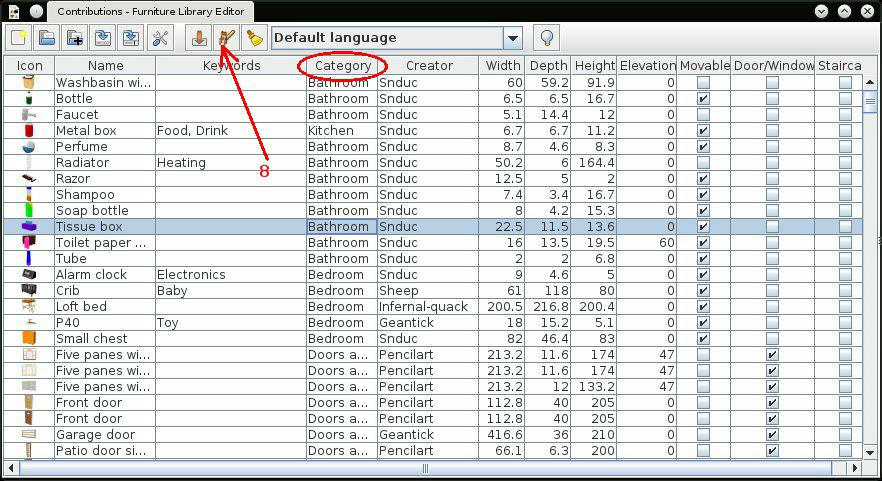
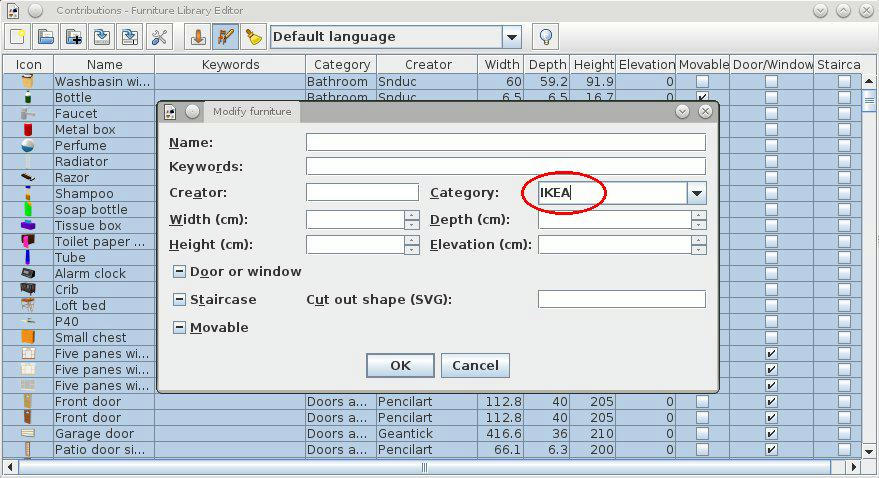
You miss few steps. The name of file is not the same with name of category. In same file you could have more category.
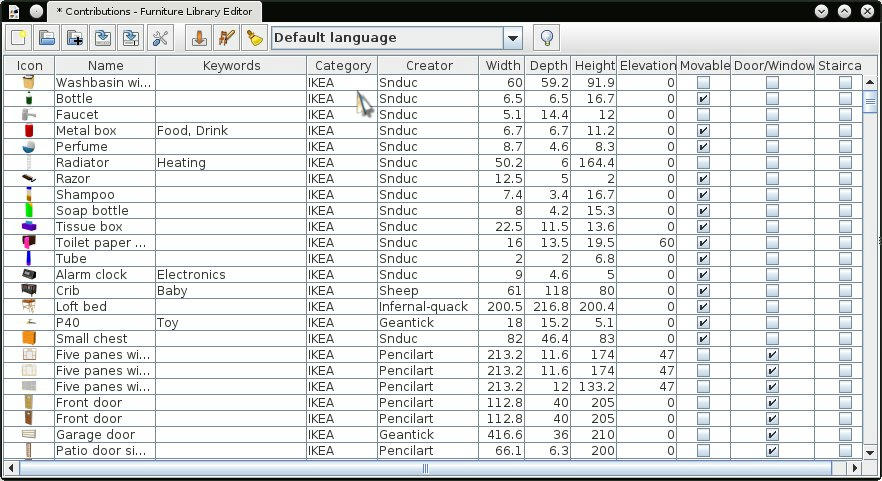
After you load the furniture in furniture library editor, select all and then click on modify selected furniture (the 8 icon from left); in the new window edit the category name. You must see it in the category column (the 4 col.). Now you can save Your library under whatever name you want. When you import it in sh3d will see the category name not the name of the file.
dorin
----------------------------------------
A computer program does what you tell it to do, not what you want it to do. Murphy's Law
When all else fails, read the instructions. Murphy's Law
If you don't like "AS IS", DIY. Dorin's law

Posted by TNTDAVID at Jul 30, 2014, 7:17:21 AM
Re: Furniture Library Editor Beta released
The icon 8 from left, contains the function "Copie"
Would it be possible to post an image to understand better ?

Thank you
----------------------------------------
On www.composant-dynamique.com create the kitchen of your dreams.

Posted by okh at Jul 30, 2014, 10:39:00 AM
Re: Furniture Library Editor Beta released
Hi, your question may be a bit confusing, at least to me. Toolbar Icon 8 from left in Furniture Library Editor is Modify selected furniture (in SH3D, nr 8 is Copy - and as far as I can tell it works according to convention?).

But obviously I am missing something. Maybe you could elaborate?

ok

Posted by dorin at Aug 1, 2014, 7:38:44 AM
Re: Furniture Library Editor Beta released


After this save your furniture library under what name you want.
Dorin
----------------------------------------
A computer program does what you tell it to do, not what you want it to do. Murphy's Law
When all else fails, read the instructions. Murphy's Law
If you don't like "AS IS", DIY. Dorin's law

Posted by TNTDAVID at Aug 18, 2014, 11:19:55 PM
Re: Furniture Library Editor Beta released
Hello,

I made a bad manipulation and I do not know how to cancel ?

If this function does not exist, it is important to add it ;-)

Small notices:

To add a column of information with the "PRICE" of the imported 3D objects, would revolutionize the use of 3D Sweet home.

By exploiting the file CSV, it would be possible to make the evaluation of the prices at the same moment as the plans of our house.
----------------------------------------
On www.composant-dynamique.com create the kitchen of your dreams.

Posted by okh at Aug 19, 2014, 10:17:49 AM
Re: Furniture Library Editor Beta released
I would agree that more of the properties could be made available to the user (tntdavid: look at the DefaultFurnitureCatalog.PropertyKey) price being one (+ creator and more).

However, in your case, there is a possibility to communicate with the user of an imported library using the property information:
information#1=<font color="RED"><a href="http://www.composant-dynamique.com" >Kitchen model EURO 56</a></font>
This provides extra information in the Furniture Catalogue view and - as the example shows - even lets you link to where you can find the item.

Maybe I am missing something, but I have not found a way of making these properties visible in the Home Furniture List. And that I think could be very useful. Especially as this list is so easy to copy and paste into a spreadsheet, it would be very easy to calculate total cost of all items.

As for the Furniture Library Editor, I don't think there is an Undo feature on the drawing board (see this post). I admit this has caused me some heartache too, but if you always work on copies and backup for every change, it is something I can live without. But - repeating myself - I would like as many properties as possible available when using the Editor. Simply because the detour of unzipping/opening the PluginFurnitureCatalog.properties and then reloading the catalogue, is distracting the process of creating objects.

Now, all these issues are, I believe in the wish-list / feature requests, and I feel a bit guilty for discussing them again. After all, whenever eTeks releases new versions, one can tell that careful consideration has gone into the priorities.

But yes, these features would be very welcome also for me. And the good news is, that SH3D is clearly designed for such future capabilities.

ok

Posted by TNTDAVID at Sep 12, 2014, 12:45:19 PM
Re: Furniture Library Editor Beta released
The priority absolute for me is to make visible the price of the 3D objects.
Sweet home will be from then on, the best free 3D software for cuisinistes and many other Building trade.
If this function does not go out to the next version, the biggest sccès will then be put back.
----------------------------------------
On www.composant-dynamique.com create the kitchen of your dreams.

Posted by Puybaret at Sep 13, 2014, 2:15:59 PM
Re: Furniture Library Editor Beta released
Prices management is already more or less programmed in Sweet Home 3D and the Furniture Library Editor, but I don't feel like activating this feature in the default release.
----------------------------------------
Emmanuel Puybaret, Sweet Home 3D creator

Posted by okh at Sep 14, 2014, 11:38:08 AM
Re: Furniture Library Editor Beta released
I must be missing something, because I am not sure I see the problem with lots of fields as long as the default furniture list does not reveal more than Name_Width_Depth_Height_Visible. What I think would be nice, though, is for the information# field to be carried over into the furniture list. That way I could look at the items from the plan - that is, with the hyperlink - without having to look up the original catalogue entry. ok

Posted by Puybaret at Oct 23, 2014, 12:49:47 AM
Re: Furniture Library Editor Beta released
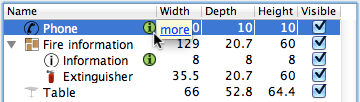
The information property is stored in .sh3d files from version 4.2, but wasn't viewed in the furniture list until Sweet Home 3D 4.5 that now displays a clickable icon at the right of the name column for the pieces which have such information available.


Hope you'll like it smile
----------------------------------------
Emmanuel Puybaret, Sweet Home 3D creator

Posted by okh at Oct 23, 2014, 8:52:25 AM
Re: Furniture Library Editor Beta released
Thank you! Clever solution with the non-changeable, linkable reference. This is bound to be a great improvement for interior designers and anyone who wants to provide model libraries for SH3D. Design a room, provide the file and link each item. Also, it will let a creator maintain some control over models in terms of copyright etc. Very good.

Basic HTML seems to work beautifully (font colours, links). However, I suspect one should keep it simple. For instance, by using HTML entities (basic character set): € did not work, but &euro; does. Which means you get a link to your model (and could even quote the price in the link).

Tried this entry which showed up beautifully in catalogue and furniture list:

information#5=<font color="GREEN"><a href="https://www.google.no/search?q=washing+machine" >Washer Dryer, &euro; 1000</a></font>

Even if this does not answer to a wish for having price as an optional Furniture column (so you can put it in a spreadsheet and get totals), but that is a different question. And this is, methinks, more important.

ok

PS - I still have the SF Bugs 499 problem that my editor seems to corrupt the item I work on in PluginFurnitureCatalog.properties, so the item does not import correctly to SH3D. However, if I open same file with Furniture Library Editor and save, the file appears fixed. I have not figured out what this might be, but Furniture Library Editor appears to have a greater tolerance of sh3f files than SH3D - go figure.

Posted by okh at Oct 23, 2014, 5:28:11 PM
Re: Furniture Library Editor Beta released
For the record - by "..this is more important..." - I mean that the new display of information is more important than price (or other optional columns). So all cred for an elegant solution implemented. Really a nice improvement. Very happy. ok

Posted by Moving at Jul 8, 2015, 8:23:52 AM
Re: Furniture Library Editor released
Awesome.

Is there a way I can duplicate an item? I have several similar object in my house for which I would like to have a separate object in my library.

Thanks!

Norbert

Posted by Zsoltsalamon at Jul 26, 2015, 5:36:02 PM
Re: Furniture Library Editor released
Hello my name is Zsolt, I have some questions about this program. How can I use it? I just download it, but I can't run it. Any help?

Posted by Voytkostudios at Aug 21, 2015, 1:57:56 AM
Re: Furniture Library Editor released
Hello,

I'm having an issue with the Library Editor. I can save files, but these .sh3f files can only be opened in the Library Editor and are only visible when opening files in this program. They are not visible in windows explorer or Sweet Home 3D. Is this a known issue? I'd appreciate any help.

Thanks!

Posted by Puybaret at Aug 21, 2015, 7:59:21 AM
Re: Furniture Library Editor released
If the .sh3f files you created are not visible in Windows explorer, how could you choose them in Sweet Home 3D to import them?
You probably saved them in a folder that is not the one you expected.
If you want, you can also send me a .sh3f file to test it on my side, but as you can't find them, it's going to be difficult for you to attach one of them to an email!
----------------------------------------
Emmanuel Puybaret, Sweet Home 3D creator

Posted by LunaC at Jan 20, 2016, 12:05:44 PM
Re: Furniture Library Editor released
I LOVE this program! Thanks so much for publishing. However is it possible to make it use a standard language for all sh3f files? The preferences lets me set it to english but there is more than one english (AE, BE,...) and I wish it would just stick to the same whenever I load a file.
Thanks!

Posted by LunaC at Jan 21, 2016, 1:44:36 PM
rose   Re: Furniture Library Editor released
Hi, I have some feature request to the plugin:
- add a simple search box for larger databases
- show number of files in database
- make the preview image bigger e.g. when changing the column size
- a possibility to choose which columns to show
- make it remember the last path used or a possibility to add a standard folder
-some kind of search for duplicates (posted that in the request area for the program itself already)

Well hats it (for now) I have no idea how complicated it is but I would really love to see any those features rose

Posted by Puybaret at Jan 22, 2016, 1:06:43 PM
Re: Furniture Library Editor released
LunaC, don't use preferences settings to give the translation of the 3D models you added to your library. The language setting in preferences is used just to change the language used in the user interface of the Editor, nothing else.
You should rather choose the language in the dropped down list shown in the tool bar of the icon. This list provides all kind of languages, possibly with their variant in some countries. When you select a language different from the Default language, the Editor prepares an additional properties file in the sh3f file for that language, suffixed by language + country codes (for example, PluginFurnitureCatalog_en_GB.properties for English UK variant, or PluginFurnitureCatalog_de.properties for default German). Then, all the modifications you make on the name, category, keywords and information of the edited models will be considered to be in the selected language (and stored in that suffixed file). If you want to edit the models in the default language again, just select Default language. See the simple example attached to this post.
You can prepare how many translations and variants as you want for your library. For example, Sweet Home 3D models libraries are proposed in 21 languages, with country variants for Chinese and Portuguese languages. When a library is translated in a certain language, it appears in bold in the language dropped down list.

Note that if you want to force a country in Sweet Home 3D that is not yours, you can use the Java -Duser.country option followed by 2 capital letters ISO 3166 country code. For Australia, it will be:
-Duser.country=AU


About your feature requests, note that you can find more easily a model in the current version by sorting the library by name, category... when you click on its column header.
If the icon got bigger when you enlarge its column, the row should grow accordingly, a reason why I don't think I'll program this feature. Nevertheless, keep in mind that a tool tip displays the icon of a model at a bigger size when you place the mouse on its icon.
----------------------------------------
Attachment Box.sh3f (2349 bytes) (Download count: 651) (A simple library with UK variant)

----------------------------------------
Emmanuel Puybaret, Sweet Home 3D creator

Posted by LunaC at Jan 28, 2016, 1:08:40 PM
Re: Furniture Library Editor released
Thank you for explaining this all to me.
Id love to use the Java-Duser but how do I do that? I don't have a program to work with java. As far as I could see from the iso codes there's none for just general english but GB would be ok for me too. Could you maybe send me that file that I need or explain/point me to a source that shows how to do this?

Thanks for your Box.sh3f but it still doesn't solve the problem I have. When I open it in Furniture Library Editor the dropdown has set "default language" when I edit the file now e.g. adding keywords and then safe it and reopen it again those keywords are visible under "default language" but not under "english (uk)" or in case of my other files under "english" without country specification.
So whenever I want to edit a file in Furniture Library Editor I have to remember to set the drop down to the language I want. If I forget it I sometimes add keywords for hours and then see I can do it all over again because it saved it to whatever it thinks is the default language.
My computer is set to german but I use the program in english (I use many programs in english because tutorials are often only written in that language).

If I would have a -Duser.country=GB would it tell the Furniture Library Editor that this is my default language and I could work with it without always having to choose from the dropdown first?

Posted by XroM at Jun 24, 2016, 10:17:04 AM
Re: Furniture Library Editor released
Crash after import new furniture or open a library sad
C:\Users\Roman\Downloads>java -jar FurnitureLibraryEditor-1.19.jar июн 24, 2016 11:54:40 AM java.util.prefs.WindowsPreferences <init> WARNING: Could not open/create prefs root node Software\JavaSoft\Prefs at root 0x80000002. Windows RegCreateKeyEx(...) returned error code 5. Java 3D: implicit antialiasing enabled Java 3D ERROR : wglGetExtensionsStringARB not support ! - ═х эрщфхэр єърчрээр яЁюЎхфєЁр. Fallback to use standard ChoosePixelFormat. Java 3D ERROR : OpenGL 1.2 or better is required (GL_VERSION=1.1) javax.media.j3d.IllegalRenderingStateException: GL_VERSION at javax.media.j3d.NativePipeline.createNewContext(Native Method) at javax.media.j3d.NativePipeline.createNewContext(NativePipeline.java:2775) at javax.media.j3d.Canvas3D.createNewContext(Canvas3D.java:4914) at javax.media.j3d.Canvas3D.createNewContext(Canvas3D.java:2440) at javax.media.j3d.Renderer.doWork(Renderer.java:917) at javax.media.j3d.J3dThread.run(J3dThread.java:275) DefaultRenderingErrorListener.errorOccurred: CONTEXT_CREATION_ERROR: Renderer: Error creating Canvas3D graphics context graphicsDevice = Win32GraphicsDevice[screen=0] canvas = com.eteks.sweethome3d.j3d.Component3DManager$ObservedCanvas3D[canvas0,0,0,128x128]

Can anybody help me please?
Windows 10 x64
java version "1.8.0_91"
Java(TM) SE Runtime Environment (build 1.8.0_91-b14)
Java HotSpot(TM) 64-Bit Server VM (build 25.91-b14, mixed mode)


Posted by Puybaret at Jun 24, 2016, 1:15:14 PM
Re: Furniture Library Editor released
I wonder if you don't have the same issue as some Windows 10 users who tried Sweet Home 3D installer 5.2. Then the solution would be to install and use Java 8u51, or to use the Java version which comes with Sweet Home 3D 5.3 with a command similar to:

"C:\Program files\SweetHome3D\jre8\bin\javaw.exe" -jar path\to\FurnitureLibraryEditor-1.19.jar

Just be sure to check the path of javaw.exe and FurnitureLibraryEditor-1.19.jar. The easiest way would be to drag and drop these files from the Windows explorer window to the cmd window.
----------------------------------------
Emmanuel Puybaret, Sweet Home 3D creator

Posted by Puybaret at Jan 19, 2017, 9:23:16 AM
Re: Furniture Library Editor released
Here's the special version 1.20 of the editor with IDs [edit: removed link, IDs can now be displayed with an option in preferences].
It fixes an issue that generated an invalid SH3F file as soon as an icon or model file was referenced more than once in the edited catalog (issue fixed in version 1.18 of the standard editor).
----------------------------------------
Emmanuel Puybaret, Sweet Home 3D creator

Posted by okh at Mar 22, 2017, 4:59:55 PM
Re: Furniture Library Editor released
Never said thanks for this. ID field is greatly appreciated. So thanks.

But also - a special thanks for the SVG input field. It is ever so nice to have the SVG path light up in red to tell you about typos. Actually, I would really have wished for that in my normal editor. Not that I ever make typos, of course ... smile

ok

PS It really would be nice if the FurnitureLibraryEditor (also with the extra fields for doors/windows/light-sources) at some point were included as an Advanced Model Option in SH3D itself. It would save some model-making time and would increase the power of SH3D enormously. But I also understand your hesitation when it comes to the interface. And I guess I am repeating myself...

Posted by jrr at Apr 8, 2017, 8:54:04 PM
Re: Furniture Library Editor released
The editor is a big help, but how do I rename or create categories?
Thanks!

Posted by Puybaret at Apr 11, 2017, 12:30:07 PM
Re: Furniture Library Editor released
The category of a 3D model is edited with an editable drop down list. Thus, if you want to rename or create a new category, just type the category name of your choice in the text field of this drop down list. If it doesn't exist, it will be created.
----------------------------------------
Emmanuel Puybaret, Sweet Home 3D creator

Posted by coguaro at Apr 18, 2017, 1:51:19 PM
Re: Furniture Library Editor released
how is possible merge some library and single furniture is possible download from sweet home 3d site automatically with all information image and other?

sorry for my english

Posted by Puybaret at Apr 19, 2017, 12:38:46 PM
Re: Furniture Library Editor released
From version 1.12, you can merge a library with another one with the 3rd button in the toolbar of the editor.
----------------------------------------
Emmanuel Puybaret, Sweet Home 3D creator

Posted by suedinym at Jun 28, 2017, 3:21:15 AM
Re: Furniture Library Editor Beta released
I should deliver the default catalog as a SH3F file too. smile

At the moment, you can quite easily get rid of the default furniture catalog of Sweet Home 3D, by following these steps:
- Ensure you installed Sweet Home 3D from its installer (not with Java Web Start).
- Remove the file named Furniture.jar from Sweet Home 3D installed files. Under Windows and Linux, this file can be found in the lib subdirectory of Sweet Home 3D installation directory


I'm running xubuntu 16.04, with Java 8. I can't get the downloaded file to run by double clicking or with the command line, so I installed it through the software manager, and it's running great. However, I have searched everywhere and can't find the Furniture.jre file to delete.

(I can find it easily in the downloaded files - but not in the version that installs and runs.)

Posted by edusson at Jul 9, 2017, 6:59:04 PM
Re: Furniture Library Editor released
Hi,

To the post about crashing, from XroM ... I had the exact same problem. As Puybaret mentioned, I also suspected that it was the same graphics issue as launching the SH3D, which is solved using the 2nd script (which pulls different Java graphic libraries, I think).

So, I created a similar script for the furniture editor. Sorry if this was obvious (I'm newbie biggrin). Copy this script in the application directory where the other 2 SweetHome3D scripts are. And copy the FurnitureLibraryEditor-1.20.jar in the lib directory (of the same application directory).
#!/bin/sh
# Retrieve Sweet Home 3D directory
PROGRAM=`readlink "$0"`
if [ "$PROGRAM" = "" ];then PROGRAM=$0
fi PROGRAM_DIR=`dirname "$PROGRAM"`

# Run Sweet Home 3D exec
exec "$PROGRAM_DIR"/jre8/bin/java -Xmx1024m -classpath "$PROGRAM_DIR"/lib/FurnitureLibraryEditor-1.20.jar:"$PROGRAM_DIR"/lib/Furniture.jar:"$PROGRAM_DIR"/lib/Textures.jar:"$PROGRAM_DIR"/lib/Help.jar:"$PROGRAM_DIR"/lib/iText-2.1.7.jar:"$PROGRAM_DIR"/lib/freehep-vectorgraphics-svg-2.1.1b.jar:"$PROGRAM_DIR"/lib/sunflow-0.07.3i.jar:"$PROGRAM_DIR"/lib/jmf.jar:"$PROGRAM_DIR"/lib/batik-svgpathparser-1.7.jar:"$PROGRAM_DIR"/lib/j3dcore.jar:"$PROGRAM_DIR"/lib/j3dutils.jar:"$PROGRAM_DIR"/lib/vecmath.jar:"$PROGRAM_DIR"/jre8/lib/javaws.jar -Djava.library.path="$PROGRAM_DIR"/lib com.eteks.furniturelibraryeditor.FurnitureLibraryEditor -open "$1"

Now it doesn't crash. Things seem to work fine except that I get an error:
com.eteks.sweethome3d.model.RecorderException: Invalid furniture library file
at com.eteks.furniturelibraryeditor.io.FurnitureLibraryFileRecorder.readFurnitureLibrary(Unknown Source)
at com.eteks.furniturelibraryeditor.viewcontroller.EditorController$3.call(Unknown Source)
at java.util.concurrent.FutureTask.run(FutureTask.java:266) at com.eteks.sweethome3d.viewcontroller.ThreadedTaskController$1.run(Unknown Source)
at java.util.concurrent.Executors$RunnableAdapter.call(Executors.java:511) at java.util.concurrent.FutureTask.run(FutureTask.java:266) at java.util.concurrent.ThreadPoolExecutor.runWorker(ThreadPoolExecutor.java:1142)
at java.util.concurrent.ThreadPoolExecutor$Worker.run(ThreadPoolExecutor.java:617)
at java.lang.Thread.run(Thread.java:745)
Caused by: java.io.IOException: Can't copy file to /tmp/furniture3331676379223917287.sh3f
at com.eteks.furniturelibraryeditor.io.FurnitureLibraryFileRecorder.copyFile(Unknown Source) ... 11 more

It does create the sh3f file in /tmp (I am in Linux) but get the error... If I ignore and keep going everything seems fine but not sure I'll see other errors down the road. I just started using it...

Regardless, thanks a lot for SH3D and the furniture editor. Should invite you one day to the place I am remodeling with it biggrin

Posted by Vcky at Aug 9, 2017, 7:42:42 PM
Re: Furniture Library Editor released
help. I have downloaded the furniture library editor and the software simply doesn't run. i tried opening it with JAVA. there is a very quick blink on the screen but then nothing. i have windows 7 installed. please help.
I have tried all methods listed here:
The easiest way to launch it is to double-click on the file. If this method fails, choose open or launch with Java in its contextual menu, or open a Terminal window and run the command:

java -jar FurnitureLibraryEditor-1.0.beta.jar

Posted by ndorigatti at Sep 8, 2017, 1:54:33 PM
Re: Furniture Library Editor released
Hello, i have used version 1.20 of the library a bit on a Mac Osx system (Sierra) with both java 1.6 and 1.8 installed (1.8 as default) and i continue to see in console issue of null pointer exception when clicking. I can use the library for a single operation (add a new 3d model, or rename, or delete). At each operation I have to save, close, reopen and go on, which is very tedious... is there a fix or there will be a fix for this? Do you need further logs/info?

Posted by Puybaret at Sep 8, 2017, 2:10:06 PM
Re: Furniture Library Editor released
Please post the stack trace that appears in the console, that could be useful.
----------------------------------------
Emmanuel Puybaret, Sweet Home 3D creator

Posted by ndorigatti at Sep 8, 2017, 3:22:34 PM
Re: Furniture Library Editor released
Hello,
this is what happens with 1.21 when:
Open the editor, import a 3ds model I already use in my house (and in another library), double click on it in the list of items.

From what i can see, is a problem of the table render, shame on you old swing! laughing

Exception in thread "AWT-EventQueue-0" java.lang.NullPointerException
at com.eteks.furniturelibraryeditor.swing.FurnitureLibraryTable$FurnitureLibraryTableColumnModel$6.getTableCellRendererComponent(Unknown Source)
at javax.swing.JTable$AccessibleJTable.getAccessibleChild(JTable.java:7031)
at javax.swing.JTable$AccessibleJTable.getAccessibleAt(JTable.java:7418)
at javax.swing.JTable$AccessibleJTable.valueChanged(JTable.java:6933)
at javax.swing.DefaultListSelectionModel.fireValueChanged(DefaultListSelectionModel.java:184)
at javax.swing.DefaultListSelectionModel.fireValueChanged(DefaultListSelectionModel.java:164)
at javax.swing.DefaultListSelectionModel.fireValueChanged(DefaultListSelectionModel.java:211)
at javax.swing.DefaultListSelectionModel.changeSelection(DefaultListSelectionModel.java:405)
at javax.swing.DefaultListSelectionModel.changeSelection(DefaultListSelectionModel.java:415)
at javax.swing.DefaultListSelectionModel.setSelectionInterval(DefaultListSelectionModel.java:459)
at javax.swing.JTable.changeSelectionModel(JTable.java:2389)
at javax.swing.JTable.changeSelection(JTable.java:2456)
at javax.swing.plaf.basic.BasicTableUI$Handler.adjustSelection(BasicTableUI.java:1115)
at javax.swing.plaf.basic.BasicTableUI$Handler.mousePressed(BasicTableUI.java:1038)
at javax.swing.plaf.basic.BasicTableUI$MouseInputHandler.mousePressed(BasicTableUI.java:798)
at java.awt.AWTEventMulticaster.mousePressed(AWTEventMulticaster.java:280)
at java.awt.AWTEventMulticaster.mousePressed(AWTEventMulticaster.java:279)
at java.awt.Component.processMouseEvent(Component.java:6532)
at javax.swing.JComponent.processMouseEvent(JComponent.java:3324)
at java.awt.Component.processEvent(Component.java:6300)
at java.awt.Container.processEvent(Container.java:2236)
at java.awt.Component.dispatchEventImpl(Component.java:4891)
at java.awt.Container.dispatchEventImpl(Container.java:2294)
at java.awt.Component.dispatchEvent(Component.java:4713)
at java.awt.LightweightDispatcher.retargetMouseEvent(Container.java:4888)
at java.awt.LightweightDispatcher.processMouseEvent(Container.java:4522)
at java.awt.LightweightDispatcher.dispatchEvent(Container.java:4466)
at java.awt.Container.dispatchEventImpl(Container.java:2280)
at java.awt.Window.dispatchEventImpl(Window.java:2750)
at java.awt.Component.dispatchEvent(Component.java:4713)
at java.awt.EventQueue.dispatchEventImpl(EventQueue.java:758)
at java.awt.EventQueue.access$500(EventQueue.java:97)
at java.awt.EventQueue$3.run(EventQueue.java:709)
at java.awt.EventQueue$3.run(EventQueue.java:703)
at java.security.AccessController.doPrivileged(Native Method)
at java.security.ProtectionDomain$JavaSecurityAccessImpl.doIntersectionPrivilege(ProtectionDomain.java:76)
at java.security.ProtectionDomain$JavaSecurityAccessImpl.doIntersectionPrivilege(ProtectionDomain.java:86)
at java.awt.EventQueue$4.run(EventQueue.java:731)
at java.awt.EventQueue$4.run(EventQueue.java:729)
at java.security.AccessController.doPrivileged(Native Method)
at java.security.ProtectionDomain$JavaSecurityAccessImpl.doIntersectionPrivilege(ProtectionDomain.java:76)
at java.awt.EventQueue.dispatchEvent(EventQueue.java:728)
at java.awt.EventDispatchThread.pumpOneEventForFilters(EventDispatchThread.java:201)
at java.awt.EventDispatchThread.pumpEventsForFilter(EventDispatchThread.java:116)
at java.awt.EventDispatchThread.pumpEventsForHierarchy(EventDispatchThread.java:105)
at java.awt.EventDispatchThread.pumpEvents(EventDispatchThread.java:101)
at java.awt.EventDispatchThread.pumpEvents(EventDispatchThread.java:93)
at java.awt.EventDispatchThread.run(EventDispatchThread.java:82)
Exception in thread "AWT-EventQueue-0" java.lang.NullPointerException
at com.eteks.furniturelibraryeditor.swing.FurnitureLibraryTable$FurnitureLibraryTableColumnModel$6.getTableCellRendererComponent(Unknown Source)
at javax.swing.JTable$AccessibleJTable.getAccessibleChild(JTable.java:7031)
at javax.swing.JTable$AccessibleJTable.getAccessibleAt(JTable.java:7418)
at javax.swing.JTable$AccessibleJTable.valueChanged(JTable.java:6933)
at javax.swing.DefaultListSelectionModel.fireValueChanged(DefaultListSelectionModel.java:184)
at javax.swing.DefaultListSelectionModel.fireValueChanged(DefaultListSelectionModel.java:154)
at javax.swing.DefaultListSelectionModel.setValueIsAdjusting(DefaultListSelectionModel.java:685)
at javax.swing.plaf.basic.BasicTableUI$Handler.setValueIsAdjusting(BasicTableUI.java:955)
at javax.swing.plaf.basic.BasicTableUI$Handler.mouseReleased(BasicTableUI.java:1166)
at javax.swing.plaf.basic.BasicTableUI$MouseInputHandler.mouseReleased(BasicTableUI.java:802)
at java.awt.AWTEventMulticaster.mouseReleased(AWTEventMulticaster.java:290)
at java.awt.AWTEventMulticaster.mouseReleased(AWTEventMulticaster.java:289)
at java.awt.Component.processMouseEvent(Component.java:6535)
at javax.swing.JComponent.processMouseEvent(JComponent.java:3324)
at java.awt.Component.processEvent(Component.java:6300)
at java.awt.Container.processEvent(Container.java:2236)
at java.awt.Component.dispatchEventImpl(Component.java:4891)
at java.awt.Container.dispatchEventImpl(Container.java:2294)
at java.awt.Component.dispatchEvent(Component.java:4713)
at java.awt.LightweightDispatcher.retargetMouseEvent(Container.java:4888)
at java.awt.LightweightDispatcher.processMouseEvent(Container.java:4525)
at java.awt.LightweightDispatcher.dispatchEvent(Container.java:4466)
at java.awt.Container.dispatchEventImpl(Container.java:2280)
at java.awt.Window.dispatchEventImpl(Window.java:2750)
at java.awt.Component.dispatchEvent(Component.java:4713)
at java.awt.EventQueue.dispatchEventImpl(EventQueue.java:758)
at java.awt.EventQueue.access$500(EventQueue.java:97)
at java.awt.EventQueue$3.run(EventQueue.java:709)
at java.awt.EventQueue$3.run(EventQueue.java:703)
at java.security.AccessController.doPrivileged(Native Method)
at java.security.ProtectionDomain$JavaSecurityAccessImpl.doIntersectionPrivilege(ProtectionDomain.java:76)
at java.security.ProtectionDomain$JavaSecurityAccessImpl.doIntersectionPrivilege(ProtectionDomain.java:86)
at java.awt.EventQueue$4.run(EventQueue.java:731)
at java.awt.EventQueue$4.run(EventQueue.java:729)
at java.security.AccessController.doPrivileged(Native Method)
at java.security.ProtectionDomain$JavaSecurityAccessImpl.doIntersectionPrivilege(ProtectionDomain.java:76)
at java.awt.EventQueue.dispatchEvent(EventQueue.java:728)
at java.awt.EventDispatchThread.pumpOneEventForFilters(EventDispatchThread.java:201)
at java.awt.EventDispatchThread.pumpEventsForFilter(EventDispatchThread.java:116)
at java.awt.EventDispatchThread.pumpEventsForHierarchy(EventDispatchThread.java:105)
at java.awt.EventDispatchThread.pumpEvents(EventDispatchThread.java:101)
at java.awt.EventDispatchThread.pumpEvents(EventDispatchThread.java:93)
at java.awt.EventDispatchThread.run(EventDispatchThread.java:82)
java.lang.NullPointerException
at com.eteks.furniturelibraryeditor.swing.FurnitureLibraryTable$FurnitureLibraryTableColumnModel$6.getTableCellRendererComponent(Unknown Source)
at javax.swing.JTable$AccessibleJTable.getAccessibleAt(JTable.java:6990)
at sun.lwawt.macosx.CAccessibility$23.call(CAccessibility.java:414)
at sun.lwawt.macosx.CAccessibility$23.call(CAccessibility.java:393)
at sun.lwawt.macosx.LWCToolkit$CallableWrapper.run(LWCToolkit.java:597)
at java.awt.event.InvocationEvent.dispatch(InvocationEvent.java:301)
at java.awt.EventQueue.dispatchEventImpl(EventQueue.java:756)
at java.awt.EventQueue.access$500(EventQueue.java:97)
at java.awt.EventQueue$3.run(EventQueue.java:709)
at java.awt.EventQueue$3.run(EventQueue.java:703)
at java.security.AccessController.doPrivileged(Native Method)
at java.security.ProtectionDomain$JavaSecurityAccessImpl.doIntersectionPrivilege(ProtectionDomain.java:76)
at java.security.ProtectionDomain$JavaSecurityAccessImpl.doIntersectionPrivilege(ProtectionDomain.java:86)
at java.awt.EventQueue$4.run(EventQueue.java:731)
at java.awt.EventQueue$4.run(EventQueue.java:729)
at java.security.AccessController.doPrivileged(Native Method)
at java.security.ProtectionDomain$JavaSecurityAccessImpl.doIntersectionPrivilege(ProtectionDomain.java:76)
at java.awt.EventQueue.dispatchEvent(EventQueue.java:728)
at java.awt.EventDispatchThread.pumpOneEventForFilters(EventDispatchThread.java:201)
at java.awt.EventDispatchThread.pumpEventsForFilter(EventDispatchThread.java:116)
at java.awt.EventDispatchThread.pumpEventsForHierarchy(EventDispatchThread.java:105)
at java.awt.EventDispatchThread.pumpEvents(EventDispatchThread.java:101)
at java.awt.EventDispatchThread.pumpEvents(EventDispatchThread.java:93)
at java.awt.EventDispatchThread.run(EventDispatchThread.java:82)
java.lang.NullPointerException
at com.eteks.furniturelibraryeditor.swing.FurnitureLibraryTable$FurnitureLibraryTableColumnModel$6.getTableCellRendererComponent(Unknown Source)
at javax.swing.JTable$AccessibleJTable.getAccessibleAt(JTable.java:6990)
at sun.lwawt.macosx.CAccessibility$23.call(CAccessibility.java:414)
at sun.lwawt.macosx.CAccessibility$23.call(CAccessibility.java:393)
at sun.lwawt.macosx.LWCToolkit$CallableWrapper.run(LWCToolkit.java:597)
at java.awt.event.InvocationEvent.dispatch(InvocationEvent.java:301)
at java.awt.EventQueue.dispatchEventImpl(EventQueue.java:756)
at java.awt.EventQueue.access$500(EventQueue.java:97)
at java.awt.EventQueue$3.run(EventQueue.java:709)
at java.awt.EventQueue$3.run(EventQueue.java:703)
at java.security.AccessController.doPrivileged(Native Method)
at java.security.ProtectionDomain$JavaSecurityAccessImpl.doIntersectionPrivilege(ProtectionDomain.java:76)
at java.security.ProtectionDomain$JavaSecurityAccessImpl.doIntersectionPrivilege(ProtectionDomain.java:86)
at java.awt.EventQueue$4.run(EventQueue.java:731)
at java.awt.EventQueue$4.run(EventQueue.java:729)
at java.security.AccessController.doPrivileged(Native Method)
at java.security.ProtectionDomain$JavaSecurityAccessImpl.doIntersectionPrivilege(ProtectionDomain.java:76)
at java.awt.EventQueue.dispatchEvent(EventQueue.java:728)
at java.awt.EventDispatchThread.pumpOneEventForFilters(EventDispatchThread.java:201)
at java.awt.EventDispatchThread.pumpEventsForFilter(EventDispatchThread.java:116)
at java.awt.EventDispatchThread.pumpEventsForHierarchy(EventDispatchThread.java:105)
at java.awt.EventDispatchThread.pumpEvents(EventDispatchThread.java:101)
at java.awt.EventDispatchThread.pumpEvents(EventDispatchThread.java:93)
at java.awt.EventDispatchThread.run(EventDispatchThread.java:82)
java.lang.NullPointerException
at com.eteks.furniturelibraryeditor.swing.FurnitureLibraryTable$FurnitureLibraryTableColumnModel$6.getTableCellRendererComponent(Unknown Source)
at javax.swing.JTable$AccessibleJTable.getAccessibleAt(JTable.java:6990)
at sun.lwawt.macosx.CAccessibility$23.call(CAccessibility.java:414)
at sun.lwawt.macosx.CAccessibility$23.call(CAccessibility.java:393)
at sun.lwawt.macosx.LWCToolkit$CallableWrapper.run(LWCToolkit.java:597)
at java.awt.event.InvocationEvent.dispatch(InvocationEvent.java:301)
at java.awt.EventQueue.dispatchEventImpl(EventQueue.java:756)
at java.awt.EventQueue.access$500(EventQueue.java:97)
at java.awt.EventQueue$3.run(EventQueue.java:709)
at java.awt.EventQueue$3.run(EventQueue.java:703)
at java.security.AccessController.doPrivileged(Native Method)
at java.security.ProtectionDomain$JavaSecurityAccessImpl.doIntersectionPrivilege(ProtectionDomain.java:76)
at java.security.ProtectionDomain$JavaSecurityAccessImpl.doIntersectionPrivilege(ProtectionDomain.java:86)
at java.awt.EventQueue$4.run(EventQueue.java:731)
at java.awt.EventQueue$4.run(EventQueue.java:729)
at java.security.AccessController.doPrivileged(Native Method)
at java.security.ProtectionDomain$JavaSecurityAccessImpl.doIntersectionPrivilege(ProtectionDomain.java:76)
at java.awt.EventQueue.dispatchEvent(EventQueue.java:728)
at java.awt.EventDispatchThread.pumpOneEventForFilters(EventDispatchThread.java:201)
at java.awt.EventDispatchThread.pumpEventsForFilter(EventDispatchThread.java:116)
at java.awt.EventDispatchThread.pumpEventsForHierarchy(EventDispatchThread.java:105)
at java.awt.EventDispatchThread.pumpEvents(EventDispatchThread.java:101)
at java.awt.EventDispatchThread.pumpEvents(EventDispatchThread.java:93)
at java.awt.EventDispatchThread.run(EventDispatchThread.java:82)
java.lang.NullPointerException
at com.eteks.furniturelibraryeditor.swing.FurnitureLibraryTable$FurnitureLibraryTableColumnModel$6.getTableCellRendererComponent(Unknown Source)
at javax.swing.JTable$AccessibleJTable.getAccessibleAt(JTable.java:6990)
at sun.lwawt.macosx.CAccessibility$23.call(CAccessibility.java:414)
at sun.lwawt.macosx.CAccessibility$23.call(CAccessibility.java:393)
at sun.lwawt.macosx.LWCToolkit$CallableWrapper.run(LWCToolkit.java:597)
at java.awt.event.InvocationEvent.dispatch(InvocationEvent.java:301)
at java.awt.EventQueue.dispatchEventImpl(EventQueue.java:756)
at java.awt.EventQueue.access$500(EventQueue.java:97)
at java.awt.EventQueue$3.run(EventQueue.java:709)
at java.awt.EventQueue$3.run(EventQueue.java:703)
at java.security.AccessController.doPrivileged(Native Method)
at java.security.ProtectionDomain$JavaSecurityAccessImpl.doIntersectionPrivilege(ProtectionDomain.java:76)
at java.security.ProtectionDomain$JavaSecurityAccessImpl.doIntersectionPrivilege(ProtectionDomain.java:86)
at java.awt.EventQueue$4.run(EventQueue.java:731)
at java.awt.EventQueue$4.run(EventQueue.java:729)
at java.security.AccessController.doPrivileged(Native Method)
at java.security.ProtectionDomain$JavaSecurityAccessImpl.doIntersectionPrivilege(ProtectionDomain.java:76)
at java.awt.EventQueue.dispatchEvent(EventQueue.java:728)
at java.awt.EventDispatchThread.pumpOneEventForFilters(EventDispatchThread.java:201)
at java.awt.EventDispatchThread.pumpEventsForFilter(EventDispatchThread.java:116)
at java.awt.EventDispatchThread.pumpEventsForHierarchy(EventDispatchThread.java:105)
at java.awt.EventDispatchThread.pumpEvents(EventDispatchThread.java:101)
at java.awt.EventDispatchThread.pumpEvents(EventDispatchThread.java:93)
at java.awt.EventDispatchThread.run(EventDispatchThread.java:82)


Posted by Puybaret at Sep 25, 2017, 10:58:35 AM
Re: Furniture Library Editor released
I couldn't reproduce this issue on my side, but maybe I didn't test correctly your "import a 3ds model I already use in my house (and in another library)" suggestion. There should be no difference in how the Furniture Library Editor manages completely unknown 3DS models or the ones you used once in a Sweet Home 3D project. What detail could I have missed?
----------------------------------------
Emmanuel Puybaret, Sweet Home 3D creator

Posted by ndorigatti at Sep 25, 2017, 11:14:31 AM
Re: Furniture Library Editor released
Hi, I think I did not explain correctly what the issue is!
The error is not related to what model I use (it was just a specification).
This is an issue with Java, AWT/SWING and OSX Sierra.
The problem is completely UI related, clicks do not work correctly, events duplicated.... I did the same the other day on a Windows 7 machine and it works perfectly.
Currently I'm running java build 1.8.0_91-b14 on OSX 10.12.6
I tryed to force running with the legacy java 1.6 but it did not change anything.
I'm quite sure it is something related to OSX, but can't understand what...

Posted by Puybaret at Sep 25, 2017, 12:02:14 PM
Re: Furniture Library Editor released
My attempt was made under macOS 10.12.6 with Java 8u144. Maybe it could worth that you try with a more recent Java version?
----------------------------------------
Emmanuel Puybaret, Sweet Home 3D creator

Posted by ndorigatti at Sep 25, 2017, 1:15:04 PM
Re: Furniture Library Editor released
Hi, even with 8u144 it gives the issue when double clicking on an imported forniture. Imported 2 forniture and double clicked on one of the two.... Gives the issue.

Is the jar code opensource? Maybe I can try to compile and debug when I have a couple of hours!

Posted by sclee at Sep 25, 2017, 1:47:26 PM
Re: Furniture Library Editor released
I use Windows system for a few days ago, I can't enter the furniture Library Editor's work, I will try to remove all JAVA and install JDK-8u144-Window, OK.

Posted by DonaS at Oct 14, 2017, 6:11:34 PM
Re: Furniture Library Editor released
I cant get my new created library to save. I just get an error saying "cant save SH3F file" I have tried changing the name and still wont save.

I also cant open any of the libraries that came with the software. Sweet Home 3D.

I really enjoy this software and I have had it for a Long time, never had the library editor until recently.

Thank you

Posted by hansmex at Oct 14, 2017, 6:30:05 PM
Re: Furniture Library Editor released
Which operating system do you use ?
Which version of SH3D ?
----------------------------------------
Hans

new website - under constuction
hansdirkse.info

Posted by DonaS at Oct 14, 2017, 8:44:18 PM
Re: Furniture Library Editor released
windows 10 and version 5.5.3

Posted by DonaS at Oct 14, 2017, 8:46:31 PM
Re: Furniture Library Editor released
and version 1:21 furniture library editor

Posted by DonaS at Oct 14, 2017, 8:55:23 PM
Re: Furniture Library Editor released
I should mention these items I want to add or create a library are items I have downloaded from 3D warehouse sketchup site for designing my office items, would that effect this?
And, sorry, I have a couple different folders with my 3D items. One is from years ago that I just kept adding to and now I have added the new version of SH3D, which I see there are new libraries in my C:programs\Sweet Home 3D.
I only have the new version installed

Any of this have a reason to do with this?

Posted by DonaS at Oct 15, 2017, 1:43:57 AM
Re: Furniture Library Editor released
I cant get my new created library to save. I just get an error saying "cant save SH3F file" I have tried changing the name and still wont save.

I also cant open any of the libraries that came with the software. Sweet Home 3D.

I really enjoy this software and I have had it for a Long time, never had the library editor until recently.

Thank you

Posted by DonaS at Oct 15, 2017, 1:50:23 AM
Re: Furniture Library Editor released
I figured it out!!!! The libraries need to be in a different folder, AKA my designs, house

perfect!!!!

Posted by NotMeNotYou at Oct 20, 2017, 10:33:41 PM
Re: Furniture Library Editor released
Hi,
I'm new here so excuse me if this is an old problem, I did search but found no answer -:(
is there a fix for high res screens for the furniture library editor my eye sight is not what it used to be and I need the big fonts.
thanks and sorry if this is the wrong place to ask

Posted by Puybaret at Oct 24, 2017, 3:11:44 PM
Re: Furniture Library Editor released
You could try to use the same properties as the ones proposed for Sweet Home 3D.
To run a Jar executable with these properties, you don't need a .ini file but rather directly cite these properties after java :

java -Dcom.eteks.sweethome3d.resolutionScale=2 -Dswing.defaultlaf=javax.swing.plaf.metal.MetalLookAndFeel -Dswing.plaf.metal.controlFont=Dialog-11 -Dswing.plaf.metal.userFont=SansSerif-11 -Dswing.plaf.metal.systemFont=SansSerif-11 -jar path/to/FurnitureLibraryEditor-1.21.jar

The problem with this solution is that the resolution scale won't influence the height of rows in the table of the editor, so text in the table might be cut for a high value.

As Java 9 is supposed to have fixed problems with HiDPI screens, it might be interesting to give it a try too. If it works correctly, then no need of any option, just double click on FurnitureLibraryEditor-1.21.jar file.
----------------------------------------
Emmanuel Puybaret, Sweet Home 3D creator

Posted by captainstarbuck at Jan 6, 2018, 5:53:28 AM
Re: Furniture Library Editor released
I recently installed SW3D for the first time and created a model of our house. Love it! Thank you VERY much!

Running SW3D 5.6, JRE 1.9, Windows 8.1

Now I'm importing SH3F files from various sources, like furniture stores that provide models. After downloading hundreds of these files I found I was unable to use the default Import feature to import more than one file. So I ZIPped the files, and while the UI refreshes and says new objects were were imported, that's never the case.

So I found the FLE here, downloaded v1.21, and while it does accept multiple files, it doesn't import the data to SW3D with the same detail as just opening a .SH3F file.

So as a user I'd like to know if I'm missing anything, and how I can import hundreds of files (with FLE?) without doing it one at a time.

As a developer, I'm happy to do some diagnostics and even (with very limited time) get into code to try to help with this.

For an example of files that import differently, see the M2Italia furniture site.

Thanks!!

Posted by Puybaret at Jan 7, 2018, 2:20:47 PM
Re: Furniture Library Editor released
To import many 3D model files at once in the Furniture Library Editor, just select multiple files and drag and drop them on the main window of the editor.
If you want to create one SH3F file from other SH3F files you should use the Merge button. Unfortunately the file dialog won't allow you to import more than a SH3F file at a time in that case, but this could be a nice improvement...
----------------------------------------
Emmanuel Puybaret, Sweet Home 3D creator

Posted by okh at Jan 30, 2018, 7:51:55 AM
Re: Furniture Library Editor released
Cleaning up libraries and shrinking models with an aim to have one compact library for all the models I know to be small and work.

Among those models are windows with several elements, such as a middle bar, that can be set to invisible. But for that I basically wish for two different sets of doorOrWindowSash....# properties for that one window. Or in other cases, I might want two different planIcons for one model (I prefer using semi transparent icons for staircases, awnings and ceiling lamps).

I was wondering how best to do this:

Is it possible/advisable to have several entries in PluginFurnitureCatalog.properties referencing one single model?

ok

Posted by okh at Jan 30, 2018, 8:01:52 AM
Re: Furniture Library Editor released
Is it possible/advisable to have several entries in PluginFurnitureCatalog.properties referencing one single model?
Point was, I seem to remember that is how it is done with the light sources, but have a feeling it might not work as well with a mixed library with many models. ok

Posted by Puybaret at Jan 30, 2018, 11:08:07 AM
Re: Furniture Library Editor released
If you want to change the visible parts of a given model, you should use different MTL files changing the transparency factor in d lines (d 0 being fully transparent and d 1 fully opaque). As the MTL file used by an OBJ file must be cited in its mtllib line, you won't have any other choice that creating different OBJ files.
But it's not a problem to have different pieces citing the same value in their model...# property and a different value in their planIcon...# or doorOrWindowSash....# properties. There was a bug in the Furniture Library Editor some time ago about this but it was fixed in version 1.20.

By the way, here's a version 1.22 of the editor with IDs if needed. I promise the choice of the columns editable in the editor will end up in preferences one day [edit: removed link, IDs can now be displayed with an option in preferences]
----------------------------------------
Emmanuel Puybaret, Sweet Home 3D creator

Posted by okh at Jan 30, 2018, 3:06:26 PM
Re: Furniture Library Editor released
Thanks for the reply.
There was a bug in the Furniture Library Editor some time ago
Good, then my memory did not fail me completely.
..change the visible parts of a given model, you should use different MTL
Maybe I do not understand, or we are talking about different things. The d setting in .mtl, it will not help me get what I want. For instance: one model consisting of a door-frame + door, with different named colours in .obj/.mtl. I import one instance of the model and use throughout the home. Where I want the door left 'open', I change that door colour (but not frame) to invisible in the colour dialogue in SH3D. That way the frames remain and I can open and close doors by toggling the colour=invisible.

I will try a couple of options and see what works best. Thanks.

ok

Posted by dorin at Jan 31, 2018, 11:05:53 AM
Re: Furniture Library Editor released
@okh I've use this feature and I've create some furniture for this.
You can try this door
https://sourceforge.net/p/sweethome3d/d-models/444/#10c5
Maybe someone could introduce this to make some animations when visit a home. When camera is near door the door start opening. Could be made it in AOI this kind of animation.
Off course only for those interested in this kind of virtual reality. I'm not!
Dorin
----------------------------------------
A computer program does what you tell it to do, not what you want it to do. Murphy's Law
When all else fails, read the instructions. Murphy's Law
If you don't like "AS IS", DIY. Dorin's law

Posted by okh at Jan 31, 2018, 1:27:25 PM
Re: Furniture Library Editor released
Thanks for the file, Dorin. It is the same principle I use. Exploiting the set-to-invisible in the colour dialogue to hide/display construction elements e.g. for quick visualisation for a planning application: changing 30 plain windows to windows with glazing-bars. Quick to see just by hiding the glazing bar.

Using one model in different contexts can be handy, but sometimes I ponder whether it could make sense to make two catalogue entries for the same model; equip the model with different properties - for instance:

One set of properties:
name#1=Door glass 3p
....
model#1=/Door glass 3p/Door-glass-3p.obj
...

Then below, a seceond set of properties for the same model:
name#2=Door glass XXXXX2
....
model#2=/Door glass 3p/Door-glass-3p.obj
model#2=doorOrWindowSash....#.... etc
....

I have yet to decide whether this can be useful or confusing. Maybe for use with one staircase model but several entries: with different cutouts, with or without semi-transparent stair planIcon (I prefer being able to see through the stairs in the 2D plan, but not everyone would agree). ok


Posted by dorin at Feb 14, 2018, 10:21:06 AM
Re: Furniture Library Editor released
From my point of view I prefer to have more options to modify an object in contextual menu than to have 3 (or more) pretty the same furniture.
Maybe in property file to have predefined few variants and in modify furniture to chose which to display. In my case 0;45;90 degrees open.
Also for modify the cutoff in Your case.
Now is about 1000 furniture on official and at least 1000 unofficial which are used for most of us. To have 4~6000 in the library I don't think is useful.
Is only an opinion.
----------------------------------------
A computer program does what you tell it to do, not what you want it to do. Murphy's Law
When all else fails, read the instructions. Murphy's Law
If you don't like "AS IS", DIY. Dorin's law

Posted by rontant at Jul 7, 2018, 5:46:10 AM
Re: Furniture Library Editor released
It would be great if this furniture library editor also has the option to change material color or textures.

Posted by Larz2 at Jul 31, 2018, 7:31:16 PM
Re: Furniture Library Editor released
It would be great if this furniture library editor also has the option to change material color or textures.

I agree with this suggestion (add same options as "Modify Furniture").

Or an option where it is possible to save changed/updated furniture into a furniture library.

Posted by Kotbsikcom at Feb 1, 2019, 6:58:15 PM
Re: Furniture Library Editor released
Hello. How to implement it? (or reuse the Java version embedded with Sweet Home 3D installer).Thanks!

Posted by ctn00 at Jun 4, 2019, 3:42:38 AM
sad   1.24 Mac OS Release (Crashing!)
Hi,

I'm trying to use the latest Library Editor on the recent OSX and the program just crashes whenever I try to import furniture. Not once has the program successfully imported furniture.

Posted by Puybaret at Jun 4, 2019, 9:22:55 AM
Re: 1.24 Mac OS Release (Crashing!)
Under macOS, you should run the Furniture Library Editor with Java 8 or Apple Java 6. It doesn't work with more recent versions of Java yet.
By the way, no need to double post!
----------------------------------------
Emmanuel Puybaret, Sweet Home 3D creator

Posted by ciberyan at Aug 28, 2019, 1:01:30 PM
Re: 1.24 Mac OS Release (Crashing!)
Hello All
Hope to be in the right place ...
Is there a way (ini file ?) to start the editor in always the same directory ?
When I launch the Editor to open a library, it always look in My Documents and would like to redirect to another more convenient folder
Thanks in advance

Posted by xyzzy at Oct 5, 2019, 6:29:32 PM
Re: 1.24 Mac OS Release (Crashing!)
Hi, I am having trouble opening the furniture library that comes with the store version of Sweet Home 3D on Windows. I would like to sort and filter the items and use the library editor to make it easier to find things. When I open the Furniture.jar file in the lib folder only one item is imported -- an aquarium.
Thank you!

Posted by Puybaret at Oct 11, 2019, 8:29:16 AM
Re: 1.24 Mac OS Release (Crashing!)
Sorry, the Furniture.jar file isn't editable with the Furniture library editor.
[Update: from version 1.26, the editor is able to open Furniture.jar file that you can save as a furniture library]
----------------------------------------
Emmanuel Puybaret, Sweet Home 3D creator

Posted by YGYL at Apr 17, 2020, 2:41:11 PM
Re: 1.24 Mac OS Release (Crashing!)
Nice to see the new version, but V1.25 Will still change the format of the imported file~

Posted by Puybaret at Apr 17, 2020, 4:02:23 PM
Re: 1.24 Mac OS Release (Crashing!)
@YGYL, I wanted to improve the handling of KMZ files, but this would have required some deeper changes in the organization of SH3F files. At the moment, if you want to keep Collada files at their original format, the DAE file should be at the root of the ZIP imported file (this is the case for 3D Warehouse models at Collada format).
----------------------------------------
Emmanuel Puybaret, Sweet Home 3D creator

Posted by YGYL at Apr 18, 2020, 6:03:17 AM
rose   Re: 1.24 Mac OS Release (Crashing!)
Thank you very much, waiting for your good news
Wish you good health~

Posted by T3NZ3N at Apr 21, 2020, 7:08:05 PM
Re: Furniture Library Editor released
For anyone Interested in making this work in the Portable Version:

1. Download JavaPortable8 and install it into your SH3D Portable Directory, into a new folder called "Common"Files", which will create a directory structure that looks like this: (My Program Location Directory)/SweetHome3D-6.3-portable/Common"Files/Java

2. Download JavaPortableLauncher and install it in the SH3D Portable Directory, so it looks like this: (My Program Location Directory)/SweetHome3D-6.3-portable/JavaPortableLauncher

Note: So wherever the JavaPortableLauncher is located, there needs to be a folder int eh same directory named "CommonFiles" and inside that a Folder named "Java", which was created when you installed JavaPortable8

3. Put FurnitureLibraryEditor-1.25.jar into the same Portable6.3 folder

4. Right-click FurnitureLibraryEditor-1.25.jar, select "Open With" > Always use this program to open this file type > Choose another program > Browse to the JavaPortableLauncher.exe file in the JavaPortableLauncher folder > OK

5. Right-click FurnitureLibraryEditor-1.25.jar > Send to > Desktop(create shortcut)

Drag & Drop your shortcut to Quicklaunch, or wherever you want it.

This should now enable you to launch FurnitureLibraryEditor & TexturesLibraryEditor from your Portable Install Folder, which could also be a USB Thumb Drive or something, but can also be anywhere on your Computer.

Posted by Bekhadda at Jun 29, 2020, 8:27:41 PM
Re: Furniture Library Editor Beta released
Bonsoir
Comme c'est un fichier compressé...
Comment l'installer svp
Merci d'avance

Posted by NikkiSevven at Aug 27, 2020, 5:20:25 PM
Re: Furniture Library Editor released
I'm having some issues with the Furniture Library Editor (Mac OS 10.11.6 and Java 1.8). Here's what I did:

1. Launched the editor.
2. Opened the Contributions library.
3. Changed the categories of some of the models, specifying new category names.
4. Tried to save the modified library, but got an error message that the library couldn't be saved.
5. Changed the name of the file and tried to save it to my desktop instead, which worked.
6. Launched SH3D and imported the modified library. However, while all my newly created categories appeared in the list, most did not contain the models I'd specified.

I have no idea what I'm doing wrong or even if I'm doing something wrong. Perhaps someone could walk me through the steps? Or point me to some instructions or a tutorial? Thank you in advance!

Posted by riribreizh at Oct 11, 2020, 3:36:43 PM
Re: Furniture Library Editor released
Bonjour

J'ai un problème avec FurnitureLibraryEditor. Il crash dès que je veux modifier quelque chose.

Pour être sûr, j'ai chargé la bibliothèque Contributions téléchargée depuis le site, enregistré sous test.sh3f.

https://i.imgur.com/Z8nwTIz.png

Si je fais Modifier sur un élément ou si j'importe autre chose, ça plante avec le message suivant :

https://i.imgur.com/zvYDlsH.png

Posted by Thops_of_Kenya at Nov 16, 2020, 9:39:40 AM
Re: Furniture Library Editor released
Hi
Thanks for a great editor. At last i can get some order in my library :)
I have one problem though, i cant open the furniture library, i get a message about that it's not a valid SH3F file, i also get that when the file i exported (all imported objects).
I don't know if it, for some reason above my knowledge, is supposed to be like this.

If it's not, it could be my fault as i, in a dark moment, added a folder with a swedish letter ( ö ), can it be that?
Especialy that folder creates a problem as the last of the objects in that can't be moved or deleted.

Can i solve this somehow ?

/Thops

Posted by hansmex at Nov 16, 2020, 10:39:44 AM
Re: Furniture Library Editor released
The editor is a standalone application, not a plug-in.

H
----------------------------------------
Hans

new website - under constuction
hansdirkse.info

Posted by Thops_of_Kenya at Nov 17, 2020, 5:57:11 AM
applause   Re: Furniture Library Editor released
Thanks for the correction of my definition.

/Thops

Posted by gr1nch at Apr 22, 2021, 12:48:20 AM
Re: Furniture Library Editor released
Am really enjoying using SH3D but I've been butting my head against a problem for a few hours.

I'm not getting anywhere with an L shaped SVG hole for stairs using the Furniture Library editor on Ubuntu 20.04.2 LTS.

Even the supplied example is not working (M0,0 v0.8 h0.5 v-0.3 h0.5 v-0.5 z) from the "L shape(d staircase)" section at http://www.sweethome3d.com/SVGPathMiniManualForSweetHome3D.pdf

This is just giving the usual rectangular hole. I've followed the instructions in the PDF - is there something that is missing there or out of date?

I've also tested with L code, e.g. M0,0 L0.5,0 L0.5,0.3 L0.3,0.3 L0.3,1.0 L0,1.0 L0,0 which works just fine in an SVG file, but again, not in an SH3D file. Any ideas?

Posted by Puybaret at Apr 22, 2021, 3:29:50 PM
Re: Furniture Library Editor released
I just tried both shapes under Ubuntu 18 and macOS 10.14 and they worked as expected.
Did you try with Sweet Home 3D version available at SourceForge.net?
----------------------------------------
Emmanuel Puybaret, Sweet Home 3D creator

Posted by Mike53 at Apr 22, 2021, 9:55:56 PM
Re: Furniture Library Editor released
I have not yet tried what happens with the code you have shown, but from what i see here :-

M0,0 v0.8 h1 v-0.8 z (example is anti clockwise)

M0,0 Moveto co-ordinates 0,0
v0.8 Cut 0.8 vertically
h1 Cut 1 horizontally
v-0.8 Cut -0.8 vertically (- means up)
z Cut to start (closes)

for a rectangle you would need v and h + a z to close

Posted by gr1nch at Apr 23, 2021, 12:39:19 AM
Re: Furniture Library Editor released
I just tried both shapes under Ubuntu 18 and macOS 10.14 and they worked as expected.
Did you try with Sweet Home 3D version available at SourceForge.net?


That's encouraging, so I spent another hour trying everything possible to produce an L-shaped hole in the ceiling for my staircase - without success. I've tried VH encoding, L encoding, my required measurements, the example measurements and a simplified rectangular hole - all to no effect. Always, the ceiling hole is the full rectangular base dimensions. It is not possible to make it smaller. The SVG encoding seems fine. It looks like a bug at the moment. Maybe because the design file is too big? I'm at a loss to explain this lack of custom hole ability.

I'm using the latest version of SH3D, i.e. 6.5 and I've looked inside the SH3F zip file and the SVG line is preserved as expected.

Can you see if you can make an L-shaped hole in this SH3D file with this SH3F staircase?

sh3f file
https://drive.google.com/file/d/1jIwirVIzb22e...2J2FQqwA/view?usp=sharing

sh3d file (this is crazy big, even though it is basically one floor of 5 rooms).
https://drive.google.com/file/d/1w8UFLfnBV1VV...IXVNOWjW/view?usp=sharing

Posted by dorin at Apr 23, 2021, 9:32:20 AM
Re: Furniture Library Editor released
Few advises:
1. When you make staircase in real life watch your head!
That's why:

Look at the head of man (184.5cm tall)
Unfortunately I've see this in real life.

staircaseCutOutShape#1=
M0,0 v0.645 h0.5 v-0.382 h0.5 v-0.258 z

The second:


staircaseCutOutShape#1=
M0,0 v0.789 h0.5 v-0.532 h0.5 v-0.258 z

2.For a precise cut out you have to make some calculations

- the red lines represent cut out
- to calculate you need to divide the needed dimension to total dimension (vertically or horizontally)
For second cut out to find first v0.789 I do 300/380 and so on.

3. When use Furniture Editor and modify a furniture move the preview a little until the program take a new shoot.
In this way you avoid the dark background.

4. Here is the modified furniture

5. In future you will have to learn how to make round corners.
Good luck cool
----------------------------------------
A computer program does what you tell it to do, not what you want it to do. Murphy's Law
When all else fails, read the instructions. Murphy's Law
If you don't like "AS IS", DIY. Dorin's law

Posted by gr1nch at Apr 23, 2021, 9:23:08 PM
Re: Furniture Library Editor released
Really appreciate the work you've done on this and I understand about stair heights, but the file you created when imported into my version of SH3D it still does not create an L-shaped opening, just the usual rectangular opening. If the L-shaped opening works for you, then the file is fine and it must, therefore be either:
* SH3D program (v6.5 on Linux) has a bug
* I'm doing something wrong with the furniture import (I choose "Staircase")

Posted by UbuntuBirdy at Apr 23, 2021, 9:41:36 PM
Re: Furniture Library Editor released
I can confirm, that the staircase posted by dorin does not cut a L-shaped opening (SH3D 6.5 - Ubuntu 20.04).
But the L-shaped staircases from the library do exactly what they should do - a L-shaped opening.
----------------------------------------
Pascal

SH3D 6.6 / Ubuntu 22.04 (Mainline-Kernel) / Radeon RX580 / Ryzen 7 5800x

Posted by dorin at Apr 24, 2021, 7:35:09 AM
Re: Furniture Library Editor released
(I choose "Staircase")
Why?
1. I use only linux (pure debian).
2. The file I've send is a sh3f file not only a simple furniture so you don't need to chose the category.
Menu -> Furniture -> Import furniture library...
(Is next after Import furniture...)
All you need is to import furniture library not only the object.
I don't find any other reason to don't work.
Try!
----------------------------------------
A computer program does what you tell it to do, not what you want it to do. Murphy's Law
When all else fails, read the instructions. Murphy's Law
If you don't like "AS IS", DIY. Dorin's law

Posted by hansmex at Apr 24, 2021, 8:01:55 AM
Re: Furniture Library Editor released
@Birdy - I downloaded the file, it installs and works as it should. Nice L-shaped cut-out.

@Dorin - Give your models the same name as the file and/or include your own name as creator. I had to try 5 stairs before I found yours.

H
----------------------------------------
Hans

new website - under constuction
hansdirkse.info

Posted by dorin at Apr 24, 2021, 8:20:32 AM
Re: Furniture Library Editor released
@hansmex You're rigth but in this particular case is not my model.
All I've do was to modify the library made by gr1nch and was destined to him.
It was a test file and I don't want to sine others work.
----------------------------------------
A computer program does what you tell it to do, not what you want it to do. Murphy's Law
When all else fails, read the instructions. Murphy's Law
If you don't like "AS IS", DIY. Dorin's law

Posted by UbuntuBirdy at Apr 24, 2021, 12:19:18 PM
Re: Furniture Library Editor released
(I choose "Staircase")
Why?

Because this is what humans intuitively do! I want to import ONE piece of furniture, so I choosed "import furniture". This is totally logical behavior (it seems gr1nch did the same)!

But you're right, I should have known that a library can also have only one piece in it. I should have known as an experienced user that the .sh3f file should be imported via "import furniture library". But even my experience did not overdrive my intuitively behavior.

So, let's say this is not really a bug but a week point of SH3D. Or a point for the "to do list"...
----------------------------------------
Pascal

SH3D 6.6 / Ubuntu 22.04 (Mainline-Kernel) / Radeon RX580 / Ryzen 7 5800x

Posted by dorin at Apr 24, 2021, 3:45:47 PM
Re: Furniture Library Editor released
@Birdy
You're also right BUT was my fault to don't be more specific when I post my reply; I've induce error!!
So, let's say this is not really a bug but a week point of SH3D. Or a point for the "to do list"...

Well, make a proposal.
Is not very intuitive but for me is enough.
Anyway, could be improve with our contribution.
----------------------------------------
A computer program does what you tell it to do, not what you want it to do. Murphy's Law
When all else fails, read the instructions. Murphy's Law
If you don't like "AS IS", DIY. Dorin's law

Posted by gr1nch at Apr 24, 2021, 8:08:01 PM
Re: Furniture Library Editor released
Guys, that was it! Importing the file as a Library worked. I removed all previous related articles and libraries, before I did so. Now a lovely L-shaped hole in the floor. Bit odd that I can't get rid of a strip of carpet where the stairs touch the wall (despite the lower wall being raised higher than necessary and the stairs moved as close to the wall as permitted). I'm happy with the result though and look forward to getting this into my Home Assistant (automation) set up.

Thanks all!

Posted by LunaCrescent at May 30, 2021, 12:40:39 PM
Re: Furniture Library Editor released
Hello,
I have a problem with the editor, it's like it's stuck or something whenever I change anything so if I choose a different language or try to adjust the column width the top and the toolbar will be stuck. The actual rows will change with scrolling to the new view but I can't change the top with anything, I tried resizing the window and minimizing/maximizing (that just ended me up with all being black)

This is how it looks, you can see where I haven't scrolled yet (starting at line 13)


I have win 10, 64-bit, latest java update and latest version of this 1,27 although the older versions show the same problem. It used to work fine for me about a year ago (I didn't need it again till now)

Is this a program bug or something on my end?
Also, offtopic, is there any program to edit these furniture libraries in some kind of texteditor, like html with it all being just code?

Thanks in advance!

Posted by Puybaret at Jun 3, 2021, 10:29:30 AM
Re: Furniture Library Editor released
This sounds a little like bug #684 but I don't remember someone reporting it for the Furniture Library Editor. Depending on your system, try to turn off Nahimic service or MSI afterburner / Riva Turner / Discord / NVidia Experience monitoring display software.

About editing furniture libraries with a text editor, read the More editing: PluginFurnitureCatalog.properties section in this document.
----------------------------------------
Emmanuel Puybaret, Sweet Home 3D creator

Posted by LunaCrescent at Jun 3, 2021, 3:02:59 PM
Re: Furniture Library Editor released
Hello and thanks for your help!

The main program is working fine for me (as do other programs like Blender, Sims 2 and such) it's just this one with a problem. I checked out the link to the bug and tried some things uninstalled java completely, restarted and reinstalled but that didn't change anything.
I also checked the permissions for those files and the folder everything is in and I have full access to everything (just saying since win10 loves to make problems there).
I can't find any of the things mentioned there (or by you) on my computer I checked the task processes and tried turning everything off that could be it but still no change
I have a Intel(R) HD Graphics 4600 and Realtek High Definition Audio (Realtek HD Audio-Manager) and NVIDIA DDS Utilities.
I'm not sure what else to try, if it were the main programm I could use compability mode but with a java app I can't select anything like that.

I also just realized this only happens with a library being open.
-If the program is just started everything is fine.
-If I add one or more objects its' fine.
-If I save those objects into a library the problem is back. Don't even have to reopen it, just saving it as a library breaks the program. (I also tried with unchanged libraries that I downloaded like Scopia, Klicker and Archibit giving the same problem)

The link how to edit the raw text is very useful and at least a backup method if I can't get this to run again thanks for that!

Posted by enkonyito at Aug 12, 2021, 4:29:29 AM
Re: Furniture Library Editor released
@Puybaret
For interested programmers, source code is committed in the FurnitureLibraryEditor SVN module separated from SweetHome3D one.
Furniture Library Editor project is derived from Sweet Home 3D project and uses a similar MVC architecture.
Project contains a README.TXT file with compilation directions.

Is there a javadoc to view online or download?
----------------------------------------
EnkoNyito

Posted by Puybaret at Aug 13, 2021, 2:37:27 PM
Re: Furniture Library Editor released
No but you could generate the javadoc if needed. Just look at the javadoc target in Sweet Home 3D project to see how.
----------------------------------------
Emmanuel Puybaret, Sweet Home 3D creator

Posted by kotbasikcom at Aug 14, 2021, 11:05:28 AM
Re: Furniture Library Editor released
Good afternoon. Please tell me how to add a choice of language in the program settings. I translated the .properties files, inserted them into the program, but in the choice of language, all the same, only English and French. Thanks.

Posted by Puybaret at Aug 14, 2021, 5:04:30 PM
Re: Furniture Library Editor released
The list of languages supported by the editor is returned by the getSupportedLanguages method in FurnitureLibraryUserPreferences class. Just add the language code you want to the array returned by this method.
----------------------------------------
Emmanuel Puybaret, Sweet Home 3D creator

Posted by kotbasikcom at Aug 14, 2021, 9:27:51 PM
Re: Furniture Library Editor released
Thank you very much

Posted by enkonyito at Aug 17, 2021, 4:36:26 AM
Re: Furniture Library Editor released
No but you could generate the javadoc if needed. Just look at the javadoc target in Sweet Home 3D project to see how.

After adding the "javadoc" target in the build.xml file of the FurnitureLibraryEditor project,
"<!-- addition start (EnkoNyito) -->
<!-- Builds FurnitureLibraryEditor-version-javadoc.zip archive that contains
the generated Javadoc of Java files found in FurnitureLibraryEditor-version-src -->
<target name="javadoc"
description="Builds FurnitureLibraryEditor-version-javadoc.zip archive">
<mkdir dir="build/javadoc/FurnitureLibraryEditor-${version}-javadoc"/>
<javadoc sourcepath="src" destdir="build/javadoc/FurnitureLibraryEditor-${version}-javadoc"
encoding="ISO-8859-1" version="true" author="true" use="true"
windowtitle="Furniture Library Editor ${version} API">
<doctitle><![CDATA[<img src='http://www.sweethome3d.com/SweetHome3DIcon.gif' width='48' height='48' alt='Sweet Home 3D' align='absmiddle'> Sweet Home 3D ${version} API]]></doctitle>
<header><![CDATA[<a href='http://www.sweethome3d.com' target='_parent'><font size='+1'>Sweet Home 3D ${version}</font></a>]]></header>
<footer><![CDATA[<a href='http://www.sweethome3d.com' target='_parent'><font size='+1'>Sweet Home 3D ${version}</font></a>]]></footer>
<bottom><![CDATA[<table align='center'><tr>
<td><a href='http://www.eteks.com' target='_parent'><img align='absmiddle' src='http://www.sweethome3d.com/images/eteks.gif' border='0'><a></td>
<td>&copy; Copyrights 2006-2021 Emmanuel PUYBARET / <a href='http://www.eteks.com' target='_parent'>eTeks</a>
<br>Distributed under <a href='http://www.gnu.org/licenses/gpl-2.0.html' target='_parent'>GNU General Public License</a></td></tr></table>]]></bottom>
<link href="http://docs.oracle.com/javase/1.5.1/docs/api/"/>
<link href="http://download.java.net/media/java3d/javadoc/1.5.3/"/>
<group title="Base classes" packages="*"/>
</javadoc>

<zip destfile="FurnitureLibraryEditor-${version}-javadoc.zip" basedir="build/javadoc"
includes="FurnitureLibraryEditor-${version}-javadoc/**" />

<!-- Clean build directory -->
<delete dir="build"/>

<echo message="FurnitureLibraryEditor-${version}-javadoc.zip ready for ftp"/>
</target>
<!-- addition end (EnkoNyito) -->"


I get this message in the console:
Buildfile: C:\Users\user\eclipse-workspace 4.16 (2020-06)\FurnitureLibraryEditor-1.28_derived\build.xml

javadoc:
[mkdir] Created dir: C:\Users\user\eclipse-workspace 4.16 (2020-06)\FurnitureLibraryEditor-1.28_derived\build\javadoc\FurnitureLibraryEditor-1.28-javadoc
[javadoc] Generating Javadoc
[javadoc] Javadoc execution
[javadoc] javadoc: error - Illegal package name: ".project"
[javadoc] javadoc: error - Illegal package name: ".settings"
[javadoc] javadoc: warning - No source files for package build
[javadoc] javadoc: warning - No source files for package build.xml
[javadoc] Loading source files for package build...
[javadoc] javadoc: warning - No source files for package COPYING.TXT
[javadoc] Loading source files for package build.xml...
[javadoc] javadoc: warning - No source files for package LICENSE.TXT
[javadoc] Loading source files for package COPYING.TXT...
[javadoc] javadoc: warning - No source files for package README.TXT
[javadoc] Loading source files for package LICENSE.TXT...
[javadoc] javadoc: warning - No source files for package src
[javadoc] Loading source files for package README.TXT...
[javadoc] Loading source files for package src...
[javadoc] Loading source files for package com.eteks.furniturelibraryeditor...
[javadoc] Loading source files for package com.eteks.furniturelibraryeditor.io...
[javadoc] Loading source files for package com.eteks.furniturelibraryeditor.model...
[javadoc] Loading source files for package com.eteks.furniturelibraryeditor.swing...
[javadoc] Loading source files for package com.eteks.furniturelibraryeditor.viewcontroller...
[javadoc] 2 errors
[javadoc] 6 warnings
[zip] Building zip: C:\Users\user\eclipse-workspace 4.16 (2020-06)\FurnitureLibraryEditor-1.28_derived\FurnitureLibraryEditor-1.28-javadoc.zip
[delete] Deleting directory C:\Users\user\eclipse-workspace 4.16 (2020-06)\FurnitureLibraryEditor-1.28_derived\build
[echo] FurnitureLibraryEditor-1.28-javadoc.zip ready for ftp

BUILD SUCCESSFUL


but the FurnitureLibraryEditor-1.28-javadoc folder is empty.
----------------------------------------
EnkoNyito

Posted by Puybaret at Aug 17, 2021, 9:36:58 AM
Re: Furniture Library Editor released
I just tried your target on my side and it worked with JDK 1.8. There were some errors because the classpath wasn't complete but FurnitureLibraryEditor-1.28-javadoc.zip was generated and usable.
----------------------------------------
Emmanuel Puybaret, Sweet Home 3D creator

Posted by enkonyito at Aug 28, 2021, 5:00:55 AM
Re: Furniture Library Editor released
By modifying the source code, I was able to add 2 new properties (LIGHT and LIGHT_SOURCES).
This adds a 'Light' column and a 'Light sources' button.
FurnitureLibraryEditor-1.28_derived.jpg

For certain color (#44371B), this one is not taken into account in the PluginFurnitureCatalog.properties file and the console returns the message
java.lang.NumberFormatException: For input string: "FF44371B"
when the library created is imported back into the editor.
----------------------------------------
EnkoNyito

Posted by enkonyito at Aug 29, 2021, 11:34:09 PM
Re: Furniture Library Editor released
By applying a mask (0x00FFFFFF), the 'Color' button returns the correct int value that is taken into account by the FurnitureLibraryFileRecorder class for writing the LIGHT_SOURCE_COLOR property.
----------------------------------------
EnkoNyito

Posted by harbinger at Aug 30, 2021, 11:42:34 AM
Re: Furniture Library Editor released
Can you link to the version history of the FLE? I'm not finding what's new with the latest version?

Posted by Puybaret at Aug 31, 2021, 2:27:26 PM
Re: Furniture Library Editor released
There's no separated version history for the Furniture Library Editor. The version 1.28 only brought some icon changes.
----------------------------------------
Emmanuel Puybaret, Sweet Home 3D creator

Posted by enkonyito at Sep 2, 2021, 3:12:02 AM
Re: Furniture Library Editor released
For building the FurnitureLibraryEditor-version.jar file with the furnitureLibraryEditorJarExecutable target, the Color button does not open any panel and displays this message in the command prompt:
Exception in thread "AWT-EventQueue-0" java.lang.IllegalArgumentException: input == null!
at javax.imageio.ImageIO.read(Unknown Source)
at com.eteks.sweethome3d.swing.SwingTools.createCustomCursor(Unknown Source)
at com.eteks.sweethome3d.swing.ColorButton$RecentColorsPanel.<init>(Unknown Source)
at com.eteks.sweethome3d.swing.ColorButton.createColorChooser(Unknown Source)
at com.eteks.sweethome3d.swing.ColorButton.access$300(Unknown Source)
at com.eteks.sweethome3d.swing.ColorButton$2.actionPerformed(Unknown Source)
...
at com.eteks.furniturelibraryeditor.swing.ModelLightSourcesComponent$ModelLightSourcesPanel.displayView(Unknown Source)
at com.eteks.furniturelibraryeditor.swing.ModelLightSourcesComponent$1.actionPerformed(Unknown Source)
...
at com.eteks.sweethome3d.swing.SwingTools.showOptionDialog(Unknown Source)
at com.eteks.sweethome3d.swing.SwingTools.showConfirmDialog(Unknown Source)
at com.eteks.furniturelibraryeditor.swing.FurniturePanel.displayView(Unknown Source)
at com.eteks.furniturelibraryeditor.viewcontroller.FurnitureController.displayView(Unknown Source)
at com.eteks.furniturelibraryeditor.viewcontroller.FurnitureLibraryController.modifySelectedFurniture(U
nknown Source)
at com.eteks.furniturelibraryeditor.swing.FurnitureLibraryTable$3.mouseClicked(Unknown Source)


In Eclipse, the Color button opens the color modification panel.
----------------------------------------
EnkoNyito

Posted by Puybaret at Sep 4, 2021, 9:32:35 AM
Re: Furniture Library Editor released
Many files of Sweet Home 3D are excluded from the JAR executable file of the Furniture Library Editor, to build a JAR file as small as possible.
If you change the features of the editor, you'll have to check which files you should not exclude anymore. In your case, I guess you need the pipette cursor icons found in com/eteks/sweethome3d/swing/resources/cursors folder.
----------------------------------------
Emmanuel Puybaret, Sweet Home 3D creator

Posted by enkonyito at Sep 5, 2021, 10:17:55 PM
Re: Furniture Library Editor released
Indeed, the problem is solved by including the pipette cursor icons.


Here is the derived version that allows to create lights and modify their sources.
FurnitureLibraryEditor-1.28_derived.jar
FurnitureLibraryEditor-1.28-src_derived.zip

Note: As it is not possible to attach the files because apparently their sizes exceed the maximum allowed, I put links to SourceForge.
----------------------------------------
EnkoNyito

Posted by harbinger at Sep 20, 2021, 2:39:17 PM
Re: Furniture Library Editor released
The derived version works well, but i'm leery of those icons. Yuk!

Would be great if the light editor would draw where the light source is in relation to the model, using the XYZ we enter. I love the fact that i can adjust the color right there!

Posted by enkonyito at Sep 20, 2021, 5:35:06 PM
Re: Furniture Library Editor released
@harbinger

The derived version works well, but i'm leery of those icons. Yuk!
The standard version of the FurnitureLibraryEditor-1.28 tool uses the new icons of Sweet Home 3D 6.6 .

Would be great if the light editor would draw where the light source is in relation to the model, using the XYZ we enter. I love the fact that i can adjust the color right there!
It would be interesting but this problem does not yet have a solution.
----------------------------------------
EnkoNyito

Posted by davidzhghenti at Oct 23, 2021, 8:10:02 PM
Re: Furniture Library Editor released
Good day all..
I download this program... In YouTube I saw Up panel is "Tools". near the File, EDIT, Plan, Help. in this How I add "TOOL"?
thanks,,,

Posted by Puybaret at Oct 23, 2021, 10:16:45 PM
Re: Furniture Library Editor released
I don’t know what you saw but the Furniture Library Editor is a separated application as explained in the first message of this thread.
----------------------------------------
Emmanuel Puybaret, Sweet Home 3D creator

Posted by enkonyito at Oct 27, 2021, 11:11:01 PM
Re: Furniture Library Editor released
FurnitureLibraryEditor-1.28.1_derived

  • added light sources 3D preview (transparent light, opaque source)


executable jar
source code
----------------------------------------
EnkoNyito

Posted by Andrew_Somovo at Dec 1, 2021, 5:57:43 AM
Re: Furniture Library Editor released
Hello! I would really like it to be possible to edit and save the price in the FurnitureLibraryEditor, so that when importing in the library, the price is linked to the model! Is there a way to do this? Our company is ready to pay for it, how much will it cost?

Posted by Puybaret at Dec 1, 2021, 10:24:56 AM
Re: Furniture Library Editor released
Hello Andrew,

You'll find a version with the additional Price / VAT / Resizable / Texturable fields in
FurnitureLibraryEditorWithPrice-1.28.jar version 2.0.

I also added Resizable and Texturable check boxes which prevents from resizing an object and changing its color / texture in Sweet Home 3D, when unchecked. If you want to preset the price of an object, I guess it's for real products which can't be resized or colored, right? I would be happy to know your actual use case.

The management of these fields was already programmed but disabled in the default version.
If you like it, I'll add a Price option in the preferences of a future version of the Furniture Library Editor to enable them and avoid keeping this special version.
----------------------------------------
Emmanuel Puybaret, Sweet Home 3D creator

Posted by Andrew_Somovo at Dec 1, 2021, 11:16:47 AM
Re: Furniture Library Editor released
Emmanuel, that's Great! Thank you very much, I will test it now!

Posted by Andrew_Somovo at Dec 1, 2021, 12:00:38 PM
Re: Furniture Library Editor released
Emmanuel, everything works, you are God! How much money does it cost, where to transfer it?

Posted by Puybaret at Dec 1, 2021, 1:18:56 PM
Re: Furniture Library Editor released
It's great that you like it smile
You can make a donation if you want.
----------------------------------------
Emmanuel Puybaret, Sweet Home 3D creator

Posted by Gigi0ne at Apr 6, 2022, 7:01:43 PM
Re: Furniture Library Editor released
hi

i have a small problem biggrin ..
any idea?
thank's

[luigi@localhost burla]$ java -jar FurnitureLibraryEditor-1.28.jar
Exception in thread "main" java.lang.reflect.InvocationTargetException
at java.base/jdk.internal.reflect.NativeMethodAccessorImpl.invoke0(Native Method)
at java.base/jdk.internal.reflect.NativeMethodAccessorImpl.invoke(NativeMethodAccessorImpl.java:62)
at java.base/jdk.internal.reflect.DelegatingMethodAccessorImpl.invoke(DelegatingMethodAccessorImpl.java:43)
at java.base/java.lang.reflect.Method.invoke(Method.java:566)
at com.eteks.furniturelibraryeditor.FurnitureLibraryEditorBootstrap.main(Unknown Source)
Caused by: java.lang.UnsatisfiedLinkError: Can't load library: /usr/lib/jvm/java-11-openjdk-11.0.14.1.1-5.fc35.x86_64/lib/libawt_xawt.so
at java.base/java.lang.ClassLoader.loadLibrary(ClassLoader.java:2630)
at java.base/java.lang.Runtime.load0(Runtime.java:768)
at java.base/java.lang.System.load(System.java:1837)
at java.base/java.lang.ClassLoader$NativeLibrary.load0(Native Method)
at java.base/java.lang.ClassLoader$NativeLibrary.load(ClassLoader.java:2442)
at java.base/java.lang.ClassLoader$NativeLibrary.loadLibrary(ClassLoader.java:2498)
at java.base/java.lang.ClassLoader.loadLibrary0(ClassLoader.java:2694)
at java.base/java.lang.ClassLoader.loadLibrary(ClassLoader.java:2648)
at java.base/java.lang.Runtime.loadLibrary0(Runtime.java:830)
at java.base/java.lang.System.loadLibrary(System.java:1873)
at java.desktop/java.awt.Toolkit$3.run(Toolkit.java:1399)
at java.desktop/java.awt.Toolkit$3.run(Toolkit.java:1397)
at java.base/java.security.AccessController.doPrivileged(Native Method)
at java.desktop/java.awt.Toolkit.loadLibraries(Toolkit.java:1396)
at java.desktop/java.awt.Toolkit.<clinit>(Toolkit.java:1429)
at java.desktop/javax.swing.UIManager.getSystemLookAndFeelClassName(UIManager.java:661)
at com.eteks.furniturelibraryeditor.FurnitureLibraryEditor.initLookAndFeel(Unknown Source)
at com.eteks.furniturelibraryeditor.FurnitureLibraryEditor.init(Unknown Source)
at com.eteks.furniture

Posted by Puybaret at Apr 6, 2022, 7:07:07 PM
Re: Furniture Library Editor released
I think you should reinstall Java or reuse the java command found in the runtime/bin subfolder of SweetHome3D installation folder.
----------------------------------------
Emmanuel Puybaret, Sweet Home 3D creator

Posted by Keet at Sep 18, 2022, 3:50:12 PM
Re: Furniture Library Editor released
Bug concerning imported object names.

When importing multiple obejcts from a series with multi-select the names are not imported as they should.
If have several objects named fence01.obj, fence02.obj, etc. When I select multiple of these they are all imported with the same name 'fence0'. Thinking removing the '0' would solve this I was disappointed that it resulted in multiple objects named 'fence'.
So I tried to import them one-by-one. This made no difference and the names are still abbreviated when imported.
Switching the preference setting for the model name also doesn't make any difference.

So I investigated further. Opening the zipped library showed that all objects did have the correct name and each had an icon named accordingly. Importing the Library in Sweethome3D also showed the correct names in the furniture list.

Conclusion: it's only the display in the Furniture Library Editor listview that shows a shortend name. I didn't test any other names but it looks like the last character is always lost.

Furniture Library Editor version 1.28
Java version 1.7.0_261
System Debian Linux
----------------------------------------
Dodecagon.nl
1300+ 3D models, manuals, and projects

Posted by Keet at Sep 18, 2022, 3:58:05 PM
Re: Furniture Library Editor released
I just noticed the latest version 1.30 and installed that but the same name problem is still occurring.
----------------------------------------
Dodecagon.nl
1300+ 3D models, manuals, and projects

Posted by Puybaret at Sep 18, 2022, 4:38:03 PM
Re: Furniture Library Editor released
It’s not not a bug. The trailing digit is removed on purpose when the Editor tries to compute a more readable name of the imported model.
Maybe, it should be an option in preferences. Meanwhile add another character to your file name if you want to keep the last digit. Note also that hyphens and underscores in the model file name are replaced by spaces.
----------------------------------------
Emmanuel Puybaret, Sweet Home 3D creator

Posted by Keet at Sep 18, 2022, 5:15:13 PM
Re: Furniture Library Editor released
That explains why importing "Staircase 400 U.obj", "Staircase 400 L.obj", and "Staircase 400 Z.obj" do keep the correct name.

The hyphen has another problem: replacing with a space is not a problem in itself although I would prefer that it was retained. When investigating I also tried "fence-1.obj", "fence-2.obj", etc. but ofcourse that also resulted in multiple objects named "fence". Adding an extra character after the number would be illogical in the case of a numbered series of objects.

A preference to retain the full object (file)name would be very welcome. Some objects are in series by number and retaining the name when importing avoids the hassle to properly name them when you suddenly find yourself with multiple different objects with the same name in your list.

If you get to implementing this preference please also add a preference a different default directory for libraries. After every restart of the editor I have to click through a long path to get to my directory with furniture libraries. Starting every time in the users home directory is fine as long as no other path is set but extremely frustating if you have a different drive and directory for your libraries.
----------------------------------------
Dodecagon.nl
1300+ 3D models, manuals, and projects

Posted by kilill at Oct 8, 2022, 12:41:05 PM
Re: Furniture Library Editor released
Importing a furniture on a 4k screen will create an incorrect icon,
seems the icon picture/screenshot is taken from a region above left of the library editor window, same happens if moving the icon the editor.
This does not happen on a non 4k screen

Posted by madame_draco at Feb 19, 2023, 11:00:12 PM
Re: Furniture Library Editor released
After I tried using this tool, I re-imported a couple of the edited furniture libraries. SH replaced the deleted items with a big red X and then crashed. It will no longer open. I've uninstalled, reinstalled the latest version, installed version 6, and still nothing. Using on Windows 10. Is there some glitch I'm missing? Do ".JAR" files open with Sweet Home or with Java as a default? Not sure what I'm doing wrong. Suggestions?

Posted by madame_draco at Feb 20, 2023, 6:06:23 PM
Re: Furniture Library Editor released
Edit to previous post. Here's the error log I get:

java.lang.ArrayIndexOutOfBoundsException: -326
at java.util.ArrayList.elementData(Unknown Source)
at java.util.ArrayList.get(Unknown Source)
at com.eteks.sweethome3d.io.ContentDigestManager.getResourceContentSize(Unknown Source)
at com.eteks.sweethome3d.io.ContentDigestManager.getContentSize(Unknown Source)
at com.eteks.sweethome3d.io.DefaultFurnitureCatalog.readPieceOfFurniture(Unknown Source)
at com.eteks.sweethome3d.io.DefaultFurnitureCatalog.readFurniture(Unknown Source)
at com.eteks.sweethome3d.io.DefaultFurnitureCatalog.readPluginFurnitureCatalog(Unknown Source)
at com.eteks.sweethome3d.io.DefaultFurnitureCatalog.<init>(Unknown Source)
at com.eteks.sweethome3d.io.FileUserPreferences.readFurnitureCatalogFromResource(Unknown Source)
at com.eteks.sweethome3d.io.FileUserPreferences$4.run(Unknown Source)
at com.eteks.sweethome3d.io.FileUserPreferences$1.execute(Unknown Source)
at com.eteks.sweethome3d.io.FileUserPreferences.updateFurnitureDefaultCatalog(Unknown Source)
at com.eteks.sweethome3d.io.FileUserPreferences.<init>(Unknown Source)
at com.eteks.sweethome3d.SweetHome3D$2.<init>(Unknown Source)
at com.eteks.sweethome3d.SweetHome3D.getUserPreferences(Unknown Source)
at com.eteks.sweethome3d.SweetHome3D.init(Unknown Source)
at com.eteks.sweethome3d.SweetHome3D.main(Unknown Source)
at sun.reflect.NativeMethodAccessorImpl.invoke0(Native Method)
at sun.reflect.NativeMethodAccessorImpl.invoke(Unknown Source)
at sun.reflect.DelegatingMethodAccessorImpl.invoke(Unknown Source)
at java.lang.reflect.Method.invoke(Unknown Source)
at com.eteks.sweethome3d.SweetHome3DBootstrap.main(Unknown Source)
at sun.reflect.NativeMethodAccessorImpl.invoke0(Native Method)
at sun.reflect.NativeMethodAccessorImpl.invoke(Unknown Source)
at sun.reflect.DelegatingMethodAccessorImpl.invoke(Unknown Source)
at java.lang.reflect.Method.invoke(Unknown Source)
at com.sun.javaws.Launcher.executeApplication(Unknown Source)
at com.sun.javaws.Launcher.executeMainClass(Unknown Source)
at com.sun.javaws.Launcher.doLaunchApp(Unknown Source)
at com.sun.javaws.Launcher.run(Unknown Source)
at java.lang.Thread.run(Unknown Source)

Posted by Puybaret at Feb 21, 2023, 7:15:07 AM
Re: Furniture Library Editor released
You shouldn’t edit the libraries stored in private folders of Sweet Home 3D while you use Sweet Home 3D itself. I wonder if it was your case.
----------------------------------------
Emmanuel Puybaret, Sweet Home 3D creator

Posted by madame_draco at Apr 15, 2023, 7:03:12 PM
Re: Furniture Library Editor released
It wasn't but that's okay for now. I had to set my computer back to factory in order to reinstall SH3D and have it work. Going to be far more careful from here on out.

Posted by excitedbox at May 6, 2023, 2:25:42 PM
Re: Furniture Library Editor released
Awesome, tool.

I would be forever greatful if you would add a direct or batch import from a website like 3dwarehouse.

It would be so nice to not have to download each model, unzip it, and import it individually.

When building a custom model library you may need hundreds of models and cutting all these steps out of the process would make it so much easier.

I was thinking maybe a search box, and the results have a thumbnail with hover to expand, a short description, and a checkbox to mark items you want to import.

This would speed up library creation greatly, and I believe would be well worth the effort.

Let me know if there is anything I can do to help.

Posted by Puybaret at May 7, 2023, 10:18:54 AM
Re: Furniture Library Editor released
Some time ago, I asked in SketchUp forum whether there was a way to explore and download the 3D models they propose on 3D Warehouse from a program, but I never got an answer sad
Nevertheless, I tried on my side and found how to do it. But now, Trimble permits to download 3D models only by registered users, probably meaning that they want to limit this traffic.
Maybe waking up the subject I started in SketchUp to get an official answer could help to get an official answer.
----------------------------------------
Emmanuel Puybaret, Sweet Home 3D creator

Posted by Vinci68 at May 8, 2023, 1:34:38 PM
Re: Furniture Library Editor released
@Puybaret,
Indeed, I use Sketchup in parallel with SH3D to create the furniture I need, and to connect to the 3D Warehouse / Trimble you must be registered...

Posted by Sameh_84 at Jun 30, 2023, 12:54:24 PM
Re: Furniture Library Editor released
Thank you very much for the great tool, but may I as to add a preview section when selecting any obj. instead of hovering the mouse over the image to show and also will be useful to preview items when scrolling with keyboard arrows.

Thanks in advance

Posted by Keet at Aug 4, 2023, 10:44:45 AM
Re: Furniture Library Editor released
Interesting feature for those who use the latest version with the added description field: You can use html tags in the description!

This allows to make a part of the description bold or cursive with the b and i tags or add a line break (br). I use it to add the library name in bold followed by a line-break if there is more description info.
----------------------------------------
Dodecagon.nl
1300+ 3D models, manuals, and projects

Posted by Puybaret at Aug 9, 2023, 2:10:38 PM
Re: Furniture Library Editor released
Hi,

The version 2.0 of Furniture Library Editor is on its way, and I would like you to test a Beta version before releasing it.
Its preferences pane was updated to let you add your own typed properties, and set whether each property should be modifiable and displayed in the furniture list of the editor. The list of furniture properties contain also the ones known in Sweet Home 3D like light properties and door/window properties, to let you choose whether you want to modify them or not in the modification dialog box of each piece of furniture.


Modifiable properties then appear in the furniture modification dialog box to let you set their values. Some known properties like price or resizable will appear as additional fields or check boxes, and other properties will appear in the new Additional properties table:


The properties with an Image type, like icon and planIcon in the previous screenshot, will be displayed as a button in their Value column to let you choose the image file of your choice.
When the icon property is made modifiable in the preferences panel, you'll be able to choose an image with this button instead of a screenshot of the 3D preview.

The Editor will check whether values entered in the table for Sweet Home 3D known properties are valid, for example if the value of door sashes properties doorOrWindowSashXAxis, doorOrWindowSashYAxis, doorOrWindowSashWidth, doorOrWindowSashStartAngle and doorOrWindowSashEndAngle each contain 2 numbers if you want to define 2 sashes.
Finally, the value of the following properties must contains lengths expressed in the current unit that the Editor will convert in centimeter in the SH3F file:
doorOrWindowWallThickness
doorOrWindowWallDistance
doorOrWindowSashXAxis
doorOrWindowSashYAxis
doorOrWindowSashWidth
lightSourceX
lightSourceY
lightSourceZ
lightSourceDiameter
dropOnTopElevation
shelfElevations
shelfBoxes

Hope you'll like it smile

[Note: Final version of Furniture Library Editor 2.0 was released on 09/22/2023]
----------------------------------------
Emmanuel Puybaret, Sweet Home 3D creator

Posted by Keet at Aug 9, 2023, 3:42:13 PM
Re: Furniture Library Editor released
Great! A first test shows everything working fine.
This will make fine-tuning specific values so much easier. Little changes to sashes or a cutout shape to get them correct can now be made much easier and faster.

Again I can scratch multiple items I have on my wishlist even without having asked for them on the forum laughing
----------------------------------------
Dodecagon.nl
1300+ 3D models, manuals, and projects

Posted by enkonyito at Aug 12, 2023, 2:59:09 AM
Re: Furniture Library Editor released
I tested the light properties.
The link between those that are optional and those that are mandatory is coherent.
This new option can be a great help for those who are not comfortable with editing the PluginFurnitureCatalog.properties file.

As far as I'm concerned, I would like to be able to add a unmodifiable property because my lights use the description property so that they are recognized by the photo plug-in.
----------------------------------------
EnkoNyito

Posted by Keet at Aug 12, 2023, 7:46:57 AM
Re: Furniture Library Editor released
As far as I'm concerned, I would like to be able to add a unmodifiable property because my lights use the description property so that they are recognized by the photo plug-in.
Starting with 7.2 you can!

From the announcement topic of 7.2 beta :
It's possible to define additional furniture properties to handle customized user data associated to the objects added to your home.
As the value of additional properties set in a furniture library will be copied to a new home object when it's added to the plan from version 7.2, you may give the initial value of these properties in a SH3F file.
You can create a custom property and you can set this property to unmodifyable. The description property can return to it's original purpose. A custom property can't be defined with a UI yet but it can be set from a plug-in. Check it out. It will solve your problem in a much better way than using the description field.
----------------------------------------
Dodecagon.nl
1300+ 3D models, manuals, and projects

Posted by hansmex at Aug 12, 2023, 12:24:05 PM
Re: Furniture Library Editor released
Having used the Furniture Library Editor again for the first time in several years, I miss something.

It would be nice if the Modify Furniture - Materials dialogue was available in the editor. It would be much easier than use Export - Import every time you want to change a model and it would keep modified models together in a library.

H
----------------------------------------
Hans

new website - under constuction
hansdirkse.info

Posted by Keet at Aug 12, 2023, 1:01:10 PM
Re: Furniture Library Editor released
Good point Hans.

I have learned to set the material properties before the last export because of this. I try to only set colors because they leave both the object and thus the library a little smaller than with textures. Only when I use a custom texture or when a specific texture is required I export with that texture so it's included with the object.

It certainly would be easier if we could set the materials in the furniture library too, it's an appropriate place to do so.
----------------------------------------
Dodecagon.nl
1300+ 3D models, manuals, and projects

Posted by YGYL at Aug 14, 2023, 10:28:41 AM
Re: Furniture Library Editor released
Thank you very much, significant feature improvements!

Posted by Puybaret at Aug 15, 2023, 3:35:36 PM
Re: Furniture Library Editor released
Thanks for your feedback smile

Here's today the version 2.0 Beta 6 of the Furniture Library Editor which proposes the following changes:
- User defined properties appear in Italic in the Furniture properties and Additional properties lists shown in preferences pane and furniture modification dialog box.
- If present, the trailing digit of an imported model file isn't removed anymore (the reason why I introduced this was to avoid showing these numbers when a user imports models from the free 3D models page where similar models like Office chair has the same file base name).
- I also added an option in the preference pane to use imported model file name as default furniture name, and not an interpreted more human readable one.
- The furniture name of an imported zip file containing a entry named model.dae (often found in 3D models available at Trimble 3D Warehouse) is now based on the zip file name itself, instead of the useless "model" name.
- I added support for JSON format export when the saved library name ends with ".json".
This will create the furniture library .json file, the sibling language .json files if any, and will export all the images and models referenced by the library. So, prefer to export a library in an empty folder (or one prepared for this purpose), or you may be flooded by files you may not have expected.
Once these .json files and their resources are ready, just move them on the server where you host Sweet Homed 3D JS and update the configuration parameters furnitureCatalogURLs and furnitureResourcesURLBase of the application, and you'll get your library instead of the default one.
You may cite more than a library in furnitureCatalogURLs parameter, but they'll share the same URL base, so you may have to adapt the icon#, planIcon# and model# properties found in the exported library .json file to make the URL base work.

A similar JSON export feature will be proposed in the version 2.0 of the Textures Library Editor (then update texturesCatalogURLs and texturesResourcesURLBase application parameters).

[Note: Final versions of Furniture Library Editor 2.0 and Textures Library Editor 2.0 were released on 09/22/2023]
----------------------------------------
Emmanuel Puybaret, Sweet Home 3D creator

Posted by Puybaret at Aug 15, 2023, 3:45:40 PM
Re: Furniture Library Editor released
And Hans, I fear that adding the ability to manage materials of imported models in the Furniture Library Editor won't be in the coming version.
It's not a feature simple to program (in particular managing the material using textures).
----------------------------------------
Emmanuel Puybaret, Sweet Home 3D creator

Posted by YGYL at Aug 15, 2023, 3:57:27 PM
Re: Furniture Library Editor released
It would be nice if the Furniture Library Editor's Additional properties could be switched on and off in Sweet Home 3D's object list.

Posted by Keet at Aug 15, 2023, 4:52:21 PM
Re: Furniture Library Editor released
- If present, the trailing digit of an imported model file isn't removed anymore (the reason why I introduced this was to avoid showing these numbers when a user imports similar models).
Great! That's one I keep stumbling into when adding multiple objects in a series. I had to manually add the correct numbers to each one after import but that is now over. Thank you!
----------------------------------------
Dodecagon.nl
1300+ 3D models, manuals, and projects

Posted by Keet at Aug 18, 2023, 9:08:03 AM
Re: Furniture Library Editor released
Version 2.0 beta6 bug:
When I add a new object and I check the 'Door or Window' checkbox the editor stops responding to any action. No save, no modify (to uncheck), nothing. I can only click the window close button and close without saving. Clicking save when prompted just closes the dialog but doesn't save and doesn't close the application. Beta5 has the same problem.

Linux Debian, Java 1.7.0_261.

To add:
When I manually edit the properties file and set DoorOrWindow to true and set the wall thickness and wall distance these are correctly accepted. I can open the object in the editor and save. I can uncheck DoorOrWindow and save, but I can not check it again and save.
----------------------------------------
Dodecagon.nl
1300+ 3D models, manuals, and projects

Posted by Puybaret at Aug 18, 2023, 10:17:53 AM
Re: Furniture Library Editor released
Thanks Keet, the issue you reported should be fixed in the version 2.0 Beta 7 of the Furniture Library Editor.

YGYL, the Additional properties of the Furniture Library Editor may be different and anyway this list is not shared with Sweet Home 3D.
I agree that setting the System property com.eteks.sweethome3d.additionalFurnitureProperties to list the additional properties which should appear in Sweet Home 3D isn't the easiest solution for users, but I prefer to see the needs around this feature before spending time on programming a user interface to set these properties.
----------------------------------------
Emmanuel Puybaret, Sweet Home 3D creator

Posted by Keet at Aug 18, 2023, 11:03:53 AM
Re: Furniture Library Editor released
Thank you for the fast fix!
It's so much easier to fine-tune the extra properties in the Furniture Editor.

About the custom additional properties: I suspect the main usage will be by plug-ins. After all, what use is a custom property if there's no code that uses it's value?
----------------------------------------
Dodecagon.nl
1300+ 3D models, manuals, and projects

Posted by YGYL at Aug 23, 2023, 8:41:34 AM
rose   Re: Furniture Library Editor released
If the user could customise the additional attributes of each object, these attributes could also be displayed and sorted. It would significantly increase the application scenarios of this software. Increase the range of users of this software.
At least I never defined Sweet Home 3D as just an interior design software. For example, some people use it to recreate the scene of a criminal police officer, some people use it to make a film sequence, some people use it to design the layout of a warehouse. That's why I pay a lot of attention to the underlying functionality. Having a database that's more granular and sortable would help a lot more people!

Posted by YGYL at Aug 23, 2023, 9:09:11 AM
Re: Furniture Library Editor released
As an example, a crime scene has 30 objects, each object has a different relationship with a different character, and different characters have different identities and different role associations.
Right now Sweet Home 3D's object list is too simple. It doesn't show the different attributes clearly. This affects the way people use it.
If the underlying data extension is strong enough, it can support plugin developers to develop more industry-specific plugins. A virtuous circle

Posted by JonnyD at Aug 23, 2023, 9:11:17 AM
Re: Furniture Library Editor released
I'd like the icons for each row to be much larger, or have a larger one pop up when hovering. It's difficult, when checking for duplicates, to see whether you are looking at the same objects without actually opening each of them.

Posted by Puybaret at Aug 23, 2023, 6:38:22 PM
Re: Furniture Library Editor released
YGYL, the additional properties are already available for anybody who is ok to set com.eteks.sweethome3d.additionalFurnitureProperties property or to program the plug-in that will prepare the list of properties. The use cases you explain are valid, but I'm not sure that this kind of users or their administrator will agree to prepare the list of properties on each computer where Sweet Home 3D is installed. An administrator will prefer to provide the right SweetHome3D.l4j.ini file or install the right plug-in, this is less error prone, isn't it?

JonnyD, lLarger icons would imply higher rows, so a less usable editor and I don't think that increasing the size of the image shown in the popup would be so helpful since the displayed image is already at its full size i.e. 128x128 pixels.
----------------------------------------
Emmanuel Puybaret, Sweet Home 3D creator

Posted by dorin at Aug 24, 2023, 7:24:22 AM
Re: Furniture Library Editor released
I've tested and used the last version.
It took me a wile to understand how it work but finally I succeed.
- Now I could personalized more easy every library.
- I've already add some custom properties to a library needed by future version of Generate Roof plugin.
Suggestions (wishes):
1. When a DoorOrWindow is edited to have somewhere a png with explanation of what mean in this case:
doorOrWindowWallThickness, doorOrWindowWallDistance and so on.
It was published somewhere in the past.
2. When load a library which have already some custom property, to be automatically added in the preferences list.
This feature is not so important wile, after I added once it remain there.
3. A visual way to draw sash and cutout.
Probably a 2D editor or viewer.
Anyway it is much performant now and I could live even without may wishes.

GOOD JOB!
----------------------------------------
A computer program does what you tell it to do, not what you want it to do. Murphy's Law
When all else fails, read the instructions. Murphy's Law
If you don't like "AS IS", DIY. Dorin's law

Posted by Keet at Aug 24, 2023, 8:08:59 AM
Re: Furniture Library Editor released
It was published somewhere in the past.
Check this post and the image in the post three further down: https://www.sweethome3d.com/support/forum/viewthread_thread,2006#8919
----------------------------------------
Dodecagon.nl
1300+ 3D models, manuals, and projects

Posted by dorin at Aug 24, 2023, 1:09:54 PM
Re: Furniture Library Editor released
EXACTLY!! Many thanks!
I think could be useful to be displayed along with modify furniture window when DoorOrWindow is checked.
Something like in ShapeGenerator plugin or maybe better.
----------------------------------------
A computer program does what you tell it to do, not what you want it to do. Murphy's Law
When all else fails, read the instructions. Murphy's Law
If you don't like "AS IS", DIY. Dorin's law

Posted by Puybaret at Aug 24, 2023, 3:52:13 PM
Re: Furniture Library Editor released
When a DoorOrWindow is edited to have somewhere a png with explanation of what mean in this case:
doorOrWindowWallThickness, doorOrWindowWallDistance and so on.
I had this idea too but I didn't decide how to program it yet. Meanwhile, I posted the links about doors and lights in my initial post about the version 2.0.
----------------------------------------
Emmanuel Puybaret, Sweet Home 3D creator

Posted by dorin at Aug 25, 2023, 7:18:28 AM
Re: Furniture Library Editor released
Some suggestions:
1. Set Change model position on top
2. When Door or window is checked,
2.1 -in Additional properties table, to be displayed all the properties related to this:
doorOrWindowWallThickness
doorOrWindowWallDistance
doorOrWindowWallCutOutOnBothSides
doorOrWindowWidthDepthDeformable
At this moment became grayed and only if Modifiable is checked in general settings.
2.2 - on the left of table, under the Change model, to be displayed the png WITHOUT sash.
3. Add a new checkbox for Sash.
Sometime is useful for other furniture with doors to see if you could open.
3.1 When checked to add on table the specific properties:
doorOrWindowSashXAxis
doorOrWindowSashYAxis
doorOrWindowSashWidth
doorOrWindowSashStartAngle
doorOrWindowSashEndAngle
3.2 - on the left to be displayed the png WITH sash
----------------------------------------
A computer program does what you tell it to do, not what you want it to do. Murphy's Law
When all else fails, read the instructions. Murphy's Law
If you don't like "AS IS", DIY. Dorin's law

Posted by Keet at Aug 25, 2023, 8:17:05 AM
Re: Furniture Library Editor released
Sometime is useful for other furniture with doors to see if you could open.
YES! I would love to add sashes to the opening drawers and doors of cabinets. Drawers showing a square sash, and cabinet doors the normal sashes as regular doors and windows have.
Implementation could be problematic if you add sashes for the ball deformation (a circle?). All the sashes around a mannequin can possibly be a little too much of a good thing. But for hinges and rails it's a no-brainer.
----------------------------------------
Dodecagon.nl
1300+ 3D models, manuals, and projects

Posted by LaVache at Aug 25, 2023, 9:17:01 AM
Re: Furniture Library Editor released
Curtains and stores, ovens, etc. ? biggrin

Posted by YGYL at Aug 25, 2023, 2:37:17 PM
Re: Furniture Library Editor released
YGYL, the additional properties are already available for anybody who is ok to set com.eteks.sweethome3d.additionalFurnitureProperties property or to program the plug-in that will prepare the list of properties. The use cases you explain are valid, but I'm not sure that this kind of users or their administrator will agree to prepare the list of properties on each computer where Sweet Home 3D is installed. An administrator will prefer to provide the right SweetHome3D.l4j.ini file or install the right plug-in, this is less error prone, isn't it?


Maybe I wasn't clear enough. I'd like to be able to show the properties attached to an object in a list either in the Furniture Library Editor or in Sweet Home 3D, and to be able to change the values at any time.
In Sweet Home 3D, you can create a new column of properties at any time, and you can sort the whole thing by a particular column.
This would greatly expand the use of Sweet Home 3D!

For example, if you are looking for something, you can see where it is placed with a single mouse click in the item list. Sorting the list as a whole will show you what else is on top of the 2nd shelf of the shelf.

Without this feature, there would be no way to sort or even find it quickly and easily!

Posted by geewee at Nov 27, 2023, 4:58:10 PM
Re: Furniture Library Editor released
I am trying to add/remove furniture from the library and followed the instructions in the initial post.

- moved Furniture.jar from C:\Programme\Sweet Home 3D\lib to different directory
- made some changes to the file with the editor
. opened SH3D and imported Furniture.jar.sh3d

Is it correct that no new Furniture.jar will be created in the \lib\ directory, but the imported file is saved in C:\users\xyz\Sweet Home 3D\furniture?

If so, will I need to remove that one before making further changes?

Also, there were many items missing in Furniture.jar, like outlets etc. How can I change those ones?

Great stuff, still learning...

Posted by Puybaret at Nov 27, 2023, 5:50:16 PM
Re: Furniture Library Editor released
opened SH3D and imported Furniture.jar.sh3d
Guess you meant "imported Furniture.jar.sh3f" or "imported Furniture.sh3f".

Is it correct that no new Furniture.jar will be created in the \lib\ directory, but the imported file is saved in C:\users\xyz\Sweet Home 3D\furniture?
Imported libraries are saved in C:\Users\xyz\AppData\Roaming\eTeks\Sweet Home 3D\ furniture

If so, will I need to remove that one before making further changes?
Not necessarily, as long as you keep the same file name, the imported library will be overwritten. No need to relaunch Sweet Home 3D too, unless you directly edit the files found in C:\Users\xyz\AppData\Roaming\eTeks\Sweet Home 3D\ furniture

Also, there were many items missing in Furniture.jar, like outlets etc. How can I change those ones?
You can merge this library with other libraries found at 3D models import page, using the button showing a + sign. You can also simply import these libraries without creating a larger library.
----------------------------------------
Emmanuel Puybaret, Sweet Home 3D creator

Posted by geewee at Nov 27, 2023, 9:27:57 PM
Re: Furniture Library Editor released
Thank you for quick clarification.

Is it correct that no new Furniture.jar will be created in the \lib\ directory, but the imported file is saved in C:\users\xyz\Sweet Home 3D\furniture?
Imported libraries are saved in C:\Users\xyz\AppData\Roaming\eTeks\Sweet Home 3D\ furniture

FYI - On my system (Win 11) it is not under \Appdata\..., but in C:\users\xyz\eTeks\Sweet Home 3D\furniture\

Posted by goldenjet50 at Dec 27, 2023, 7:29:58 PM
Re: Furniture Library Editor released
Emmanuel, (Or anyone else) What where is the latest version of the Furniture editor? Has it been bundled in an installer, or is it installed using a java script?

Thanks,
Robert

Posted by Puybaret at Dec 27, 2023, 7:45:59 PM
Re: Furniture Library Editor released
Last version is currently 2.0, available here and is still a JAR executable file requiring that you install Java or that you reuse the java executable bundled with Sweet Home 3D installer.
----------------------------------------
Emmanuel Puybaret, Sweet Home 3D creator

Posted by mbuie at Dec 30, 2023, 3:11:53 PM
Re: Furniture Library Editor 2.0
Thank you for the update.

After edits are made I save to new file.
Delete program files from user.
Install the new sh3f file.

***
Shows multiple folders (categories) with my files, although I have saved them as only one category.
Names are not changing. (oven, oven = oven 1, oven 2)
***

Is this a bug or are files somehow marked not to move from category?

Posted by Keet at Jan 12, 2024, 6:08:26 PM
Re: Furniture Library Editor 2.0
Found a little glitch: The column Model Size doesn't order according to the model sizes.
----------------------------------------
Dodecagon.nl
1300+ 3D models, manuals, and projects

Posted by Puybaret at Jan 12, 2024, 7:01:33 PM
Re: Furniture Library Editor 2.0
Thanks for reporting this issue. It will be fixed in the next release.
----------------------------------------
Emmanuel Puybaret, Sweet Home 3D creator

Posted by artwhitehead at Apr 2, 2024, 2:23:49 AM
Re: Furniture Library Editor 2.0
Downloaded the latest version and seem to be having a problem when trying to load my library. Going back to version 1.28, I'm having the same problem, so it may have something to do with Java. When I click Open Library, the load dialog is very slow and I can't change directories. If I click on Import Furniture, no dialog box comes up at all. I ran the program from the console and generated the following log file:

Exception in thread "AWT-EventQueue-0" java.lang.IllegalArgumentException: Comparison method violates its general contract!
at java.util.ComparableTimSort.mergeHi(Unknown Source)
at java.util.ComparableTimSort.mergeAt(Unknown Source)
at java.util.ComparableTimSort.mergeCollapse(Unknown Source)
at java.util.ComparableTimSort.sort(Unknown Source)
at java.util.Arrays.sort(Unknown Source)
at sun.awt.shell.Win32ShellFolderManager2.get(Unknown Source)
at sun.awt.shell.ShellFolder.get(Unknown Source)
at com.sun.java.swing.plaf.windows.WindowsFileChooserUI$DirectoryComboBoxModel.addItem(Unknown Source)
at com.sun.java.swing.plaf.windows.WindowsFileChooserUI$DirectoryComboBoxModel.access$800(Unknown Source)
at com.sun.java.swing.plaf.windows.WindowsFileChooserUI.doDirectoryChanged(Unknown Source)
at com.sun.java.swing.plaf.windows.WindowsFileChooserUI.access$1100(Unknown Source)
at com.sun.java.swing.plaf.windows.WindowsFileChooserUI$11.propertyChange(Unknown Source)
at java.beans.PropertyChangeSupport.fire(Unknown Source)
at java.beans.PropertyChangeSupport.firePropertyChange(Unknown Source)
at java.awt.Component.firePropertyChange(Unknown Source)
at javax.swing.JFileChooser.setCurrentDirectory(Unknown Source)
at sun.swing.WindowsPlacesBar.actionPerformed(Unknown Source)
at javax.swing.AbstractButton.fireActionPerformed(Unknown Source)
at javax.swing.AbstractButton$Handler.actionPerformed(Unknown Source)
at javax.swing.DefaultButtonModel.fireActionPerformed(Unknown Source)
at javax.swing.JToggleButton$ToggleButtonModel.setPressed(Unknown Source)
at javax.swing.plaf.basic.BasicButtonListener.mouseReleased(Unknown Source)
at java.awt.Component.processMouseEvent(Unknown Source)
at javax.swing.JComponent.processMouseEvent(Unknown Source)
at java.awt.Component.processEvent(Unknown Source)
at java.awt.Container.processEvent(Unknown Source)
at java.awt.Component.dispatchEventImpl(Unknown Source)
at java.awt.Container.dispatchEventImpl(Unknown Source)
at java.awt.Component.dispatchEvent(Unknown Source)
at java.awt.LightweightDispatcher.retargetMouseEvent(Unknown Source)
at java.awt.LightweightDispatcher.processMouseEvent(Unknown Source)
at java.awt.LightweightDispatcher.dispatchEvent(Unknown Source)
at java.awt.Container.dispatchEventImpl(Unknown Source)
at java.awt.Window.dispatchEventImpl(Unknown Source)
at java.awt.Component.dispatchEvent(Unknown Source)
at java.awt.EventQueue.dispatchEventImpl(Unknown Source)
at java.awt.EventQueue.access$500(Unknown Source)
at java.awt.EventQueue$3.run(Unknown Source)
at java.security.AccessController.doPrivileged(Native Method)
at java.security.ProtectionDomain$JavaSecurityAccessImpl.doIntersectionPrivilege(Unknown Source)
at java.awt.EventQueue$4.run(Unknown Source)
at java.security.AccessController.doPrivileged(Native Method)
at java.security.ProtectionDomain$JavaSecurityAccessImpl.doIntersectionPrivilege(Unknown Source)
at java.awt.EventQueue.dispatchEvent(Unknown Source)
at java.awt.EventDispatchThread.pumpOneEventForFilters(Unknown Source)
at java.awt.EventDispatchThread.pumpEventsForFilter(Unknown Source)
at java.awt.WaitDispatchSupport$2.run(Unknown Source)
at java.awt.WaitDispatchSupport$4.run(Unknown Source)
at java.security.AccessController.doPrivileged(Native Method)
at java.awt.WaitDispatchSupport.enter(Unknown Source)
at java.awt.Dialog.show(Unknown Source)
at javax.swing.JFileChooser.showDialog(Unknown Source)
at javax.swing.JFileChooser.showOpenDialog(Unknown Source)
at com.eteks.sweethome3d.swing.FileContentManager.showFileChooser(Unknown Source)
at com.eteks.sweethome3d.swing.FileContentManager.showOpenDialog(Unknown Source)
at com.eteks.furniturelibraryeditor.FurnitureLibraryEditor$1.showOpenDialog(Unknown Source)
at com.eteks.furniturelibraryeditor.viewcontroller.EditorController$2.run(Unknown Source)
at com.eteks.furniturelibraryeditor.viewcontroller.EditorController.open(Unknown Source)
at sun.reflect.NativeMethodAccessorImpl.invoke0(Native Method)
at sun.reflect.NativeMethodAccessorImpl.invoke(Unknown Source)
at sun.reflect.DelegatingMethodAccessorImpl.invoke(Unknown Source)
at java.lang.reflect.Method.invoke(Unknown Source)
at com.eteks.sweethome3d.swing.ControllerAction.actionPerformed(Unknown Source)
at com.eteks.sweethome3d.swing.ResourceAction$AbstractDecoratedAction.actionPerformed(Unknown Source)
at javax.swing.AbstractButton.fireActionPerformed(Unknown Source)
at javax.swing.AbstractButton$Handler.actionPerformed(Unknown Source)
at javax.swing.DefaultButtonModel.fireActionPerformed(Unknown Source)
at javax.swing.DefaultButtonModel.setPressed(Unknown Source)
at javax.swing.plaf.basic.BasicButtonListener.mouseReleased(Unknown Source)
at java.awt.AWTEventMulticaster.mouseReleased(Unknown Source)
at java.awt.Component.processMouseEvent(Unknown Source)
at javax.swing.JComponent.processMouseEvent(Unknown Source)
at java.awt.Component.processEvent(Unknown Source)
at java.awt.Container.processEvent(Unknown Source)
at java.awt.Component.dispatchEventImpl(Unknown Source)
at java.awt.Container.dispatchEventImpl(Unknown Source)
at java.awt.Component.dispatchEvent(Unknown Source)
at java.awt.LightweightDispatcher.retargetMouseEvent(Unknown Source)
at java.awt.LightweightDispatcher.processMouseEvent(Unknown Source)
at java.awt.LightweightDispatcher.dispatchEvent(Unknown Source)
at java.awt.Container.dispatchEventImpl(Unknown Source)
at java.awt.Window.dispatchEventImpl(Unknown Source)
at java.awt.Component.dispatchEvent(Unknown Source)
at java.awt.EventQueue.dispatchEventImpl(Unknown Source)
at java.awt.EventQueue.access$500(Unknown Source)
at java.awt.EventQueue$3.run(Unknown Source)
at java.security.AccessController.doPrivileged(Native Method)
at java.security.ProtectionDomain$JavaSecurityAccessImpl.doIntersectionPrivilege(Unknown Source)
at java.awt.EventQueue$4.run(Unknown Source)
at java.security.AccessController.doPrivileged(Native Method)
at java.security.ProtectionDomain$JavaSecurityAccessImpl.doIntersectionPrivilege(Unknown Source)
at java.awt.EventQueue.dispatchEvent(Unknown Source)
at java.awt.EventDispatchThread.pumpOneEventForFilters(Unknown Source)
at java.awt.EventDispatchThread.pumpEventsForFilter(Unknown Source)
at java.awt.EventDispatchThread.pumpEventsForHierarchy(Unknown Source)
at java.awt.EventDispatchThread.pumpEvents(Unknown Source)
at java.awt.EventDispatchThread.run(Unknown Source)

Posted by Puybaret at Apr 2, 2024, 10:39:53 AM
Re: Furniture Library Editor 2.0
This must be due to a bug in Java, but it should be fixed in the coming version of the editor.
Meanwhile you should run the editor from the command line to define the java.util.Arrays.useLegacyMergeSort to true, with a command of the form:
java -Djava.util.Arrays.useLegacyMergeSort=true -jar /path/to/FurnitureLibraryEditor-2.0.jar

----------------------------------------
Emmanuel Puybaret, Sweet Home 3D creator

Posted by artwhitehead at Apr 2, 2024, 10:06:22 PM
Re: Furniture Library Editor 2.0
Perfect! Thank You. That did the trick.

Posted by Keet at May 5, 2024, 10:08:54 PM
Re: Furniture Library Editor 2.0
At the top of the PluginFurnitureCatalog.properties file in a .sh3f file you can add a few library properties. The ones I know of:

id=
name=
description=
version=
license=
provider=

Since you can't add a custom property that is preserved when you save the file in the library editor I wondered if there are other properties that are supported?

Second question:
How do you remove a planicon other than manually editing the properties file and removing the image from the .sh3f zip?
----------------------------------------
Dodecagon.nl
1300+ 3D models, manuals, and projects

Posted by Puybaret at May 6, 2024, 10:42:53 AM
Re: Furniture Library Editor 2.0
Since you can't add a custom property that is preserved when you save the file in the library editor I wondered if there are other properties that are supported?
No it's the only supported properties for a library. Custom properties are for pieces of furniture, not the library itself.
How do you remove a planicon other than manually editing the properties file and removing the image from the .sh3f zip?
Sorry, there's no other way for the moment. I simply didn't think about it when I programed this feature.
----------------------------------------
Emmanuel Puybaret, Sweet Home 3D creator

Posted by Keet at May 11, 2024, 6:38:26 PM
Re: Furniture Library Editor 2.0
Would it be possible to have the Furniture Libary Editor generate a new catalog icon when you rotate the preview icon in the modify dialog?
Every property is correctly saved except a change in the perspective of the preview icon.

I know I can set a custom icon but that seems a little overkill. In most cases a simple replace with the preview that is shown is sufficient (unless of course a custom icon is set).
----------------------------------------
Dodecagon.nl
1300+ 3D models, manuals, and projects

Posted by dorin at May 11, 2024, 8:45:31 PM
Re: Furniture Library Editor 2.0
This feature already exist.
I've used for the molding library.
----------------------------------------
A computer program does what you tell it to do, not what you want it to do. Murphy's Law
When all else fails, read the instructions. Murphy's Law
If you don't like "AS IS", DIY. Dorin's law

Posted by Puybaret at May 11, 2024, 9:56:12 PM
Re: Furniture Library Editor 2.0
This feature is available when the icon property is not modifiable in the preferences panel. See also the post about version 2.0.
----------------------------------------
Emmanuel Puybaret, Sweet Home 3D creator

Posted by Keet at May 11, 2024, 10:09:07 PM
Re: Furniture Library Editor 2.0
Aha, that solves my problem. I'm glad that the option is already available. I had no idea that it depended on the modifiable setting of the icon. Seems reasonable though.
Thank you.
----------------------------------------
Dodecagon.nl
1300+ 3D models, manuals, and projects

Posted by Keet at Jul 13, 2024, 5:11:56 PM
Furniture Library Editor Bug
Emmanuel, in another thread concerning lightsources you stated this:
You can already have more than one material listed in the lightSourceMaterialName# property. Just separe them with one or more spaces.
Unfortunately there's a bug in the Library Editor (v2.0) that prevents this from working correctly.

I add two lightsource material names: "UpLight DownLight" (without the quotes). I save and import the library but when I render a photo only the last light shows. (When I switch the order of the lights the other one is the only one that shows.)
I go back to the library and when I modify the object with two light sources I see that the Library Editor has added a comma between the two light sources. Even worse, when I save again without changing anything another comma is added after the first. With every save another comma is added.

I assume that adding the comma is not supposed to happen and that is the cause of only accepting the last light source.

ETA:
In the Home.xml file both lightsources are correctly listed:
<light id='light-15930b30-3aba-40fe-b5be-b7d20db73264' level='level-a8f78c57-ad8a-4eab-8e30-6df9906d7ae5' name='Elevator Call buttons' creator='Keet' model='218/CallButtonPanel.obj' icon='217' x='-1984.5288' y='1783.7722' width='6.0' depth='0.5' height='11.0' modelSize='4201' description='<b>(Dodecagon Glass Elevator)</b>' license='CC0 1.0 Universal' power='0.5'>
<lightSourceMaterial name='UpLight,'/>
<lightSourceMaterial name='DownLight'/>
</light>


ETA 2:
When I manually remove the comma in the library properties file both lights work. It is definitely just the Library Editor that writes a comma where it shouldn't. And keeps writing it with every save.

ETA3:
Further investigation shows that saving the library adds the comma to all objects with multiple lightsources listed. This means it's not when you save the object with multiple lightsources but when you save the library itself.
----------------------------------------
Dodecagon.nl
1300+ 3D models, manuals, and projects

Posted by Puybaret at Jul 15, 2024, 12:01:21 PM
Re: Furniture Library Editor Bug
Thanks Keet for reporting this issue. I fixed it and the correction will be available in the next version.
----------------------------------------
Emmanuel Puybaret, Sweet Home 3D creator

Posted by Keet at Aug 4, 2024, 11:15:38 AM
Re: Furniture Library Editor Bug
Not a bug but a nuisance:
After I open and close the preferences dialog all columns are perfectly sized to the width of the contents. It would be nice if this also happended when you open the library. Currently I abuse the open and close of the preferences dialog because that's easier than resizing each column to fit the contents but it should resize by default.
----------------------------------------
Dodecagon.nl
1300+ 3D models, manuals, and projects

Posted by Puybaret at Aug 22, 2024, 8:08:08 AM
Re: Furniture Library Editor 2.2
The version 2.2 of the Furniture Library Editor containing the correction of the bug on lightSourceMaterialName# property was released yesterday.

Keet, I couldn't reproduce your issue about columns size in the editor. Maybe it's due to the Java version you use.
----------------------------------------
Emmanuel Puybaret, Sweet Home 3D creator

Posted by Keet at Aug 22, 2024, 8:42:19 AM
Re: Furniture Library Editor 2.2
Keet, I couldn't reproduce your issue about columns size in the editor. Maybe it's due to the Java version you use.
Do you mean that when you open a library in the editor all columns are resized according to their content?

I don't think it's a java version problem. I changed my start script for the editor to specifically use the same version as supplied with Sweet Home 3D. That doesn't make a difference. The trick with opening the preference dialog and closing with OK works the same, all columns perfectly resized. I'll keep using that trick.
Or did you mean the tiny column divider for resizing? That is not a java version problem, that is my old age working against me laughing

Thank you for fixing the lightSourceMaterialName bug. No more manual editing to fix it after I edited a library!
----------------------------------------
Dodecagon.nl
1300+ 3D models, manuals, and projects

Posted by Puybaret at Aug 22, 2024, 8:54:03 AM
Re: Furniture Library Editor 2.2
Sorry, I didn’t try after opening a SH3F file because I thought that rows content didn’t make a difference. I’ll try again…
----------------------------------------
Emmanuel Puybaret, Sweet Home 3D creator

Posted by Keet at Aug 23, 2024, 1:55:06 PM
Re: Furniture Library Editor 2.2
Yesterday I changed my library editor startup script to check if the columns problem was related to the java version. I added the path to the runtime/bin directory in the Sweet Home 3D java directory to force use of the Sweeet Home 3D supplied java runtime.

Today I tried to add a model to a library with drag&drop and I got a run time error and the application quits. I removed the java path and the error is gone and everything works as it should.

I'm not sure but just setting the path might not be enough. I probably should set some environment variables for java too. It works without the path which means no problem for me but it might point to another problem. Here is the info:

This sh script works:
#!/bin/sh
exec java -jar /path/to/SH3D/tools/FurnitureLibraryEditor-2.2.jar -open "$1"

And this gives the error:
#!/bin/sh
exec /path/to/SH3D/SweetHome3D-7.3/runtime/bin/java -jar /path/to/SH3D/tools/FurnitureLibraryEditor-2.2.jar -open "$1"


To be clear, the library opens just fine. The error occurs when I drag&drop a new model in the editor window.
By-the-way, this is the same with version 2.1.

The error I get with the path to the Sweet Home 3D java version:
com.jogamp.opengl.GLException: J3D-Renderer-1: Error making temp context(1) current: display 0x7f73b816e760, context 0x7f73b8014130, drawable X11OnscreenGLXDrawable[Realized true,
Factory jogamp.opengl.x11.glx.X11GLXDrawableFactory@f3e9a2f,
Handle 0x42000a4,
Surface JAWTWindow[0x4ee5a2cc][JVM version: 1.8.0_202 (1.8.0 update 202)
JAWT version: 0x10004, CA_LAYER: false, isLayeredSurface false, bounds [ 0 / 0 128 x 128 ], insets [ l 0, r 0 - t 0, b 0 - 0x0], pixelScale 1.0x1.0, shallUseOffscreenLayer false, isOffscreenLayerSurface false, attachedSurfaceLayer 0x0, windowHandle 0x42000a4, surfaceHandle 0x42000a4, bounds [ 0 / 0 128 x 128 ], insets [ l 0, r 0 - t 0, b 0 - 0x0], window [0/0 128x128], pixels[scale 1.0, 1.0 -> 128x128], visible true, lockedExt false,
config AWTGraphicsConfiguration[AWTGraphicsScreen[AWTGraphicsDevice[type .awt, connection :0.0, unitID 0, awtDevice X11GraphicsDevice[screen=0], handle 0x0], idx 0],
chosen GLCaps[glx vid 0x28, fbc 0xaf: rgba 8/8/8/8, opaque, accum-rgba 16/16/16/16, dp/st/ms 24/0/0, dbl, mono , hw, GLProfile[GL4bc/GL4bc.hw], on-scr[.]],
requested GLCaps[rgba 5/5/5/1, opaque, accum-rgba 0/0/0/0, dp/st/ms 24/0/0, dbl, mono , hw, GLProfile[GL4bc/GL4bc.hw], on-scr[.]],
X11GraphicsConfig[dev=X11GraphicsDevice[screen=0],vis=0x28],
encapsulated X11GLXGraphicsConfiguration[X11GraphicsScreen[X11GraphicsDevice[type .x11, connection :0.0, unitID 0, handle 0x7f73b816e760, owner true, JAWTToolkitLock[obj 0x7c4f6c2, isOwner true, <4515b9ca, 3e01bca5>[count 1, qsz 0, owner <J3D-Renderer-1>]]], idx 0], visualID 0x28, fbConfigID 0xaf,
requested GLCaps[rgba 5/5/5/1, opaque, accum-rgba 0/0/0/0, dp/st/ms 24/0/0, dbl, mono , hw, GLProfile[GL4bc/GL4bc.hw], on-scr[.]],
chosen GLCaps[glx vid 0x28, fbc 0xaf: rgba 8/8/8/8, opaque, accum-rgba 16/16/16/16, dp/st/ms 24/0/0, dbl, mono , hw, GLProfile[GL4bc/GL4bc.hw], on-scr[.]]]],
awtComponent com.eteks.sweethome3d.j3d.Component3DManager$ObservedCanvas3D[canvas2,0,0,128x128],
surfaceLock <45f048cb, 1439739>[count 1, qsz 0, owner <J3D-Renderer-1>]]]
at jogamp.opengl.x11.glx.X11GLXContext.createImpl(X11GLXContext.java:393)
at jogamp.opengl.GLContextImpl.makeCurrentWithinLock(GLContextImpl.java:794)
at jogamp.opengl.GLContextImpl.makeCurrent(GLContextImpl.java:677)
at jogamp.opengl.GLContextImpl.makeCurrent(GLContextImpl.java:615)
at javax.media.j3d.JoglPipeline.createNewContext(JoglPipeline.java:6411)
at javax.media.j3d.Canvas3D.createNewContext(Canvas3D.java:4612)
at javax.media.j3d.Canvas3D.createNewContext(Canvas3D.java:2386)
at javax.media.j3d.Renderer.doWork(Renderer.java:881)
at javax.media.j3d.J3dThread.run(J3dThread.java:271)

DefaultRenderingErrorListener.errorOccurred:
CONTEXT_CREATION_ERROR: Renderer: Error creating Canvas3D graphics context
graphicsDevice = X11GraphicsDevice[screen=0]
canvas = com.eteks.sweethome3d.j3d.Component3DManager$ObservedCanvas3D[canvas2,0,0,128x128]
X11Util.Display: Shutdown (JVM shutdown: true, open (no close attempt): 2/2, reusable (open, marked uncloseable): 0, pending (open in creation order): 2)
X11Util: Open X11 Display Connections: 2
X11Util: Open[0]: NamedX11Display[:0.0, 0x7f73b8003280, refCount 1, unCloseable false]
X11Util: Open[1]: NamedX11Display[:0.0, 0x7f73b816e760, refCount 1, unCloseable false]

----------------------------------------
Dodecagon.nl
1300+ 3D models, manuals, and projects

Posted by scjo at Oct 1, 2024, 1:10:38 AM
Re: Furniture Library Editor 2.2
I tried both
$ java --version
openjdk 11.0.24 2024-07-16
OpenJDK Runtime Environment (build 11.0.24+8-post-Ubuntu-1ubuntu322.04)
OpenJDK 64-Bit Server VM (build 11.0.24+8-post-Ubuntu-1ubuntu322.04, mixed mode, sharing)
$ java -jar /path/to/SH3D/tools/FurnitureLibraryEditor-2.0.jar
and
$ /path/to/SH3D/SweetHome3D-7.5/runtime/bin/java -version
java version "1.8.0_202"
Java(TM) SE Runtime Environment (build 1.8.0_202-b08)
Java HotSpot(TM) 64-Bit Server VM (build 25.202-b08, mixed mode)
$ /path/to/SH3D/SweetHome3D-7.5/runtime/bin/java -jar /path/to/SH3D/tools/FurnitureLibraryEditor-2.0.jar

However, the runtime error right after opening a dialog happens with both (as well as with FLE 2.1 and 2.2). My detailed error output is in ...crashing on Modify Furniture dialog. It does not seem to differ significantly between the JVMs. It resembles that of Keet above.

I am not "literate" enough (yet) to read it but willing to learn. What could be the next trials/assumptions/diagnostic steps towards stable dialogs?
----------------------------------------
Cheers - Joe //

Posted by Waldemar.Hersacher at Oct 24, 2024, 9:28:49 PM
Re: Furniture Library Editor 2.2
I have the same problem. Exists in FLE 2.0 too.
----------------------------------------
MSI GP60, Linux Mint 21.3 Virginia base: Ubuntu 22.04 jammy, SH3D 7.5 with Photo-video rendering 2.8

Posted by Puybaret at Oct 25, 2024, 2:44:11 AM
Re: Furniture Library Editor 2.2
Try to run the Furniture Library Editor with the additional option
-Dcom.eteks.sweethome3d.j3d.version=1.5.2

----------------------------------------
Emmanuel Puybaret, Sweet Home 3D creator

Posted by dorin at Oct 25, 2024, 7:50:56 PM
Re: Furniture Library Editor 2.2
Maybe this tread could help.
Anyway, I've stop many years ago to use the system provided java or sh3d related.
I, under linux, use only installer version to avoid head-pain.
----------------------------------------
A computer program does what you tell it to do, not what you want it to do. Murphy's Law
When all else fails, read the instructions. Murphy's Law
If you don't like "AS IS", DIY. Dorin's law

Posted by Waldemar.Hersacher at Oct 25, 2024, 9:04:43 PM
Re: Furniture Library Editor 2.2
The solution from Emmanuel is working on my system.
----------------------------------------
MSI GP60, Linux Mint 21.3 Virginia base: Ubuntu 22.04 jammy, SH3D 7.5 with Photo-video rendering 2.8

Posted by scjo at Oct 26, 2024, 12:04:47 AM
Re: Furniture Library Editor 2.2
The solution from Emmanuel is working on my system.
Congrats! For me it doesn't.

What helped was a different graphics driver for my outdated nvidia. I changed the Linux driver from proprietary to open source nouveau this afternoon, after even SH3D itself crashed my graphics. FLE has been running since then.
----------------------------------------
Cheers - Joe //

Posted by Waldemar.Hersacher at Oct 27, 2024, 10:41:19 AM
Re: Furniture Library Editor 2.2
I have an older laptop with a GT 740M GPU and Driver 470.256.02.

X Server version 11.0, Vendor version 1.21.1.4 and NV-Control 1.29.

And only 1 screen attached.
----------------------------------------
MSI GP60, Linux Mint 21.3 Virginia base: Ubuntu 22.04 jammy, SH3D 7.5 with Photo-video rendering 2.8

Posted by scjo at Oct 27, 2024, 11:48:26 PM
Re: Furniture Library Editor 2.2
Interesting! I'm also using the 470 generation. Since my driver change to nouveau, my 2nd Monitor has been ignored, and so has the HDMI audio output. Even after I switched back to proprietary drivers - which in turn did not crash neither SH3D nor FLE anymore.

Anybody got a left-over, maybe outdated, non-nvidia PCIe graphics card for fair money? All I want is to drive one 3840×2160 and one 1920×1080 display, no gaming, even fine @ 30 Hz. PMs welcome.
----------------------------------------
Cheers - Joe //

Posted by Wendell_Burke at Nov 20, 2024, 5:33:01 AM
Re: Furniture Library Editor released
Hey there,
I’m pretty new to Sweet Home 3D, I have a problem trying to start the Furniture Library Editor and I was hoping I could get some help with that here?
I’m running Windows 10 Pro, I’ve installed the Java Development Kit 23.0.1 (64 bit), but that just seems to be a collection of weblinks. I installed Java Version 8 Update 431, (Build 1.8.0_431-b10), and I’ve downloaded Furniture Library Editor 2.2, but when I double click on it, nothing happens. No menus open, nada. I’ve read this whole thread, but I’m at a bit of a loss, as I’m not a programmer and have never done anything with Java before. I need to get the furniture editor up and running as I’m working on a project with custom lights, and so I need to do some editing. I’m also totally new to 3D modelling, but I’ve been teaching myself what I can so far, and others here have been really kind and helpful in offering explanations as well. Can anyone please help me out with this?

Posted by selden at Jun 9, 2025, 6:29:18 PM
Re: Furniture Library Editor released
Problem: warning messages from Java jdk-24

I'm a irst time (attempted) user of the library creation tool under windows 10.

I installed and configured Java jdk-24, which seems to work.

1. How can I display the current documentation for the furniture library creation tool?

2. invoking the command

+ java -jar ./FurnitureLibraryEditor-2.2.jar
opens the editor window.

However, when I tried to drag-and-drop of the directory folder containing the .obj and .mtl files into the main pane of that window, nothing happens but I get this error message in the cli (I'm using cygwin bash) command window:

WARNING: A restricted method in java.lang.System has been called
WARNING: java.lang.System::loadLibrary has been called by com.jogamp.common.jvm.JNILibLoaderBase in an unnamed module (file:/C:/User
s/selden/Documents/sh3d_models/FurnitureLibraryEditor-2.2.jar)
WARNING: Use --enable-native-access=ALL-UNNAMED to avoid a warning for callers in this module
WARNING: Restricted methods will be blocked in a future release unless native access is enabled

Hopefully this problem can be fixed in the next release of the Furniture Library Editor. In the meantime, I'll try what java suggests.
----------------------------------------
Selden

Posted by selden at Jun 9, 2025, 6:45:27 PM
Re: Furniture Library Editor released
No luck: Java complains it doesn't understand the option. (rolls eyes)
----------------------------------------
Selden

Posted by Keet at Jun 9, 2025, 6:59:42 PM
Re: Furniture Library Editor released
...
However, when I tried to drag-and-drop of the directory folder containing the .obj and .mtl files into the main pane of that window, nothing happens but I get this error message in the cli (I'm using cygwin bash) command window:
You can't drag a folder in the Furniture Library Editor. You can select multiple OBJ files and/or ZIP files containing OBJ/MTL files and drag&drop those in the FLE window.

I use the Java runtime provided with Sweet Home 3D and that one works perfectly fine.
Correction, for the FLE is use an older runtime: 1.7.0_261.
----------------------------------------
Dodecagon.nl
1300+ 3D models, manuals, and projects