Print at Dec 20, 2025, 8:56:33 PM
Posted by hansmex at Jun 27, 2010, 9:20:08 AM
Strange behaviour from DAE-import
Emmanuel:

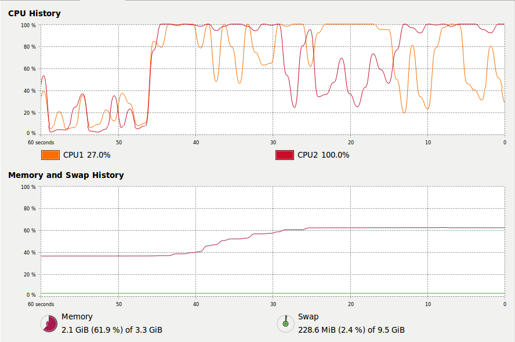
Today I downloaded some plant models from the Google repository. All in DAE-format and for the amount of detail shown, they're rather small files. Unfortunately SH3D locks after inserting the model into a design. Using the system monitor I noticed that the processor starts running at around 100% (see screen shot) and memory usage increase from a "moderate" 400 Mb after a clean start-up, to 1.1 Gb a few moments after inserting the dae-model into a design (that consists of only this 33.2 Kb dae-model).


I attach one of the files to this post. Maybe other people also have problems with this file?
Seeing that I had to "kill the process" there is no log file.

Hans
----------------------------------------
Attachment finihed tree.zip (33973 bytes) (Download count: 674)

----------------------------------------
Hans

new website - under constuction
hansdirkse.info

Posted by Puybaret at Jun 27, 2010, 11:25:35 AM
Re: Strange behaviour from DAE-import
I knew this tree already. wink
I can import it with no problem.
Please, can you run Sweet Home 3D from a Terminal window and see if there's any error?

By the way, for models coming from Google 3D Warehouse, please prefer to provide a link to the page where the SKP/DAE/Collada model can be found and do not copy the models in a Sweet Home 3D attachment.
----------------------------------------
Emmanuel Puybaret, Sweet Home 3D creator

Posted by db4tech at Jun 27, 2010, 1:44:15 PM
Re: Strange behaviour from DAE-import
Hi Hans,

I have exactly the same CPU usage (while navigating, drops to around 15% while no navigation) and memory usage (around 1.25 GB) while the model is imported. Except no crashes under Windows 7.

To really push this test hard, I produced this render, on a 1.6GHz Netbook, with 2GB of ram. While also watching full screen YouTube videos.

Still no crashes.

Here is the render.


Is it possible that it could be either the Linux distro or a faulty memory module that might be causing your program instabilities?

One reason why Sweet Home might crash for you, while other programs don't, memory problems don't usually become obvious, until something really taxes their usage.

Did the person who fitted your memory modules, wear an anti static discharge wrist strap?

How is the Visualization going? If it is up and running, please could you try the same test, running the Windows version of Sweet Home, within the Windows 7 virtual machine, if it doesn't crash there, then it isn't your memory. Just trying to help think of ideas to solve your Sweet Home crashes.

db4tech

Posted by hansmex at Jun 27, 2010, 1:58:53 PM
Re: Strange behaviour from DAE-import
Emmanuel, db4tech:

Starting up SH3D in a terminal window produced the following error message:
Java 3D WARNING : reported GLX version = 1.2 GLX version 1.3 or higher is required. The reported version number may be incorrect. There is a known ATI driver bug in glXQueryVersion that incorrectly reports the GLX version as 1.2 when it really is 1.3, so Java 3D will attempt to run anyway.
I googled a bit and found this post concerning EXACTLY the same problem. Unfortunately I don't understand what it means or how I can solve this.

As to the virtualization that db4tech suggested: I downloaded the software (and the W7 trial) and tried to run it, but it didn't work, or I didn't understand what to do. So I left it at that.

I guess I'll have to use my Windows laptop more often for SH3D.

EDIT 1
As to memory problems: I often use Autopano Pro to combine several photos into a large panoramic photo. I assume these are memory-hungry calculations as well, but the program has never crashed or caused other mishap (since the Ubuntu 9.10 video driver update). I was already suspecting some error in the Ubuntu version of the Java code (Java, not SH3D code) and have been thinking to install another Java version, but I'm not sure if that is wise.

EDIT 2
Twice I tried to import that same tree on my laptop (Windows Vista, 2 Gb memory) and twice it went into "not responding" mode when I inserted the tree into design window.

Hans
----------------------------------------
Hans

new website - under constuction
hansdirkse.info

Posted by Puybaret at Jun 27, 2010, 4:13:02 PM
Re: Strange behaviour from DAE-import
Hans, I got the same error message at Sweet Home 3D launch under the Ubuntu virtual machine I test it, so I don't think it's so important.
I've tested again the tree file and if the import wizard was able to handle with no problem, I discovered that Sweet Home 3D hangs too after the importation on my machine. So I guess it's an other bug I'll have to fix... sad
----------------------------------------
Emmanuel Puybaret, Sweet Home 3D creator

Posted by Puybaret at Jun 27, 2010, 4:19:30 PM
Re: Strange behaviour from DAE-import
I've found a workaround though: import the DAE file instead of the ZIP containing the DAE file.
Please fill a bug in bugs tracker.
----------------------------------------
Emmanuel Puybaret, Sweet Home 3D creator

Posted by hansmex at Jun 27, 2010, 4:40:37 PM
Re: Strange behaviour from DAE-import
Emmanuel:

Thank you for the (temporary) solution.
I filled out the bug tracker.

Hans
----------------------------------------
Hans

new website - under constuction
hansdirkse.info

Posted by db4tech at Jun 29, 2010, 9:46:24 PM
Re: Strange behaviour from DAE-import
Emmanuel, db4tech:

As to the virtualization that db4tech suggested: I downloaded the software (and the W7 trial) and tried to run it, but it didn't work, or I didn't understand what to do. So I left it at that.

I guess I'll have to use my Windows laptop more often for SH3D.

EDIT 2
Twice I tried to import that same tree on my laptop (Windows Vista, 2 Gb memory) and twice it went into "not responding" mode when I inserted the tree into design window.

Hans
Hi Hans,

Hope you are having a nice week so far.

Please describe what happened when you tried to install the virtualization software, so I can try and help.

When I did the render on the Netbook, I had to wait a while for the model to unpack in memory, before I could place and use it in the scene. Which is why Emmanuel's idea for that tree is probably the best workaround. smile

db4tech

Posted by Puybaret at Aug 17, 2010, 10:11:00 AM
Re: Strange behaviour from DAE-import
Hans, I fixed this bug. You can test it in the last Beta of version 2.6.
Thank you for reporting it.
----------------------------------------
Emmanuel Puybaret, Sweet Home 3D creator

Posted by hansmex at Aug 17, 2010, 10:38:07 AM
Re: Strange behaviour from DAE-import
Emmanuel:

I downloaded the new 2.6 and tried to import the problem tree.
It works like a charm on my Ubuntu PC! Thank you very much!!

Hans
----------------------------------------
Hans

new website - under constuction
hansdirkse.info

Posted by whippetsleek at Aug 19, 2010, 6:45:07 PM
Re: Strange behaviour from DAE-import
I also had alot of problems with the DAE files, so I investigated a little on my own, and since of course I'm not much of a programmer, I don't really know if what I suspect is correct, mainly that DAE assigns most textures as two sided. Is this correct? When I "fixed" google dae , I always reversed the faces and made sure both faces had the same texture. I don't know if this was accurate, but it seemed to work. But I am trying out the new version, and would bow to you as a god if this new version makes trees and plants easier to import.
----------------------------------------


Posted by Puybaret at Aug 19, 2010, 9:46:26 PM
Re: Strange behaviour from DAE-import
Chris, instead of invoking the gods, would you be kind enough to post here some links to the DAE files which caused problems (or the pages where I can find them)? wink
----------------------------------------
Emmanuel Puybaret, Sweet Home 3D creator

Posted by whippetsleek at Aug 19, 2010, 10:41:32 PM
Re: Strange behaviour from DAE-import
Sure, no problem. Here are the links to the page for the file in Google...
http://sketchup.google.com/3dwarehouse/detail...f74273df8&prevstart=0


http://sketchup.google.com/3dwarehouse/detail...bf37e6ffe&prevstart=0

http://sketchup.google.com/3dwarehouse/detail...86092ceb&prevstart=12

http://sketchup.google.com/3dwarehouse/detail...d1738016&prevstart=12

I can attach some of my own files after I have done a little work on them. The Books has major texture problems and I'm not exactly sure why. I've tried retexturing but that did not work, so I'm not sure if it is a problem with the file itself, a problem with the texture though other files use that same texture and have no problems), or a bug with the DAE file... picture me shrugging... smile
----------------------------------------
Attachment Books.skp (290918 bytes) (Download count: 254)

----------------------------------------


Posted by Puybaret at Aug 19, 2010, 11:14:30 PM
Re: Strange behaviour from DAE-import
Chris, I had only problems with the 4th one (grass) under version 2.5, but even this one seems to work now in version 2.6 Beta. As expected and seen in the joined image, the grass is not rendered correctly with SunFlow because it doesn't support transparent textures.

----------------------------------------
Attachment DAETest.jpg (29274 bytes) (Download count: 3443)
DAETest.jpg
----------------------------------------
Emmanuel Puybaret, Sweet Home 3D creator

Posted by whippetsleek at Aug 19, 2010, 11:33:30 PM
Re: Strange behaviour from DAE-import
Hmm, maybe the books is just my graphics driver then. I did update it, but I'll have to ask around about any known issues with rendering.
I haven't tried importing in 2.6 yet, so I am glad that you kind of paved the way, lol. The plants froze my version of 2.5, but if I am having trouble with my graphics driver, maybe it is due to that also? My video is ATI Radeon hd 4350. Do you know of any issues?
----------------------------------------


Posted by hansmex at Aug 20, 2010, 8:05:44 PM
Re: Strange behaviour from DAE-import
Hello all,

Browsing the Sketchup Warehouse I came across this tree. Make sure to click on the 3D View button inside the preview window. On my laptop (Windows Vista) the trees display the same as the strange tree #4 in one of the previous posts.

This leads me to think that it's a Sketchup or Collada problem, and not so much a SH3D problem.

Hans
----------------------------------------
Hans

new website - under constuction
hansdirkse.info

Posted by hansmex at Sep 10, 2010, 2:54:11 PM
Re: Strange behaviour from DAE-import
Emmanuel:

Today I tried to import some plants from the Sketchup Warehouse.

On my Windows laptop I started Sketchup, imported the *.skp model, and exported it as a *.dae model, which I then imported in SH3D. Perfect!

I then used a usb-stick to copy the models to my Ubuntu PC. Although the model imported, the texture was missing, and I had just a gray model.

This (sm-juniperuspro-01.skp) is one of the files that causes the problem. It's from this site.

Is it just me who's having this problem?

Hans
----------------------------------------
Hans

new website - under constuction
hansdirkse.info

Posted by Puybaret at Sep 10, 2010, 5:57:34 PM
Re: Strange behaviour from DAE-import
Sorry Hans, I don't know how to download any file from the site you mentioned. sad
Am I the only person to have problems with this site?
I tried with Safari and Firefox, and the site keeps on behaving incorrectly. confused
----------------------------------------
Emmanuel Puybaret, Sweet Home 3D creator

Posted by whippetsleek at Sep 10, 2010, 6:13:53 PM
Re: Strange behaviour from DAE-import
Have you tried changing the texture in your version of Sketch up? It might be Ubuntu isn't associating the texture's file (if it was made from a picture file) correctly. I sometimes have trouble with "white" areas on models because the people who originally made the file used a picture file such as a gif or jpg, and then for some reason the association with the file broke, and Sketch up "lost" the texture info. I just then gave the model my own texture.
----------------------------------------


Posted by hansmex at Sep 10, 2010, 7:11:51 PM
Re: Strange behaviour from DAE-import
Hello all:

Here's the correct link to this huge collection of plants, trees and shrubs.

In the paragraph "Sketchup Components" click on the link Trees or Shrubs. That should open the page where you can download 100's if not 1000's of plants.

Hans
----------------------------------------
Hans

new website - under constuction
hansdirkse.info

Posted by Puybaret at Sep 11, 2010, 11:15:52 AM
Re: Strange behaviour from DAE-import
Thank you Hans. It works much better with this link. smile
With the previous one, I had no images and no correct download link.

Did you copy also the folder SM-JuniperusPro-01 folder created with SM-JuniperusPro-01.dae file at exportation time in Sketchup? It contains the texture image of the model and without it, it won't work...
----------------------------------------
Emmanuel Puybaret, Sweet Home 3D creator

Posted by hansmex at Sep 11, 2010, 2:10:31 PM
Re: Strange behaviour from DAE-import
Emmanuel:

No, I didn't... :-)
I'll try again, maybe as a zipped file.

Hans
----------------------------------------
Hans

new website - under constuction
hansdirkse.info