Print at Dec 22, 2025, 12:48:55 PM
Posted by kumax at Aug 28, 2010, 10:48:17 AM
biggrin   My photos on the wall..
.. and some other things! biggrin

I allways wanted to know how my photos would look like on the wall as a big prints. This way I found SH3D and there are some of my renders. :)

(some of the pictures have a small touch of Photoshop)
(all photos used on the walls (and on the monitor screen) they are my own)


This pictures were used for the "Mafia" project we've done with my friends for fun. cool


Posted by Puybaret at Aug 28, 2010, 11:53:38 AM
Re: My photos on the wall..
What a gallery! biggrin
Thank you for sharing these beautiful images.
I love the smoke effect you added with Photoshop.
----------------------------------------
Emmanuel Puybaret, Sweet Home 3D creator

Posted by hansmex at Aug 28, 2010, 1:15:22 PM
Re: My photos on the wall..
Beautiful!!!
----------------------------------------
Hans

new website - under constuction
hansdirkse.info

Posted by whippetsleek at Aug 28, 2010, 9:20:47 PM
Re: My photos on the wall..
Wow, I love the pictures. Great work. The tower picture is of Malaysia's Twin Towers, no? The Petronas Towers? I'm staying in KL right now, and see those towers every day. Great picture of them!
----------------------------------------


Posted by kumax at Aug 29, 2010, 10:01:59 AM
Re: My photos on the wall..
Thanks! I'm glad you like it! smile

(Yes, it's my HDR photo of Petronas, you've got a good eye! cool )

Posted by db4tech at Aug 30, 2010, 1:58:01 PM
Re: My photos on the wall..
Hi kumax,

Some fantastic renders! I also used Sweet Home to see how some of my photographs would look before hanging them. Not keen on the murder 'scene of crime' but like how you effectively used grunge style textures for the walls. Really appreciate your brilliant PP Photoshop work in the others! smile

I was hoping we would be able to add volumetric effects to Sweet Home, but it seems that Sunflow (the current render engine) doesn't support them.

After your renders, did you proceed to have some big prints made of your photos?


db4tech

Edit:
Forgot to ask. In your first image, did you use a landscape model, build your own landscape mesh in another program or is it a photo?

Posted by kumax at Aug 31, 2010, 9:47:43 AM
Re: My photos on the wall..
I've tried to render the scenes in Blender for better light results, but I'm still not a friend with the program (it means I still don't know how to do it.. angel ) so I had to add some light effects with Ps.
Now I'm experimenting with some render plugins (Advanced, Uber, Phong) and with extra lights, but my computer don't like it.. laughing I have 4 cores in my AMD phenom, but (as everybody knows) AMD fries a lot and so my PC shuts down often within rendering because the temperature on cores is too hight. crying

No no.. I don't have any big prints of my pictures. smile I wanted to know how it looks because I sell my photos for the prints. And a few months ago, someone bought a really big framed print of my "greek photo" (the orange waterscape on the first picture) so I was really curious how my photo may looks on someones wall. biggrin
And the answer for your last question - yes, it is a reall photo from my last summer holidays in Greece.
You can see all my used photos (and some others too) in my deviantArt gallery. smile

Posted by db4tech at Aug 31, 2010, 2:17:47 PM
Re: My photos on the wall..
I've tried to render the scenes in Blender for better light results, but I'm still not a friend with the program (it means I still don't know how to do it.. angel ) so I had to add some light effects with Ps.
Blender does have a very steep learning curve. I'm waiting for the final version of 3.5 (3.6, or whatever version the final is) before I really start spending time with it.

Now I'm experimenting with some render plugins (Advanced, Uber, Phong) and with extra lights, but my computer don't like it.. laughing
If it is helpful, you don't need to spend time trying all those different plug-ins. smile The uber and phong plug-ins you mention were just a test versions. We now have a final release version AdvancedRendering-1.6.sh3p or for users with lower resolution displays, there is AdvancedRenderingMini-1.6.sh3p (A smaller interface version of the first plugin)

As you may have read, phong was dropped because it had lots of limitations, plus uber can do everything phong can do and more! The plug-ins I linked to supperceeds all other rendering plug-ins, because they contain both shiny, and uber shaders.

Glossy setting = shiny shader.
Silk setting = uber shader.

For most renders the Glossy setting will be enough and is also faster.
If your scene contains any diffused surfaces or metals that you would like rendering correctly then you need to choose Silk.

If you've not already done so, you will also need to download either BasicLights.sh3f or
BacicPlusExtraLights.sh3f (As the name implies, the BasicPlusExtraLights also contains the BasicLights and adds lots of others) If you want to enable full light control.


I have 4 cores in my AMD phenom, but (as everybody knows) AMD fries a lot and so my PC shuts down often within rendering because the temperature on cores is too hight. crying
I used to have AMD, and yes they do get quite warm! sad If you are able to and are still using the stock cooler, you really should consider a 3rd party cooler, they make a big difference to temps. Even so it shouldn't be overheating and shutting down?? The computer should throttle the CPU to reduce temps, overheating and shutting down is usually only a last resort.

Have you tweaked the BIOS at all or are you using default settings?

Is the computer in a hot environment?

Is there a good air flow around the case?

I sell my photos for the prints. And a few months ago, someone bought a really big framed print of my "greek photo" (the orange waterscape on the first picture) so I was really curious how my photo may looks on someones wall. biggrin
Sounds great! smile

Thank you for the link.

db4tech

Posted by kumax at Sep 10, 2010, 4:36:58 PM
Re: My photos on the wall..
I'm going to buy some 3rd party cooler for my case and maybe for the CPU too. My BIOS has default settings and I'm pretty sure the cause of shutting down is overheating. After shutting down my poor computer has still his fans on and that is noise! laughing

I'm using the light plugins and it's the best thing. I had a problem with so dark pictures, but with the lights I can sipmply customize the light conditions. Thank you for it!

__________
By the way.. my new render - my friend's painted picture in some room.
(God bless google warehouse.. biggrin )


Posted by chuck at Sep 24, 2010, 5:33:34 AM
Re: My photos on the wall..
Hi biggrin
This is brilliant work dude. I know i am a little late.. I couldnt help it . Let me come to point ,the photoshop work you did just adds to the overall beauty. I guess i could come up with things like this. Thanks for sharing your valuable ideas.
Cheers cool

Posted by kumax at Oct 5, 2010, 8:59:52 AM
Re: My photos on the wall..
Thanks for the nice comment! blushing

___________

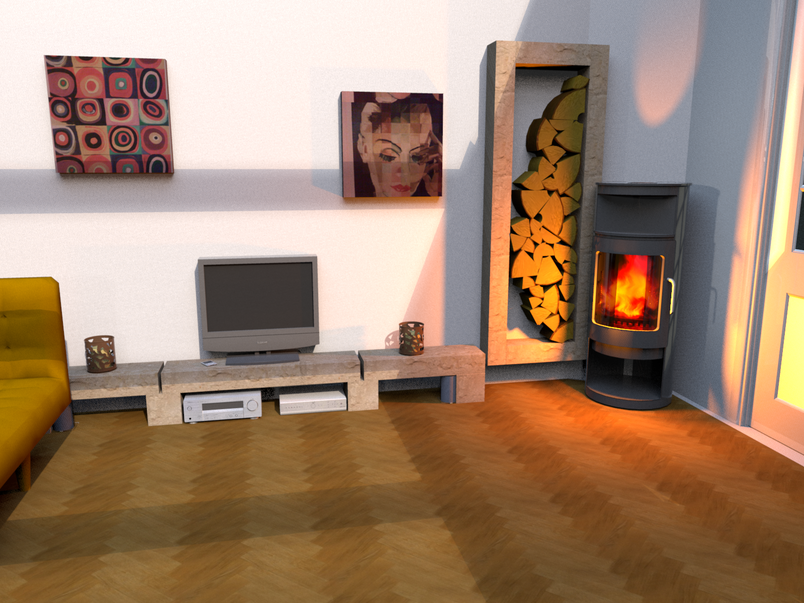
Another render for my another friend. Big photo print on the wall.


I wish the quality of shadows and textures would be better but the floor is perfect!! applause Thank you advanced photo render. wink

Posted by Puybaret at Oct 5, 2010, 9:22:36 AM
Re: My photos on the wall..
Very nice. smile
I'm looking forward discovering the picture you'll submit to Sweet Home 3D contest. 6 days left before the end! wink
----------------------------------------
Emmanuel Puybaret, Sweet Home 3D creator

Posted by db4tech at Oct 6, 2010, 8:13:48 PM
Re: My photos on the wall..
Another great looking render! smile

What is it about the shadows that you'd like to change, the hardness? Also the textures?

db4tech

Posted by sanjoyp at Oct 6, 2010, 11:13:44 PM
Re: My photos on the wall..
Hi sorry for the thread hijack. I am running in to problems with my photos I have made into paintings on the wall ? I have found that those taken from gifs are okay but when the jpg resolution is high 2000+ * 2000+ pixels I am unable to render. I get the dreaded red x, memory issue ?

This image has two boxes with customer textures which are iphone photos of paintings.


Is it just lack of RAM ?

Posted by sanjoyp at Oct 6, 2010, 11:15:23 PM
Re: My photos on the wall..
Which floor texture did you use in this photos it is exactly what I am after!


Posted by hansmex at Oct 6, 2010, 11:34:28 PM
Re: My photos on the wall..
Sanjoy,

There's some kind of an upper limit to the size of texture you can use.This problem has been reported before (see this thread). The solution is to make your texture smaller.

A remark about texture size: If you make a render of 4000x3000 pixels and there's a picture on the wall (see the two pictures in your last post) then the size of the pictures on the wall is maybe 800x600 pixels. Why would you apply a texture of 2400x1800 pixels (or something similar) only to have it reduced in the final result to 800x600? It takes up a lot of processor time to calculate every pixel, but none of it shows as a better quality in the final result.

Hans
----------------------------------------
Hans

new website - under constuction
hansdirkse.info

Posted by sanjoyp at Oct 6, 2010, 11:40:20 PM
Re: My photos on the wall..
Good point Hans, I was using the train of thought of not removing any detail I had and using the high res imaged. Will retry.

Cheers

Sanjoy

Posted by kumax at Oct 31, 2010, 11:46:29 AM
Re: My photos on the wall..
Another great looking render! smile

What is it about the shadows that you'd like to change, the hardness? Also the textures?

db4tech

Not the hardness but the smoothness? I don't know how to say it, but I see some dots in the shadow and I would rather like to have it in one smooth surface. I think the thing which would solve my problem it's to render it in bigger resolution and than resize it to smaller picture. But the bigger resolution would kill my computer.. :-))

And the thing about textures.. I meant it would be nice to see some fabric texture of the sofa... for example. :)

Posted by whippetsleek at Nov 1, 2010, 6:26:39 PM
Re: My photos on the wall..
Hi kumax... not sure about the shadows.. that would be puybarets or db4tech's area.. smile but when I want to get a fabric type texture, I used a smaller texture of between 256 x256 or 512x512, and make it the shades very distinct. Then I make the texture very small in the texture editor, like 1 inch sq. Here is an example..


It used this texture at 4x4 inches


This one is a little lighter


and used this at 1x1


And this is dark...


and used this at 6x6 inches


And those were great looking renders! wink
----------------------------------------