 Is this a bug?
Sometimes when I import a .zip file, I don't get a thumbnail of the object, just a grey square. See photo:
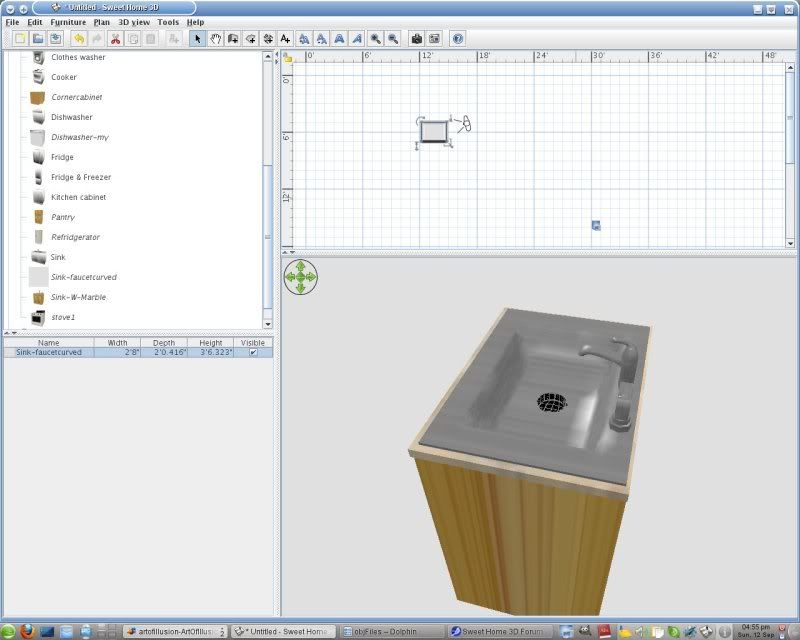
I'm using SH3D 2.6
|
Sweet Home 3D Forum » List all forums » » Forum: Installation » » » Thread: Is this a bug? |
|
| Print at Sep 26, 2026, 11:32:31 PM | View all posts in this thread on one page |
| Posted by pencilart at Sep 12, 2010, 10:03:56 PM |
|
Is this a bug? Sometimes when I import a .zip file, I don't get a thumbnail of the object, just a grey square. See photo: I'm using SH3D 2.6 |
| Posted by Puybaret at Sep 12, 2010, 10:09:25 PM |
|
Re: Is this a bug? Yes it's a bug. I tried to program image creation using different ways and compatible with the systems where offscreen imaging isn't available. At this time, it's some kind of automatic screen capture. If it fails, please modify the imported model by double-clicking on its icon in the catalog and just pass the 4 parts of the wizard. ---------------------------------------- Emmanuel Puybaret, Sweet Home 3D creator |
| Posted by pencilart at Sep 13, 2010, 10:00:45 PM |
|
Re: Is this a bug? That worked. :D |
| Posted by db4tech at Sep 14, 2010, 7:09:49 PM |
|
Re: Is this a bug? At this time, it's some kind of automatic screen capture. Hi Emmanuel,Do you use that method because it is less resource hungry, than using a vector plan view of the object, in the plan view? Must admit, one of the first things I always do, after installing Sweet Home, is switch Furniture icons in plan: from Catalog items to Top view Even though "Catalog items" has a bounding box, I find "Top view" so much more helpful at illustrating the actual size of the furniture, plus it really helps show how everything fits together and how much space is left in the room. Was the "Catalog items" the original method before you created the "Top view"? If so I'm really glad you added the "Top view", in fact, it's so helpful I wish that was the default setting!  PS: I'm not mentioning my personal preferences as any kind of self promotion, I just thought you might be interested to hear how users use your software, for future development. db4tech |
| Posted by Puybaret at Sep 15, 2010, 9:05:50 AM |
|
Re: Is this a bug? Do you use that method because it is less resource hungry, than using a vector plan view of the object, in the plan view? I never planed to display a vector view of the object (it would be probably much more resource hungry as you say than displaying a scaled image). Screen capture is the only method that works most of the time for everyone, even for computers that don't support 3D offscreen imaging.Was the "Catalog items" the original method before you created the "Top view"? Yes, and it will probably remain the default setting for a while, because creating the top view requires 3D offscreen imaging, and some configurations can't even test if they support this feature without a crash (see the FAQ Sweet Home 3D crashes when I want to edit preferences, print, create a photo or create a video. What can I do?). This may change in the future though, because Sweet Home 3D plan is now able to display also some "precomputed" top view images, which would allow everyone to display the top view of the existing models (but the problem would remain unchanged for people who want to import furniture).---------------------------------------- Emmanuel Puybaret, Sweet Home 3D creator |

|
Current timezone is GMT Sep 26, 2026, 11:32:31 PM |