|
Sweet Home 3D Forum » List all forums » » Forum: 3D problems » » » Thread: Tree Transparencies |
|
| Print at Dec 23, 2025, 6:50:56 AM | View all posts in this thread on one page |
| Posted by whippetsleek at Oct 15, 2010, 4:15:49 PM |
|
Tree Transparencies I am having trouble with a couple of files that use three transparent textures, and a high polygon tree. It freezes my version of Sweet Home. I'm using the newest version- 3.0 11 Each of the files can be used and rendered by themselves, but for some reason when they are put together in a scene, it freezes. The file is available from media fire, maybe it is just my graphics driver can't handle the additional calculations... but would appreciate any help or ideas. ![]() http://www.mediafire.com/file/icdtpf3bzxmfv5s/plants1.sh3d ---------------------------------------- ![]() |

| Posted by hansmex at Oct 15, 2010, 4:32:14 PM |
|
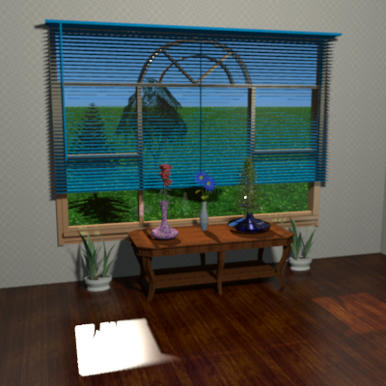
Re: Tree Transparencies Chris, Both using v2.6 and v3.0-b12 I had no problems opening your file and changing the perspective. As you may know, I use an Ubuntu PC. When does your problem occur? On opening? During rendering? If rendering, on first render, or after several renders? There is/was a memory problem there. Hans ---------------------------------------- Hans new website - under constuction hansdirkse.info |
| Posted by whippetsleek at Oct 15, 2010, 4:42:50 PM |
|
Re: Tree Transparencies It freezes after I try the first render. I can load the file and move around the 3d view just fine until I try to render, but it will freeze as soon as I push the create button. Then I have to use task manager (as I am running win Vista)to close the program. I've done some more tests after I posted, and the high polygon tree will render by itself, but not with any of the transparent texture trees. ---------------------------------------- ![]() |
| Posted by hansmex at Oct 15, 2010, 5:10:49 PM |
|
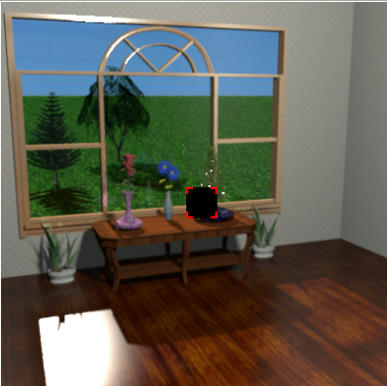
Re: Tree Transparencies Chris, Rendering with version 3.0 beta 12 in highest quality didn't cause any problem. I'll try to attach an image, but Mediafire (or my internet connection) is causing trouble. I noticed one strange thing: the blue flower in the middle of the low table didn't show in the 3D preview, but rendered OK. Hans EDIT ![]() ---------------------------------------- Hans new website - under constuction hansdirkse.info |
| Posted by whippetsleek at Oct 15, 2010, 8:59:50 PM |
|
Re: Tree Transparencies That is strange Hansmex. The flowers are a small file from Sketch. It is odd they wouldn't show. I have to assume it is something in my video card setting or graphics driver. Thank you for your help. ![]() I will have to take out the transparent trees for now, as they are what seems to be stopping the renders. ![]() ---------------------------------------- ![]() |
| Posted by hansmex at Oct 15, 2010, 9:06:16 PM |
|
Re: Tree Transparencies Chris, Is there enough memory for SH3D to make the render? If a quality 3 doesn't work, maybe you can make a quality 2? Have you ever tried the Xmx-trick? Hans ---------------------------------------- Hans new website - under constuction hansdirkse.info |
| Posted by whippetsleek at Oct 15, 2010, 9:29:29 PM |
|
Re: Tree Transparencies Yes, I followed the instructions from db4tech a while back, in the thread of yours I think it was, to increase the memory to 1024. I started the renders at the lowest quality setting as I was just going to frame the scene first before upping the quality. ---------------------------------------- ![]() |
| Posted by hansmex at Oct 15, 2010, 9:55:40 PM |
|
Re: Tree Transparencies Chris, Emmanuel, It's a strange file, though... I closed SH3D and started it again, just to see if I could reproduce the "white box" that replaced the blue flowers. First Q3 render didn't finish, it ended almost complete. Second Q3 render doesn't finish either. Two little squares, one red, one green, are used as progress indicators. What happens both times is that the green indicator makes its spiraling motion to the end. But the red one doesn't move and stays in the centre position. The result is that you can't save the picture. Only change I made is t hat I moved the blue blinds to another position to better admire the view. Hans ![]() ---------------------------------------- Hans new website - under constuction hansdirkse.info |
|
|
Current timezone is GMT Dec 23, 2025, 6:50:56 AM |