Emmanuel,
Is there a solution to get these paintings to render properly?
It seems that every render gives a different result.
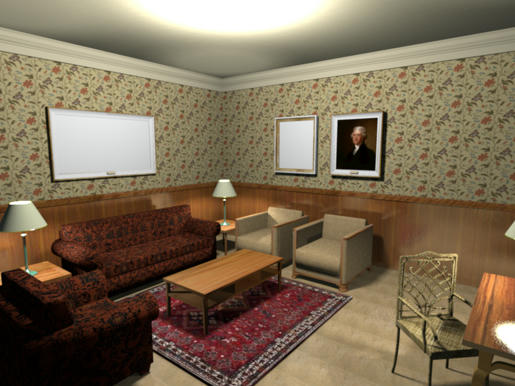
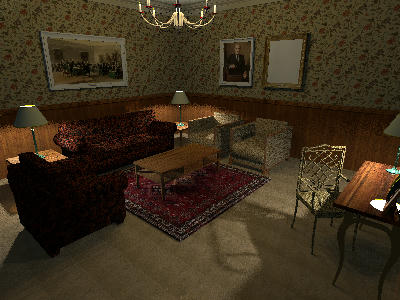
Hans
----------------------------------------
Hans
new website - under constuction
hansdirkse.info
|
Sweet Home 3D Forum » List all forums » » Forum: 3D problems » » » Thread: DAE model with render problem |
|
| Print at Sep 29, 2026, 7:39:35 AM | View all posts in this thread on one page |
| Posted by hansmex at Nov 21, 2010, 7:47:47 PM |
|
DAE model with render problem Emmanuel, Is there a solution to get these paintings to render properly? It seems that every render gives a different result. Hans ---------------------------------------- Hans new website - under constuction hansdirkse.info |
| Posted by Puybaret at Nov 21, 2010, 8:47:11 PM |
|
Re: DAE model with render problem Could you give a link to one of the files which cause problem or send it to me? ---------------------------------------- Emmanuel Puybaret, Sweet Home 3D creator |
| Posted by hansmex at Nov 21, 2010, 9:27:46 PM |
|
Re: DAE model with render problem Emmanuel, Here is the file. Hans ---------------------------------------- Hans new website - under constuction hansdirkse.info |
| Posted by Puybaret at Nov 21, 2010, 10:05:36 PM |
|
Re: DAE model with render problem Thank you Hans, it looks like this bug. Not sure I'll be able to fix that one before version 3.0 release...  ---------------------------------------- Emmanuel Puybaret, Sweet Home 3D creator |
| Posted by hansmex at Nov 21, 2010, 10:56:09 PM |
|
Re: DAE model with render problem Emmanuel, I think I found a solution!  A few days ago PtiNounours posted this message. Having finally been able to install SketchUp, I decided to install the plug-in he mentioned: FaceFront. After activating the plug-in, you "paint" over (parts of) your model and it reorients the faces of the model. In SketchUp you can't see a difference, but there definitely is a difference in the DAE-file when it's imported in SH3D. I treated two paintings this way, then did at least 5 renders, and each one came out correct. Hans 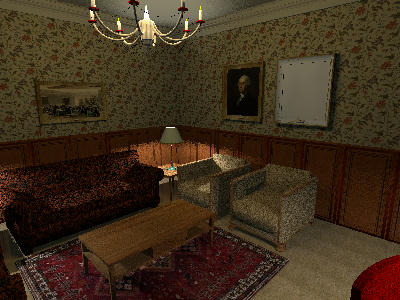 ---------------------------------------- Hans new website - under constuction hansdirkse.info |

|
Current timezone is GMT Sep 29, 2026, 7:39:35 AM |