Print at Dec 20, 2025, 4:09:13 AM
Posted by wrosun at Dec 19, 2010, 11:35:59 AM
Floor Rendering Problem
Hello! friends
Here is a problem i observed,The problrm is about creating floors.
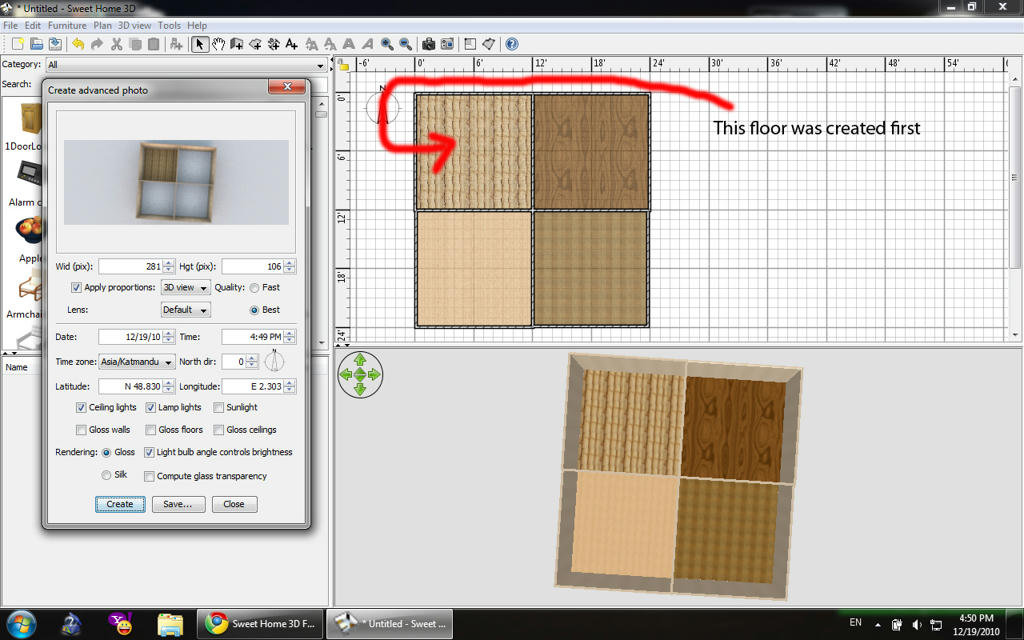
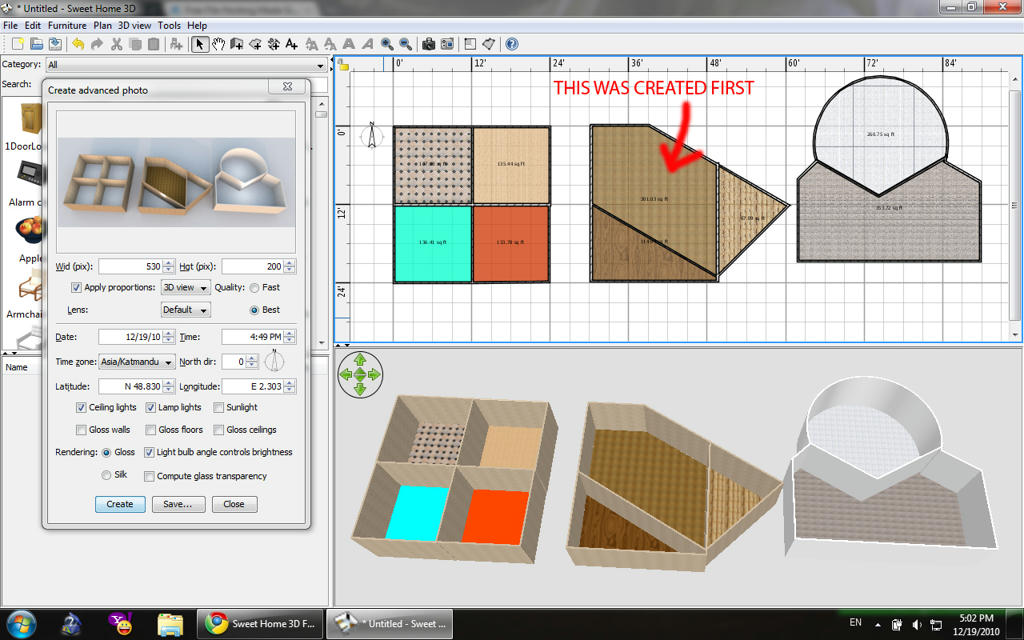
if a single floor(room) is created for whole house then it appears while rendering but if diffenent floors are created then only the floor which is created at first is seen while rendering confused

I dont hink i explained well so here are some pictures to show what i mean


IN THIS ONE I USED COLOR/DEFAULT TEXTURES/USER MADE TEXTURE


AS YOU CAN SEE NON OF THESE WORK OUT.

Posted by Puybaret at Dec 19, 2010, 11:49:32 AM
Re: Floor Rendering Problem
It's probably the same problem as macfrog.
I never saw it happen yet.
Can you send me your wrong SH3D files please?
----------------------------------------
Emmanuel Puybaret, Sweet Home 3D creator

Posted by hansmex at Dec 19, 2010, 12:20:55 PM
Re: Floor Rendering Problem
wrosun,

I tried to copy this behaviour but without success. I copied your designs exactly, created the first room in the same place, I used four imported textures. and applied textures to the walls. It renders perfectly in aerial view and virtual visitor view.

Can you check the size of the images you use for your textures? Not only how big the file is (in Kb) but also the size in pixels.

Hans
----------------------------------------
Hans

new website - under constuction
hansdirkse.info

Posted by Puybaret at Dec 19, 2010, 12:47:50 PM
Re: Floor Rendering Problem
Hans I don't think it's a matter of size. From the screen captures, even some texture images coming from Sweet Home 3D (256x256 pixels) aren't displayed.
----------------------------------------
Emmanuel Puybaret, Sweet Home 3D creator

Posted by wrosun at Dec 19, 2010, 1:02:01 PM
Re: Floor Rendering Problem
well this is a file i created in 5 min to show you guys and any model i create shows same problem.

Yup it is same problem as MACFROG. First i thought it was some thing he did but i tries it and when ever i make models shows the problem.

@HANS:
This problem is same if i create room in other places at first only that room shows floor .I dont think its is pixel problem hans because when i use default textures only also then there is the same problem and if i create first room using user texture then the rooms will show texture while rendering...

@puybaret:
I will attach a sh3d file showing the problem,File

I have done every thing but the problem is always there. devilish

Posted by Puybaret at Dec 19, 2010, 1:12:44 PM
Re: Floor Rendering Problem
Too bad, I don't have any problem to render the file you posted at the 2 best quality levels.
If I can't reproduce the problem, I won't be easy to fix. sad

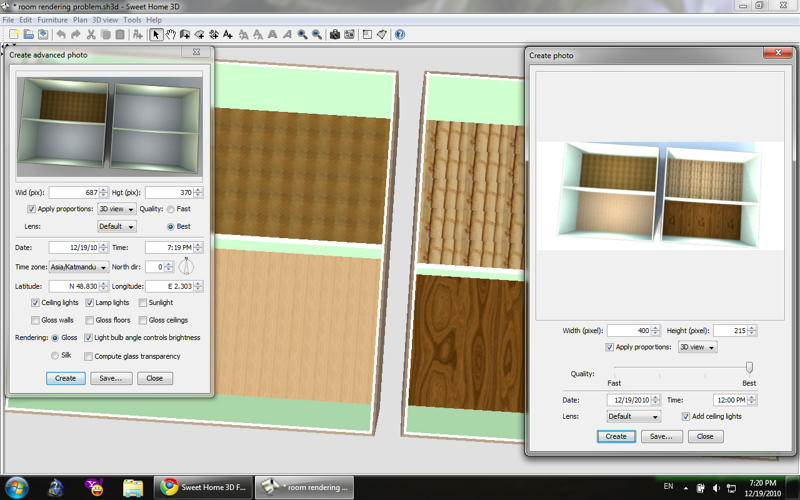
From you screen captures, I see you tried to compute the images with the Advanced rendering plug-in. Could you try with Sweet Home 3D default photo creation dialog? I don't think it will change anything for you, since macfrog used this dialog too, but who knows what can happen with furtive bugs?
----------------------------------------
Emmanuel Puybaret, Sweet Home 3D creator

Posted by hansmex at Dec 19, 2010, 1:14:09 PM
Re: Floor Rendering Problem
wrosun,

Thanks for the file. On my computer (operating system is Ubuntu 10.10) they render perfectly.

Hans
----------------------------------------
Hans

new website - under constuction
hansdirkse.info

Posted by wrosun at Dec 19, 2010, 1:18:36 PM
Re: Floor Rendering Problem
Really? well i havent tried it with Ubuntu. My operating system is Windows 7 home premium if you can try with it once some how then may be you will see the problem....can there be problem with my computer???

Posted by Puybaret at Dec 19, 2010, 1:29:24 PM
Re: Floor Rendering Problem
can there be problem with my computer?
No I don't think so.
On my side, I tried under Windows 7 and Mac OS X successfully.

By the way, wrosun, your avatar looks nice. wink
----------------------------------------
Emmanuel Puybaret, Sweet Home 3D creator

Posted by wrosun at Dec 19, 2010, 1:38:09 PM
Re: Floor Rendering Problem
@Puybaret:
May be i should have told you before that the rendering with default photo creation dialogue works perfectly in any quality mode.I am having problems in advanced rendering plug-in.


Thanks! biggrin

Posted by hansmex at Dec 19, 2010, 2:02:54 PM
Re: Floor Rendering Problem
wrosun,

With the plug-in I get the same results as you have.
Just don't use the plug-in anymore. Version 3.0 has the functions of the plug-in built into the program itself. So you really don't need it anymore, unless you want to keep us busy asking questions on the forum... wink

Hans
----------------------------------------
Hans

new website - under constuction
hansdirkse.info

Posted by Puybaret at Dec 19, 2010, 2:03:56 PM
Re: Floor Rendering Problem
The advanced rendering plug-in isn't supported in Sweet Home 3D 3.0.
It may work but I didn't try.
----------------------------------------
Emmanuel Puybaret, Sweet Home 3D creator

Posted by wrosun at Dec 19, 2010, 2:12:37 PM
Re: Floor Rendering Problem
Nice one Hans. laughing
I dont want to sound like a smart ass but i ask questions on forum only when i think there is no more i can do to solve this problem.Then i say lets take it to the experts lol.

@Puybaret:
Point taken boss wink

Posted by cyrano at Dec 19, 2010, 2:27:31 PM
Re: Floor Rendering Problem
Thanks for this post wrosun, since last week I was trying to solve this. This morning I finally figured out by chance that I should not use the advanced rendering plug in anymore. And this thread just confirm it. So it is useful to post that kind of issue and its solution.
Note: the reason I kept using the advanced rendering plug in, is that I could not see all the functions of it in the standard renderer dialog. So by force of habit I kept on using the plug in.

Posted by wrosun at Dec 19, 2010, 2:40:31 PM
Re: Floor Rendering Problem
Cyrano,
I wouldn't say default photo creation dialogue has less functions the thing is that the advanced photo plugin makes it look like it has more function with all the chek box and every thing...the effect that you want can be created in default photo creation even more accurately you can make different floors having different surface bye changing whether it is mat or shiny in modify furniture,modify wall,modify room functions...i like default photo creation over advanced rendering....i personally think default photo creation takes less memory to create photo. smile

Posted by wrosun at Dec 19, 2010, 3:46:10 PM
Re: Floor Rendering Problem
in another thought i think there are differences like compute glass transparency and silk effects...

Posted by cyrano at Dec 19, 2010, 5:41:06 PM
Re: Floor Rendering Problem
Yes I agree with you wrosun, I have been playing with it most afternoon, and the new version of the renderer is really good.

Posted by Puybaret at Dec 19, 2010, 6:27:36 PM
Re: Floor Rendering Problem
cyrano, wrosun, the standard renderer dialog uses all the parameters available in the advanced rendering plug-in dialog, but these parameters are displayed differently, that's why I'm not in the mood to maintain the advanced rendering plug-in. In case you didn't follow how the standard renderer changes in version 3.0, here's a sum up of the changes and improvements:
- User interface controls for size, lens, quality, date, hour and default ceiling lights are displayed in the same dialog.
- User interface controls for time zone, longitude, latitude and north direction are displayed in the compass modification dialog. The time zone, longitude and latitude are not the ones of Paris by default anymore, but the values matching the main city in the time zone of your computer.
- Lamp lights are turned on depending of the power set on each light source or lamp with its modification dialog or its power indicator.
- Sunlight is always active during daylight. The color of its rays depends on its location in the sky, with a warmer color at dawn and twilight. If you really don't want the sun, use a night time with a texture for the sky, or add an object in the scene that will hide its rays.
- The shininess of walls, floors and ceilings can be set individually on each wall, floor and ceiling with their modification dialog. You can also set the shininess of each piece of furniture. Keep in mind that Sweet Home 3D let you modify the shininess (or an other attribute) of a group of items, if you select them first and use the Modify menu item matching the type of object to modify.
- The shininess rendering is always set to glossy at the 3rd quality level and to silk at the best quality level. If you prefer glossy with a better quality, create a larger image (at least twice larger), then downsize it with any image software, that should give the same effect as in the plug-in.
- Light angle used to control brightness is replaced by the much more logic light power attribute available on each light.
- Glass transparency computation was an option in the plug-in because it didn't work in some cases. Now glass transparency is always computed, but doesn't use caustics anymore which are slower to compute and didn't work all the time. If you look at the images in this message, you'll see that caustics are more realistic, but I hope you'll agree with my answer to db4tech stating that Sweet home 3D is for interior design purpose first. Therefore I prefer that users can see a light reflect in windows with the new transparency algorithm.

Even if it's still not perfect, the standard renderer supports also colored transparent glasses, textures with transparency, ambient occlusion to avoid too dark shadows in some cases, and manages better the lights included in lamps.
----------------------------------------
Emmanuel Puybaret, Sweet Home 3D creator

Posted by wrosun at Dec 20, 2010, 2:45:31 PM
Re: Floor Rendering Problem
thanks for the information Puybaret.
i didnt know about silk effect and the transparency working...now i do..
thanks again

Posted by soul at Mar 19, 2011, 6:12:49 PM
Re: Floor Rendering Problem
hello,i was reading plugins tutorial, and i jumped in this thread, user hansmex says that sweet home 3d v3.0 already has creating photo plugin based in software but in the pic of wrosun's post, it clearly can be seen that advenced rendering plugin showin more natural light renderings than create photo plugin, so does advanced rendering plugin work on sweet home 3d v.3.1 that i using now??

Posted by soul at Mar 19, 2011, 6:29:37 PM
Re: Floor Rendering Problem
i really having LİGHTİNG problems lately ,
anyone has advices about what to do about the big white area on the ceiling, i couldnt arrange and make a good room light effect with 'add ceiling' and using 'air-lamb' light renders together, just cant use and make a balanced light effect
http://i11.photobucket.com/albums/a178/mcdost/aa.png (see this on explorer, my google chrome just dont work properly after i installed sweet home 3d v.3.1.. i think its about java adds. ı dunno really whats problem.. anyone knows about solution?? i cant use google chrome!!

Posted by Puybaret at Mar 19, 2011, 7:31:44 PM
Re: Floor Rendering Problem
does advanced rendering plugin work on sweet home 3d v.3.1 that i using now?
Yes, there was a small bug that prevented it to work correctly under version 3.0, but I fixed that in version 3.1. But you'll probably get slightly different images if you use it with version 2.6, 3.1 and 3.2 of Sweet Home 3D.

If you want a total control on lighting, don't check Add ceiling lights option. Ceiling lights power depends on the area of the room. It works well in many cases, but you have a better control on lights if you add your own light sources.
----------------------------------------
Emmanuel Puybaret, Sweet Home 3D creator