|
Sweet Home 3D Forum » List all forums » » Forum: Features use and tips » » » Thread: Printing question |
|
| Print at Dec 21, 2025, 5:04:33 AM | View all posts in this thread on one page |
| Posted by jollywollup at Dec 27, 2010, 4:32:17 AM |
|
Printing question Hello, I'm trying to figure out how to print the plan with a certain scale in mind. When I go to page setup, I can select whichever scale I wish, for example 1/48. However, when I go to print preview, only one page will get printed, and it is just the top left corner of my plan. Printing to scale won't be very useful if it is cutting off the entire rest of the house plans, so is there something I'm doing wrong? Can someone else try this feature and see if it works? I'm running version 3.0. Many thanks! |
| Posted by hansmex at Dec 27, 2010, 7:44:42 AM |
|
Re: Printing question Jolly, Did you notice the green arrows in the top of the Preview window?? Hans ---------------------------------------- Hans new website - under constuction hansdirkse.info |
| Posted by Puybaret at Dec 27, 2010, 8:05:41 AM |
|
Re: Printing question Hans, the green arrows won't show unprinted pages of the plan! See this request about scale printing. Meanwhile you can also print in PDF on bigger pages then print this PDF document with an other tool able to handle multiple pages. ---------------------------------------- Emmanuel Puybaret, Sweet Home 3D creator |
| Posted by hansmex at Dec 27, 2010, 11:00:00 AM |
|
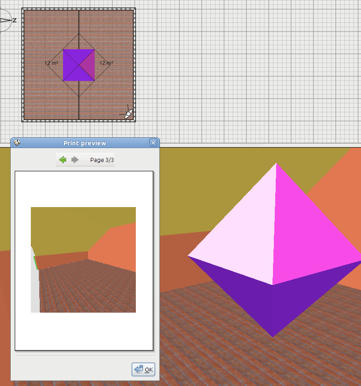
Re: Printing question @Emmanuel, Sorry to be mistaken. Glad I could learn something While on this topic, I might add a few other problems in the PDF department. 1 - Shown below is a room with a diamond, but without the diamond. The PDF preview doesn't seem to like diamonds. When I add another object, the diamond is visible in the preview. When using Print to PDF the same problem occurs: The diamond is invisible when alone, visible when accompanied by another object. ![]() 2 - When choosing Page setup --> Custom no dialog pops up to let you enter the paper size, making the idea of "custom" pretty useless. EDIT 3 - You may also notice that the left wall has no colour, although in reality it's orange. The colour magically re-appears when at least one extra object is inserted into the design. Hans ---------------------------------------- Hans new website - under constuction hansdirkse.info |
| Posted by davew at Dec 29, 2010, 7:52:35 PM |
Re: Printing questionI am having the same problem. I have a plan that I'm trying to print in 1/48 (1/4" = 1') scale and all I get is the upper left portion of the plan. I have tried setting up PDF printing with a "huge" page size but have only been able to get about 1/4 of the plan to print. Plan size is roughly 90' wide by 65' deep. |
| Posted by hansmex at Dec 29, 2010, 8:25:55 PM |
|
Re: Printing question Dave, After this question was asked first, I tried this out myself. Indeed, I noticed that printing is a bit of a problem. The only solution I have found, would be to print to a much bigger scale, so that everything fits on one page. Don't print to paper, but print to PDF. Then, you can try to work out a way to print an oversized PDF, in such a way that one page becomes, say, 6 pages. Example: instead of printing 1:48, try printing to 1:480. Then enlarge the PDF 10-fold and print it out on multiple pages. Hans ---------------------------------------- Hans new website - under constuction hansdirkse.info |
| Posted by davew at Jan 3, 2011, 4:48:57 PM |
|
Re: Printing question Hans - Sorry for not responding to your idea. I tried various methods of printing smaller/enlarging but was unable to get anything to work correctly. In order to produce the 1:48 scale I ended up having to cut/paste various "printable on one page" sections of the plan into "new" plans and then print them individually and then do a manual cut/tape process on all the seperate printouts to get one "scale" drawing. It's sure not very pretty but it did get me an output I could take to our discussions with various builders. |
| Posted by hansmex at Jan 3, 2011, 6:08:52 PM |
|
Re: Printing question Dave, If you have to talk to builders, you probably need plans, not 3D images. If so, try this: - export your design with Plan --> Export to SVG format - import in your preferred graphics program (e.g. The Gimp) and scale and print it. Hans ---------------------------------------- Hans new website - under constuction hansdirkse.info |
| Posted by Puybaret at Jan 3, 2011, 7:48:48 PM |
|
Re: Printing question jollywollup, Dave, if you want to print a large plan on multiple pages, please try the latest version beta 3.1 (requires you install Java first). ---------------------------------------- Emmanuel Puybaret, Sweet Home 3D creator |
| Posted by davew at Jan 3, 2011, 10:51:00 PM |
|
Re: Printing question Emmanuel - Thanks so much!! The Beta version does EXACTLY what I need! A little trimming of the page edges and a little taping and I've got the plan printed in a format that I can take to a builder for discussions. Hans - Sorry if I wasn't clear earlier about what it was I was trying to print....it is the 2D "floor plan" view of the plan and not one of the 3D views. Thanks to ALL for your assistance!! Dave |
|
|
Current timezone is GMT Dec 21, 2025, 5:04:33 AM |