|
Sweet Home 3D Forum » List all forums » » Forum: Sweet Home 3D bar » » » Thread: 2 floor restaurant. |
|
| Print at Dec 23, 2025, 7:04:41 AM | |
| Posted by Fintan at Dec 27, 2010, 8:41:17 AM |
|
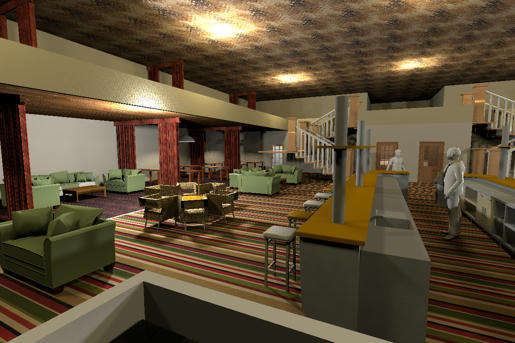
2 floor restaurant. I am designinig a restaurant with a gallery on the "2nd" floor" I followed this: http://www.sweethome3d.com/multiLevelHouseGuide.pdf I have two sh3d's: - Restaurant - Gallery When I finish designing the gallery part and do: select all->group->copy as furniture I cannot paste the gallery (as furniture) into my reatuarant sh3d. Exporting to obj works but importing the gallery obj into the restaurant crashes SH3d. When I just copy the grouped gallery, I can then paste it into my restaurant. The only problem here is that the floor of the gallery does not show. So all my ellements are hanging in mid air. whe I change the hight form the ground to the proper value(350cm). Can someone point me in the right direction? |
| Posted by Puybaret at Dec 27, 2010, 9:25:50 AM |
|
Re: 2 floor restaurant. You can paste only in the plan or the furniture list. Did you give them focus by clicking in them? ---------------------------------------- Emmanuel Puybaret, Sweet Home 3D creator |
| Posted by hansmex at Dec 27, 2010, 10:07:10 AM |
|
Re: 2 floor restaurant. Fred, The best way is to use Tools --> Copy as new furniture to copy and paste your gallery. That part of your design can then be elevated and placed on top of the ground floor. There is one little problem in SH3D: floors and ceilings are one-sided. For ceilings this means that they are visible from below, but transparent from above. For floors it means that they are visible from above, but transparent from below. This means that the floor of your gallery may be invisible when seen from below, but will be visible when seen from above. The solution is to give the ground floor a ceiling that matches the gallery floor. As an alternative you can use flat boxes to make a new floor for the gallery. Hans ---------------------------------------- Hans new website - under constuction hansdirkse.info |
| Posted by Fintan at Dec 28, 2010, 8:44:15 AM |
|
Re: 2 floor restaurant. Thank you guys You can paste only in the plan or the furniture list. Did you give them focus by clicking in them? I tried that to no effect. Cannot paste a "copy as furniture" element into a different plan. The solution is to give the ground floor a ceiling that matches the gallery floor. See here: http://www.fintan-gastro-consulting.ch/Italian/ItalianRestPresentation.html All I can do for now is put a box in there but that is not very satisfactory: http://www.fintan-gastro-consulting.ch/Italian/ItalianRestPresentation2.html As well my graphiccard is so week I cannot really tell if I am applying the floor/cieling textures correctly. |
| Posted by Puybaret at Dec 28, 2010, 10:48:34 AM |
|
Re: 2 floor restaurant. Maybe you encountered this bug. Can you try if it works better with the latest beta please? One workaround would be to use Copy as new furniture plug-in (see here for more information about this plug-in). ---------------------------------------- Emmanuel Puybaret, Sweet Home 3D creator |
| Posted by hansmex at Dec 28, 2010, 11:52:39 AM |
|
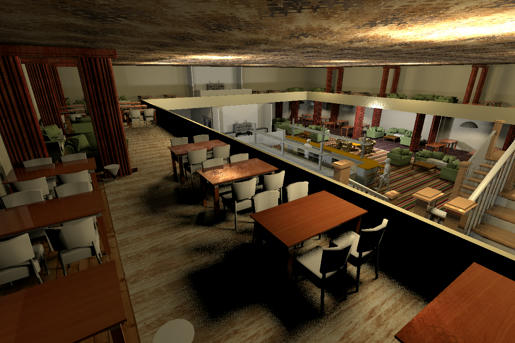
Re: 2 floor restaurant. Fred, Can you share your design with us? The 3D images you shared aren't very helpful in seeing what's going wrong. 1 - Using the plug-in CopyAsNewFurniture allows you to copy (part of) your design and paste it in another instance of the program that is open at the same time. I do it every day: if it works on my computer, it should work on yours. Read the manual to see how to install it. The plug-in adds the function Tools --> Copy as new furniture to the menu, as I wrote before. 2 - The way you describe to copy (part of) your design (select all --> group --> copy as furniture ) does NOT describe an actual way of working in SH3D, so it is impossible to say if you do it correctly or not. 3 - If you suspect that your computer isn't powerful enough, you can temporarily make all tables and chairs invisible. This will reduce the workload for your computer considerably, and the program will react much faster. EDIT Below is a picture of a fast sketch design I made: a restaurant with a gallery. Just to show you that it is possible to do this with SH3D. Hans ![]() ---------------------------------------- Hans new website - under constuction hansdirkse.info |
| Posted by PtiNounours at Dec 28, 2010, 10:40:31 PM |
|
Re: 2 floor restaurant. Good evening, I have a question relative to the viewer that is integrated onto the Website of Fred (Fintan). At the opening of the applet, loading the SH3D file and when handling the camera, are the server hosting this site or the client that uses resources CPU/GPU so you can view this 3D model? Beautiful presentation of the restaurant, Hans. ![]() |
| Posted by hansmex at Dec 28, 2010, 11:19:59 PM |
|
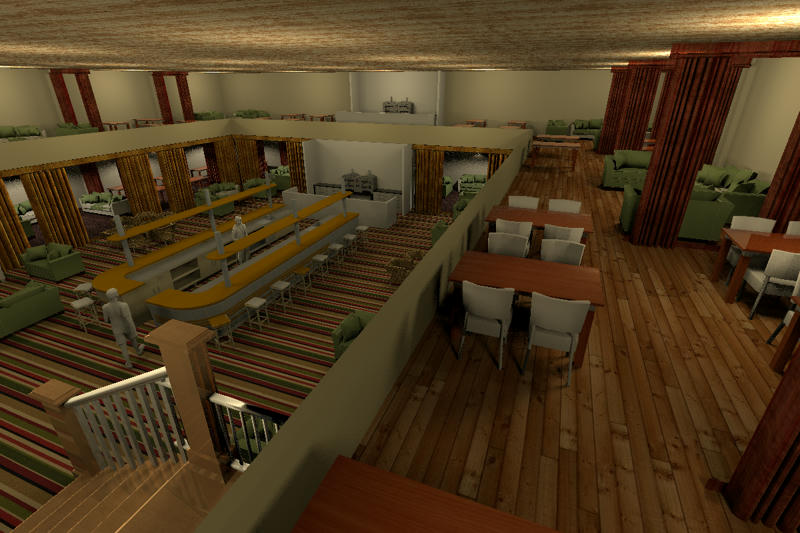
Re: 2 floor restaurant. Sebastien, Thank you for the compliment. Here is a newer and much larger version. Hans click here for even larger picture ![]() EDIT And here is another large picture ![]() ---------------------------------------- Hans new website - under constuction hansdirkse.info |
| Posted by Fintan at Dec 29, 2010, 7:20:43 AM |
|
Re: 2 floor restaurant. Hello all, thank you for the advice and responses. I installed the "copy as furniture" plugin as described in the manual. Since I didn't have: a plugins dir in .eteks/sweethome3d/plugins I created one and then moved the plugins over to that dir. So I have: Tools --> Copy as new furniture but I cannot paste the copy from the gallery instance into the restaurant (gound floor) instance. 2 - The way you describe to copy (part of) your design (select all --> group --> copy as furniture ) does NOT describe an actual way of working in SH3D I am not sure what you mean. That is the only eay I can describe what I was doing. When I finished making the gallery I right clicked then selected all->grouped the selection and did tools->copy as furniture. To no avail becuase I can only paste the copy back into gallery but not into the restaurant. @Hans: How can I share? The restaurant and gallery are both over 8MB. I can PM my FTP if that is helpful. Very nice restaurant, Especially for a "quicky". Mine is not quite as prfessional, yet. |
| Posted by hansmex at Dec 29, 2010, 7:47:07 AM |
|
Re: 2 floor restaurant. Fred, When there is a link in a message, it is a good idea to follow it to see what information it points to. Check out the earlier messages... I gave a link to "How to share images and files" ! It explains how to easily share files, even when 100Mb or larger. If you only read half of the messages we post, it's a waste of time. When you want to use the plug-in CopyAsNewFurniture do it exactly <!!> this way: - Open the source file from where you want to copy - Open the target file to which you want to copy - In the source file, select the part of your design that you want to copy with the mouse - In the source file, click Tools --> Copy as new furniture - Switch to the target file and do a Right-click and Paste - Move the copied block into position and give it the correct elevation Note - There is no need to group furniture! Note - it is imperative that both instances of SH3D are open before you start the copy action! This is the way I made the restaurant above. It works, as you can see. Since you write that you created a .eteks directory, I assume you are using Linux/Ubuntu, just like me. Hans ---------------------------------------- Hans new website - under constuction hansdirkse.info |
| Posted by hansmex at Dec 29, 2010, 3:57:43 PM |
|
Re: 2 floor restaurant. Another picture of the restaurant with gallery. It's about time to hire a chef! Hans Click here for a larger picture. ![]() ---------------------------------------- Hans new website - under constuction hansdirkse.info |
| Posted by wrosun at Dec 29, 2010, 4:11:50 PM |
|
Re: 2 floor restaurant. Nice work there hans....really nice floor texture for the gallery...but i dont like the roof texture... |
| Posted by hansmex at Dec 29, 2010, 4:53:23 PM |
|
Re: 2 floor restaurant. wrosun, Thank you! The nice thing about SH3D is, that you can design your own restaurant, with all your favourite textures! I sent you a link to the texture. Hans ---------------------------------------- Hans new website - under constuction hansdirkse.info |
| Posted by wrosun at Dec 29, 2010, 5:23:18 PM |
|
Re: 2 floor restaurant. ya! i meant that that was carefullt designed ..i guess you know what i actually mean Anyway i dont see the link where is it...??? |
| Posted by Fintan at Dec 29, 2010, 5:39:53 PM |
|
Re: 2 floor restaurant. Hans: here is the share: http://www.sweethome3d.com/support/forum/view...ad,2002_lastpage,yes#8901 I will have a look at the rest tonight :) |
| Posted by hansmex at Dec 29, 2010, 8:14:43 PM |
|
Re: 2 floor restaurant. Fred, Here is part 1 Here is part 2 I have taken the liberty to adapt your files a bit in order to explain a few things. When you draw a multi-level building it is very important that you work with exact X,Y coordinates. Hand-drawn walls will never stack properly and result in ragged walls, corners, etc. The most important change I made is change all coordinates in such a way that the ground floor and first floor have the exact same X,Y coordinates for walls, floors, etc. This also makes it much easier to place furniture in a correct manner; in this case, e.g., with logical distances between two rows of restaurant tables. Just have a look and compare what I did with your own design. Hans ---------------------------------------- Hans new website - under constuction hansdirkse.info |
| Posted by Fintan at Dec 30, 2010, 8:55:39 AM |
|
Re: 2 floor restaurant. Thank you Hans, I had a look and see your point. I made a few changes to the gallery and tried to "copy as new furniture" again but still cannot paste into "restaurant". This should be straight forward enough but I just cannot see what I am doing wrong. I have SH3d 2.6 (?) on a friends windows computer and will play with that later. I have uploaded the changed designs to the same link as before. If you want to have a look. I really appreciate your help and efforts Best Greetings Fred |
| Posted by hansmex at Dec 30, 2010, 9:19:03 AM |
|
Re: 2 floor restaurant. Fred, I have forgotten all about v2.6. That was ages ago, in another life. Please update to v3.0 (not v3.1) and make sure you have the latest updates of the plug-ins. Follow exactly the description in this post: I wrote it while doing a step-by-step myself to make sure I didn't omit the tiniest detail. I now notice one other thing. You wrote Since I didn't have: a plugins dir in .eteks/sweethome3d/plugins I created one and then moved the plugins over to that dir Maybe here we have the problem?- Which operating system do you have? Am I correct that it's Linux/Ubuntu? The dot in ".eteks" makes me think so. - In the menu, can you see the new command Tools --> Copy as new furniture ? - Do you have other plug-ins installed? Do they work correctly? - Do you open BOTH files before you make your selection, and before you give the command Tools --> Copy as new furniture ? I don't want to seem overbearing, but this method really works. If there is an English word you don't understand, send me an email or PM in German, and we'll try and sort it out in German if that's easier for you. The language problem then lies with me, as my English is better than my German, but at least you will understand all nuances and can ask the right questions. Hans ---------------------------------------- Hans new website - under constuction hansdirkse.info |
| Posted by Fintan at Dec 31, 2010, 7:34:44 AM |
|
Re: 2 floor restaurant. Hello Hans and thank you for your input. - Which operating system do you have? Am I correct that it's Linux/Ubuntu? The dot in ".eteks" makes me think so. - In the menu, can you see the new command Tools --> Copy as new furniture ? - Do you have other plug-ins installed? Do they work correctly? - Do you open BOTH files before you make your selection, and before you give the command Tools --> Copy as new furniture ? Yes, to all of the above. I was trying out my designs on my friends windows laptop with vers. 2.6. Made no real difference. As a Californian, English should not be a problem All plugins are latest. The version on my machine is 3.0. I'll go through your step-by-step again. and report back. Cheers Fred |
| Posted by Fintan at Dec 31, 2010, 8:40:42 AM |
|
Re: 2 floor restaurant. Well, I went through the step-by step again.Nada. I don't know if the plugin "copy as new furniture" is working correctly. I can see it under tools when I select something. With nothing selected it is greyed out. When applying copy as new furniture it shows a progress bar and then nothing. Pasting into another (ALREADY OPEN) design simply does not work here. Where does it copy to? Maybe I could import to furniture from there? I have all the pieces finished but cannot seem to combine them. ![]() |
| Posted by hansmex at Dec 31, 2010, 2:58:33 PM |
|
Re: 2 floor restaurant. Fred, You're the first to "complain" about this plug-in, so I assume it's working correctly. You might try a slightly different way: - select your model - click Tools --> Copy as new furniture - right-click and Paste it in your existing model. - check that this works; the copy should be exactly on top of the original. - if that works, open your target file - switch back to the source file, select the copy you made and do CTRL-C - switch to the target file - click in the top-right window to give it focus - do CTRL-V to paste it there If this doesn't work, let your father, mother, wife, boyfriend/girl, neighbour try it. If neither of them manages it, there's something strange going on. Goblins? Hans ---------------------------------------- Hans new website - under constuction hansdirkse.info |
| Posted by Fintan at Jan 2, 2011, 10:39:55 AM |
|
Re: 2 floor restaurant. Happy new year Hans! You might try a slightly different way: - select your model - click Tools --> Copy as new furniture - right-click and Paste it in your existing model. - check that this works; the copy should be exactly on top of the original. - if that works, open your target file - switch back to the source file, select the copy you made and do CTRL-C - switch to the target file - click in the top-right window to give it focus - do CTRL-V to paste it there If this doesn't work, let your father, mother, wife, boyfriend/girl, neighbour try it. If neither of them manages it, there's something strange going on. Goblins? It is goblin time As you can see here: But it does not paste into anything. Neither the provenance nor the target. Could this be a KDE 4.x.x thing?? |
| Posted by hansmex at Jan 2, 2011, 1:00:16 PM |
|
Re: 2 floor restaurant. Fred, Thank you, and a Happy New Year to you too! Your screen shot shows that the plug-in itself is working correctly. I'm not familiar with KDE, as I use the Gnome desktop. Have you tried using Edit --> Paste instead of the right-click or CTRL-C and CTRL-V? ---------------------------------------- Hans new website - under constuction hansdirkse.info |
| Posted by Puybaret at Jan 3, 2011, 7:50:10 PM |
|
Re: 2 floor restaurant. Fred, I've got some doubts about your clipboard. Did you try whether a simple copy paste works or not? ---------------------------------------- Emmanuel Puybaret, Sweet Home 3D creator |
| Posted by Fintan at Jan 4, 2011, 7:49:10 AM |
|
Re: 2 floor restaurant. Fred, I've got some doubts about your clipboard. Did you try whether a simple copy paste works or not? I am not sure what you mean by "simple copy / paste". I will repeat (again) what I am doing here: I open the gallery (the model I want to copy as new furniture) and the rest.bottom model (this where the "new furniture" is supposed to go). Both models are now open. I go to the gallery model select all and do: tools->copy as new furniture. This seems to work. Now I switch over to the ALREADY OPEN rest.bottom model and try the following: -right click on the model panel -> no paste option. -using "edit" does not show a paste option. -CTRL - V does not work. Where does sh3d store the copy as new furniture? |
| Posted by Puybaret at Jan 4, 2011, 9:03:09 AM |
|
Re: 2 floor restaurant. By "simple copy / paste", I mean select an item in plan, choose "Edit > Copy" then "Edit > Paste", and check if the copied item was pasted. ---------------------------------------- Emmanuel Puybaret, Sweet Home 3D creator |
| Posted by Fintan at Jan 5, 2011, 8:31:44 AM |
|
Re: 2 floor restaurant. Okay, well in a word, no: Now I switch over to the ALREADY OPEN rest.bottom model and try the following: -right click on the model panel -> no paste option. -using "edit" does not show a paste option. -CTRL - V does not work. |
| Posted by hansmex at Jan 5, 2011, 11:30:27 AM |
|
Re: 2 floor restaurant. Fred, Can you install the Gnome desktop to see if that works? Hans ---------------------------------------- Hans new website - under constuction hansdirkse.info |
| Posted by yocarbo at Aug 28, 2012, 9:48:13 PM |
|
Re: 2 floor restaurant. Hello, I "reopen" with topic because I have the same problem ! I have KDE 4.4.8-3 on (K)ubuntu 12.04 and SH3D 3.5 with the last(?) plugin CopyAsNewFurniturePlugin-1.1.sh3p After click Tools → Copy as new furniture, I can't paste the furniture. I don't have any log in my konsole for debugging. Have you find solution ? Best regards, |
| Posted by hansmex at Aug 28, 2012, 11:40:08 PM |
|
Re: 2 floor restaurant. Yo, I'm using Ubuntu 12.04 with a classic desktop, and I don't have any problems with SH3D 3.5. Over time I've learned that the installed version of SH3D works best, because it comes complete with Java. If you have problems, first un-install all Java-versions, then download the installer-version of SH3D. Most other problems are caused by graphics card or graphics driver problems, especially on older computers. Make sure to update your drivers, and in the FAQ read the section that deals with video issues. Hans ---------------------------------------- Hans new website - under constuction hansdirkse.info |
| Posted by yocarbo at Aug 29, 2012, 2:45:21 PM |
|
Re: 2 floor restaurant. Hello, Thank you for your response, but I used 2 différents PC DELL with ATI or Intel video card. I'm on 64bits, make a difference ? I use already the installed version. I have tested without java installed and in command line with different version of java (1.6.0_32 and 1.7.0_06) and executable jar : java -jar SweetHome3D-3.5.jar but no success Regards, |
| Posted by hansmex at Aug 29, 2012, 4:25:30 PM |
|
Re: 2 floor restaurant. Yo, One of the suggestions done earlier is to do a "normal" Copy-Paste operation. Example: Open your text processor Writer (?), type some text, now Copy and Paste it. If that causes (more or less) the same problem(s), maybe something is wrong with the clipboard function. One other thing about using CopyAsNewFurniture: the copy that you make, is put exactly on top of the original. Sometimes it may seem as if no copy has been made, when in fact (invisibly) the copy is right on top of the original. One other cause of problems, in rare cases, is the model that you are trying to copy. If that model is faulty, than sometimes it may cause strange behaviour. You can easily test this by trying to copy some kind of standard furniture in an otherwise empty SH3D design. Finally, maybe you can try a third computer with Ubuntu 32-bits installed? Or make a dual-install? Hans ---------------------------------------- Hans new website - under constuction hansdirkse.info |
| Posted by yocarbo at Aug 29, 2012, 8:10:14 PM |
Re: 2 floor restaurant.HANSMEX YOU ARE A GENIUS ! the solution is very simple ... pfff ! On KDE, an application manages the copy/paste : klipper ! I have desactivated this application and "bazinga", it's worked fine ! Thank you for your big help, I can continue my project for my house with this simple, efficient and magnifique program SH3D ! Best regards, |
| Posted by Yuri_fromBY at Sep 1, 2012, 7:59:18 AM |
|
Re: 2 floor restaurant. The originator of a similar problem in Ubuntu 12.04 was clipboard manager Diodon. |
|
|
Current timezone is GMT Dec 23, 2025, 7:04:41 AM |