Print at Dec 20, 2025, 3:15:32 AM
Posted by TanvirAlam at Feb 2, 2011, 11:09:53 AM
sad   Is there any way we can turn on the anti aliasing features?
Is there any way we can turn on the anti aliasing features???? my 3D models are created using 3D Max and are exported to OBJ file with high quality textures. however, when I imported to sweet home 3D the border line looks jaggied would like to know how to make a smooth anti aliasing??
Posted by Puybaret at Feb 2, 2011, 11:22:35 AM
Re: Is there any way we can turn on the anti aliasing features?
Anti aliasing is always on. If it doesn't seem to be antialiased, it's probably Java 3D which didn't succeed to turn it on.
By the way, a screen capture would be greatly welcome to ensure we talk about the same thing.
See this subject if you don't know how to share your images.
----------------------------------------
Emmanuel Puybaret, Sweet Home 3D creator

Posted by TanvirAlam at Feb 3, 2011, 6:14:47 AM
Re: Is there any way we can turn on the anti aliasing features?
How can I turn on the JAVA 3D antialiased. I can I find out it is enabled or not?

Posted by macfrog at Feb 6, 2011, 11:03:20 AM
Re: Is there any way we can turn on the anti aliasing features?
Hi,
there's another issue that might cause your problem: when exporting something to wavefront obj, sometimes you can specify the quality of the exported textures (they are not included in the obj) mostly jpg. so, try to look for export options-> texture/material quality.
greetz
macfrog

Posted by TanvirAlam at Feb 8, 2011, 6:52:01 AM
Re: Is there any way we can turn on the anti aliasing features?
I have tried to modification of OBJ file but no options available. I am still having this problem with anti aliasing. The object edge looks JAGGED but if I render it it looks ok and not JAGGED. I need it to be looking smooth on the 3D Preview. there got to be a way. because the other software applies anti aliasing features. such as WaireFusion 5.0. Please help...........

Posted by hansmex at Feb 8, 2011, 7:18:26 AM
Re: Is there any way we can turn on the anti aliasing features?
Tanvir,

Try this:
- click Plan --> Export to SVG format
- open that file in a graphics program (like The Gimp) and look at the quality

Hans
----------------------------------------
Hans

new website - under constuction
hansdirkse.info

Posted by TanvirAlam at Feb 8, 2011, 8:26:44 AM
Re: Is there any way we can turn on the anti aliasing features?
How will it help! SVG file can be opened with any browser. I did and I viewed it using browsers. it shows the Plan part of it not the 3D view part of it. I am having this problem in 3d View part. Please advice....

Posted by TanvirAlam at Feb 8, 2011, 8:31:08 AM
Re: Is there any way we can turn on the anti aliasing features?
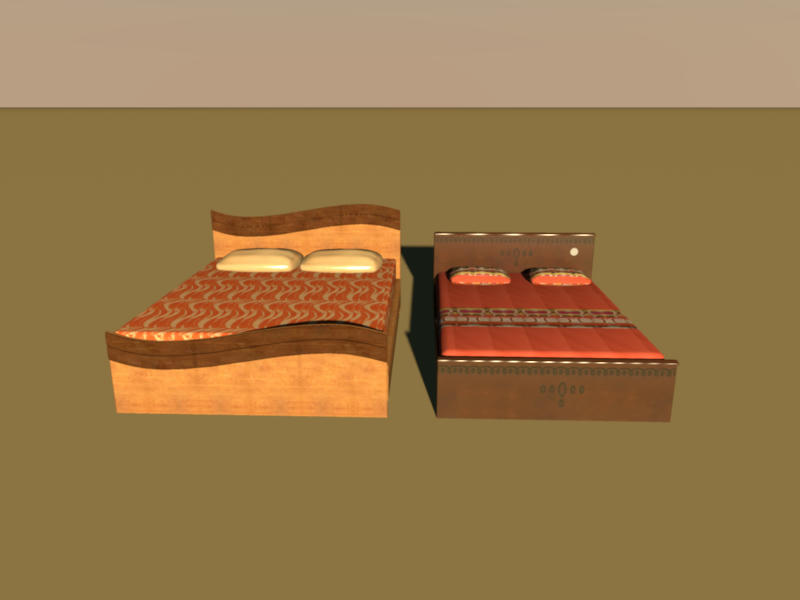
I have upload the pic! "Aveter" the object edge looks JAGGED. and when ever I try to move it looks more JAGGED. Please advice

Posted by hansmex at Feb 8, 2011, 8:33:08 AM
Re: Is there any way we can turn on the anti aliasing features?
Tanvir,

Can you email me your design, so that I can see what is the problem?

Hans
----------------------------------------
Hans

new website - under constuction
hansdirkse.info

Posted by TanvirAlam at Feb 8, 2011, 9:47:48 AM
Re: Is there any way we can turn on the anti aliasing features?
Hi Hans,

I sent you the OBJ file

Tanvir

Posted by hansmex at Feb 8, 2011, 10:12:53 AM
Re: Is there any way we can turn on the anti aliasing features?
Tanvir,

Your models give crisp and sharp objects in the 3D preview.
When I render an image in high quality, the result is also excellent.
I can't see any jagged lines.

However, the images for the textures have been badly chosen. The wood textures are far too big (2487x1500 pixels) and may cause problems. I propose you reduce these images to approx. 512x512 pixels. On the other hand, some of the other images are too small, e.g. the blanket on the left bed.

I hope this answers your question.

Hans


----------------------------------------
Hans

new website - under constuction
hansdirkse.info

Posted by TanvirAlam at Feb 8, 2011, 10:37:38 AM
Re: Is there any way we can turn on the anti aliasing features?
You are right it gives excellent result if you do rendering in in high quality. but I want it with out rendering! in the 3D preview. I will make all my texture image 512X512. in the 3d preview it shows the Jagged lines. how can I solve that.

Posted by hansmex at Feb 8, 2011, 1:09:04 PM
Re: Is there any way we can turn on the anti aliasing features?
Tanvir,

pre·view
   /ˈpriˌvyu/
[pree-vyoo
]
–noun
1. an earlier or previous view.
2. an advance showing of a motion picture, play, etc., before its public opening.
3. an advance showing of brief scenes in a motion picture, television show, etc., for purposes of advertisement.
4. anything that gives an advance idea or impression of something to come.

@4: That means that a high quality rendering is meant to be high quality. A preview is a preview and may be low(er) quality. That includes jagged lines.

Hans
----------------------------------------
Hans

new website - under constuction
hansdirkse.info

Posted by TanvirAlam at Feb 9, 2011, 5:11:54 AM
Re: Is there any way we can turn on the anti aliasing features?
Nicely explained! Thank you! it explains it all!