Print at Feb 4, 2026, 6:40:05 PM
Posts: 77   Pages: 8   [ Previous Page | 1 2 3 4 5 6 7 8 | Next Page ]
View all posts in this thread on one page
Posted by db4tech at May 20, 2010, 3:45:32 PM
Re: Simulate sun position and lights/shadows
I never tried using multiple shaders per object. I'll have to test that. Thank you for the idea! smile

Just as long as you don't use Phong C1 biggrin even with Importance sampling turned on it still looks like a squashed ball compared to Uber shader.

Can't wait to test this and see the new render results!

Thanks,

db4tech

Posted by db4tech at May 21, 2010, 8:09:07 PM
Re: Simulate sun position and lights/shadows
Hi Emmanuel,

Firstly thank you for the interesting link on caustics.

Now that advanced rendering plug-in version 1.2 has been thoroughly tested (oh! Also not forgetting the BasicPlusExtraLights.sh3f package of course! wink He he) will you be updating the front page so people who don't visit the forum can know about them? Many may still be using version 1.1 and not even know about 1.2.

db4tech

Posted by Puybaret at May 21, 2010, 10:47:42 PM
Re: Simulate sun position and lights/shadows
To db4tech and other interested testers,
Here are two temporary plug-ins that will let you test SunFlow's Uber and Phong Shader:
http://www.sweethome3d.com/plugins/AdvancedRendering-PhongShader-1.3.sh3p
http://www.sweethome3d.com/plugins/AdvancedRendering-UberShader-1.3.sh3p
These plug-ins create two new menu items in Tools menu, so you can distinguish them from each other.

To change the shininess of an object, you'll have to play with the shininess value and the specular color stored in the Ns et Ks parameters of its MTL file. If you're patient enough, try to render different existing homes in the galeries, and give us your opinion.

Please don't link these files in an other document, because I'll probably delete them once we decide which track to follow.

[Note]
2010/05/26: These two plug-ins were updated to support models at DAE/Collada format.
----------------------------------------
Emmanuel Puybaret, Sweet Home 3D creator

Posted by db4tech at May 21, 2010, 10:52:09 PM
Re: Simulate sun position and lights/shadows
To db4tech and other interested testers,
Here are two temporary plug-ins that will let you test SunFlow's Uber and Phong Shader:
http://www.sweethome3d.com/plugins/AdvancedRendering-PhongShader-1.3.sh3p
http://www.sweethome3d.com/plugins/AdvancedRendering-UberShader-1.3.sh3p
These plug-ins create two new menu items in Tools menu, so you can distinguish them from each other.

To change the shininess of an object, you'll have to play with the shininess value and the specular color stored in the Ns et Ks parameters of its MTL file. If you're patient enough, try to render different existing homes in the galeries, and give us your opinion.

Please don't link these files in an other document, because I'll probably delete them once we decide which track to follow.


Thank you Emmanuel already downloaded and can't wait to test them!!!!! smile

db4tech

Posted by db4tech at May 22, 2010, 2:23:36 AM
Re: Simulate sun position and lights/shadows
I've still not managed to get a slightly shiny floor yet.

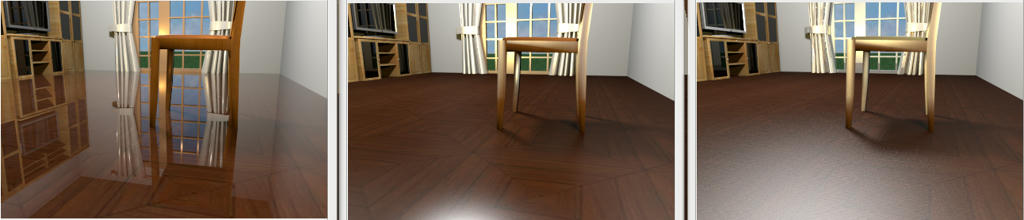
Here is how the same scene renders with the 3 different shaders.

For reference. Normal Advanced photo render version 1.2 (Shiny shader)


Phong shader


Uber shader


Uber shader seems to be badly affected by the room ceiling light, the problem disappears if the ceiling light is turned off (Emmanuel is this with Importance sampling turned on?) Phong shader is slightly affected by the ceiling light.

Here are my findings so far (apart from the floor) with Phong and Uber shaders all items that should be reflective are even more reflective, notice the knobs on the unit and strangely the curtains?

Apart from the obvious ceiling light issues, both Phong and Uber shaders render all lights used in a scene with a brighter intensity than Shiny shader, Phong slightly brighter and Uber very brightly, notice the window frame and chair reflecting brightly the lights illuminating the scene placed behind the virtual visitor.

Render speeds:
Shiny shader is the fastest
Phong and Uber about the same, sometimes Phong was faster, other times Uber was, it was too close to call without carrying out some accurately timed renders.

More tests to follow.
db4tech

Posted by hansmex at May 22, 2010, 8:42:13 PM
Re: Simulate sun position and lights/shadows
db4tech:

Could you make your file available? I would like to do some tests on exactly the same file as you are using.

Hans
----------------------------------------
Hans

new website - under constuction
hansdirkse.info

Posted by db4tech at May 23, 2010, 4:31:19 AM
Re: Simulate sun position and lights/shadows
Hi Hans,

Yes of course, it isn't a fully designed house or room, just a quick purposely built model for this test.

db4tech
----------------------------------------
Attachment Reflection test room.sh3d (729940 bytes) (Download count: 109901)


Posted by hansmex at May 23, 2010, 9:50:24 AM
Re: Simulate sun position and lights/shadows
Gentlemen:

It works. I get exactly the same results.

Hans


----------------------------------------
Hans

new website - under constuction
hansdirkse.info

Posted by fhoofman at May 23, 2010, 10:58:11 AM
confused   Re: Simulate sun position and lights/shadows
To db4tech and other interested testers,
Here are two temporary plug-ins that will let you test SunFlow's Uber and Phong Shader:
http://www.sweethome3d.com/plugins/AdvancedRendering-PhongShader-1.3.sh3p
http://www.sweethome3d.com/plugins/AdvancedRendering-UberShader-1.3.sh3p
These plug-ins create two new menu items in Tools menu, so you can distinguish them from each other.

To change the shininess of an object, you'll have to play with the shininess value and the specular color stored in the Ns et Ks parameters of its MTL file. If you're patient enough, try to render different existing homes in the galeries, and give us your opinion.

Please don't link these files in an other document, because I'll probably delete them once we decide which track to follow.


mr Puybaret, i tried your http://www.sweethome3d.com/plugins/AdvancedRendering-PhongShader-1.3.sh3p
http://www.sweethome3d.com/plugins/AdvancedRendering-UberShader-1.3.sh3p

and then my render become weird. unlike normal as the picture you mention above. and the i choose "tools => create advance photo".
the render still weird.
can you help me?

Posted by hansmex at May 23, 2010, 11:02:22 AM
Re: Simulate sun position and lights/shadows
fhoofman:

Can you show us the pictures of your renders?

Hans
----------------------------------------
Hans

new website - under constuction
hansdirkse.info

Posts: 77   Pages: 8   [ Previous Page | 1 2 3 4 5 6 7 8 | Next Page ]