|
Sweet Home 3D Forum » List all forums » » Forum: New versions » » » Thread: Sweet Home 3D 3.4 |
|
| Print at Dec 18, 2025, 1:46:20 AM | |
| Posted by Puybaret at Sep 5, 2011, 5:51:18 PM |
|
Sweet Home 3D 3.4 Hi, The version 3.4 of Sweet Home 3D is on the tracks. As always, the Beta version is available as a Java Web Start application. I don't know yet what features this version will contain. At this time it contains the two following new features: - auto completion in the name text fields displayed in furniture, room and label dialogs (suggested words comes from previous entered texts and are saved in preferences, plus some default room names are available), - support for fine model orientation during the second step of furniture importation: when pressing the orientation arrow buttons with the shift key down, the model angle changes 1° by 1°, instead of 90°. You can keep the button pressed to increase/decrease the rotation value continuously and I added an "Identity" button in the center of the arrows to reset the orientation to its default value. Caution: imported models with an orientation angle different from a multiple of 90° won't be correctly displayed with previous versions of Sweet Home 3D. So backup your home files if you continue to use Sweet Home 3D 3.3 at the same time as this Beta. Hope you'll like it ![]() [Note from developer: Sweet Home 3D 3.4 was released on December 20, 2011] ---------------------------------------- Emmanuel Puybaret, Sweet Home 3D creator |
| Posted by hansmex at Sep 5, 2011, 6:02:38 PM |
|
Re: Sweet Home 3D 3.4 Emmanuel, Thank you for implementing the old wish of fine rotation during import :-) My first try shows me that rotation happens in 1% increments, not in 1° increments, because with 25 clicks a model turns 90 degrees. Hans ---------------------------------------- Hans new website - under constuction hansdirkse.info |
| Posted by Puybaret at Sep 5, 2011, 6:19:41 PM |
|
Re: Sweet Home 3D 3.4 Thank you Hans for you feedback. I'm sure the step is 1° ![]() But maybe the autorepeat effect when pressing on the arrow buttons should start later. I'll try to increase the delay and see how it behaves. ---------------------------------------- Emmanuel Puybaret, Sweet Home 3D creator |
| Posted by Puybaret at Sep 5, 2011, 7:50:15 PM |
|
Re: Sweet Home 3D 3.4 I changed the initial delay before the automatic increase/decrease starts to repeat itself. Hope you'll prefer it that way. ---------------------------------------- Emmanuel Puybaret, Sweet Home 3D creator |
| Posted by hansmex at Sep 5, 2011, 8:27:17 PM |
|
Re: Sweet Home 3D 3.4 Emmanuel, Thank you. Now I have to click 90 times to rotate an object 90 degrees. Hans ---------------------------------------- Hans new website - under constuction hansdirkse.info |
| Posted by Puybaret at Sep 6, 2011, 9:19:24 PM |
|
Re: Sweet Home 3D 3.4 Today's update allows to read OBJ files that contain \ line separator characters in v vn vt l f lines. This allows to read some models of http://www.flyingarchitecture.com/. Thank you to makouillex for reporting this issue. ![]() ---------------------------------------- Emmanuel Puybaret, Sweet Home 3D creator |
| Posted by hansmex at Sep 6, 2011, 9:31:27 PM |
|
Re: Sweet Home 3D 3.4 And now it works :-) ---------------------------------------- Hans new website - under constuction hansdirkse.info |
| Posted by Puybaret at Oct 28, 2011, 2:07:15 AM |
|
Re: Sweet Home 3D 3.4 And... finally... here's the great feature awaited for years: multiple levels management Hope you'll like this first beta version which contains the following features: - New Plan > Create level / Modify level / Delete level menu items to support multiple levels with possible intermediate levels, - Made floors and ceilings transparent with the same factor used for walls, - Improved magnetism of walls during drawing, - Fixed minimum sizes change during importation avoiding to loose proportions. This system doesn't support negative levels (below the ground level) yet, and I foresee to add menu items to choose between assembled levels and currently selected level in the 3D view. I sincerely hope you'll find it easy enough to use. I'll update help later and will try to post a few examples. ---------------------------------------- Emmanuel Puybaret, Sweet Home 3D creator |
| Posted by hansmex at Oct 28, 2011, 7:59:14 AM |
|
Re: Sweet Home 3D 3.4 Emmanuel, First of all THANK YOU very much for the new beta. Long awaited by many, you've done a superb job. I've not yet had the chance to do elaborate testing, but I found a few bugs. - When I click the link in your post, Firefox 7.0.1 opens a new tab. That's all. I can click the link again, and a new tab opens again. "Ad infinitum". Is it Ubuntu 11.10? However, when I click the 3.4 b4 link on my desktop, SH3D opens with b5. - When I draw a few walls, I cannot copy them using CTRL-C + CTL-V. - ESC doesn't end the drawing of walls. - It's not possible to drag an object into the 2D window. Add to home works OK. - When I move a wall, I cannot Undo that action. - When I draw a simple house with two floors (= two layers), and then use Modify layer to increase the thickness of the ceiling and decrease the height of the walls of the top layer, there is a "strange" overlap visible in the walls, that corresponds with the decrease of wall height. This can be seen in aerial view and virtual visitor, and resembles the effect when you have two overlapping walls. - The compass has moved to the "old" position of 0,0. - When inserting furniture, no handles appear to rotate or change height. - When level 1 is active, it's still possible to delete furniture on level 0. Hans Post 09:00 hrs Edit 15:30 hrs, 16:45 hrs ---------------------------------------- Hans new website - under constuction hansdirkse.info |
| Posted by Puybaret at Oct 28, 2011, 7:17:54 PM |
|
Re: Sweet Home 3D 3.4 Thank you for your feedback. Sounds like there are some problems with Ubuntu 11.10. I just tried under Ubuntu 11.04 and didn't noticed the problems you reported about shorcuts, drag & drop and furniture handles. Can you check everything works when you use menu items? When I draw a simple house with two floors (= two layers), and then use Modify layer to increase the thickness of the ceiling and decrease the height of the walls of the top layer, there is a "strange" overlap visible in the walls, that corresponds with the decrease of wall height. You should decrease the height of the lower level walls also. Wall heights are independent from level height. This has some drawbacks like the one you reported but lets you also completely free to manage walls the way you want, something required to manage intermediate levels. Level height is actually only used to compute ceilings.The compass has moved to the "old" position of 0,0. I guess you edited an old document. On a new document, the location is at the same place.When level 1 is active, it's still possible to delete furniture on level 0. I couldn't reproduce this bug, except if the selected piece is high enough to appear on a higher level, in which case I found normal to be able to select it and delete it.---------------------------------------- Emmanuel Puybaret, Sweet Home 3D creator |
| Posted by hansmex at Oct 29, 2011, 7:30:54 AM |
|
Re: Sweet Home 3D 3.4 Emmanuel, I'm glad to report that the problems I reported don't exist anymore. Of course I don't understand what caused them, it's as if half of my computer was asleep. Hans ---------------------------------------- Hans new website - under constuction hansdirkse.info |
| Posted by Puybaret at Oct 30, 2011, 1:37:34 AM |
|
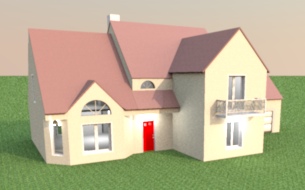
Re: Sweet Home 3D 3.4 Great to read it now works for you Hans. ![]() Tonight, Beta 6 fixes a few bugs found in level management, while trying to build the attached file, built from the house plan available on this site. For your information, it took me more than 6 hours to reproduce the plan and the roof of this quite complicated house with 2 levels. ![]() ---------------------------------------- ---------------------------------------- Emmanuel Puybaret, Sweet Home 3D creator |
| Posted by hansmex at Oct 31, 2011, 3:47:27 PM |
|
Re: Sweet Home 3D 3.4 Hello all, If you're using Ubuntu 11.10, 64 bits, you may have difficulties using the newest beta. Install the original Sun Java and your problem will be solved. Here is a help page for easy installation. These are the commands I used: sudo add-apt-repository "deb http://archive.canonical.com/ lucid partner"Hans ---------------------------------------- Hans new website - under constuction hansdirkse.info |
| Posted by Puybaret at Nov 2, 2011, 1:21:27 PM |
|
Re: Sweet Home 3D 3.4 Today's Beta 7 brought 3D view > Display all levels and 3D view > Display selected level menu items, and improved magnetism during rooms drawing (you should have much less problem to draw a simple rectangle). I also increased a little the sensitivity of magnetism. ---------------------------------------- Emmanuel Puybaret, Sweet Home 3D creator |
| Posted by pial at Nov 4, 2011, 8:53:38 AM |
|
Re: Sweet Home 3D 3.4 And now beta 8 ! ;-) Tanks a lot for that pretty good job Emmanuel ! ---------------------------------------- ---------------------- Pierre |
| Posted by Puybaret at Nov 4, 2011, 9:39:09 PM |
|
Re: Sweet Home 3D 3.4 Tonight's Beta 9 adds support for levels at a negative elevation. Hope you like it. As soon as you place an object, a room or a surface surrounded by walls at a level with a negative elevation, Sweet Home 3D will compute a hole that will surround the added item. Multiple underground levels containing items of different sizes are supported. Note that the virtual visitor can't go below elevation 0, and I'm not sure I'll add that in the next update (keeping the visitor location in the home when underground isn't so easy). ---------------------------------------- Emmanuel Puybaret, Sweet Home 3D creator |
| Posted by Puybaret at Nov 4, 2011, 10:30:04 PM |
|
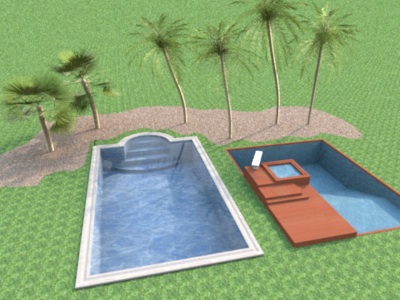
Re: Sweet Home 3D 3.4 And here's a Beta 10 because I forgot to make the required changes to the photo creation tool. Which swimming pool will you prefer? ![]() ---------------------------------------- Emmanuel Puybaret, Sweet Home 3D creator |
| Posted by pial at Nov 5, 2011, 1:19:02 AM |
Re: Sweet Home 3D 3.4I prefer the left one. Though "underground elevation" sounds a bit strange , anyway it's a huge step upgrade. Great job ! How can you make it so quickly ? ---------------------------------------- ---------------------- Pierre |
| Posted by Puybaret at Nov 7, 2011, 1:18:40 AM |
|
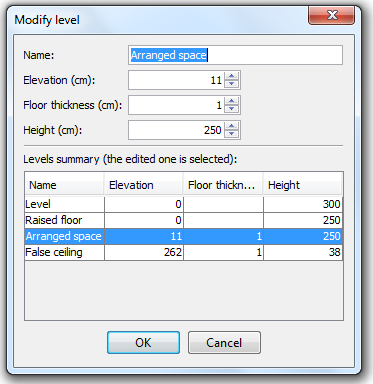
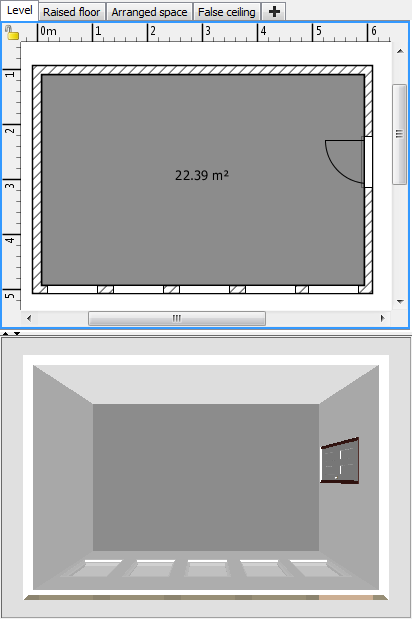
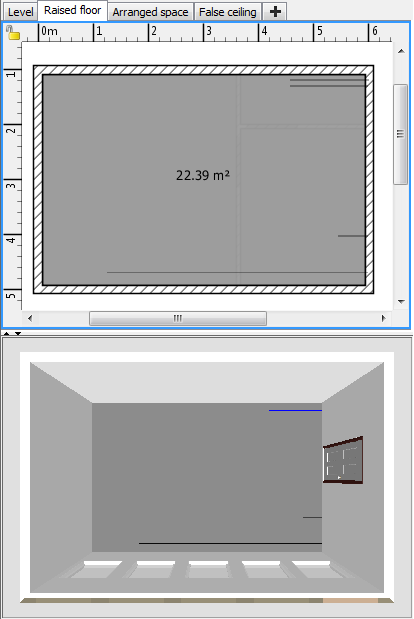
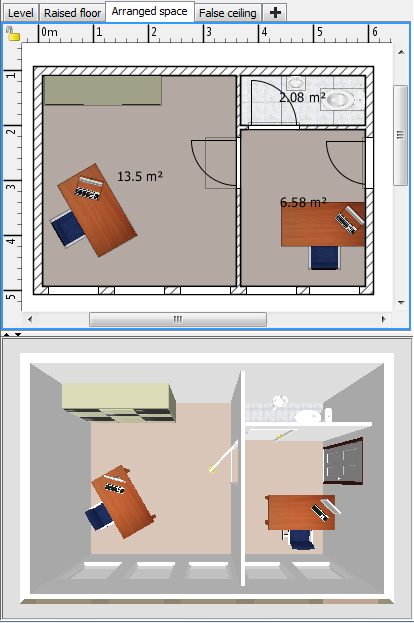
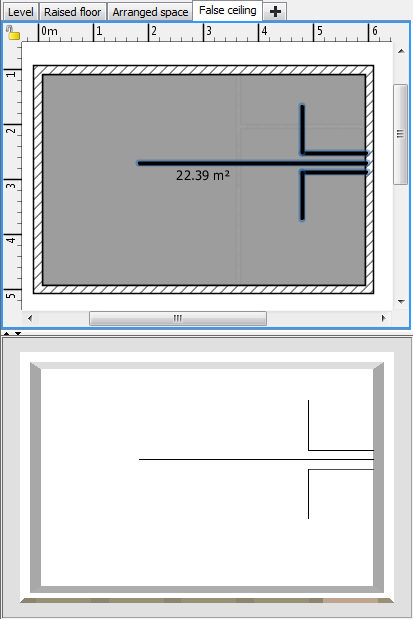
Re: Sweet Home 3D 3.4 The Beta 11 brings a few new small features and improvements: - Added New floors thickness field in preferences pane, - Added a button to import language libraries in preferences pane to make it easier to install SH3L files when file association doesn't work (there are now 3 SH3L available files: Traditional Chinese , Korean and Finnish), - Added some tooltips to show the current angle on rotation axis in the 2nd step of the Import furniture wizard, - Added a table in the Level modification dialog to help users compare the values of the edited level with the ones of other levels. And as showed in the previous dialog, I checked that the new level feature was able to handle correctly raised floor and false ceiling. This test was made on the attached example that shows the 4 following levels when 3D view > Display selected level menu item is checked (the outer level isn't mandatory but still nice to have). Raised floor: Arranged space: False ceiling: I guess that a few ones among you are going to be happy because levels actually behave like layers when they are at the same elevation, excepted that walls are always displayed when they are at the same elevation as a level elevation, but I don't feel it's annoying for a software like Sweet Home 3D. Like always your comments will be appreciated. ![]() ---------------------------------------- ---------------------------------------- Emmanuel Puybaret, Sweet Home 3D creator |
| Posted by hansmex at Nov 7, 2011, 3:49:45 PM |
|
Re: Sweet Home 3D 3.4 Emmanuel, I think I found a small bug in v3.4 b11 that concerns creating a room. In the attached file the outline of a building is drawn. You will find that it is impossible to create a room by double-clicking inside this shape. If you inspect the connection of the two wall segments marked with a red circle, you will see that this connection isn't at a 90 degree angle, but is slanted or skewed. It looks a bit like a problem you fixed earlier. Now, if you bisect the room, you will find that you can create a room by double-clicking in the part without the red circle, but NOT in the part where the slanted connection is. Hans ---------------------------------------- ---------------------------------------- Hans new website - under constuction hansdirkse.info |
| Posted by Puybaret at Nov 7, 2011, 8:12:38 PM |
|
Re: Sweet Home 3D 3.4 Was it similar to this bug? I couldn't reproduce your problem, the walls looked correct and I had no problem to create a room with a double click. Maybe it was due to a temporary computed value that disappeared when the program was relaunched? ---------------------------------------- Emmanuel Puybaret, Sweet Home 3D creator |
| Posted by hansmex at Nov 7, 2011, 11:53:10 PM |
|
Re: Sweet Home 3D 3.4 After reloading the file, the problem was solved. It was similar to the first stages of the bug you showed. That bug also started with a "strange" connection, that became worse after splitting the wall again. ---------------------------------------- Hans new website - under constuction hansdirkse.info |
| Posted by Puybaret at Nov 10, 2011, 11:44:36 AM |
|
Re: Sweet Home 3D 3.4 I just released a version 3.4 beta 13 with a few bug fixes. ---------------------------------------- Emmanuel Puybaret, Sweet Home 3D creator |
| Posted by Tiz at Nov 10, 2011, 12:54:51 PM |
|
Re: Sweet Home 3D 3.4 Hello! I'm using this version because I'm tring to project the house that my housband and me are buying. It'is on two levels, but each one is on two different levels (4 steps). I've never used a 3D software before SH3D... a lot of instruction are in English (wich is not my language...), in spite of all I'm using it sucesfully! So: very good job guys, you are great! Thanks a lot! |
| Posted by Puybaret at Nov 14, 2011, 9:23:50 PM |
|
Re: Sweet Home 3D 3.4 Thank you Tiz for your feedback. I just released the version 3.4 Beta 15 with some small bug fixes, and two new help pages for level management (available also here: Adding levels and Editing levels). Please tell me if you feel that my explanations aren't clear enough or that I missed some important information. ---------------------------------------- Emmanuel Puybaret, Sweet Home 3D creator |
| Posted by Puybaret at Nov 17, 2011, 4:44:39 PM |
|
Re: Sweet Home 3D 3.4 I released version 3.4 Beta 17 with more bug fixes and the ability to toggle the visibility of a piece of furniture by clicking on its Visible check box in the furniture list. It includes also Italian and Czech updated translation. A special thank to Ondrej Dolejsi, our new Czech contributor. ![]() ---------------------------------------- Emmanuel Puybaret, Sweet Home 3D creator |
| Posted by Puybaret at Nov 18, 2011, 9:46:27 AM |
|
Re: Sweet Home 3D 3.4 I released version 3.4 Beta 18 where I added a Select object submenu in the contextual menu of the plan that will let the user select an object among the superimposed ones that appear where he clicked. This menu won't appear if there's no object under the cursor. Hope you'll like it ![]() ---------------------------------------- Emmanuel Puybaret, Sweet Home 3D creator |
| Posted by pial at Nov 18, 2011, 4:55:03 PM |
|
Re: Sweet Home 3D 3.4 I love it !!! ---------------------------------------- ---------------------- Pierre |
| Posted by pencilart at Nov 18, 2011, 9:59:22 PM |
|
Re: Sweet Home 3D 3.4 I tried out version 3.4 Beta 18 and so far, I love it! Once I got "the hang" of things, it's really fun to play with! :D A render of the kitchen area: http://i64.photobucket.com/albums/h186/gymnar...rsionsh3d3-4Beta19web.jpg |
| Posted by Puybaret at Nov 28, 2011, 1:20:41 AM |
|
Re: Sweet Home 3D 3.4 Thank you for your feedback! Tonight the version 3.4 Beta 26 brings an important bug fix for people using Sweet Home 3D on a computer with multiple screens. This is related to this bug report, this one and this one (in French). Please, if you use more than one monitor, I'll be happy to know if you have still have problems to run the Import furniture wizard on a monitor different from the main one, or if you can reopen a home window saved at location different from the main monitor. Thanks for your help. ---------------------------------------- Emmanuel Puybaret, Sweet Home 3D creator |
| Posted by fhoofman at Dec 9, 2011, 2:57:36 AM |
|
Re: Sweet Home 3D 3.4 I was hoping that version 3.4 will provide more realistic rendering but I really appreciate the effort so far. |
| Posted by LYRY at Dec 10, 2011, 4:55:42 PM |
|
Re: Sweet Home 3D 3.4 how used the new Beta in my operation sistem Windows7? I don´t know how. can u help me? |
| Posted by Puybaret at Dec 12, 2011, 9:11:12 AM |
|
Re: Sweet Home 3D 3.4 The version 3.4 Beta 31 brings some corrections to some old bugs I finally found how to fix: - a bug that reset 3D view aspect ratio after a camera change (see here), - a bug that displayed a texture as inverted when applied to the left side of a wall, - a bug that wrongly shifted the texture applied on an object with a 3D model file not placed at the origin (see here). The correction of this last bug helped me also to find how to show a texture correctly on the front side of an object, so you don't have to turn it around to see its back face. This new behavior will be applied only to the texture changes you'll make from this version. how used the new Beta in my operation sistem Windows7? Install Java on your computer and click on this link. If it doesn't install the current beta on your system, then please wait for the final release a few more days.---------------------------------------- Emmanuel Puybaret, Sweet Home 3D creator |
| Posted by pencilart at Dec 12, 2011, 9:42:31 PM |
|
Re: Sweet Home 3D 3.4 I have a question about putting stairs in: When you put them in, shouldn't they punch a "hole" in the floor above, or below them like windows and doors do? But I know you'd have to be able to tell SH3D that the stairs start on floor 0 (and therefore no floor hole is needed) but for them to punch a hole in the floor above to get to the 2nd floor and if another set of stairs is placed above that, to punch a hole in the floor above that to get to the 3rd floor, etc.? I hope this is not too difficult. I thought you had an icon for adding levels. Where did that go? I hope you won't be taking that out for the final version. P.S. I made a balcony with a floor but when you "walk" under it, you can see right through the floor like it isn't even there. (that's funny, lol). However, when you're there standing on the balcony, you can see the floor just fine. See the attached pic (I hope it works) ---------------------------------------- |
| Posted by Puybaret at Dec 13, 2011, 4:36:56 PM |
|
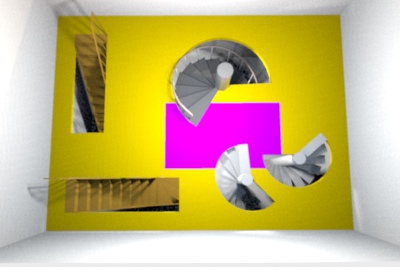
Re: Sweet Home 3D 3.4 I have a question about putting stairs in: When you put them in, shouldn't they punch a "hole" in the floor above, or below them like windows and doors do? I just added this feature in version 3.4 Beta 32. This required a new property in the description file of the furniture of the catalog. I called it staircaseCutOutShape and it describes the shape used to cut out the ceiling and the floor of the upper levels when they intersect a staircase. This shape should be written with the syntax of the SVG path element described at http://www.w3.org/TR/SVG/paths.html (for example, M0,0 v1 h1 v-1 z describes a 1 unit wide square). This will allow to have complicated shapes like a pie shape for spiral staircases, as show in the following image and the attached document: To let you import 3D models as staircases too, I added a new Staircase checkbox at the third step of the import furniture wizard and in the upcoming update of the Furniture Library Editor. In that case, the cut out shape of the staircase will be a rectangle with the same width and depth as the object itself. I thought you had an icon for adding levels. Where did that go? I hope you won't be taking that out for the final version. To avoid presenting too much features to beginners, the button and the level tabs are displayed only once you added a first level with... the Plan > Add level menu item.I made a balcony with a floor but when you "walk" under it, you can see right through the floor like it isn't even there. This behavior happens because you didn't create a ceiling at the lower level matching the bottom of the balcony, and OpenGL faces are visible only from one side. As I'm afraid of a flow of FAQs about this, I'm probably going to improve this behavior before releasing version 3.4. The idea would be to always create the opposite (ceiling) part of upper level floors, except at the places where the user drew a ceiling at the lower level. This is not so easy because it requires to compute some intersections between the user ceilings and these opposite parts, otherwise the superimposed surfaces won't be rendered correctly.---------------------------------------- ---------------------------------------- Emmanuel Puybaret, Sweet Home 3D creator |
| Posted by hansmex at Dec 13, 2011, 5:25:43 PM |
|
Re: Sweet Home 3D 3.4 Emmanuel, Wow, another great feature! I had a quick look at it, and it looks perfect. Right now, I don't have the time to thoroughly test it, hopefully that will come in the next few days. Hans ---------------------------------------- Hans new website - under constuction hansdirkse.info |
| Posted by pencilart at Dec 13, 2011, 5:43:25 PM |
|
Re: Sweet Home 3D 3.4 That stairs test worked great! I'm very excited about the new features and I can hardly wait until the release! :D But I know that great things can't be rushed. :D |
| Posted by pial at Dec 13, 2011, 7:21:06 PM |
|
Re: Sweet Home 3D 3.4 Great improvement, congratulations, Emmanuel, though when I downloaded the new version, I wish it was an update for the zoom problem in bird view mode ! Next time may be ? ![]() ---------------------------------------- ---------------------- Pierre |
| Posted by Puybaret at Dec 14, 2011, 6:43:07 PM |
|
Re: Sweet Home 3D 3.4 I updated the beta version to generate automatically the bottom part of a floor at upper levels, when no ceiling part was drawn at the lower level. It contains also a few bug fixes reported by a nice team of Swedish students who test Sweet Home 3D at this time. Nice job guys! I wish it was an update for the zoom problem in bird view mode Sorry I don't think I will change bird view mode anytime soon, except for this case.---------------------------------------- Emmanuel Puybaret, Sweet Home 3D creator |
| Posted by pencilart at Dec 15, 2011, 8:18:00 PM |
|
Re: Sweet Home 3D 3.4 It works great! I'm so happy with that. Great job Emmanuel! |
| Posted by Puybaret at Dec 17, 2011, 1:21:06 PM |
|
Re: Sweet Home 3D 3.4 Thank you for your feedback. I fixed a bug in the version 3.4 beta 37 to improve performances when you set textures on many different walls, rooms or furniture. Hope you can confirm it works better when you try to modify these objects (just trying to move them should make a difference). ---------------------------------------- Emmanuel Puybaret, Sweet Home 3D creator |
| Posted by hansmex at Dec 17, 2011, 3:19:05 PM |
|
Re: Sweet Home 3D 3.4 Emmanuel, How many textures would you consider to be "many" textures? I prepared a room with 20 boxes in it, all in all 30 different textures, with a compressed file size of 4.1 MB. I made a second room with 82 different textures, and a compressed file size of 10.3 MB. Is that enough? Moving boxes is as smooth as I would expect. Rendering in Q3 with just the ceiling light at 800x800 is fast. The 3D preview rotates smoothly as well. I can share the file(s), or prepare an even bigger one. Hans ---------------------------------------- Hans new website - under constuction hansdirkse.info |
| Posted by Puybaret at Dec 17, 2011, 5:21:04 PM |
|
Re: Sweet Home 3D 3.4 Thank you for your tests. [...] Is that enough? I would say it depends on the power of your processor. Recently, some users complained about some performance regression and the bug I found could lead to some performance loss. But the slowing effect could take place only when trying to compute 3D updates, after moving wall, rooms or furniture which use some texture, or changing their size. Rendering speed won't get faster in the photo creation dialog.---------------------------------------- Emmanuel Puybaret, Sweet Home 3D creator |
| Posted by hansmex at Dec 17, 2011, 5:44:41 PM |
|
Re: Sweet Home 3D 3.4 Emmanuel, I have a dual core machine, not sure which processor exactly, about 3-4 yrs old. Maybe the problem is mainly with "older" machines with even lower specs? Hans ---------------------------------------- Hans new website - under constuction hansdirkse.info |
| Posted by Puybaret at Dec 18, 2011, 12:00:17 PM |
|
Re: Sweet Home 3D 3.4 It wasn't annoying on my Intel i7 too, but I clearly measured a waste of computation in textures handling that wasn't supposed to happen. In version 3.4 beta 38, I improved ground management to be able to handle elevations up to 1000m without viewing some black parts at the horizon in the 3D view. Miserably, SunFlow renderer starts to render incorrectly the ground at an elevation higher than 100m, and it's getting worse at higher elevations. Not sure I'll try to fix that soon or I'll limit it back to 100m. ---------------------------------------- Emmanuel Puybaret, Sweet Home 3D creator |
| Posted by Puybaret at Dec 19, 2011, 8:52:04 AM |
|
Re: Sweet Home 3D 3.4 In version 3.4 beta 39, it's finally possible to visit underground levels by setting a negative elevation. The minimum elevation of the point of view depends on the current minimum elevation of levels. To avoid quality problems, I finally limited the max elevation to 100m. The minimum elevation is set to -10m at this time. If you find a good reason why I should allow a smaller value, please tell me before I release version 3.4 (it should happen soon). ---------------------------------------- Emmanuel Puybaret, Sweet Home 3D creator |
| Posted by pencilart at Dec 19, 2011, 9:33:23 PM |
|
Re: Sweet Home 3D 3.4 Great work Emmanuel! I made a swimming pool in the back yard of a house I'm testing. I also made a "basement" but it's more like a crawl space. You can't see it unless you go down there. :) I'm attaching snapshots so you can see. ---------------------------------------- ---------------------------------------- |
| Posted by Puybaret at Dec 21, 2011, 2:00:22 AM |
|
Re: Sweet Home 3D 3.4 Sweet Home 3D 3.4 was released tonight. Thank you all for your feedback and support. ![]() ---------------------------------------- Emmanuel Puybaret, Sweet Home 3D creator |
| Posted by pencilart at Dec 21, 2011, 1:56:16 PM |
|
Re: Sweet Home 3D 3.4 I just thought of a question about importing libraries: When importing a furniture library and there is a piece that has the same name as one already in the catalog, will it ask to rename it or simply overwrite it, or make a duplicate of it? I'm asking because I'm planning to import my furniture library onto this new(ish) computer and I have a few of those pieces in my catalog already and I don't want a lot of unnecessary duplicates. I would need to know the difference between the newly imported pieces and the old ones so that I could go back and delete the old ones. This is because I have set different default measurements on some of them. |
| Posted by pencilart at Dec 22, 2011, 7:15:29 PM |
|
Re: Sweet Home 3D 3.4 I just discovered something with the Windows version (on Windows 7 that has Java version 7 update 2 installed). The "virtual visit" does not seem to work. When "virtual visit" is selected, the view is still the "aerial view" but there's no home showing at all and the view does not change despite moving the visitor around. |
| Posted by Puybaret at Dec 22, 2011, 9:21:48 PM |
|
Re: Sweet Home 3D 3.4 Even if Sweet Home 3D isn't officially supported under Java 7, I just tried and noticed that sometimes the 3D view becomes grey and completely empty (for example after resizing the window). Is that what you mean? I also noticed that the Java Web Start version can't be installed with Java 7 update 2 under Windows. Fortunately, the download page suggests to use the installer in case of problem. ---------------------------------------- Emmanuel Puybaret, Sweet Home 3D creator |
| Posted by pencilart at Dec 22, 2011, 9:46:34 PM |
|
Re: Sweet Home 3D 3.4 I just tried it again and now the virtual visit is working both for full screen and windowed. Go figure. I hadn't done anything to it. Now that you told me about the java webstart version not running SH3d with Java 7 update 2, I'm going to try it out for the fun of it. :) ok, I just tried it out and it ran without problems. I did come across this dialog box about file associations or something. See my attached screenshot. I just said "yes" to the questions a few times. Otherwise it ran fine, and with the webstart version, I was even able to open a test home. ---------------------------------------- |
|
|
Current timezone is GMT Dec 18, 2025, 1:46:20 AM |