|
Sweet Home 3D Forum » List all forums » » Forum: Features use and tips » » » Thread: Lampshade transparency |
||
| Print at Dec 18, 2025, 10:31:09 AM |
|
|
| Posted by Tic at Sep 28, 2011, 2:36:07 PM |
|
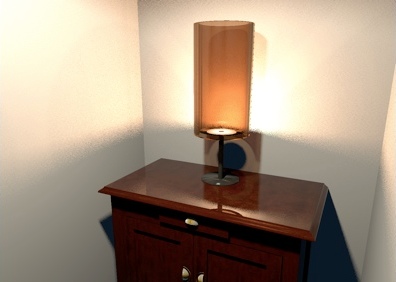
Lampshade transparency Hi everybody, I’m an enthusiastic recent SH3D user. First of all let me congratulate the developers team on sharing this excellent tool. I’m practicing with models and light and I’m trying to obtain a realistic rendering of a translucent lampshade. I made some tests modifying Ni parameter in .mtl file, but I had no satisfying result. Here an example of the effect I’d like to obtain. Can anyone give suggestions? Thanks |
| Posted by Puybaret at Sep 28, 2011, 4:55:21 PM |
|
Re: Lampshade transparency From the MTL specifications, the Ni value is for optical density or index of refraction and not transparency. You should better play with the d value which is the transparency factor from 0 (fully transparent) to 1 (fully opaque and default value). I'll be happy to see the results of your tests. ![]() ---------------------------------------- Emmanuel Puybaret, Sweet Home 3D creator |
| Posted by Tic at Sep 28, 2011, 7:56:23 PM |
|
Re: Lampshade transparency Emmanuel, thank you for your prompt reply! Ok, I tried with d = 0.32 on a 20x20cm empty box (with 1mm thick walls) that I put in upside-down position on the floor of a dark room. Inside the box I put a 10x10cm light source hanging at 10cm elevation. Unfortuntely the resulting Q4 photo is still far from my targert: there are black shimmers on the box surfaces and some light escapes from the bottom of the box I would have sent you an image, but sorry, I just cannot find the proper "attach file" or "upload image" option.... |
| Posted by Puybaret at Sep 28, 2011, 8:38:19 PM |
|
Re: Lampshade transparency Here's an example I built from partially transparent round walls exported then reimported. I put this shade on on a small floor uplight to make it look like a small lamp. ![]() ---------------------------------------- ---------------------------------------- Emmanuel Puybaret, Sweet Home 3D creator |
| Posted by Tic at Sep 28, 2011, 9:29:13 PM |
|
Re: Lampshade transparency Wow, that's quite similar to what I mean... I'll let you know my further steps.. In the meantime you can have a look at my poor result... ![]() Thank you! ---------------------------------------- |
| Posted by Puybaret at Sep 28, 2011, 10:36:51 PM |
|
Re: Lampshade transparency Be sure to give the lampshade a color darker than white otherwise it will be rendered completely transparent. You can test also with textures but it might be buggy like here. ---------------------------------------- Emmanuel Puybaret, Sweet Home 3D creator |
| Posted by Tic at Sep 29, 2011, 8:29:14 AM |
|
Re: Lampshade transparency Emmanuel, could you please post the mtl assignments of your cylindrical lampshade? I'd like to compare it to mine. |
| Posted by Puybaret at Sep 29, 2011, 10:22:30 AM |
|
Re: Lampshade transparency Tic if you want to know these values, just create an empty document in which you copy/paste only the lampshade and then export it to OBJ format. ---------------------------------------- Emmanuel Puybaret, Sweet Home 3D creator |
| Posted by Tic at Sep 29, 2011, 10:49:47 AM |
|
Re: Lampshade transparency Great! Thank you so much.. sorry..I'm sitll learning.. ![]() |
| Posted by Tic at Sep 30, 2011, 7:45:03 PM |
|
Re: Lampshade transparency Emmanuel, I'm back after more tests: I think that the bad rendering is due to the Obj export method of the modelling software I use (Wings3D). On the left you can see your original lampshade and on the right the same object imported in wings3d and then re-exported as .obj. I manteined the same mtl file for both. ![]() |
|
|
|
Current timezone is GMT Dec 18, 2025, 10:31:09 AM |