|
Sweet Home 3D Forum » List all forums » » Forum: New versions » » » Thread: Sweet Home 3D 3.5 |
|
| Print at Dec 19, 2025, 2:33:38 PM | |
| Posted by Puybaret at Feb 17, 2012, 8:42:15 PM |
|
Sweet Home 3D 3.5 Hello, The first public beta version of Sweet Home 3D 3.5 is out and can be tested with Java Web Start link. At this moment, it contains mainly the following alignment / magnetism / anti-colision features: - new Furniture > Align side by side menu item to align selected furniture on the sides and on the back side of the first selected piece, - new Furniture > Align on front side / Align on back side / Align on left side / Align on right side menu items to align selected furniture on the front / back / left / right side of the first selected piece, - new Furniture > Distribute horizontally / Distribute vertically menu items to distribute selected furniture accordingly, - new magnetism behavior during the drag and drop of a piece in the plan when its borders approach the borders of an other piece of furniture, - improved magnetism of furniture along walls with anti collision system (including round walls). This new version centers also zoom on the mouse cursor when zoom is done with mouse wheel while Ctrl key is pressed (Cmd under Mac OS X). I made also the ground color vary according to light power setting. To ensure a better rendering at default settings, the ground color of home files made with previous versions will be automatically updated. This might lead to some small changes in rendering, according to the light power you set in 3D view modification pane. Hope you'll like this new version, and you'll feel that placing furniture will be much easier now. ![]() [Note from developer: Sweet Home 3D 3.5 was released on April 28, 2012] ---------------------------------------- Emmanuel Puybaret, Sweet Home 3D creator |
| Posted by rohitverma at Feb 18, 2012, 5:19:01 AM |
|
Re: Sweet Home 3D 3.5 awesome sir, keep up the good work..we look up to you.... |
| Posted by pial at Feb 18, 2012, 5:02:29 PM |
|
Re: Sweet Home 3D 3.5 Anti collision works fine. However an "anti-collision" checkbox in each furniture properties could be usefull for special needs. Kudos for the ctrl zoom function too ! Great improvement ! I have a dream of a similar powerful function in aerial view window... Thanks for that new upgrade ! ---------------------------------------- ---------------------- Pierre |
| Posted by Puybaret at Feb 18, 2012, 10:23:41 PM |
|
Re: Sweet Home 3D 3.5 Thanks for your feedback However an "anti-collision" checkbox in each furniture properties could be usefull for special needs. Anti collision and magnetism can be disabled by pressing the shift while moving a piece, or by disabling magnetism in the preferences pane.---------------------------------------- Emmanuel Puybaret, Sweet Home 3D creator |
| Posted by pial at Feb 19, 2012, 5:39:23 PM |
|
Re: Sweet Home 3D 3.5 Thanks for the tip ![]() ---------------------------------------- ---------------------- Pierre |
| Posted by jasan at Mar 7, 2012, 6:07:26 PM |
|
Re: Sweet Home 3D 3.5 Can beta be downloaded (no using web based startup)? |
| Posted by Puybaret at Mar 7, 2012, 6:56:15 PM |
|
Re: Sweet Home 3D 3.5 No but it can run offline after first launch. Or use source code to build a Jar executable or an installer. ---------------------------------------- Emmanuel Puybaret, Sweet Home 3D creator |
| Posted by Puybaret at Mar 8, 2012, 9:14:13 PM |
|
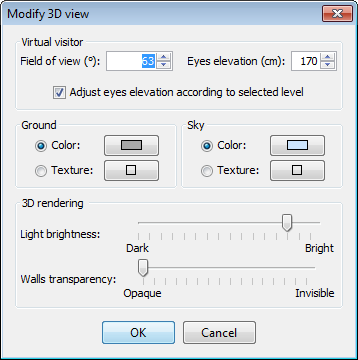
Re: Sweet Home 3D 3.5 Tonight, the beta 3 brings the new Adjust eyes elevation according to selected level option in the 3D view modification pane, which layout was updated. This option is selected by default for new homes. ![]() ---------------------------------------- Emmanuel Puybaret, Sweet Home 3D creator |
| Posted by Puybaret at Mar 9, 2012, 1:03:14 PM |
|
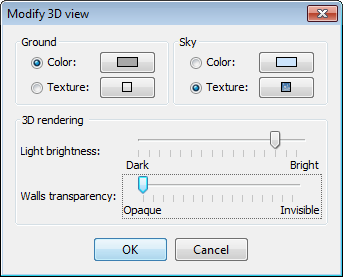
Re: Sweet Home 3D 3.5 In the version 3.5 Beta 4, I removed Virtual visitor attributes from the 3D view modification pane, and created a new virtual visitor modification pane showing all the coordinates of the virtual visitor and its angles. This new dialog box can be displayed by double clicking on the virtual visitor in the plan or by selecting the new 3D view > Modify virtual visitor menu item. The Adjust eyes elevation according to selected level option is displayed only for multi level homes. In this version, I also reversed the pitch rotation in aerial view mode. Sorry for any inconvenience, but all 3D software behaves this way and I should have better noticed from the beginning. ---------------------------------------- Emmanuel Puybaret, Sweet Home 3D creator |
| Posted by marvukis at Apr 18, 2012, 2:17:16 AM |
|
Re: Sweet Home 3D 3.5 hello Guys.. May I ask how to make a stop at Sweet Home ? -.-" |
| Posted by Puybaret at Apr 29, 2012, 1:15:49 AM |
|
Re: Sweet Home 3D 3.5 Sweet Home 3D 3.5 was released tonight. Thank you all for your feedback and support. ![]() ---------------------------------------- Emmanuel Puybaret, Sweet Home 3D creator |
| Posted by coldcomfort at May 2, 2012, 2:21:05 PM |
|
Re: Sweet Home 3D 3.5 I liked the old control in 3D view window, felt more natural. Seems that now i get a ceiling for the ground floor, in all my designs, even tho there used to be none. And maybe it's only my feeling but 3D view seems to be heavier on the CPU? I didn't used the program lately, but i remember it was a lot snappier on my old laptop. |
| Posted by Puybaret at May 2, 2012, 2:29:44 PM |
|
Re: Sweet Home 3D 3.5 Sorry but I just changed the vertical rotation direction when you move the mouse. I'm pretty sure you'll get used to it after a while. Unless... you found a bug in which case I'll be pleased that you report it. ---------------------------------------- Emmanuel Puybaret, Sweet Home 3D creator |
|
|
Current timezone is GMT Dec 19, 2025, 2:33:38 PM |