|
Sweet Home 3D Forum » List all forums » » Forum: 3D problems » » » Thread: Graphics problems... |
|
| Print at Feb 5, 2026, 6:20:07 AM | |
| Posted by siod at Jul 29, 2012, 4:15:40 PM |
|
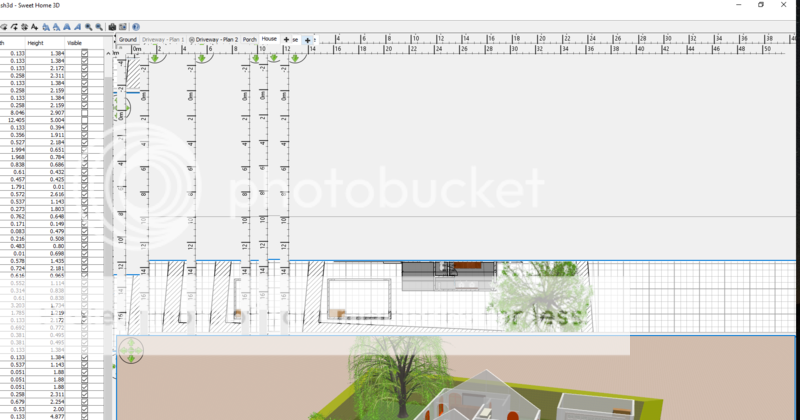
Graphics problems... Hi, I´m having a big problem with sewwt home 3d and I try to describe it here, also if it´s a bit hard to do...: well, I start the program and the plan of my flat. When I move my mouse, the screen starts reproducing my plan again and again and then disapears until it gets repoduced again. Look at the Pic: [img]http://www.abload.de/thumb/unbenannt8dayv.jpg[/img] Java is 1.6.0_32, SH3D is 3.5. Any Idea?? |
| Posted by Puybaret at Jul 31, 2012, 4:55:08 AM |
|
Re: Graphics problems... It looks like a graphics card driver issue. Try to update it if possible. ---------------------------------------- Emmanuel Puybaret, Sweet Home 3D creator |
| Posted by siod at Jul 31, 2012, 9:57:53 AM |
|
Re: Graphics problems... I´m having AMD Catalyst 12.6, it´s up-to-date! |
| Posted by siod at Aug 2, 2012, 9:18:35 AM |
|
Re: Graphics problems... can´t anybody help? Nobody with the same problem? |
| Posted by hansmex at Aug 3, 2012, 1:09:49 PM |
|
Re: Graphics problems... Siod, As Puybaret suggested, most problems of the kind you described are caused in one way or another by the graphics card or the graphics driver. There's a section in the FAQ about all kinds of video problems and solutions. You didn't mention which operating system you are using. In rare cases the version of Java you are using can cause problems. You may try to uninstall SH3D and all versions of Java, then install SH3D again, using the installer version from the Download page. Hans ---------------------------------------- Hans new website - under constuction hansdirkse.info |
| Posted by LDH at Aug 27, 2012, 12:15:38 AM |
|
Re: Graphics problems... I had Sweet Home 3D on my computer, but installed the latest version yesterday and now it crashes every time with a 'fatal error' message telling me to upgrade my graphics card... I can't upgrade my hardware though. |
| Posted by Puybaret at Aug 27, 2012, 12:27:13 AM |
|
Re: Graphics problems... Sweet Home 3D doesn't require you to change your hardware, but suggest you to update the driver of your graphics card (the program that makes it work in the system). ---------------------------------------- Emmanuel Puybaret, Sweet Home 3D creator |
| Posted by wolfi0 at Aug 2, 2018, 2:30:35 PM |
|
Re: Graphics problems... I have the same problem any solutions? asus G752VY-GC110T, GTX 980m win10 |
| Posted by CameronG at Feb 11, 2019, 6:30:56 PM |
|
Re: Graphics problems... Same problem here - GTX 1070 / Intel UHD 630, win10. All drivers up-to-date. Newest version of SH3D (6.1.2) - attempted uninstalling and replacing with version 5.7 and the same issue occurs. Does anyone have any thoughts? |
| Posted by Puybaret at Feb 12, 2019, 8:50:33 AM |
|
Re: Graphics problems... If you are under Windows 10 64 bit, run again the installer and select the 32 bit option in the screen that lets you choose the installation folder. It may solve your issue. ---------------------------------------- Emmanuel Puybaret, Sweet Home 3D creator |
| Posted by CameronG at Feb 14, 2019, 5:05:14 AM |
|
Re: Graphics problems... Thanks for the quick reply, but unfortunately the same problem continues after uninstalling the 64 bit version and replacing it with the 32 bit version ... after a minute or so, moving the mouse begins to create endless duplicate views of parts of the window. Any other thoughts? I had used SH3D in the past without any issues. I have a design of my home that I would really like to be able to access. Additional System Info: Sweet Home 3D ® Version 6.1.2 Java version 1.8.0_202 - 32bit - 0.1 / 0.6 GB Java 3D version 1.5.2 OS Name Microsoft Windows 10 Home Version 10.0.17134 Build 17134 System Manufacturer Micro-Star International Co., Ltd. System Model GS65 Stealth Thin 8RF System Type x64-based PC Processor Intel(R) Core(TM) i7-8750H CPU @ 2.20GHz, 2201 Mhz, 6 Core(s), 12 Logical Processor(s) Installed Physical Memory (RAM) 16.0 GB Total Physical Memory 15.8 GB Available Physical Memory 8.34 GB Total Virtual Memory 32.8 GB Available Virtual Memory 21.9 GB Page File Space 17.0 GB |
| Posted by Puybaret at Feb 14, 2019, 3:27:55 PM |
|
Re: Graphics problems... Install the program in 32 bit again, then copy the SweetHome3D.l4j.ini attached to this post in the installation folder of Sweet Home 3D (probably C:\Program Files (x86)\Sweet Home 3D) and restart the program. ---------------------------------------- ---------------------------------------- Emmanuel Puybaret, Sweet Home 3D creator |
| Posted by CameronG at Feb 14, 2019, 9:15:41 PM |
|
Re: Graphics problems... Thanks, Puybaret! That seems to be a good work-around. After a 10 min test, everything has worked fine on my primary monitor. Oddly, though, as soon as I move it to my external monitor, the program now crashes. Another side note that may be helpful from a development standpoint: the problem seems to be some conflict with the nvida card (driver up-to-date directly from nvidia). With the standard installation (prior to adding your ini file) I found last night that if I disabled my nvidia card and only ran with the onboard graphics, everything ran well. I also tried the opposite, but with that the problems continued (nvidia card only ... onboard graphics disabled). |
| Posted by CameronG at Feb 14, 2019, 9:19:49 PM |
|
Re: Graphics problems... I spoke too soon :( It's back to doing the same thing. ![]() |
| Posted by tormi at Mar 23, 2019, 10:44:31 PM |
|
Re: Graphics problems... Hi! Did you ever get this fixed? I have the exact same problem. |
| Posted by Smurfi at Apr 29, 2019, 11:02:40 AM |
|
Re: Graphics problems... habe das selbe problem win10 pro nvidia rtx-2080-ti i9-9900x 32gb ram sh3d ver. 6.1.4 java ver. 1.8.0_202 64bit java 3d ver. 1.6.1 |
| Posted by FDpaffie at Apr 29, 2019, 4:26:46 PM |
|
Re: Graphics problems... Did u try setting your screen resolution lower like 1280x1024 0r 1920x1200 java seems to have a problem with 4k resolutions read; https://pivotce.com/2017/12/11/fix-java-applications-for-high-dpi-display/ Find java.exe and/or javaw.exe likely found in C:\Program Files\Sweet Home 3D\jre8\bin\javaw.exe Right click on it and select -> Properties Go to Compatibility tab Check Override high DPI scaling behavior. Choose System for Scaling performed by: Click OK i hope it may help you ---------------------------------------- To Draw or not to Draw ...... Thats nolonger a question .. We draw |
| Posted by Smurfi at May 6, 2019, 5:34:32 PM |
|
Re: Graphics problems... Unfortunately, nothing has changed, have tried a few settings. still have graphic errors |
| Posted by Tixtreme at Jun 5, 2019, 10:52:23 PM |
|
Re: Graphics problems... Hi guys, Is there any solution to this problem? I tried everything that i have been reading here but still no result. Also tried disconnecting my advanced periphials but also no luck with that. Does it have anything to do with the resolution that you think? It is too bad because i liked using the program very much. Would it help to buy the version provided in the windows store? I hope we can find a solution |
| Posted by Tixtreme at Jun 19, 2019, 12:06:39 AM |
|
Re: Graphics problems... Can anyone please provide support? Is there any solution?? Will i still have this problem if i buy the payed version? |
| Posted by Puybaret at Jun 20, 2019, 9:03:03 AM |
|
Re: Graphics problems... Quickly said, the payed version offers the same features + all the furniture and textures libraries available on sweethome3d.com. So sorry, don't hope that the payed version will offer some bug fixes that wouldn't be available in the GNU GPL version (or very temporarily). You could try older versions like the version 4.6 which used an older Java version. If it works, then replace the *.jar files found in lib subfolder of the installation folder with the ones of the latest version (therefore make a copy them before uninstalling the version of Sweet Home 3D you have). ---------------------------------------- Emmanuel Puybaret, Sweet Home 3D creator |
| Posted by Tixtreme at Jun 21, 2019, 7:29:16 PM |
|
Re: Graphics problems... Hi Emmanuel, Thank you very much for your reply. I will try your option this evening and will update here asap. Thanks again |
| Posted by vapodrop at Jul 9, 2019, 1:16:38 PM |
|
Re: Graphics problems... So seeing as Puybaret or any one else has not come up with a vaild fix yet I am going to dual boot windows I already have win10_x64 clean install. I have issues with free and bought versions with every thing updated as much as possible. So win7 will be installed wednesday and updated and will see what this program does then. |
| Posted by vapodrop at Jul 13, 2019, 2:25:01 PM |
|
Re: Graphics problems... So updated version 6.21 released friday has been running on windows 10 x64 with current drivers for 2 hours without issues. Exact same system where 6.12 had the graphic corruption issue Will continue to monitor and use sweet home 3d :) |
| Posted by Puybaret at Aug 11, 2019, 10:04:18 PM |
|
Re: Graphics problems... Nathan Mai seems to have found a solution to this issue. It would be nice if more users could report how it works for them. ---------------------------------------- Emmanuel Puybaret, Sweet Home 3D creator |
| Posted by vishvas at Aug 13, 2019, 11:11:17 AM |
|
Re: Graphics problems... Reporting failure on arch linux: sweethome3d com.jogamp.opengl.GLException: J3D-Renderer-2: Error making temp context(1) current: display 0x7f76241f8090, context 0x7f762445dc08, drawable X11OnscreenGLXDrawable[Realized true, Factory jogamp.opengl.x11.glx.X11GLXDrawableFactory@2650fdf5, Handle 0x4c000bc, Surface JAWTWindow[0x208fc7a5][JVM version: 1.8.0_202-release (1.8.0 update 202) JAWT version: 0x10004, CA_LAYER: false, isLayeredSurface false, bounds [ 0 / 0 744 x 383 ], insets [ l 0, r 0 - t 0, b 0 - 0x0], pixelScale 1.0x1.0, shallUseOffscreenLayer false, isOffscreenLayerSurface false, attachedSurfaceLayer 0x0, windowHandle 0x4c000bc, surfaceHandle 0x4c000bc, bounds [ 0 / 0 744 x 383 ], insets [ l 0, r 0 - t 0, b 0 - 0x0], window [0/0 744x383], pixels[scale 1.0, 1.0 -> 744x383], visible true, lockedExt false, config AWTGraphicsConfiguration[AWTGraphicsScreen[AWTGraphicsDevice[type .awt, connection :0.1, unitID 0, awtDevice X11GraphicsDevice[screen=1], handle 0x0], idx 1], chosen GLCaps[glx vid 0x28, fbc 0xaf: rgba 8/8/8/8, opaque, accum-rgba 16/16/16/16, dp/st/ms 24/0/0, dbl, mono , hw, GLProfile[GL4bc/GL4bc.hw], on-scr[.]], requested GLCaps[rgba 5/5/5/1, opaque, accum-rgba 0/0/0/0, dp/st/ms 24/0/0, dbl, mono , hw, GLProfile[GL4bc/GL4bc.hw], on-scr[.]], X11GraphicsConfig[dev=X11GraphicsDevice[screen=1],vis=0x28], encapsulated X11GLXGraphicsConfiguration[X11GraphicsScreen[X11GraphicsDevice[type .x11, connection :0, unitID 0, handle 0x7f76241f8090, owner true, JAWTToolkitLock[obj 0x3a0d748b, isOwner true, <7de165b1, 5cff90ad>[count 1, qsz 0, owner <J3D-Renderer-2>]]], idx 0], visualID 0x28, fbConfigID 0xaf, requested GLCaps[rgba 5/5/5/1, opaque, accum-rgba 0/0/0/0, dp/st/ms 24/0/0, dbl, mono , hw, GLProfile[GL4bc/GL4bc.hw], on-scr[.]], chosen GLCaps[glx vid 0x28, fbc 0xaf: rgba 8/8/8/8, opaque, accum-rgba 16/16/16/16, dp/st/ms 24/0/0, dbl, mono , hw, GLProfile[GL4bc/GL4bc.hw], on-scr[.]]]], awtComponent com.eteks.sweethome3d.j3d.Component3DManager$ObservedCanvas3D[canvas4,0,0,744x383], surfaceLock <45c36be, 4180f004>[count 1, qsz 0, owner <J3D-Renderer-2>]]] at jogamp.opengl.x11.glx.X11GLXContext.createImpl(X11GLXContext.java:393) at jogamp.opengl.GLContextImpl.makeCurrentWithinLock(GLContextImpl.java:765) at jogamp.opengl.GLContextImpl.makeCurrent(GLContextImpl.java:648) at jogamp.opengl.GLContextImpl.makeCurrent(GLContextImpl.java:586) at javax.media.j3d.JoglPipeline.createNewContext(JoglPipeline.java:6411) at javax.media.j3d.Canvas3D.createNewContext(Canvas3D.java:4612) at javax.media.j3d.Canvas3D.createNewContext(Canvas3D.java:2386) at javax.media.j3d.Renderer.doWork(Renderer.java:881) at javax.media.j3d.J3dThread.run(J3dThread.java:271) Error in Java 3D : 3 Renderer: Error creating Canvas3D graphics contextX11Util.Display: Shutdown (JVM shutdown: true, open (no close attempt): 4/4, reusable (open, marked uncloseable): 0, pending (open in creation order): 4) X11Util: Open X11 Display Connections: 4 X11Util: Open[0]: NamedX11Display[:0, 0x7f760002caf0, refCount 1, unCloseable false] X11Util: Open[1]: NamedX11Display[:0, 0x7f760020ec00, refCount 1, unCloseable false] X11Util: Open[2]: NamedX11Display[:0, 0x7f7624001820, refCount 1, unCloseable false] X11Util: Open[3]: NamedX11Display[:0, 0x7f76241f8090, refCount 1, unCloseable false] |
| Posted by RZLDZL at Sep 29, 2019, 1:05:52 PM |
|
Re: Graphics problems... Great. I was having this problem and I turned off Discord and NVidia Experience. Low and behold, it seems to have fixed the issue. Thank you much. |
| Posted by Priapus at May 22, 2020, 8:57:38 PM |
|
Re: Graphics problems... It would be absolutely amazing if the solution would be to disable any running "overlay software" as per Puybaret's link. I'm struggling to see any application thought that fit this description on my system. Could other users with this issue confirm if this has worked for them? BTW. With v6.3 I have far less problems with this issue than in previous versions, but it still occurs every time I use the software. |
| Posted by Priapus at May 22, 2020, 9:43:44 PM |
|
Re: Graphics problems... I can't see to be able to edit my previous post. I just want to share an update. In desperation I, more or less, closed all open applications. It actually seems to work… I'll do more detailed tests in the next days. |
| Posted by xLex at May 27, 2020, 9:03:47 AM |
|
Re: Graphics problems... Hi, any new solutions? win 10 x64, sh3d 6.3 and tried older versions. 2560*1440p tried java9 - nothing changed. nvidia experience turned off. ![]() |
| Posted by xLex at May 28, 2020, 7:32:06 AM |
|
Re: Graphics problems... Found a solution: 1. uninstall sh3d 2. uninstall all old java jre 3. install new java jre 9.0.4 x64 4. download and use sh3d 6.3 jar file, not exe |
| Posted by sunducth at Jul 11, 2020, 10:14:57 PM |
|
Re:
Graphics problems... Hi, I tried to close almost every process in windows and found this to be responsible: In my case the audio driver NahimicSvc32.exe has caused the graphical issue with the 32bit app. Closing NahimicSvc64.exe helped also for the 64bit app version. |
| Posted by Patatusina at Jul 20, 2020, 12:26:34 PM |
|
Re: Graphics problems... Thanks a lot, because I too by disabling NahimicSvc64.exe I solved it |
| Posted by ludjay at Jan 16, 2024, 4:53:58 PM |
|
Re: Graphics problems... Confirm the problem is there, but it is not necessary to disinstall or remove it, then disable the SOUND TRACKER |
| Posted by bouchetanne at Feb 25, 2024, 3:46:47 AM |
|
Re: Graphics problems... Bonjour, j ai un problème similaire avec un pc tout neuf zenbook15 Asus, avec Ryzen7 et AMD RADEON. Sous windows11 64 bits. J ai installé la version sh3d 7.2 et la visualisation 3d plante complement, des traits partout qui ne ressemblent à rien. Surtout pour le mobilier. Help🙠|
| Posted by Puybaret at Feb 25, 2024, 7:05:28 PM |
|
Re: Graphics problems... Anne, mettez à jour le driver de votre carte graphique, c'est un problème déjà corrigé par AMD. ---------------------------------------- Emmanuel Puybaret, Sweet Home 3D creator |
| Posted by Enrico1972 at May 11, 2024, 9:03:50 PM |
|
Re: Graphics problems... Good evening, I'm using SH3D since years. Never had problems with previous revisions. Since I need the SW today, I bought last revision from Microsoft Store and it doesn't work properly. I have the same problem described by other users. My graphics drivers are already updated (NVIDIA RTX). O.S. is Windows 11: Edizione Windows 11 Pro Versione 23H2 Data installazione: ‎21/‎09/‎2022 Build sistema operativo 22631.3447 Esperienza Windows Feature Experience Pack 1000.22688.1000.0 Hardware is: Nome dispositivo Mostro Processore 11th Gen Intel(R) Core(TM) i7-11700K @ 3.60GHz 3.60 GHz RAM installata 32,0 GB (31,8 GB utilizzabile) Tipo sistema Sistema operativo a 64 bit, processore basato su x64 Please let me know if you need further info. PS Disabling "NahimicSvc64.exe" had no effect. |
| Posted by Daniels118 at May 12, 2024, 9:10:24 AM |
|
Re: Graphics problems... Can you describe the problem? If you have the Pan 3D view plugin installed, maybe you should update it too to the last version; try to remove it first. |
| Posted by XalexD at May 15, 2024, 5:34:31 PM |
|
Re: Graphics problems... If anyone still has this problem: https://www.sweethome3d.com/faq.jsp#errorIn3DRenderingSystem get the ini file from this post in FAQ and put it into the program's folder in program files (its all there in the FAQ). This fixed it for me. |
| Posted by joaopmb at Sep 10, 2024, 2:10:57 AM |
|
Re: Graphics problems... I had the same problem. Disabling NahimicSvc64.exe solved it for me. dell G15 5511, windows 11, geforce rtx 3060 |
|
|
Current timezone is GMT Feb 5, 2026, 6:20:07 AM |